

- Posts: 57
- Thank you received: 2
display of the category picture
5 years 6 months ago #330641
by Machka
display of the category picture was created by Machka
-- url of the page with the problem -- :
webdesign.emidee.de/bacicle
-- HikaShop version -- : 4.4.1
-- Joomla version -- : 3.9.25
-- PHP version -- : 7.1
-- Browser(s) name and version -- : FF
-- Error-message(debug-mod must be tuned on) -- : none
when clicking on the category there is the description picture above and the products below.
The problem is: The images of the category was bigger earlier but was resized to a smaller Image. the customer wanted it smaller. Now the picture isn´t centered anymore.
How can I solve this?
And I also would love to get the Name of the category above the picture and would love to know where to place the css for the text.elements too to change color, size and so on.
-- HikaShop version -- : 4.4.1
-- Joomla version -- : 3.9.25
-- PHP version -- : 7.1
-- Browser(s) name and version -- : FF
-- Error-message(debug-mod must be tuned on) -- : none
when clicking on the category there is the description picture above and the products below.
The problem is: The images of the category was bigger earlier but was resized to a smaller Image. the customer wanted it smaller. Now the picture isn´t centered anymore.
How can I solve this?
And I also would love to get the Name of the category above the picture and would love to know where to place the css for the text.elements too to change color, size and so on.
Please Log in or Create an account to join the conversation.

5 years 6 months ago - 5 years 6 months ago #330647
by Philip
Replied by Philip on topic display of the category picture
Hello,
In order to better understand the context can you provide the Url link with the current display issue.
We have already provide an Url but for a reason or another we can reach your website...

Awaiting your elements to be able to progress on your subject.
Regards
In order to better understand the context can you provide the Url link with the current display issue.
We have already provide an Url but for a reason or another we can reach your website...
Awaiting your elements to be able to progress on your subject.
Regards
Last edit: 5 years 6 months ago by Philip.
Please Log in or Create an account to join the conversation.
5 years 6 months ago - 5 years 6 months ago #330680
by Machka
Replied by Machka on topic display of the category picture
yes, I´m very sorry. I see I´m missing an y in the url.
here the giant logo
here the bike in the upper area
here the giant logo
here the bike in the upper area
Last edit: 5 years 6 months ago by Machka.
Please Log in or Create an account to join the conversation.
5 years 6 months ago - 5 years 6 months ago #330697
by Philip
Replied by Philip on topic display of the category picture
Hello,
First in order to show you how to add some Css code, have a look on this tutorial .
Then, have a look on my screenshot :
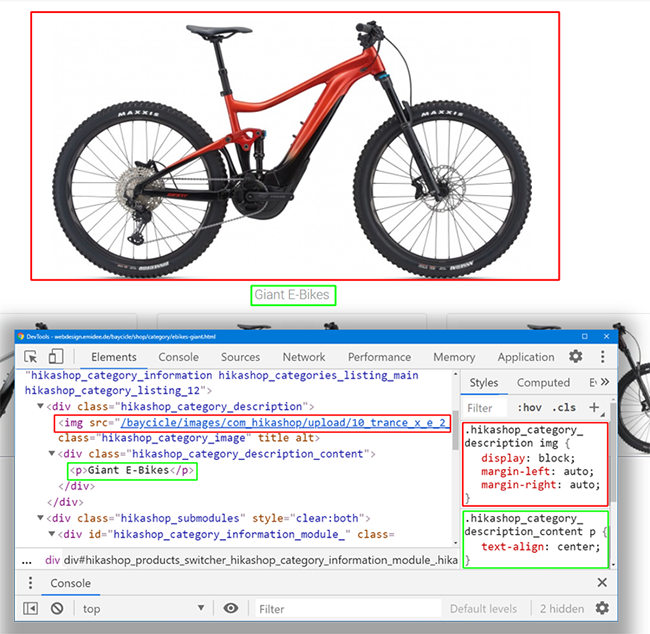
To have a view on your html & css code (like on my screenshot), you have to use the Inspector tool from your Navigator.
Point your element, and right-click => Inspector tool (or inspect).
And here some explanations to understand how to build high priority css command :
1. First the minimum necessary to function properly :
Check that your selector is well written, good class (or Id) html and no mistake or typo
If your command is visible in your browser inspector tool, but is overridden (css command crossed out), then his priority isn't strong enough.
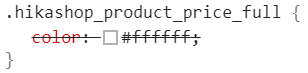
2. Now, some css priority system explanation :
From less to the highest priority :
.html_class_element {command: value}
.html_class_module .html_class_element {command: value}
.html_class_page .html_class_module .html_class_element {command: value}
.html_class_page .html_class_module .html_class_element {command: value !important;}
Note, that if 2 css commands have strictly the same selector, then the last written in the css file will be the one used.
Hope this will help you to achieve what you need.
Regards
First in order to show you how to add some Css code, have a look on this tutorial .
Then, have a look on my screenshot :
To have a view on your html & css code (like on my screenshot), you have to use the Inspector tool from your Navigator.
Point your element, and right-click => Inspector tool (or inspect).
And here some explanations to understand how to build high priority css command :
1. First the minimum necessary to function properly :
Check that your selector is well written, good class (or Id) html and no mistake or typo
If your command is visible in your browser inspector tool, but is overridden (css command crossed out), then his priority isn't strong enough.
2. Now, some css priority system explanation :
From less to the highest priority :
.html_class_element {command: value}
.html_class_module .html_class_element {command: value}
.html_class_page .html_class_module .html_class_element {command: value}
.html_class_page .html_class_module .html_class_element {command: value !important;}
Note, that if 2 css commands have strictly the same selector, then the last written in the css file will be the one used.
Hope this will help you to achieve what you need.
Regards
Last edit: 5 years 6 months ago by Philip.
Please Log in or Create an account to join the conversation.
5 years 6 months ago #330990
by Machka
Replied by Machka on topic display of the category picture
thank you very much for the fast reply. I didn´t see that you replied that fast and thats why my reaction comes so late. Sorry and thank you.
Thanks for the very detailled description, but my intention was different.
I need to find the place, where to change the place of the paragraph (<p></p>) for the Product title to be above the category picture, so that the Name of the Category is above the picture itself.
I know, that I can change color and style and so on via custom.css - i did for the regular product price.
But in my opinion this topic isn´t a css - topic....
kind regards
Thanks for the very detailled description, but my intention was different.
I need to find the place, where to change the place of the paragraph (<p></p>) for the Product title to be above the category picture, so that the Name of the Category is above the picture itself.
I know, that I can change color and style and so on via custom.css - i did for the regular product price.
But in my opinion this topic isn´t a css - topic....
kind regards
Please Log in or Create an account to join the conversation.
5 years 6 months ago - 5 years 6 months ago #331034
by Philip
Replied by Philip on topic display of the category picture
Hello,
Actually this can be realize through Css code as well, but you can as well proceed via an override view (see this documentation ).
To proceed through an override view, html & php knowledge is required, and basically the way to proceed is to find the block that manage of the image display and the product name display in order to be able to intervene in the code of the view.
Note : You can use the "Display view files" option (from Main HikaShop Configuration => Advanced tab, Advanced Settings part), and define it on "Front-end" to add to your front end display view reference names, this will help you to know which view have to be edited.
Hope this will help you to achieved what you need.
Regards
Actually this can be realize through Css code as well, but you can as well proceed via an override view (see this documentation ).
To proceed through an override view, html & php knowledge is required, and basically the way to proceed is to find the block that manage of the image display and the product name display in order to be able to intervene in the code of the view.
Note : You can use the "Display view files" option (from Main HikaShop Configuration => Advanced tab, Advanced Settings part), and define it on "Front-end" to add to your front end display view reference names, this will help you to know which view have to be edited.
Hope this will help you to achieved what you need.
Regards
Last edit: 5 years 6 months ago by Philip.
The following user(s) said Thank You: Machka
Please Log in or Create an account to join the conversation.
Time to create page: 0.242 seconds