
- Posts: 121
- Thank you received: 2
Anonymous Ordering
- andrewwinkler
-
 Topic Author
- Offline
Less
More
5 years 6 months ago #331104
by andrewwinkler
Anonymous Ordering was created by andrewwinkler
-- url of the page with the problem -- :
foreignpantry.com/shop
-- HikaShop version -- : 4.4.1
-- Joomla version -- : 3.9.25
-- PHP version -- : 7.4
-- Browser(s) name and version -- : Firefox
How can I configure HikaShop so that customers don't need to create an account to place an order? (However, I still need them to provide a phone number and/or email address when placing an order so that they can be contacted.)
-- HikaShop version -- : 4.4.1
-- Joomla version -- : 3.9.25
-- PHP version -- : 7.4
-- Browser(s) name and version -- : Firefox
How can I configure HikaShop so that customers don't need to create an account to place an order? (However, I still need them to provide a phone number and/or email address when placing an order so that they can be contacted.)
Please Log in or Create an account to join the conversation.

5 years 6 months ago #331116
by nicolas
Replied by nicolas on topic Anonymous Ordering
Hi,
In the HikaShop configuration, under the "checkout" tab, you can set the "registration" option to "guest".
Note that if a customer already has a user account, he won't be able to use the email address of that user account to guest checkout. He will have to login instead, unless you delete his Joomla account.
In the HikaShop configuration, under the "checkout" tab, you can set the "registration" option to "guest".
Note that if a customer already has a user account, he won't be able to use the email address of that user account to guest checkout. He will have to login instead, unless you delete his Joomla account.
Please Log in or Create an account to join the conversation.
- andrewwinkler
-
Topic Author
- Offline
Less
More
- Posts: 121
- Thank you received: 2
5 years 6 months ago - 5 years 6 months ago #331132
by andrewwinkler
Replied by andrewwinkler on topic Anonymous Ordering
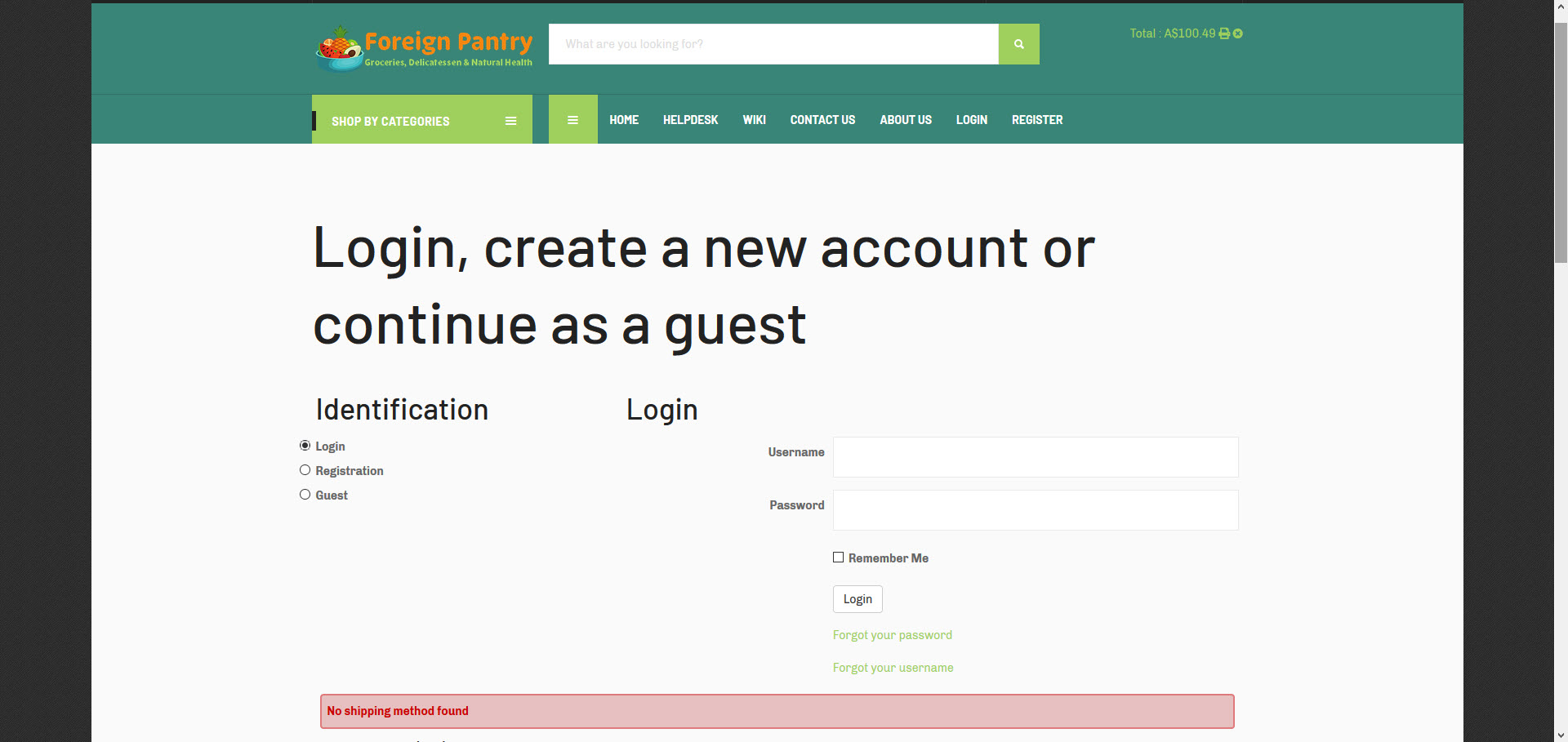
I just tried that, however, no matter which checkout method I select - login, registration or guest - I get an error message, right below the form, saying: no shipping method found. That message only goes away, after I've logged in.Then I get a choice of all available delivery options, i.e. "Local Delivery" or "Australia Post".
Last edit: 5 years 6 months ago by andrewwinkler.
Please Log in or Create an account to join the conversation.
5 years 6 months ago #331139
by nicolas
Replied by nicolas on topic Anonymous Ordering
Hi,
This means that you either:
- restricted your shipping methods to the "registered" user group
- restricted your shipping methods to a zone and thus the address is needed
- configured shipping methods that need the shipping address of the user to calculate the shipping cost
So before the address is entered, no shipping method is available and thus the "shipping" view of your checkout workflow displays that message.
If you don't want that, you could rearrange your checkout workflow so that the login/address views are on a different step than the shipping view:
www.hikashop.com/support/documentation/4...eckout-workflow.html
This means that you either:
- restricted your shipping methods to the "registered" user group
- restricted your shipping methods to a zone and thus the address is needed
- configured shipping methods that need the shipping address of the user to calculate the shipping cost
So before the address is entered, no shipping method is available and thus the "shipping" view of your checkout workflow displays that message.
If you don't want that, you could rearrange your checkout workflow so that the login/address views are on a different step than the shipping view:
www.hikashop.com/support/documentation/4...eckout-workflow.html
Please Log in or Create an account to join the conversation.
- andrewwinkler
-
Topic Author
- Offline
Less
More
- Posts: 121
- Thank you received: 2
5 years 6 months ago #331162
by andrewwinkler
Replied by andrewwinkler on topic Anonymous Ordering
I cannot work out where I could have restricted any of the shipping methods to logged in users. The only restriction I am aware of is that local deliveries are restricted to customers with a delivery addresses with a postcode between 6000 and 6199. The delivery method "Australia Post" - to my knowledge - has no restriction.
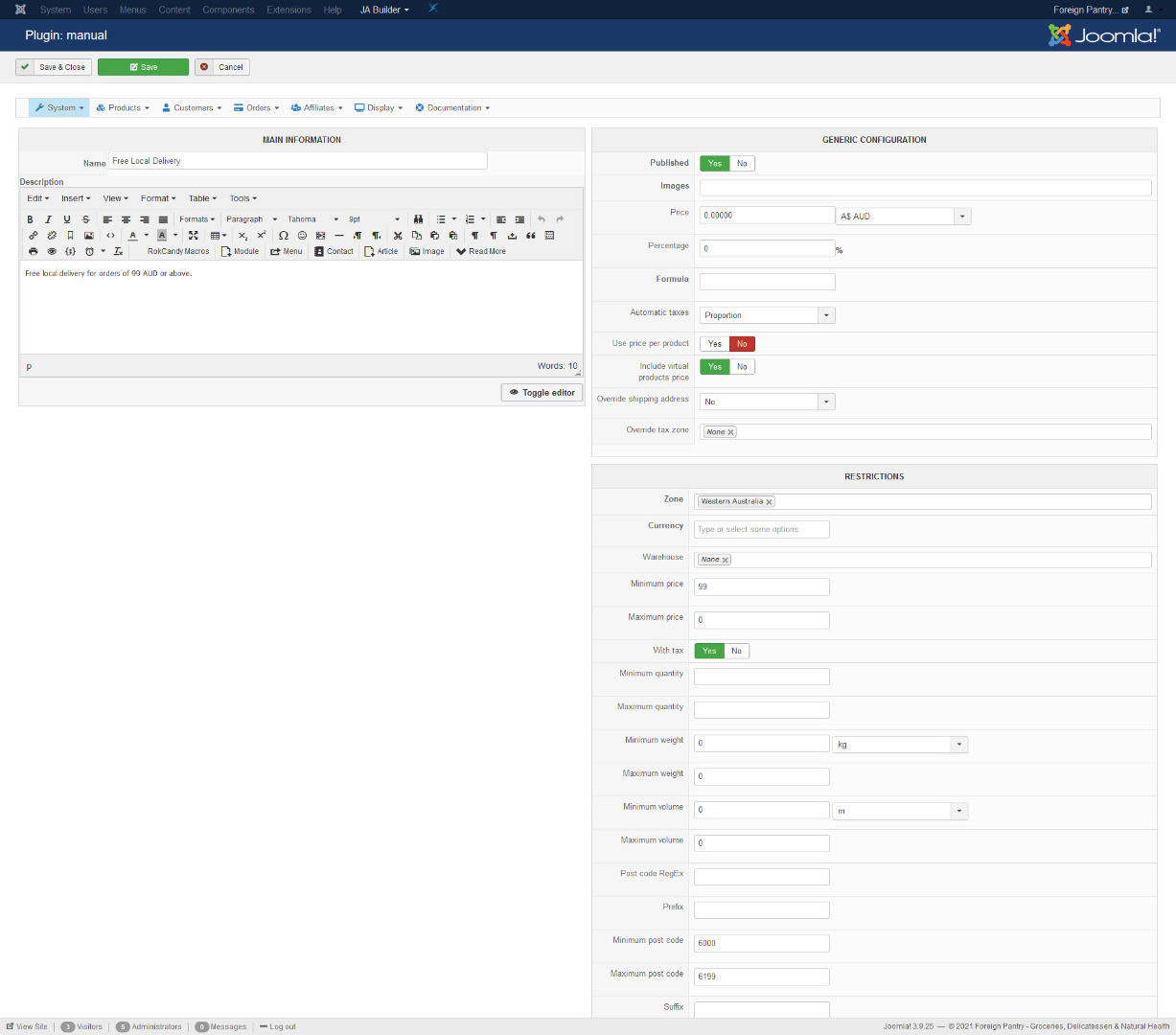
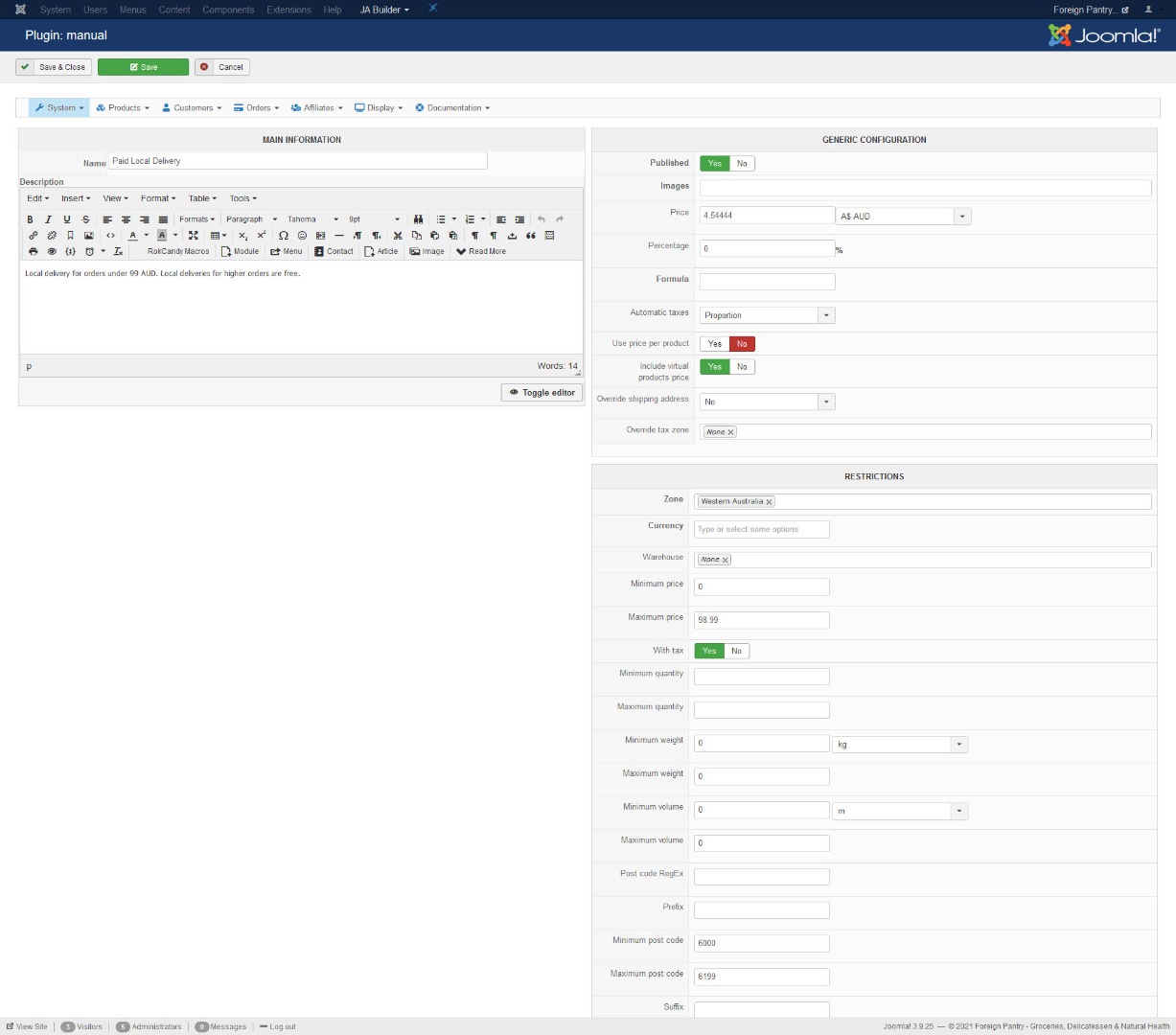
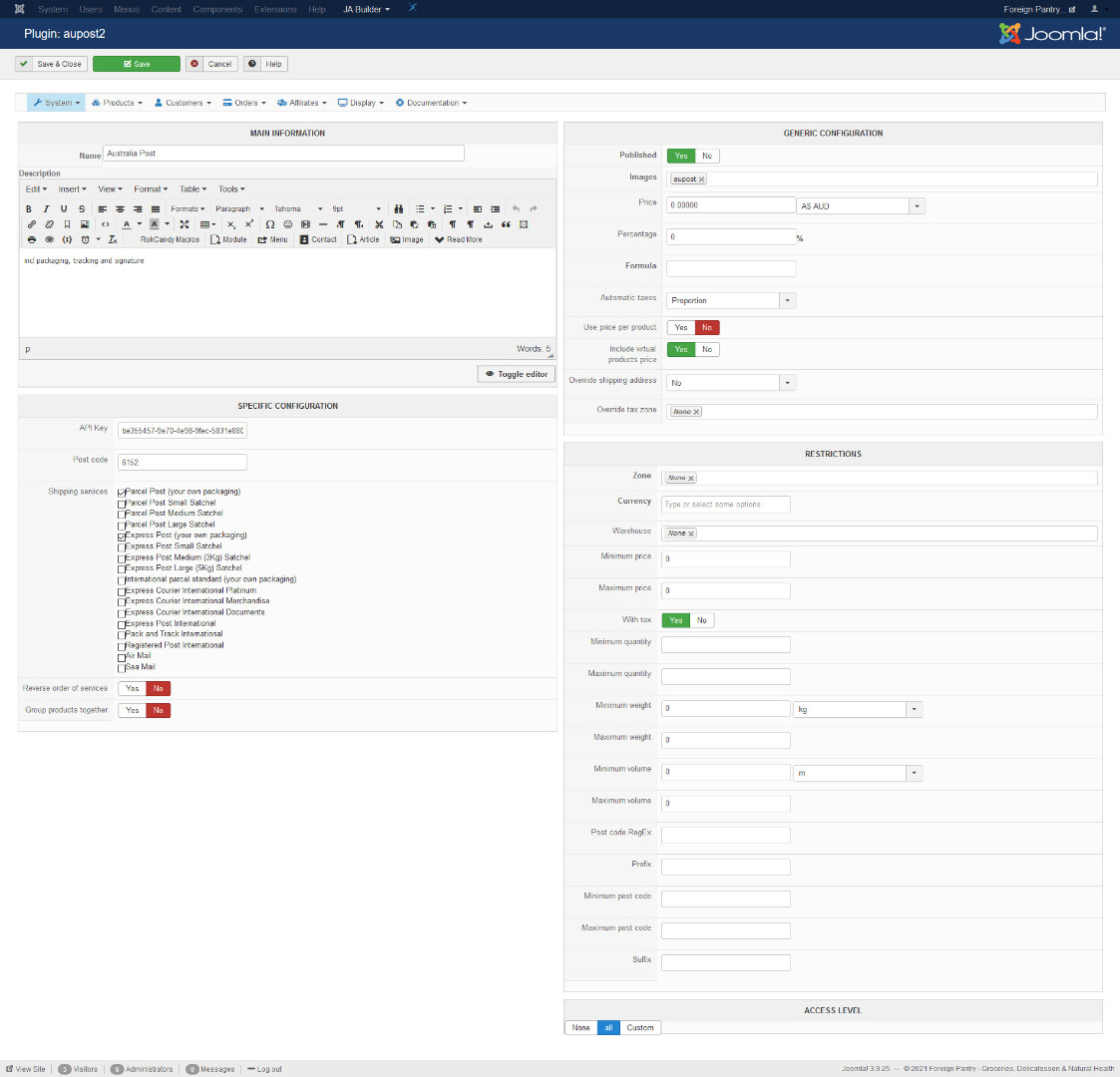
As far checkout workflow is concerned, I cannot work out either how to change it to the way you suggested. Please advise what I need to change.
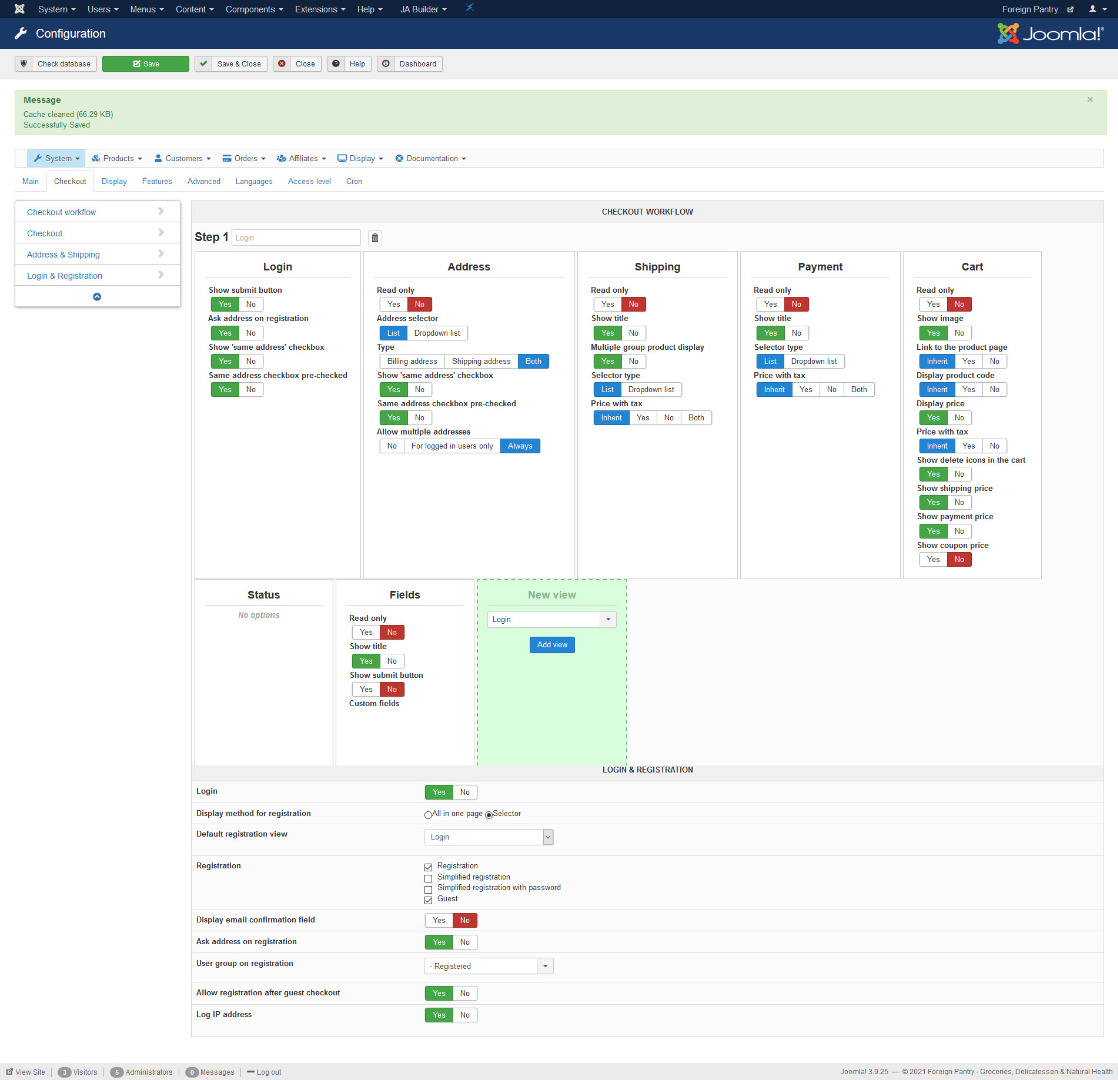
As far checkout workflow is concerned, I cannot work out either how to change it to the way you suggested. Please advise what I need to change.
Please Log in or Create an account to join the conversation.
5 years 6 months ago #331173
by nicolas
Replied by nicolas on topic Anonymous Ordering
Hi,
Let's do it simpler then.
Just remove the line:
$this->checkoutHelper->displayMessages('shipping');
in the file show_block_shipping via the menu Display>Views and it won't display shipping methods error messages.
I would still recommend that you study the tutorial on how to customize your checkout workflow, as it's an import thing to adapt your checkout :
www.hikashop.com/support/documentation/4...eckout-workflow.html
Let's do it simpler then.
Just remove the line:
$this->checkoutHelper->displayMessages('shipping');
in the file show_block_shipping via the menu Display>Views and it won't display shipping methods error messages.
I would still recommend that you study the tutorial on how to customize your checkout workflow, as it's an import thing to adapt your checkout :
www.hikashop.com/support/documentation/4...eckout-workflow.html
The following user(s) said Thank You: andrewwinkler
Please Log in or Create an account to join the conversation.
- andrewwinkler
-
Topic Author
- Offline
Less
More
- Posts: 121
- Thank you received: 2
5 years 6 months ago - 5 years 6 months ago #331276
by andrewwinkler
Replied by andrewwinkler on topic Anonymous Ordering
What I've done instead is to change the message text in a joomla language override for the constant "NO_SHIPPING_METHOD_FOUND" changing it to " Your shipping and payment options depend on your delivery address. " That way they realise that they have to login, register or provide at least a delivery address as a guest to get their delivery and payment options.
Last edit: 5 years 6 months ago by andrewwinkler.
Please Log in or Create an account to join the conversation.
Time to create page: 0.195 seconds