

- Posts: 317
- Thank you received: 20
Unwanted input field in comments section
3 years 7 months ago - 3 years 7 months ago #350235
by jgribble
Unwanted input field in comments section was created by jgribble
-- url of the page with the problem -- :
www.javelincommunications.com/build-your-dream-stanchion
-- HikaShop version -- : 4.7.1
-- Joomla version -- : 3.10.11
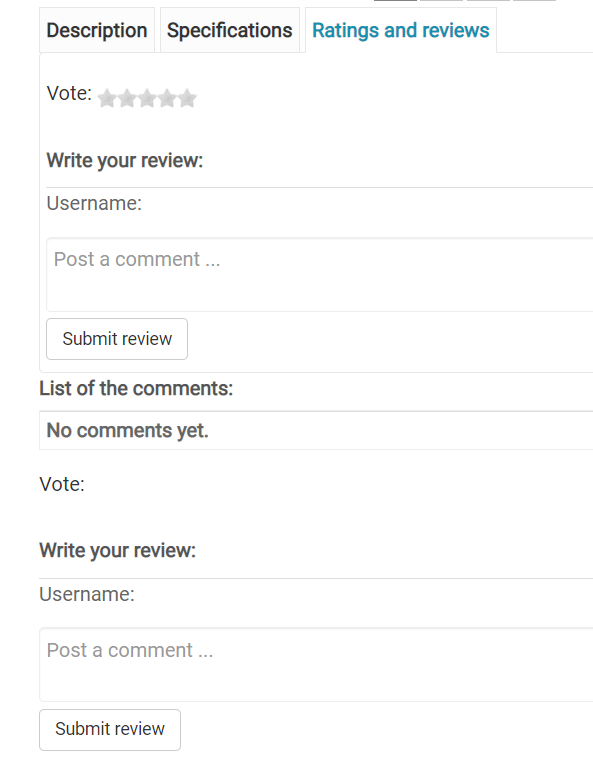
The above is what we see when click in the tab. There are two text fields instead of one. The second one doesn't allow voting. It's just a text field. The submit button is repeated below the second text field. Is this a bug or a configuration mistake on our part?
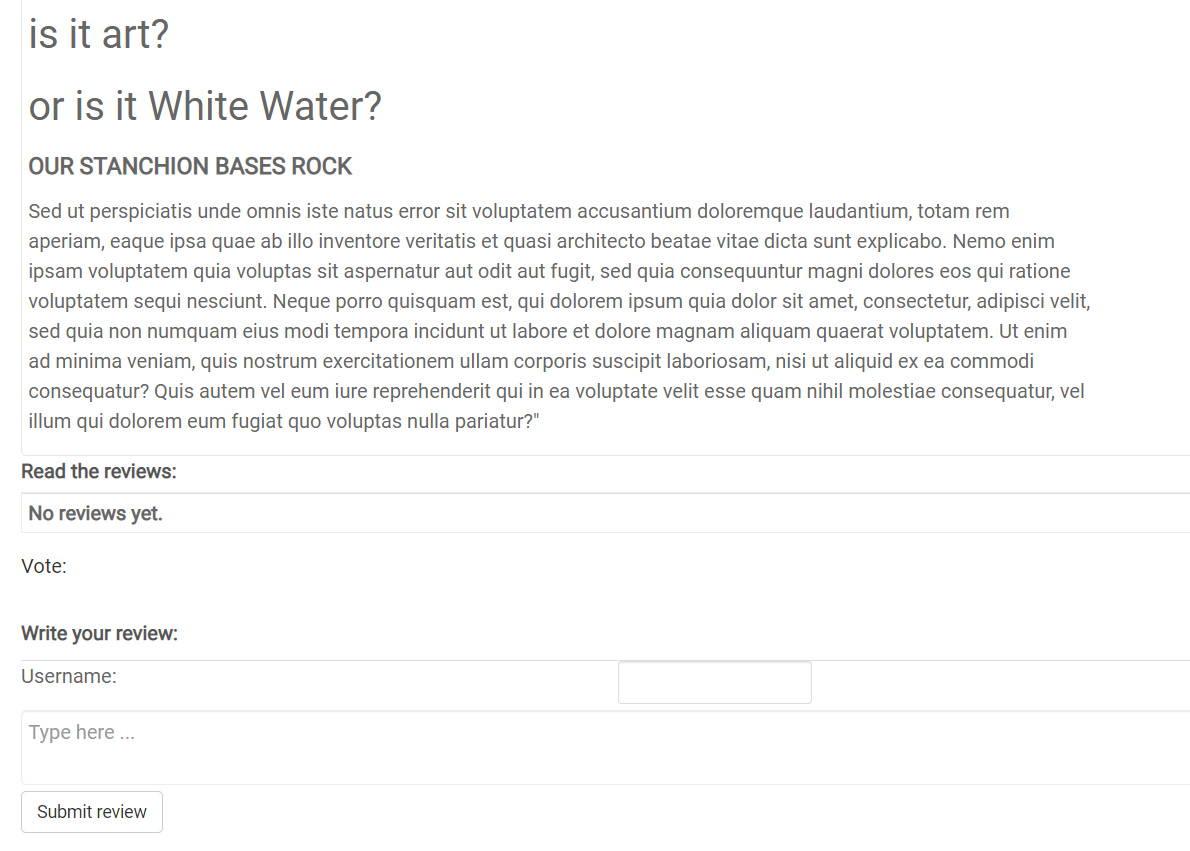 .
.
The above is what we see on page open. The voting/comments section publishes below the two preceding tabs. (Voting however is missing in this view). This is a behavior I didn't anticipate and don't want. I only want the comments section to open when user clicks the tab.
Again, it is probably not a bug, but rather a configuation error on my part. I am sure it can be corrected. Please take a look?
I have experimented with module types and nothing seems to work, as far as fixing the issues.
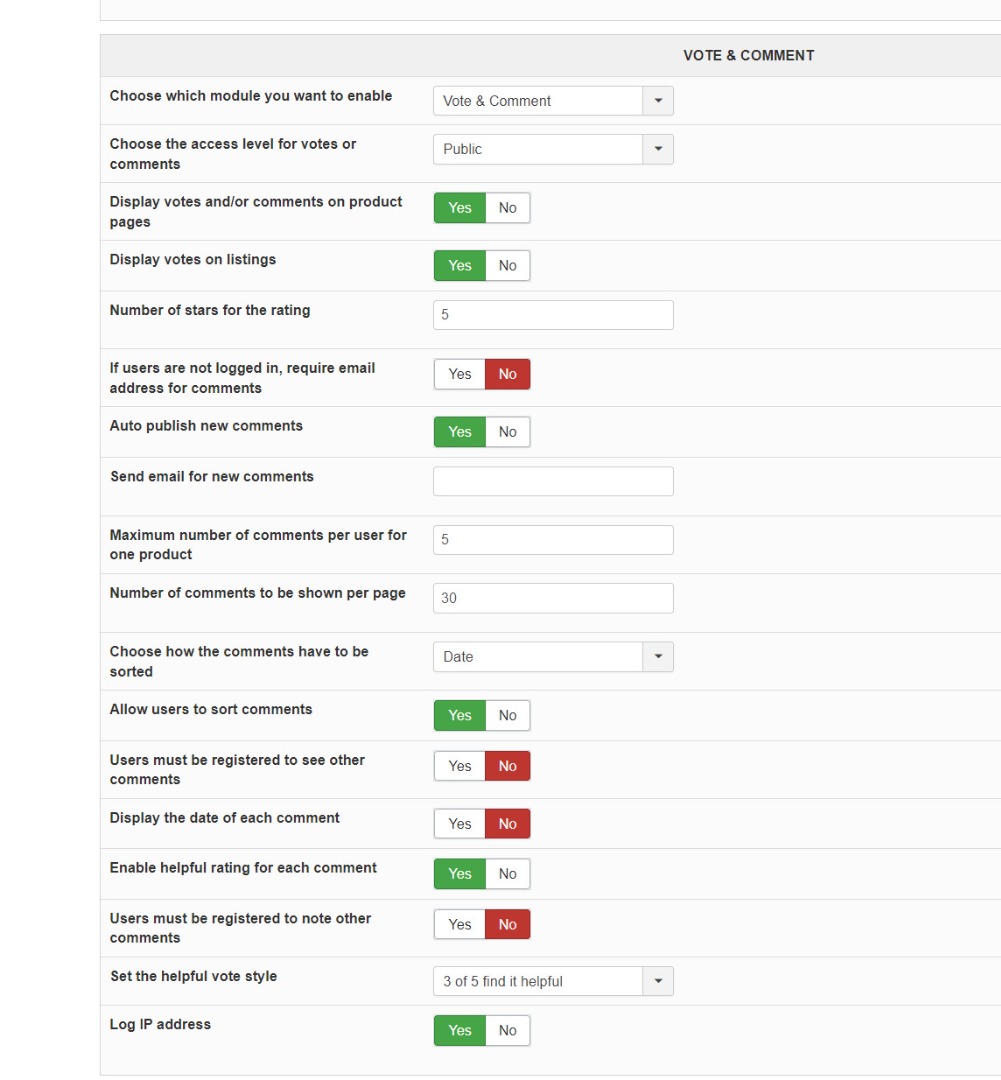
The one that comes closest is "vote and comment connected." When I use "vote and comment," that does seem to correct the submission issues; however comments do not publish. Screen is blank where they are supposed to be.
Finally, alas, I find that the username field isn't live and I can't enter my username there to post a test review.
I know that years ago this system wouldn't work unless a paid extension called jcomments was installed.
Still the case? I hope not because that costs an added $60 a year and is another extension to maintain.
Thank you,
-Jim Gribble
-- HikaShop version -- : 4.7.1
-- Joomla version -- : 3.10.11
The above is what we see when click in the tab. There are two text fields instead of one. The second one doesn't allow voting. It's just a text field. The submit button is repeated below the second text field. Is this a bug or a configuration mistake on our part?
The above is what we see on page open. The voting/comments section publishes below the two preceding tabs. (Voting however is missing in this view). This is a behavior I didn't anticipate and don't want. I only want the comments section to open when user clicks the tab.
Again, it is probably not a bug, but rather a configuation error on my part. I am sure it can be corrected. Please take a look?
I have experimented with module types and nothing seems to work, as far as fixing the issues.
The one that comes closest is "vote and comment connected." When I use "vote and comment," that does seem to correct the submission issues; however comments do not publish. Screen is blank where they are supposed to be.
Finally, alas, I find that the username field isn't live and I can't enter my username there to post a test review.
I know that years ago this system wouldn't work unless a paid extension called jcomments was installed.
Still the case? I hope not because that costs an added $60 a year and is another extension to maintain.
Thank you,
-Jim Gribble
Last edit: 3 years 7 months ago by jgribble.
Please Log in or Create an account to join the conversation.
3 years 7 months ago - 3 years 7 months ago #350241
by jgribble
Replied by jgribble on topic Unwanted input field in comments section
I seem to have fixed most of this by toggling "display on product page" to "no." However the username field isn't live, so I can't do a test. What is the fix for that? Very difficult to find the right settings. "Post a comment" bloc publishes to bottom of all tabs - missing the vote field. I am suspecting there needs to be a custom layout edit? Is that why under certain conditions "post a comment" field publishes to all tabs?
Thank you,
-Jim Gribble
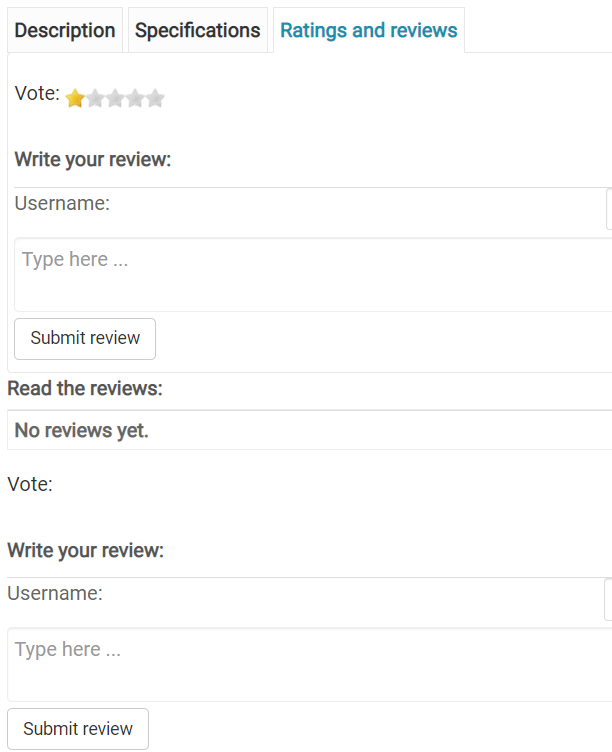
Current view under ratings and reviews tab. You will note the duplication of fields. We want to hide all fields below "no reviews yet."
Thank you,
-Jim Gribble
Current view under ratings and reviews tab. You will note the duplication of fields. We want to hide all fields below "no reviews yet."
Last edit: 3 years 7 months ago by jgribble.
Please Log in or Create an account to join the conversation.

3 years 7 months ago #350258
by nicolas
Replied by nicolas on topic Unwanted input field in comments section
Hi,
This looks like a customization issue.
The comments and vote area should only be displayed in the tab when in tabular layout, and it should only display at the end of the page when using another layout.
On your page, both locations are displayed, which isn't the case by default in HikaShop. So I can only think that it's linked to the customization(s) you've done to the layout.
Try temporarily renaming the folder templates/YOUR_TEMPLATE/html/com_hikashop to something else via FTP.
This will deactivate all the view overrides you've made for HikaShop (in the menu Display>Views).
That way, you can check how it is supposed to look by default, and hopefully, it should display fine, which would confirm that the issue comes from some changes you made in one of the view files.
This looks like a customization issue.
The comments and vote area should only be displayed in the tab when in tabular layout, and it should only display at the end of the page when using another layout.
On your page, both locations are displayed, which isn't the case by default in HikaShop. So I can only think that it's linked to the customization(s) you've done to the layout.
Try temporarily renaming the folder templates/YOUR_TEMPLATE/html/com_hikashop to something else via FTP.
This will deactivate all the view overrides you've made for HikaShop (in the menu Display>Views).
That way, you can check how it is supposed to look by default, and hopefully, it should display fine, which would confirm that the issue comes from some changes you made in one of the view files.
Please Log in or Create an account to join the conversation.
3 years 7 months ago #350270
by jgribble
Replied by jgribble on topic Unwanted input field in comments section
It wasn't necessary to rename the file. I just switched back to the default tabs layout which I had saved. This cleared the problem. So, what could have caused the weirdness?
1. You helped me hide product price. (Is there a way to do that via custom.css selecting product ID? Seems like it would be easier)
2. In the drag/drop layout customizer, I deleted the product name block so I could display my custom header via PHP injection.
3. Also via PHP injection, I added headings at the top of main image and "select options." (By the time I did this third customization, the rendering issue already was present; so I don't think #3 was a factor.)
These were the major customizations, and the only thing they affected was the comments block.
Any thoughts?
Thanks for looking at the prototype.
-Jim Gribble
1. You helped me hide product price. (Is there a way to do that via custom.css selecting product ID? Seems like it would be easier)
2. In the drag/drop layout customizer, I deleted the product name block so I could display my custom header via PHP injection.
3. Also via PHP injection, I added headings at the top of main image and "select options." (By the time I did this third customization, the rendering issue already was present; so I don't think #3 was a factor.)
These were the major customizations, and the only thing they affected was the comments block.
Any thoughts?
Thanks for looking at the prototype.
-Jim Gribble
Please Log in or Create an account to join the conversation.
3 years 7 months ago #350271
by jgribble
Replied by jgribble on topic Unwanted input field in comments section
This custom code hides product name and price. Can it can be applied selectively to individual products by means of an ID# prefix? Doing it this way avoids any need to edit PHP layout. And it DOES NOT disturb rendering of comments tab. Much more of a lightweight approach.
#hikashop_product_name_main {
display: none;
}
#hikashop_product_price_main .hikashop_product_price_full {
display: none;
}
Thank you!
-Jim Gribble
#hikashop_product_name_main {
display: none;
}
#hikashop_product_price_main .hikashop_product_price_full {
display: none;
}
Thank you!
-Jim Gribble
Please Log in or Create an account to join the conversation.
3 years 7 months ago - 3 years 7 months ago #350273
by jgribble
Replied by jgribble on topic Unwanted input field in comments section
I made a quick copy of master layout and experimented. I found that it's not a layout customization issue. It's a conflict between the comment PHP and the Smart Slider 3 banner. I tried dropping it into layout via shortcode, but that didn't help. No matter how the banner is inserted, it makes the comments layout go a little crazy. I also tried inserting it to the very top of the file, outside of the layout PHP, and that didn't help either. The bad effects still cascaded downward. Nothing else is affected except for comments.
Do you think there's a way to resolve this conflict?
I am trying a different tack. Am experimenting with a Joomla custom module published just above the component posiition in my current template layout. Am hopeful that will work.
Thank you again,
Jim Gribble
Do you think there's a way to resolve this conflict?
I am trying a different tack. Am experimenting with a Joomla custom module published just above the component posiition in my current template layout. Am hopeful that will work.
Thank you again,
Jim Gribble
Last edit: 3 years 7 months ago by jgribble.
Please Log in or Create an account to join the conversation.
3 years 7 months ago #350278
by nicolas
Replied by nicolas on topic Unwanted input field in comments section
Hi,
I would recommend adding the smart slider as a module in the Joomla modules manager. From what I know, there is already a module to do that by default, included in the smart slider install zip, you don't need a custom module.
Add it to the position at the top of the main area, and only for the menu item where you have that product for which you want to display it.
That way, it will appear in the same area on the page but it won't interfer with HikaShop's HTML.
It will also reduce the amount of customization, which is always good.
I would recommend adding the smart slider as a module in the Joomla modules manager. From what I know, there is already a module to do that by default, included in the smart slider install zip, you don't need a custom module.
Add it to the position at the top of the main area, and only for the menu item where you have that product for which you want to display it.
That way, it will appear in the same area on the page but it won't interfer with HikaShop's HTML.
It will also reduce the amount of customization, which is always good.
Please Log in or Create an account to join the conversation.
3 years 7 months ago - 3 years 7 months ago #350287
by jgribble
Replied by jgribble on topic Unwanted input field in comments section
Thank you, that's exactly what I tried last night and it does work. Hikashop doesn't like PHP injection of Smart Slider 3. But it's fine with SS3 modules being published to a layout position. So now I am using the default tabs layout. And instead of further editing that, I'm going to hide price/product name via simple custom CSS.
This code works for that.
#hikashop_product_name_main {
display: none;
}
#hikashop_product_price_main .hikashop_product_price_full {
display: none;
}
It makes the change storewide. Can I use as ID# to apply it locally just to certain products?
Interestingly, it is only some components which cause Hikashop to gag when inserted. I added a Convertforms ask-a-question form without a problem.
Jim Gribble
This code works for that.
#hikashop_product_name_main {
display: none;
}
#hikashop_product_price_main .hikashop_product_price_full {
display: none;
}
It makes the change storewide. Can I use as ID# to apply it locally just to certain products?
Interestingly, it is only some components which cause Hikashop to gag when inserted. I added a Convertforms ask-a-question form without a problem.
Jim Gribble
Last edit: 3 years 7 months ago by jgribble.
Please Log in or Create an account to join the conversation.
3 years 7 months ago #350290
by jgribble
Replied by jgribble on topic Unwanted input field in comments section
Hello.
Close to having my working prototype of an entire store on one page.
www.javelincommunications.com/build-your-dream-stanchion
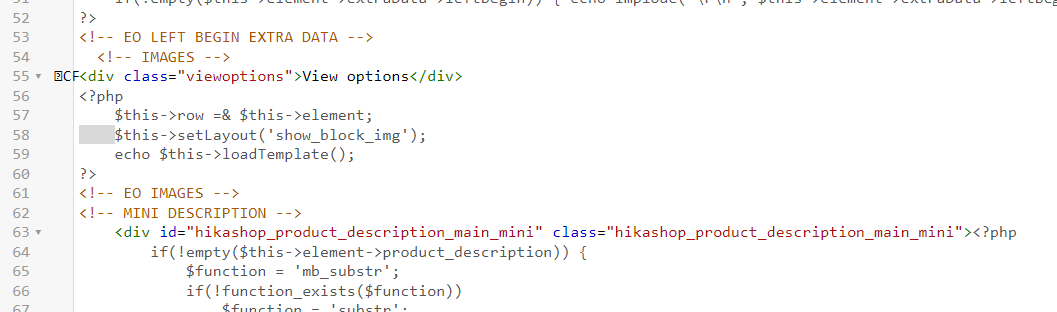
I'd like to add some headings to layout and it works, but every time it explodes the rendering of comments. The comments rendering is clearly very sensitive to any editing of default layout.
Here is an example of how I tried it. It works great except it explodes the comments section. I'm probably not using the right tags.
Thank you for the great support.
-Jim Gribble
Close to having my working prototype of an entire store on one page.
www.javelincommunications.com/build-your-dream-stanchion
I'd like to add some headings to layout and it works, but every time it explodes the rendering of comments. The comments rendering is clearly very sensitive to any editing of default layout.
Here is an example of how I tried it. It works great except it explodes the comments section. I'm probably not using the right tags.
Thank you for the great support.
-Jim Gribble
Please Log in or Create an account to join the conversation.
3 years 7 months ago #350293
by nicolas
Replied by nicolas on topic Unwanted input field in comments section
Hi,
I don't see a problem with that HTML.
Try:
- removing the customization with the delete button on the views listing
- editing the view
- saving it without any modifications
If you have the same issue, it's probably some security mechanism messing with the HTML/JS sent by your browser to your website when you save the view file.
A few weeks ago, someone had a similar issue with the invoice popup print button because of RS Firewall when customizing the invoice view file:
www.hikashop.com/support/forum/5-support...onne-pas.html#349640
I don't see a problem with that HTML.
Try:
- removing the customization with the delete button on the views listing
- editing the view
- saving it without any modifications
If you have the same issue, it's probably some security mechanism messing with the HTML/JS sent by your browser to your website when you save the view file.
A few weeks ago, someone had a similar issue with the invoice popup print button because of RS Firewall when customizing the invoice view file:
www.hikashop.com/support/forum/5-support...onne-pas.html#349640
Please Log in or Create an account to join the conversation.
3 years 7 months ago - 3 years 6 months ago #350302
by jgribble
Replied by jgribble on topic Unwanted input field in comments section
Thanks for looking at my code. There is a Sucuri firewall but the domain is whitelisted and this is the only such problem I encountered. I like your theory. You think edit saves are somehow being corrupted? Would explain a lot.
The other developer who had this problem fixed it by whitelisting com_hikashop. How in practice would I do that? Sucuri fortunately has outstanding service. Would the whitelist be something like www.javelincommunications.com/com_hikashop ?
I'll be you a dollar there was never anything wrong with my edits, as well as insertion of the Smart Slider 3 header. The whole problem might be a firewall nuance.
-Jim Gribble
The other developer who had this problem fixed it by whitelisting com_hikashop. How in practice would I do that? Sucuri fortunately has outstanding service. Would the whitelist be something like www.javelincommunications.com/com_hikashop ?
I'll be you a dollar there was never anything wrong with my edits, as well as insertion of the Smart Slider 3 header. The whole problem might be a firewall nuance.
-Jim Gribble
Last edit: 3 years 6 months ago by jgribble.
Please Log in or Create an account to join the conversation.
3 years 6 months ago #350307
by nicolas
Replied by nicolas on topic Unwanted input field in comments section
Hi,
I've never used Sucuri Firewall so I don't know.
I tried to look a bit online about how to allow for that, but I couldn't find any useful information.
I would recommend attacking the issue in a different way. What you can do is to create the view file modification the old way.
HikaShop's view file override interface actually relies on Joomla's layout override system:
www.joomlashack.com/blog/joomla/overrides/
So what you can do is to manually create the override via FTP by copying the files around.
For example, if you copy the file components/com_hikashop/views/product/tmpl/show_tabular.php to templates/YOUR_TEMPLATE/html/com_hikashop/product/show_tabular.php via FTP you'll have done the same thing as saving the product / show_tabular view file via the menu Display>Views without any modifications. But since you'll do it via FTP, you'll actually bypass the firewall.
Note that Joomla has created a tool to generate the overrides for you:
www.joomlashack.com/blog/joomla/easy-overrides/
However, this will create all the overrides of a view at once. So for the product view, you'll get dozens of overrides at once. I don't recommend doing this as it will create more issues with updates due to the numerous overrides. It's best to reduce the amount of overrides as best as you can.
I've never used Sucuri Firewall so I don't know.
I tried to look a bit online about how to allow for that, but I couldn't find any useful information.
I would recommend attacking the issue in a different way. What you can do is to create the view file modification the old way.
HikaShop's view file override interface actually relies on Joomla's layout override system:
www.joomlashack.com/blog/joomla/overrides/
So what you can do is to manually create the override via FTP by copying the files around.
For example, if you copy the file components/com_hikashop/views/product/tmpl/show_tabular.php to templates/YOUR_TEMPLATE/html/com_hikashop/product/show_tabular.php via FTP you'll have done the same thing as saving the product / show_tabular view file via the menu Display>Views without any modifications. But since you'll do it via FTP, you'll actually bypass the firewall.
Note that Joomla has created a tool to generate the overrides for you:
www.joomlashack.com/blog/joomla/easy-overrides/
However, this will create all the overrides of a view at once. So for the product view, you'll get dozens of overrides at once. I don't recommend doing this as it will create more issues with updates due to the numerous overrides. It's best to reduce the amount of overrides as best as you can.
Please Log in or Create an account to join the conversation.
3 years 6 months ago - 3 years 6 months ago #350322
by jgribble
Replied by jgribble on topic Unwanted input field in comments section
Thank you. This is useful, but very. very time consuming and complicated. I would think, 1, you would ditch any reliance on Joomla's layout override system. Then this issue will be permanently deleted.
2. I have a couple questions.
If I copy that file to a new location and folder, how will Hikashop find it to use it?
In the past I've had trouble with FTP working on this site. Could I simipy do it via the server file manager? Or by one of the simpler extensions that give access to server files via the CP? I have used Extplorer for years.
I very much appreciate it that you have offered a potential cure. Just trying to minimize my hours and keep things as simple as possible.
I'm also going to file a support ticket with Sucuri to pass along your findngs and see if they could indeed create a whitelist which would take care of everything.
-Jim Gribble
2. I have a couple questions.
If I copy that file to a new location and folder, how will Hikashop find it to use it?
In the past I've had trouble with FTP working on this site. Could I simipy do it via the server file manager? Or by one of the simpler extensions that give access to server files via the CP? I have used Extplorer for years.
I very much appreciate it that you have offered a potential cure. Just trying to minimize my hours and keep things as simple as possible.
I'm also going to file a support ticket with Sucuri to pass along your findngs and see if they could indeed create a whitelist which would take care of everything.
-Jim Gribble
Last edit: 3 years 6 months ago by jgribble.
Please Log in or Create an account to join the conversation.
3 years 6 months ago #350323
by nicolas
Replied by nicolas on topic Unwanted input field in comments section
Hi,
- a big proportion of Joomla users are familiar with it so it's easier for them
- templates can include overrides for your extension. That way, you can have templates made specifically with customized view files for HikaShop. So the integration between HikaShop and the template can be pushed really far thanks to that.
That wouldn't solve the problem. Firewall mechanisms could still prevent you from changing the layouts in HikaShop. Also, there are many advantages to being compatible with Joomla's layout override system. Two of them I can think of right now:you would ditch any reliance on Joomla's layout override system. Then this issue will be permanently deleted.
- a big proportion of Joomla users are familiar with it so it's easier for them
- templates can include overrides for your extension. That way, you can have templates made specifically with customized view files for HikaShop. So the integration between HikaShop and the template can be pushed really far thanks to that.
The code of HikaShop/Joomla is made so that it looks first for the override file, and if it doesn't find it, it looks for the default one.If I copy that file to a new location and folder, how will Hikashop find it to use it?
Yes, you can do what I said in my previous message via the file manager instead of FTP, it's the same result.Could I simipy do it via the server file manager?
Yes, provided the firewall won't block the operation.Or by one of the simpler extensions that give access to server files via the CP? I have used Extplorer for years.
Please Log in or Create an account to join the conversation.
3 years 6 months ago #350364
by jgribble
Replied by jgribble on topic Unwanted input field in comments section
Thanks for this explanation. I wIould hope some investment is made in fixing this bug, because a very large proportion of your customers will have firewalls nowadays. It's pretty much mandatory for any website which features e-commerce, with cybercrime being the epidemic problem that it is. And so this issue potentially affects many users. Also I think it would be good for you in that fewer and fewer template sifes are being built with every passing year. Dynamically scaling flexbox builders like Divi, Elementor and Youtheme Pro have revolutionized web design.
This prototype was developed on my company website which happens to use Sucuri, with which I have been very happy over the years. However, it's going to be published to an all-new Joomla 4 website where we can have any firewall solution we please. Can you or someone recommend a few "Hika-safe" firewall solutions?
I want to be able to get the most out of the app and easily create as many custom layouts as we need. There have got to be some good alternatives to Sucuri which work smoothly with Hikashop.
I always appreciate the generous support found on this forum. Sorry to have so many questions and comments,.
-Jim Gribble
This prototype was developed on my company website which happens to use Sucuri, with which I have been very happy over the years. However, it's going to be published to an all-new Joomla 4 website where we can have any firewall solution we please. Can you or someone recommend a few "Hika-safe" firewall solutions?
I want to be able to get the most out of the app and easily create as many custom layouts as we need. There have got to be some good alternatives to Sucuri which work smoothly with Hikashop.
I always appreciate the generous support found on this forum. Sorry to have so many questions and comments,.
-Jim Gribble
Please Log in or Create an account to join the conversation.
3 years 6 months ago #350369
by nicolas
Replied by nicolas on topic Unwanted input field in comments section
Hi,
Here, and supposing that the issue comes from the firewall, it's normal the firewall blocks potential threats if it finds any.
And HikaShop cannot circumvent the firewall. It's a false positive, or a conflict, but not really a bug.
So it's not something which can be fixed, as far as I understand.
The solution would be to not allow you to edit view files, which doesn't solve anything. Or to completely change the view edition mechanism to build a layout builder like Divi, Elementor, which is a big endeavour. Not impossible, but a hell of a task compared to "fixing a bug".
I provided two methods to make the override without the HikaShop interface. Sure, it's a nice workaround for your situation, but it's first a foremost a good way to check whether it comes from the firewall messing things up during the save, or if there is something else.
Regarding hika-safe firewall solutions, the most used one I know on Joomla is RS Firewall:
extensions.joomla.org/extension/rsfirewall/
It can create the same issue, but the solution is easy, and it is to whitelist your IP address in it:
www.hikashop.com/forum/product-category-...y/239152.html#239152
A bug is when something which should not happen happens.I wIould hope some investment is made in fixing this bug
Here, and supposing that the issue comes from the firewall, it's normal the firewall blocks potential threats if it finds any.
And HikaShop cannot circumvent the firewall. It's a false positive, or a conflict, but not really a bug.
So it's not something which can be fixed, as far as I understand.
The solution would be to not allow you to edit view files, which doesn't solve anything. Or to completely change the view edition mechanism to build a layout builder like Divi, Elementor, which is a big endeavour. Not impossible, but a hell of a task compared to "fixing a bug".
First, do we know that the problem is indeed with the firewall ?Can you or someone recommend a few "Hika-safe" firewall solutions?
I provided two methods to make the override without the HikaShop interface. Sure, it's a nice workaround for your situation, but it's first a foremost a good way to check whether it comes from the firewall messing things up during the save, or if there is something else.
Regarding hika-safe firewall solutions, the most used one I know on Joomla is RS Firewall:
extensions.joomla.org/extension/rsfirewall/
It can create the same issue, but the solution is easy, and it is to whitelist your IP address in it:
www.hikashop.com/forum/product-category-...y/239152.html#239152
Please Log in or Create an account to join the conversation.
3 years 6 months ago #350382
by jgribble
Replied by jgribble on topic Unwanted input field in comments section
Nicolas,
Sounds to me like the the fix is to use RS Firewall, and we'll try that with this upcoming project. Adding a simple whitelist entry is so much easier than the workarouind.
My interest in commenting is benevolent. I like Hikashop and would not want to see it go away just because Joomla world stagnated. Lots of folks have bailed. This upcoming project may well be the last template-based site we ever build. Once you experience the new way of doing things, you never go back. We stuck with Joomla here because we prefer Hikashop for small-business e-commerce. Migrating to WordPress/WooCommerce would have been a huge amount of extra work.
And, we wouldn't have had access to the great support offered by Hikashop.
So, just my trhoughts.
Thanks again,'
-Jim G.
Sounds to me like the the fix is to use RS Firewall, and we'll try that with this upcoming project. Adding a simple whitelist entry is so much easier than the workarouind.
My interest in commenting is benevolent. I like Hikashop and would not want to see it go away just because Joomla world stagnated. Lots of folks have bailed. This upcoming project may well be the last template-based site we ever build. Once you experience the new way of doing things, you never go back. We stuck with Joomla here because we prefer Hikashop for small-business e-commerce. Migrating to WordPress/WooCommerce would have been a huge amount of extra work.
And, we wouldn't have had access to the great support offered by Hikashop.
So, just my trhoughts.
Thanks again,'
-Jim G.
The following user(s) said Thank You: nicolas
Please Log in or Create an account to join the conversation.
Time to create page: 0.679 seconds