
- Posts: 48
- Thank you received: 5
problem product display image and social
- aromamassage
-
 Topic Author
- Offline
Less
More
2 years 10 months ago #357205
by aromamassage
problem product display image and social was created by aromamassage
-- url of the page with the problem -- :
www.aroma-massage.it/shop/prodotti-viso/...chera-lip-gloss.html
-- HikaShop version -- : 5.0.2
-- Joomla version -- : 4.4.0
hi, I noticed without making any changes, that on the product view page, the additional images are squashed and stretched, furthermore, the social icons are different and bulkier than normal.
What happened? What parameters can I control?
Thank you
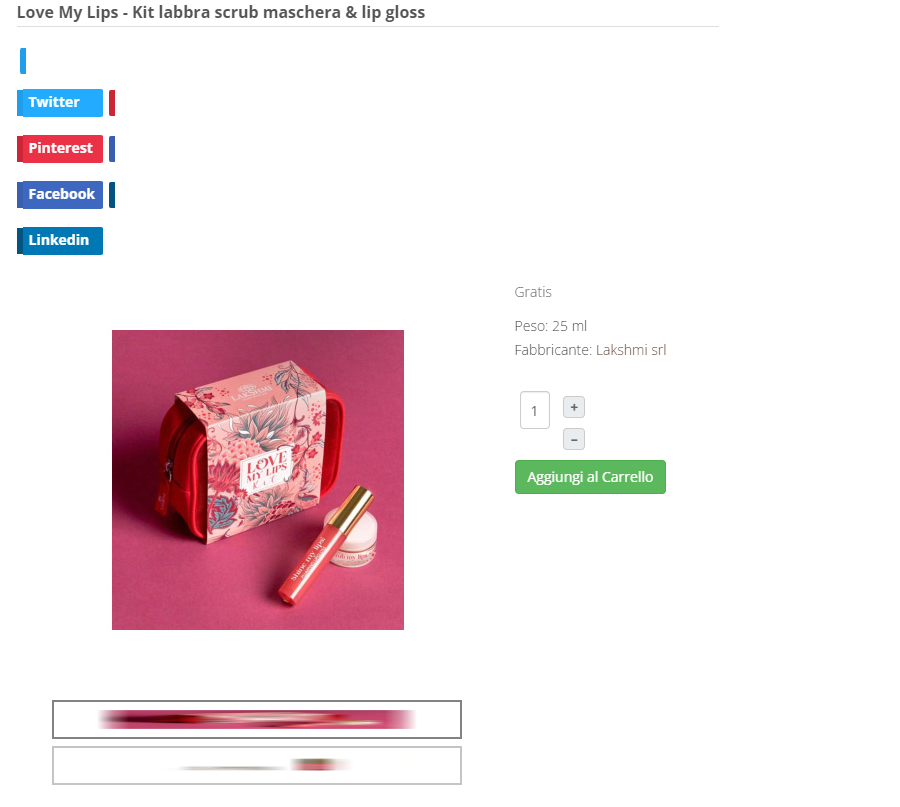
-- HikaShop version -- : 5.0.2
-- Joomla version -- : 4.4.0
hi, I noticed without making any changes, that on the product view page, the additional images are squashed and stretched, furthermore, the social icons are different and bulkier than normal.
What happened? What parameters can I control?
Thank you
Please Log in or Create an account to join the conversation.

2 years 10 months ago - 2 years 10 months ago #357213
by Philip
Replied by Philip on topic problem product display image and social
Hello,
Can you process a test with a default template?
We can see that there are lots of css command that come from your template, see my screenshot :

If the default template test solve your issue, then we can only invite you to contact the template creator support.
Regards
Can you process a test with a default template?
We can see that there are lots of css command that come from your template, see my screenshot :
If the default template test solve your issue, then we can only invite you to contact the template creator support.
Regards
Last edit: 2 years 10 months ago by Philip.
Please Log in or Create an account to join the conversation.
Less
More
- Posts: 6
- Thank you received: 1
2 years 10 months ago #357551
by spadajoker
Replied by spadajoker on topic problem product display image and social
hi, i'm tried with cassiopeia template but the problem still remain.
only the problem relating to the social button is solved but the secondary image have a strange elongated format.
www.aroma-massage.it/shop/prodotti-viso/...chera-lip-gloss.html
any suggestion?
only the problem relating to the social button is solved but the secondary image have a strange elongated format.
www.aroma-massage.it/shop/prodotti-viso/...chera-lip-gloss.html
any suggestion?
Please Log in or Create an account to join the conversation.
2 years 10 months ago - 2 years 10 months ago #357569
by Philip
Replied by Philip on topic problem product display image and social
Hello,
Did you check your settings in HikaShop Configuration, in Main tab => Image part :

Regards
Did you check your settings in HikaShop Configuration, in Main tab => Image part :
Regards
Last edit: 2 years 10 months ago by Philip.
Please Log in or Create an account to join the conversation.
Less
More
- Posts: 6
- Thank you received: 1
2 years 10 months ago #357717
by spadajoker
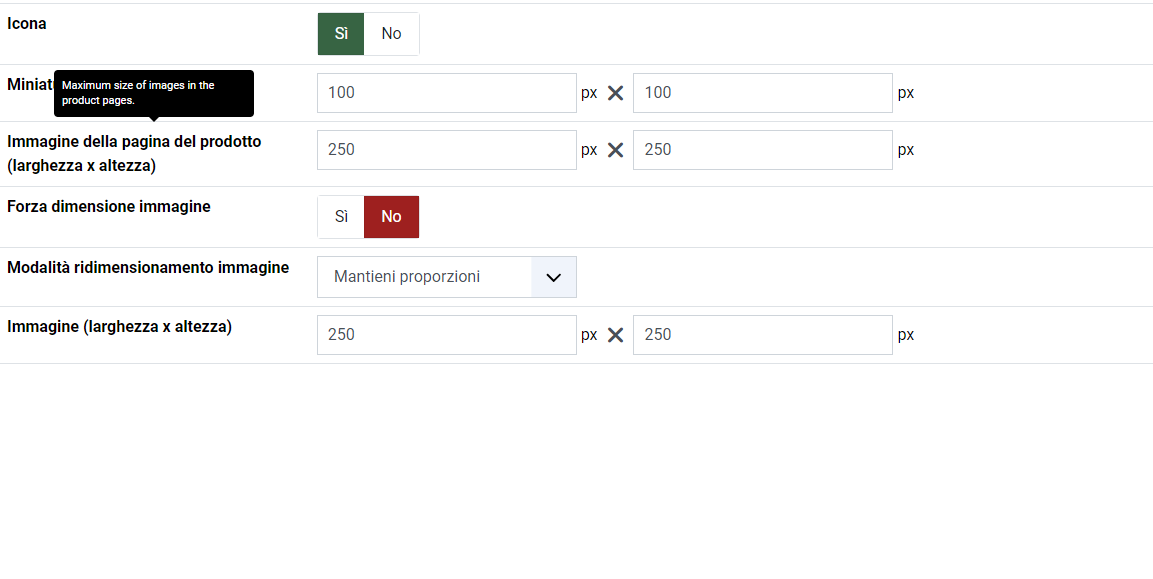
this is setted option..
Replied by spadajoker on topic problem product display image and social
this is setted option..
Please Log in or Create an account to join the conversation.
Less
More
- Posts: 6
- Thank you received: 1
2 years 10 months ago #357719
by spadajoker
Replied by spadajoker on topic problem product display image and social
in reality I notice that almost all the images present anomalies in display, even in this other screenshot you can see how the image is significantly smaller than the container..
any suggestion? i've tried to analyze with google console but i can't find anything..
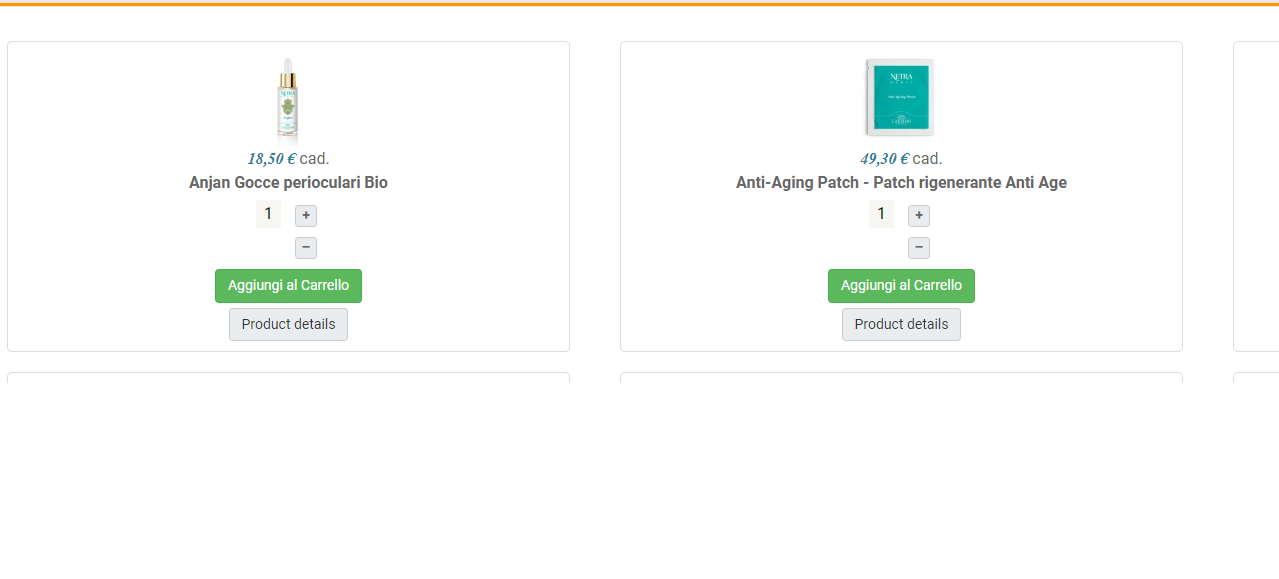
any suggestion? i've tried to analyze with google console but i can't find anything..
Please Log in or Create an account to join the conversation.

2 years 10 months ago #357721
by nicolas
Replied by nicolas on topic problem product display image and social
Hi,
1. The issue with the thumbnails on the product details page comes from CSS.
As your website CSS is compressed by JCH Optimize, I don't know what is missing where.
However, adding such CSS code should solve the problem:
2. Regarding the thumbnails on the products listings, I'm not sure what you mean. You've configured the thumbnails to be 100*100 there and thus they are very small because of that.
If you want them bigger, you need to increase the values in the "Thumbnail (width x height)" of the configuration page.
1. The issue with the thumbnails on the product details page comes from CSS.
As your website CSS is compressed by JCH Optimize, I don't know what is missing where.
However, adding such CSS code should solve the problem:
Code:
.hikashop_product_page div.hikashop_small_image_div a img {
width: auto;
}
2. Regarding the thumbnails on the products listings, I'm not sure what you mean. You've configured the thumbnails to be 100*100 there and thus they are very small because of that.
If you want them bigger, you need to increase the values in the "Thumbnail (width x height)" of the configuration page.
Please Log in or Create an account to join the conversation.
- aromamassage
-
Topic Author
- Offline
Less
More
- Posts: 48
- Thank you received: 5
2 years 10 months ago #357737
by aromamassage
Replied by aromamassage on topic problem product display image and social
for the product listing images I had set a smaller size because in mobile mode I don't like having only one column of products but I would like at least 2, but I still didn't succeed, in fact as soon as I switch to mobile view only one column returns, even if I had set several. is there a solution for this?
The other problem concerns the category images, as I have not specified particular dimensions there but I don't know why it is inserted smaller than the container, in fact here too by inserting
the image takes the correct size but covers the category title, setting it to 90% becomes adequate. (
www.aroma-massage.it/shop.html
)
maybe I made some mess with the css in the past... because even if I disable Jch the problems persist...
The other problem concerns the category images, as I have not specified particular dimensions there but I don't know why it is inserted smaller than the container, in fact here too by inserting
Code:
#hikashop_category_imager: width:100%
maybe I made some mess with the css in the past... because even if I disable Jch the problems persist...
Please Log in or Create an account to join the conversation.
2 years 10 months ago - 2 years 10 months ago #357743
by Philip
Replied by Philip on topic problem product display image and social
Hello,
1. Please, provide these elements in order to better understand:
- Url link (one or several) to allow us to see the context
- Details what you want to achieve via precise description (annotated screenshot, scheme etc...)
=> Make 2 precise descriptions, one for the classic view and one for the mobile view
2. For your categories image, you have to use bigger image AND use wider settings (or not, depending on the case) in your relative Item Menu, see my screenshot :

Regards
1. Please, provide these elements in order to better understand:
- Url link (one or several) to allow us to see the context
- Details what you want to achieve via precise description (annotated screenshot, scheme etc...)
=> Make 2 precise descriptions, one for the classic view and one for the mobile view
2. For your categories image, you have to use bigger image AND use wider settings (or not, depending on the case) in your relative Item Menu, see my screenshot :
Regards
Last edit: 2 years 10 months ago by Philip.
Please Log in or Create an account to join the conversation.
- aromamassage
-
Topic Author
- Offline
Less
More
- Posts: 48
- Thank you received: 5
2 years 10 months ago - 2 years 10 months ago #357801
by aromamassage
Replied by aromamassage on topic problem product display image and social
The first anomaly I notice is this (
www.aroma-massage.it/shop.html
):
the images of the categories do not fill the container, in fact upon analysis the images are almost all 320x124px but no one has ever set these measurements, while the container appears to be 580x243px. The result is images that are significantly smaller than the space they should occupy. This issue is viewable in both mobile and desktop modes.
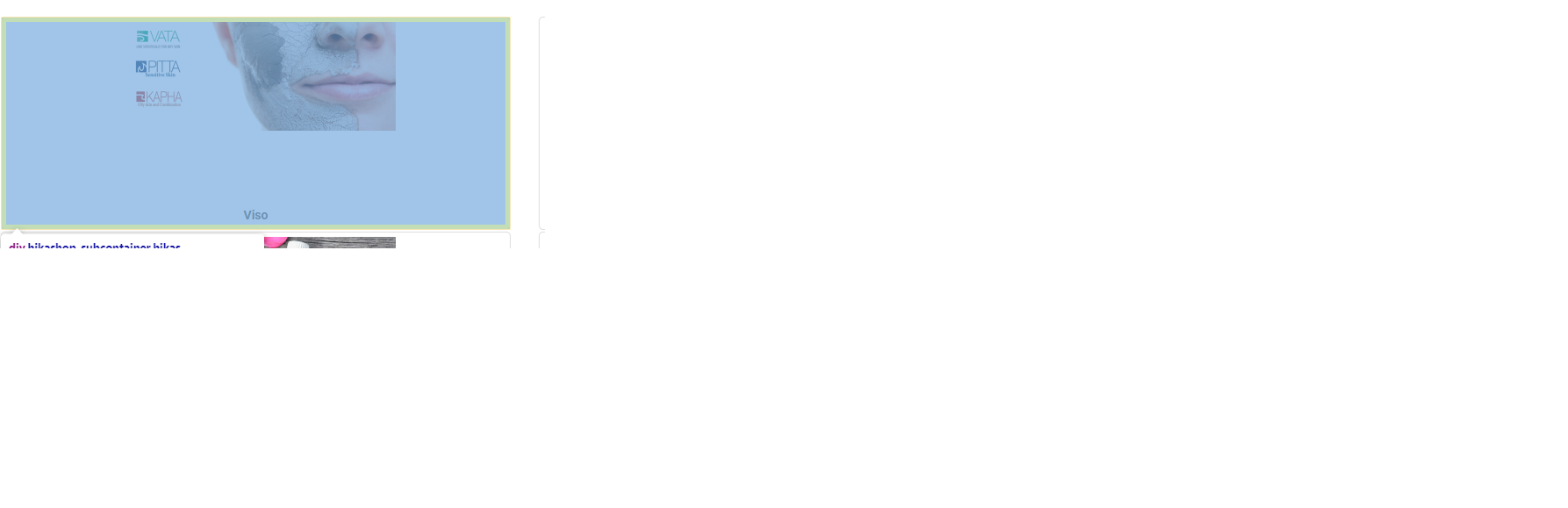
the second anomaly similar to the previous one ( www.aroma-massage.it/shop/prodotti-viso.html ) is that in the list of subcategories of the "face" category the images are also smaller than the container, even more evident given that they are only 2 columns.
therefore I would like to understand if it is normal or if there is some incorrect setting.
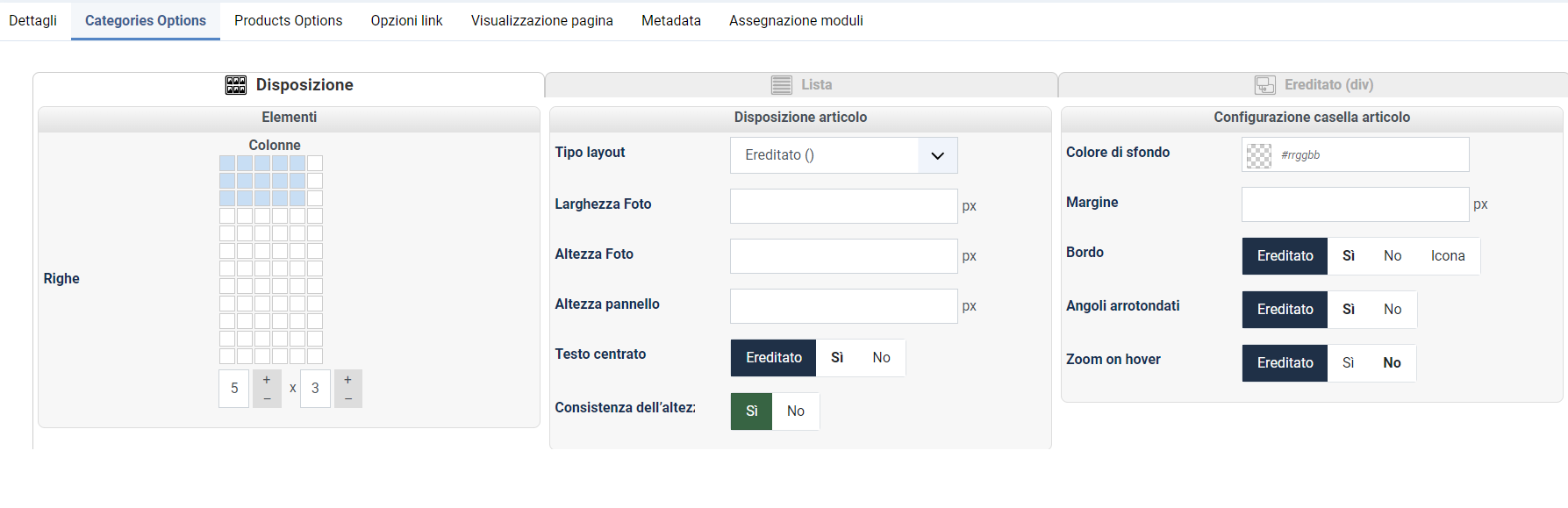
furthermore, I wanted to understand if in mobile mode there is the possibility of fixing the view on two columns, given that in mobile mode it automatically works with only one column.
Also, analyzing the console I get this error which I don't know if it can be relevant
I hope I was more understandable
the images of the categories do not fill the container, in fact upon analysis the images are almost all 320x124px but no one has ever set these measurements, while the container appears to be 580x243px. The result is images that are significantly smaller than the space they should occupy. This issue is viewable in both mobile and desktop modes.
the second anomaly similar to the previous one ( www.aroma-massage.it/shop/prodotti-viso.html ) is that in the list of subcategories of the "face" category the images are also smaller than the container, even more evident given that they are only 2 columns.
therefore I would like to understand if it is normal or if there is some incorrect setting.
furthermore, I wanted to understand if in mobile mode there is the possibility of fixing the view on two columns, given that in mobile mode it automatically works with only one column.
Also, analyzing the console I get this error which I don't know if it can be relevant
Code:
Uncaught TypeError: Cannot read properties of null (reading 'body')
at window.iFrameHeight (iframe-height.js?e92a34:9:33)
at HTMLIFrameElement.onload (shop.html:945:33)
window.iFrameHeight @ iframe-height.js?e92a34:9
onload @ shop.html:945
I hope I was more understandable
Last edit: 2 years 10 months ago by aromamassage.
Please Log in or Create an account to join the conversation.
2 years 10 months ago - 2 years 10 months ago #357826
by Philip
Replied by Philip on topic problem product display image and social
Hello,
Please provide these elements, we will need to process some tests directly on your website :
- Url link to your backend (administrator)
- Backend user references (with maximum Acl)
Note : Use our Contact us form to provide these elements, and don't forget to add an Url link to this topic
Precise us if your website is in production phase or not, please.
Regards
Please provide these elements, we will need to process some tests directly on your website :
- Url link to your backend (administrator)
- Backend user references (with maximum Acl)
Note : Use our Contact us form to provide these elements, and don't forget to add an Url link to this topic
Precise us if your website is in production phase or not, please.
Regards
Last edit: 2 years 10 months ago by Philip.
Please Log in or Create an account to join the conversation.
2 years 9 months ago #357862
by nicolas
Replied by nicolas on topic problem product display image and social
Hi,
1. Regarding the size of the images on your listing:
I checked the situation there and it's normal it does this.
If you look at the URL of your images, you can see for example this:
/images/com_hikashop/upload/thumbnails/200x320/slidepviso.png
So the size of the thumbnails configured for the categories listing (under the "categories options" tab of your menu item settings page) is 200*320 pixels.
Also, The ratio of the original image doesn't respect the ratio you asked so that means that the thumbnail image generated will be smaller in height and thus you end up with an image measuring 124*320 pixels.
Also, you have activated the "height consistency" setting of your menu item. This means that the height of each category block on the listing will be stretched to use the biggest one.
And on that same listing, you also have the image:
images/com_hikashop/upload/thumbnails/200x320/slide_gift.png
This image is the only one with a different ratio that the others with 200*244 pixels.
So it's the only one using the full height you configured. And thus all the other category blocks have extra space to match with the category block of this image.
So either:
- rework on that image slide_gift.png so that it uses the same aspect ratio as the image of the other categories
- turn off the "height consistency" setting of your menu item so that different category blocks can have different heights, and each will adapt to the height of the image
- change the "Image scale mode" setting of the HikaShop configuration from "keep ratio" to "crop". In that case, all the thumbnails generated will have the exact ratio you configured by croping the images sides (you probably don't want to do this from what I understand).
- activate the "force size" setting of the HikaShop configuration. In that case, the images generated will also have th exact ratio you configured, but instead of croping the images, the system will add extra white stripes. So the images which don't match the ratio will get white stripes and thus the images will look centered both horizontally and vertically in their area in the category block.
2. Since different templates and different configurations of the same template and modules will allocate different spaces to the listings, to be on the safe side, HikaShop's CSS automatically switches from several columns to 1 column for mobile devices regardless of whether their could be enough space available for 2 columns as it is impossible to tell, from HikaShop's perspective.
And since this is done directly in the CSS, it's difficult to make it a setting which could be easily configured.
But that doesn't mean it's impossible. With either some view override modifications, or custom CSS code it is possible to do it. Several users have done it in the past, in order to fit their needs. However, it requires some programing skills. You can read more about all this on this thread:
www.hikashop.com/forum/product-category-...-reponsive-view.html
1. Regarding the size of the images on your listing:
I checked the situation there and it's normal it does this.
If you look at the URL of your images, you can see for example this:
/images/com_hikashop/upload/thumbnails/200x320/slidepviso.png
So the size of the thumbnails configured for the categories listing (under the "categories options" tab of your menu item settings page) is 200*320 pixels.
Also, The ratio of the original image doesn't respect the ratio you asked so that means that the thumbnail image generated will be smaller in height and thus you end up with an image measuring 124*320 pixels.
Also, you have activated the "height consistency" setting of your menu item. This means that the height of each category block on the listing will be stretched to use the biggest one.
And on that same listing, you also have the image:
images/com_hikashop/upload/thumbnails/200x320/slide_gift.png
This image is the only one with a different ratio that the others with 200*244 pixels.
So it's the only one using the full height you configured. And thus all the other category blocks have extra space to match with the category block of this image.
So either:
- rework on that image slide_gift.png so that it uses the same aspect ratio as the image of the other categories
- turn off the "height consistency" setting of your menu item so that different category blocks can have different heights, and each will adapt to the height of the image
- change the "Image scale mode" setting of the HikaShop configuration from "keep ratio" to "crop". In that case, all the thumbnails generated will have the exact ratio you configured by croping the images sides (you probably don't want to do this from what I understand).
- activate the "force size" setting of the HikaShop configuration. In that case, the images generated will also have th exact ratio you configured, but instead of croping the images, the system will add extra white stripes. So the images which don't match the ratio will get white stripes and thus the images will look centered both horizontally and vertically in their area in the category block.
2. Since different templates and different configurations of the same template and modules will allocate different spaces to the listings, to be on the safe side, HikaShop's CSS automatically switches from several columns to 1 column for mobile devices regardless of whether their could be enough space available for 2 columns as it is impossible to tell, from HikaShop's perspective.
And since this is done directly in the CSS, it's difficult to make it a setting which could be easily configured.
But that doesn't mean it's impossible. With either some view override modifications, or custom CSS code it is possible to do it. Several users have done it in the past, in order to fit their needs. However, it requires some programing skills. You can read more about all this on this thread:
www.hikashop.com/forum/product-category-...-reponsive-view.html
Please Log in or Create an account to join the conversation.
- aromamassage
-
Topic Author
- Offline
Less
More
- Posts: 48
- Thank you received: 5
2 years 9 months ago #357882
by aromamassage
Replied by aromamassage on topic problem product display image and social
fine, i'm solved for the image, I have two menus for the shop and I didn't realize that one of them had old measurements set. I'm resized. I edited the photos with the correct measurements and everything was fine.
The following user(s) said Thank You: Philip
Please Log in or Create an account to join the conversation.
Time to create page: 0.523 seconds