
- Posts: 11
- Thank you received: 0
Hikashop not collecting addresses
- oceanswims
-
 Topic Author
- Offline
Less
More
10 years 10 months ago #225399
by oceanswims
Hikashop not collecting addresses was created by oceanswims
-- url of the page with the problem -- :
www.oceanswims.com/shop/checkout/task-step/step-1.html
-- HikaShop version -- : HikaShop Starter 2.6.0
-- Joomla version -- : 3.4.8
-- Browser(s) name and version -- : N/a
-- Error-message(debug-mod must be tuned on) -- : N/a
Hikashop has stopped collecting addresses from customers. I see in one part of documentation that address won't be displayed without login. I don't wish to force customers to login, and I have not needed to before now. System worked ok until now.
-- HikaShop version -- : HikaShop Starter 2.6.0
-- Joomla version -- : 3.4.8
-- Browser(s) name and version -- : N/a
-- Error-message(debug-mod must be tuned on) -- : N/a
Hikashop has stopped collecting addresses from customers. I see in one part of documentation that address won't be displayed without login. I don't wish to force customers to login, and I have not needed to before now. System worked ok until now.
Please Log in or Create an account to join the conversation.

10 years 10 months ago #225413
by Jerome
Jerome - Obsidev.com
HikaMarket & HikaSerial developer / HikaShop core dev team.
Replied by Jerome on topic Hikashop not collecting addresses
Hi,
Please provide a screenshot of your checkout workflow.
Regards,
Please provide a screenshot of your checkout workflow.
Regards,
Jerome - Obsidev.com
HikaMarket & HikaSerial developer / HikaShop core dev team.
Please Log in or Create an account to join the conversation.
- oceanswims
-
Topic Author
- Offline
Less
More
- Posts: 11
- Thank you received: 0
10 years 10 months ago #225595
by oceanswims
Replied by oceanswims on topic Hikashop not collecting addresses
Thank you. Screenshot attached.
Paul
Paul
Please Log in or Create an account to join the conversation.
10 years 10 months ago #225600
by Philip
Replied by Philip on topic Hikashop not collecting addresses
Hello,
I don't see your attached file, thanks to pdf, jpeg or png files type.
Regards,
I don't see your attached file, thanks to pdf, jpeg or png files type.
Regards,
Please Log in or Create an account to join the conversation.
- oceanswims
-
Topic Author
- Offline
Less
More
- Posts: 11
- Thank you received: 0
10 years 10 months ago #225602
by oceanswims
Replied by oceanswims on topic Hikashop not collecting addresses
JPG version attached.
Thank you.
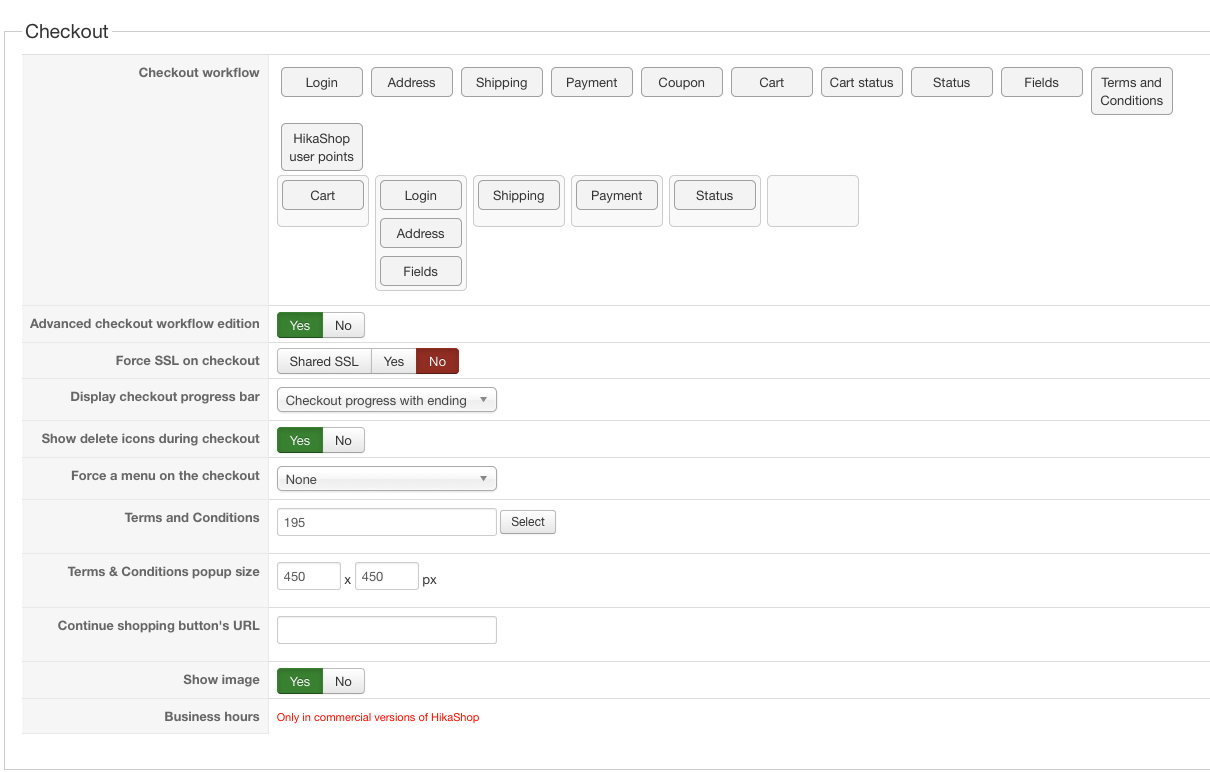
Thank you.
Please Log in or Create an account to join the conversation.

Less
More
- Posts: 12953
- Thank you received: 1778
10 years 10 months ago - 10 years 10 months ago #225607
by Mohamed Thelji
Replied by Mohamed Thelji on topic Hikashop not collecting addresses
Hello,
When I test it, I'm actually getting a "Registration not allowed" error message, enabling it will solve your issue.
Also, the best solution will probably be to move "Address" action to the same step as the "Shipping" one.
When I test it, I'm actually getting a "Registration not allowed" error message, enabling it will solve your issue.
Also, the best solution will probably be to move "Address" action to the same step as the "Shipping" one.
Last edit: 10 years 10 months ago by Mohamed Thelji.
Please Log in or Create an account to join the conversation.
- oceanswims
-
Topic Author
- Offline
Less
More
- Posts: 11
- Thank you received: 0
10 years 10 months ago #225668
by oceanswims
Replied by oceanswims on topic Hikashop not collecting addresses
Thank you for your reply, Mohamed. I have moved address into shipping, as you suggest. However, I don't wish to enable Registration because I don't wish to require it as part of the check-out process. I did not have it previously, and the system worked well.
Thanks,
Paul
Thanks,
Paul
Please Log in or Create an account to join the conversation.
- oceanswims
-
Topic Author
- Offline
Less
More
- Posts: 11
- Thank you received: 0
10 years 10 months ago #225669
by oceanswims
Replied by oceanswims on topic Hikashop not collecting addresses
Indeed, I have now included address and shipping together, and I have deleted Registration. The process now skips address completely and goes straight to Shipping.
Thank you
Paul
Thank you
Paul
Please Log in or Create an account to join the conversation.
Less
More
- Posts: 12953
- Thank you received: 1778
10 years 10 months ago #225702
by Mohamed Thelji
Replied by Mohamed Thelji on topic Hikashop not collecting addresses
Hello,
That's weird, did you add some customization through the address files of the "checkout" view of your front-end template via "Hikashop->Display->Views" ?The process now skips address completely and goes straight to Shipping.
Please Log in or Create an account to join the conversation.
- oceanswims
-
Topic Author
- Offline
Less
More
- Posts: 11
- Thank you received: 0
10 years 10 months ago #225750
by oceanswims
Replied by oceanswims on topic Hikashop not collecting addresses
Yes, I added two custom fields to collect other data. I'm not using them now, so I took the Fields step out of the workflow.
Paul
Paul
Please Log in or Create an account to join the conversation.

10 years 10 months ago #225826
by nicolas
Replied by nicolas on topic Hikashop not collecting addresses
Hi,
The address data is only collected with the "address" and the "login" views. And you can't have one without the other.
So you need both.
And if you don't want the registration, you can change the "registration" setting to "guest" in the Checkout tab of the HikaShop configuration.
The address data is only collected with the "address" and the "login" views. And you can't have one without the other.
So you need both.
And if you don't want the registration, you can change the "registration" setting to "guest" in the Checkout tab of the HikaShop configuration.
Please Log in or Create an account to join the conversation.
- oceanswims
-
Topic Author
- Offline
Less
More
- Posts: 11
- Thank you received: 0
10 years 10 months ago #225855
by oceanswims
Replied by oceanswims on topic Hikashop not collecting addresses
Thanks
I have no setting, that I can see, that allows me to set registration to guest. Please see screenshot attached.
I am puzzled because Hikashop was working just fine until a few days ago without compelling registration and login.
I am using Hikashop Starter.
Paul
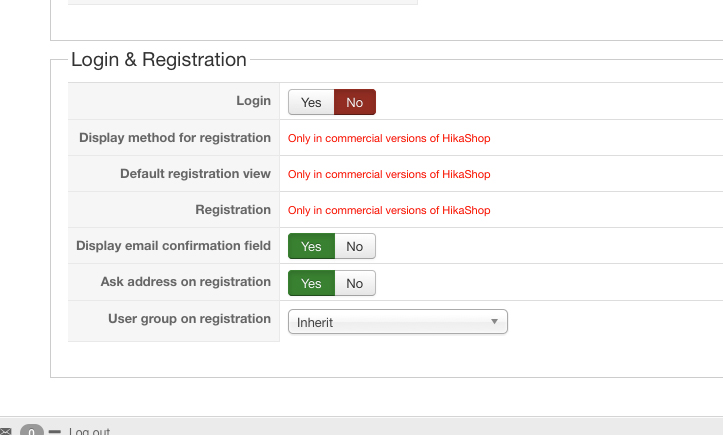
I have no setting, that I can see, that allows me to set registration to guest. Please see screenshot attached.
I am puzzled because Hikashop was working just fine until a few days ago without compelling registration and login.
I am using Hikashop Starter.
Paul
Please Log in or Create an account to join the conversation.
10 years 10 months ago #225904
by nicolas
Replied by nicolas on topic Hikashop not collecting addresses
Hi,
Well, if you remover the "login" and "address" views from your checkout, then you won't get the registration.
But in that case, you won't get the address either.
So if it was working before, the only reason would be that some code of HikaShop had been changed on your website by someone to allow for that and that this modification was somehow removed.
Because by default the Starter edition doesn't allow for that.
Of course, you can do it with the Essential or Business edition thanks to the "registration" setting, as I explained, but you would have to upgrade your HikaShop in that case.
Well, if you remover the "login" and "address" views from your checkout, then you won't get the registration.
But in that case, you won't get the address either.
So if it was working before, the only reason would be that some code of HikaShop had been changed on your website by someone to allow for that and that this modification was somehow removed.
Because by default the Starter edition doesn't allow for that.
Of course, you can do it with the Essential or Business edition thanks to the "registration" setting, as I explained, but you would have to upgrade your HikaShop in that case.
Please Log in or Create an account to join the conversation.
- oceanswims
-
Topic Author
- Offline
Less
More
- Posts: 11
- Thank you received: 0
10 years 10 months ago #225989
by oceanswims
Replied by oceanswims on topic Hikashop not collecting addresses
Thank you.
I have almost given up on this. I have now enabled "Login" because I have now gone over a week without my shopping cart working. But now, with Login enabled, when an order goes to Checkout, there are two fields for login and password (for existing users, but ot displaing completely) but registration (for new users) is not allowed.
I should just recap, Hikashop was working just fine until a week ago, when customers could order and pay for goods perfectly easily without having to login or to register. Now, suddenly, they can't, and I've lost at least several hundreds of dollars in business. Now, they can't even register.
I have almost given up on this. I have now enabled "Login" because I have now gone over a week without my shopping cart working. But now, with Login enabled, when an order goes to Checkout, there are two fields for login and password (for existing users, but ot displaing completely) but registration (for new users) is not allowed.
I should just recap, Hikashop was working just fine until a week ago, when customers could order and pay for goods perfectly easily without having to login or to register. Now, suddenly, they can't, and I've lost at least several hundreds of dollars in business. Now, they can't even register.
Please Log in or Create an account to join the conversation.
10 years 9 months ago #226664
by Jerome
Jerome - Obsidev.com
HikaMarket & HikaSerial developer / HikaShop core dev team.
Replied by Jerome on topic Hikashop not collecting addresses
Hi,
The registration feature is handle by Joomla.
If you deactivate the registration in your Joomla global configuration ; HikaShop won't be able to create new user.
So, in that specific case, HIkaShop can only allow customer to "login" and not "register".
With commercial edition of HikaShop ; there is a feature called "guest checkout".
The goal of that feature is to allow customer to create an account in the HikaShop database but to not create a Joomla user.
So, even if you do not authorize the registration in Joomla ; HikaShop can still collect customer details.
Even if HikaShop is an open-source software, our team need to live so we are selling commercial edition of HikaShop (or in my specific case, add-on for HikaShop).
You can create an entirely working store using HikaShop starter but the commercial edition bring features to go further.
We have a page which compare the different edition of HikaShop :
www.hikashop.com/extensions/compare-versions.html
Your website is " oceanswims.com" but your current account does not have any license.
But I can see in the HikaShop database that there is a user who have an HikaShop essential license for that domain name.
So I think that your website had an HikaShop essential but that you forgot that and you update your website with HikaShop starter.
Please use the account who bought the license for your website in order to download HikaShop essential.
By upgrading HikaShop with that package ; you will restore the commercial features in your website and it will return as normal.
Regards,
The registration feature is handle by Joomla.
If you deactivate the registration in your Joomla global configuration ; HikaShop won't be able to create new user.
So, in that specific case, HIkaShop can only allow customer to "login" and not "register".
With commercial edition of HikaShop ; there is a feature called "guest checkout".
The goal of that feature is to allow customer to create an account in the HikaShop database but to not create a Joomla user.
So, even if you do not authorize the registration in Joomla ; HikaShop can still collect customer details.
Even if HikaShop is an open-source software, our team need to live so we are selling commercial edition of HikaShop (or in my specific case, add-on for HikaShop).
You can create an entirely working store using HikaShop starter but the commercial edition bring features to go further.
We have a page which compare the different edition of HikaShop :
www.hikashop.com/extensions/compare-versions.html
Your website is " oceanswims.com" but your current account does not have any license.
But I can see in the HikaShop database that there is a user who have an HikaShop essential license for that domain name.
So I think that your website had an HikaShop essential but that you forgot that and you update your website with HikaShop starter.
Please use the account who bought the license for your website in order to download HikaShop essential.
By upgrading HikaShop with that package ; you will restore the commercial features in your website and it will return as normal.
Regards,
Jerome - Obsidev.com
HikaMarket & HikaSerial developer / HikaShop core dev team.
Please Log in or Create an account to join the conversation.
Time to create page: 0.099 seconds