
- Posts: 42
- Thank you received: 1
Weird numbers showing up in checkout
- BNRBranding
-
 Topic Author
- Offline
Less
More
9 years 1 month ago #280133
by BNRBranding
Weird numbers showing up in checkout was created by BNRBranding
-- url of the page with the problem -- :
www.lknprints.com/weinig-holzher/
-- HikaShop version -- : 3.2.0
-- Joomla version -- : 3.8.1
-- PHP version -- : 7.0.12
Periodically we have some weird numbers showing up in checkout. It doesn't seem to do it all the time, but when it does it's in the content area of the check out. See attached for an example.
We are using some template overrides, but we have disabled those when the problem happens and they show up even without the overrides.
Any ideas?
-- HikaShop version -- : 3.2.0
-- Joomla version -- : 3.8.1
-- PHP version -- : 7.0.12
Periodically we have some weird numbers showing up in checkout. It doesn't seem to do it all the time, but when it does it's in the content area of the check out. See attached for an example.
We are using some template overrides, but we have disabled those when the problem happens and they show up even without the overrides.
Any ideas?
Please Log in or Create an account to join the conversation.

9 years 1 month ago #280146
by Jerome
Jerome - Obsidev.com
HikaMarket & HikaSerial developer / HikaShop core dev team.
Replied by Jerome on topic Weird numbers showing up in checkout
Hello,
It would be interesting to have some kind of workflow to reproduce the issue because we made some tests and we do not have these number displayed.
If you can find what action (or actions) you have to do to get that content ; it will guide us to perform the analysis.
Regards,
It would be interesting to have some kind of workflow to reproduce the issue because we made some tests and we do not have these number displayed.
If you can find what action (or actions) you have to do to get that content ; it will guide us to perform the analysis.
Regards,
Jerome - Obsidev.com
HikaMarket & HikaSerial developer / HikaShop core dev team.
Please Log in or Create an account to join the conversation.

9 years 1 month ago #280415
by Arjan
Replied by Arjan on topic Weird numbers showing up in checkout
I experience the same thing, but only with products with warehouse-selection. Maybe that points into a direction.
Same system specs as BNRBranding.
Regards, Arjan
Same system specs as BNRBranding.
Regards, Arjan
Please Log in or Create an account to join the conversation.
- BNRBranding
-
Topic Author
- Offline
Less
More
- Posts: 42
- Thank you received: 1
9 years 1 month ago #280418
by BNRBranding
The way this site is setup is basically a bunch of independent stores. Each store is a product category that has it's own warehouse. This allows us to use different shipping options for each "store". I can't seem to replicate the issue, but the site owner has it happen all the time. I inspected the code when I did see it happen and it's definitely showing up within the Hikashop part of the code.
Replied by BNRBranding on topic Weird numbers showing up in checkout
Hmm. We use warehouses for our products, but products are only ever in one warehouse. Do you use AWOcoupons?Arjan wrote: I experience the same thing, but only with products with warehouse-selection. Maybe that points into a direction.
Same system specs as BNRBranding.
Regards, Arjan
The way this site is setup is basically a bunch of independent stores. Each store is a product category that has it's own warehouse. This allows us to use different shipping options for each "store". I can't seem to replicate the issue, but the site owner has it happen all the time. I inspected the code when I did see it happen and it's definitely showing up within the Hikashop part of the code.
Please Log in or Create an account to join the conversation.

9 years 1 month ago #280419
by nicolas
Replied by nicolas on topic Weird numbers showing up in checkout
Hi,
Could you provide a link to the shop, instructions to reproduce the issue and a screenshot of the settings of the product(s) you're using for your tests ?
Could you provide a link to the shop, instructions to reproduce the issue and a screenshot of the settings of the product(s) you're using for your tests ?
Please Log in or Create an account to join the conversation.
9 years 1 month ago #280628
by Arjan
Replied by Arjan on topic Weird numbers showing up in checkout
Hi Guys, sorry it took a while but I was caught up in other work.
The website is located at cyclostyle.com/
When you go to cyclostyle.com/shoppen/Artikelen/cyclowear and select for example WK T-shirt PROUD - Tom Dumoulin ( cyclostyle.com/shoppen/Product/wk-t-shirt-proud-tom-dumoulin ) and add to cart you will notice the numbers on the left, underneath the breadcrumbs.
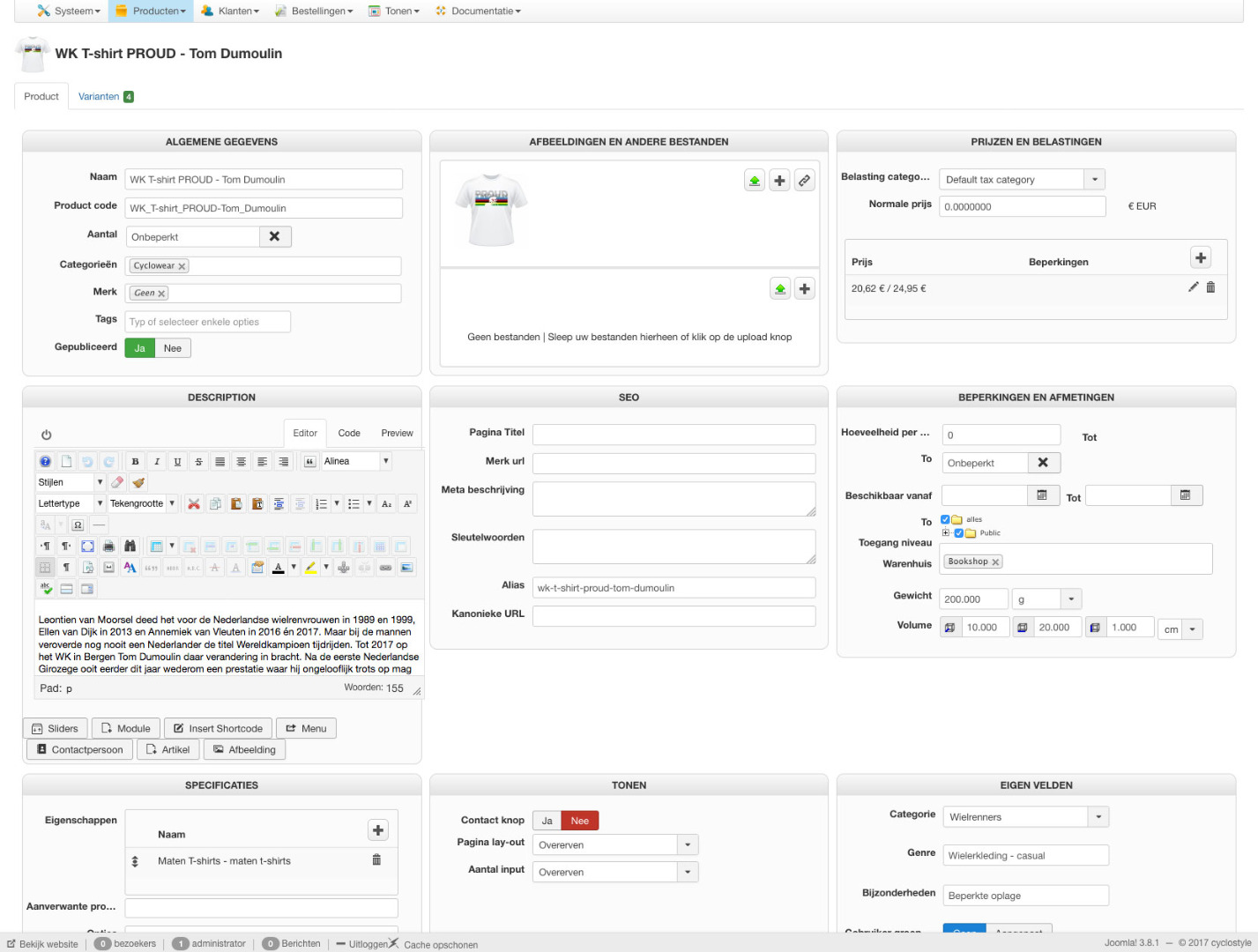
See attached screenshot for the settings.
ps
after add to cart there is no popup, as I use JM Creatrix which is no longer stable popups don't work anymore. Working on an update with new template!
The website is located at cyclostyle.com/
When you go to cyclostyle.com/shoppen/Artikelen/cyclowear and select for example WK T-shirt PROUD - Tom Dumoulin ( cyclostyle.com/shoppen/Product/wk-t-shirt-proud-tom-dumoulin ) and add to cart you will notice the numbers on the left, underneath the breadcrumbs.
See attached screenshot for the settings.
ps
after add to cart there is no popup, as I use JM Creatrix which is no longer stable popups don't work anymore. Working on an update with new template!
Please Log in or Create an account to join the conversation.
- BNRBranding
-
Topic Author
- Offline
Less
More
- Posts: 42
- Thank you received: 1
9 years 1 month ago #280644
by BNRBranding
Replied by BNRBranding on topic Weird numbers showing up in checkout
I can't reliably make it happen in our store, but it's exactly like this when we get it to happen. The numbers show up in the same place in the code - inside the component container but before all of the hika code.
Please Log in or Create an account to join the conversation.
9 years 1 month ago #280629
by nicolas
Replied by nicolas on topic Weird numbers showing up in checkout
Hi,
This looks like some debug data that wasn't removed when it should have. Unfortunately, I couldn't pinpoint where it is coming from and I'm not able to reproduce the issue on my end.
Could you provide a backend and FTP access to your website so that we can have a deeper look into it ?
www.hikashop.com/support/contact-us.html
This looks like some debug data that wasn't removed when it should have. Unfortunately, I couldn't pinpoint where it is coming from and I'm not able to reproduce the issue on my end.
Could you provide a backend and FTP access to your website so that we can have a deeper look into it ?
www.hikashop.com/support/contact-us.html
Please Log in or Create an account to join the conversation.
- BNRBranding
-
Topic Author
- Offline
Less
More
- Posts: 42
- Thank you received: 1
9 years 1 week ago #282121
by BNRBranding
Replied by BNRBranding on topic Weird numbers showing up in checkout
Are you still experiencing this issue and do you use AWOCoupon? My client is reporting the issue only seems to happen when they have an active coupon in the cart.
Please Log in or Create an account to join the conversation.
9 years 1 week ago #282125
by nicolas
Replied by nicolas on topic Weird numbers showing up in checkout
Hi,
If it's with an AWOCoupon coupon only, then it could indeed well come from that.
However, on the screenshots from www.hikashop.com/forum/checkout/892297-w...checkout.html#280415 there is no coupon being used so I don't think it would be linked (although it could).
The best to make sure is to disable the AWOCoupon plugins in the Joomla plugins manager and try again. If you don't see the numbers anymore, then it's from AWOCoupon. If you do, then it's something else.
If it's with an AWOCoupon coupon only, then it could indeed well come from that.
However, on the screenshots from www.hikashop.com/forum/checkout/892297-w...checkout.html#280415 there is no coupon being used so I don't think it would be linked (although it could).
The best to make sure is to disable the AWOCoupon plugins in the Joomla plugins manager and try again. If you don't see the numbers anymore, then it's from AWOCoupon. If you do, then it's something else.
Please Log in or Create an account to join the conversation.
Time to create page: 0.070 seconds