

- Posts: 70
- Thank you received: 1
Customise the layout of the checkout page
3 years 4 months ago #353231
by Storm
Customise the layout of the checkout page was created by Storm
-- url of the page with the problem -- :
store.alpha-electronics.com/
-- HikaShop version -- : 4.7.4
-- Joomla version -- : 3.10.11
-- PHP version -- : 7.4.33
I need to customise the layout of the checkout page, I know I can use the Checkout Worflow, but this only puts the layout into a 1 column for me, I'm looking to achieve a layout similar to here:
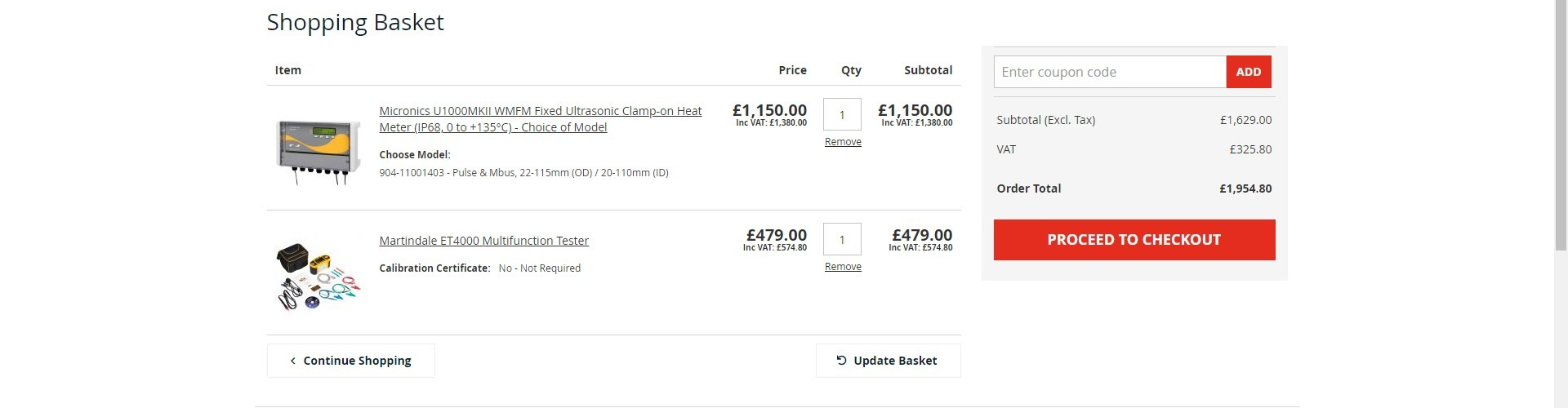
How can this be done please?
-- HikaShop version -- : 4.7.4
-- Joomla version -- : 3.10.11
-- PHP version -- : 7.4.33
I need to customise the layout of the checkout page, I know I can use the Checkout Worflow, but this only puts the layout into a 1 column for me, I'm looking to achieve a layout similar to here:
How can this be done please?
Please Log in or Create an account to join the conversation.

3 years 4 months ago - 3 years 4 months ago #353233
by nicolas
Replied by nicolas on topic Customise the layout of the checkout page
Hi,
The checkout workflow allows for 2 columns display. You need to add a separator in your checkout workflow :
www.hikashop.com/support/documentation/4...ut-workflow.html#sep
The checkout workflow allows for 2 columns display. You need to add a separator in your checkout workflow :
www.hikashop.com/support/documentation/4...ut-workflow.html#sep
Last edit: 3 years 4 months ago by nicolas.
Please Log in or Create an account to join the conversation.
3 years 4 months ago #353235
by Storm
Replied by Storm on topic Customise the layout of the checkout page
Thank you, how can I show the cart totals on the right, rather than below the products in the cart? As shown in my example image
Please Log in or Create an account to join the conversation.
3 years 4 months ago #353237
by nicolas
Replied by nicolas on topic Customise the layout of the checkout page
Hi,
First, you can configure your views like this:
i.imgur.com/IhXUOYS.png
It will result in this:
i.imgur.com/5PAzuvU.png
Then, you can use CSS code to hide the total rows on the left side and hide the product rows on the right side:
where you need to change the 5 and the 8 based on the ids of your views on your checkout.
This will give you something like this:
i.imgur.com/TWQM3nT.png
Then a bit more CSS to make it look closer to your screenshot and you'll be able to reproduce it.
First, you can configure your views like this:
i.imgur.com/IhXUOYS.png
It will result in this:
i.imgur.com/5PAzuvU.png
Then, you can use CSS code to hide the total rows on the left side and hide the product rows on the right side:
Code:
#hikashop_checkout_cart_1_5 tbody tr:not(.row0):not(.row1) {
display: none;
}
#hikashop_checkout_cart_1_8 tr.row0, #hikashop_checkout_cart_1_8 tr.row1, #hikashop_checkout_cart_1_8 thead {
display: none;
}
#hikashop_checkout_cart_1_8 tbody{ border-top: none !important; }
This will give you something like this:
i.imgur.com/TWQM3nT.png
Then a bit more CSS to make it look closer to your screenshot and you'll be able to reproduce it.
Please Log in or Create an account to join the conversation.
3 years 4 months ago #353261
by Storm
Replied by Storm on topic Customise the layout of the checkout page
Thank you, can the column width be adjusted please? Also, how can I get the checkout button to show under the total costs (on the right)?
Please Log in or Create an account to join the conversation.
3 years 4 months ago #353262
by nicolas
Replied by nicolas on topic Customise the layout of the checkout page
Hi,
Well, you are already on the checkout, so there is no "go to checkout" button. The "next" button is displayed at the bottom. You might be able to move it a bit with CSS, but it's gonna be dirty and difficult for responsiveness.
The width can be adjusted with CSS code. For example:
Well, you are already on the checkout, so there is no "go to checkout" button. The "next" button is displayed at the bottom. You might be able to move it a bit with CSS, but it's gonna be dirty and difficult for responsiveness.
The width can be adjusted with CSS code. For example:
Code:
.hikashop_checkout_page_step1 .hkc-md-6:first-of-type {
width: 75%;
}
.hikashop_checkout_page_step1 .hkc-md-6:last-of-type {
width: 25%;
}
Please Log in or Create an account to join the conversation.
3 years 3 months ago #353407
by Storm
Replied by Storm on topic Customise the layout of the checkout page
Thanks for your reply and help so far.
Is there anyway to add the code and the Next button to be part of the column on the right?
I know you said it can be done but would be dirty, I really need the Next button (in our case we've renamed it to be Checkout) to be under the cart prices on the right, as shown in my original image.
Is there anyway to add the code and the Next button to be part of the column on the right?
I know you said it can be done but would be dirty, I really need the Next button (in our case we've renamed it to be Checkout) to be under the cart prices on the right, as shown in my original image.
Please Log in or Create an account to join the conversation.
3 years 3 months ago #353408
by Storm
Replied by Storm on topic Customise the layout of the checkout page
I've worked out how to do it now, it was surprisingly simple using the following code:
(function() {
jQuery("#hikabtn_checkout_next")
.detach()
.appendTo("#hikashop_checkout_cart_1_4");
})();
(function() {
jQuery("#hikabtn_checkout_next")
.detach()
.appendTo("#hikashop_checkout_cart_1_4");
})();
The following user(s) said Thank You: nicolas
Please Log in or Create an account to join the conversation.
Time to create page: 0.078 seconds