
- Posts: 30
- Thank you received: 4
Login view allignment and selection
- Scramble ITS
-
 Topic Author
- Offline
Less
More
2 years 1 month ago #363789
by Scramble ITS
Login view allignment and selection was created by Scramble ITS
-- url of the page with the problem -- :
www.scramble.nl
-- HikaShop version -- : 5.1.1
-- Joomla version -- : 5.1.4
-- PHP version -- : 8.1
-- Browser(s) name and version -- : Edge 128.0.2739.42
During the checkout process you get to the login view. Here I have three options being login, registration and guest. In an example I saw these properly alligned (left) and with radio buttons. I don't seen to find that setting anywhere. They are centered and now just a clickeable link. Any ideas how to accomplish that? S
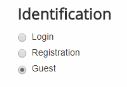 pecially the radio buttons. Allignment is most probably just CSS.
-- HikaShop version -- : 5.1.1
-- Joomla version -- : 5.1.4
-- PHP version -- : 8.1
-- Browser(s) name and version -- : Edge 128.0.2739.42
During the checkout process you get to the login view. Here I have three options being login, registration and guest. In an example I saw these properly alligned (left) and with radio buttons. I don't seen to find that setting anywhere. They are centered and now just a clickeable link. Any ideas how to accomplish that? S
Please Log in or Create an account to join the conversation.
2 years 1 month ago - 2 years 1 month ago #363805
by Philip
Replied by Philip on topic Login view allignment and selection
Hello,
We were able to reach your website, and unless we're missing something, it looks like you've resolved your issues, right?
Otherwise, can you elaborate more so that we understand the problem and what you want to achieve.

Regards
We were able to reach your website, and unless we're missing something, it looks like you've resolved your issues, right?
Otherwise, can you elaborate more so that we understand the problem and what you want to achieve.
Regards
Last edit: 2 years 1 month ago by Philip.
Please Log in or Create an account to join the conversation.
- Scramble ITS
-
Topic Author
- Offline
Less
More
- Posts: 30
- Thank you received: 4
2 years 1 month ago #363815
by Scramble ITS
Replied by Scramble ITS on topic Login view allignment and selection
Nono, that is the current shop (J2store), not the new one.
Please Log in or Create an account to join the conversation.
2 years 1 month ago #363816
by Philip
Replied by Philip on topic Login view allignment and selection
Hello,
Then we need to get access to your new website in order to experience your issue.
Regards
Then we need to get access to your new website in order to experience your issue.
Regards
Please Log in or Create an account to join the conversation.
- Scramble ITS
-
Topic Author
- Offline
Less
More
- Posts: 30
- Thank you received: 4
2 years 2 weeks ago #364242
by Scramble ITS
Replied by Scramble ITS on topic Login view allignment and selection
Can I PM you the login details?
Please Log in or Create an account to join the conversation.
2 years 2 weeks ago - 2 years 2 weeks ago #364247
by Philip
Replied by Philip on topic Login view allignment and selection
Hello,
In order to provide these kind of elements, you have to use our Contact us form, and don't forget to add an Url link to this subject in order to keep the link.
Regards
In order to provide these kind of elements, you have to use our Contact us form, and don't forget to add an Url link to this subject in order to keep the link.
Regards
Last edit: 2 years 2 weeks ago by Philip.
Please Log in or Create an account to join the conversation.
- Scramble ITS
-
Topic Author
- Offline
Less
More
- Posts: 30
- Thank you received: 4
2 years 1 week ago #364390
by Scramble ITS
Replied by Scramble ITS on topic Login view allignment and selection
Sorry for the late reply. Just sent the info.
Please Log in or Create an account to join the conversation.
2 years 1 week ago #364402
by Philip
Replied by Philip on topic Login view allignment and selection
Hello,
We do not know how to access your HikaShop, provide us with a link or an explanation on how to view your site in the HikaShop "version".
Also be careful not to have a plugin that will redirect us to your J2store version.
We have tried several things and only come to your current site.
Regards
We do not know how to access your HikaShop, provide us with a link or an explanation on how to view your site in the HikaShop "version".
Also be careful not to have a plugin that will redirect us to your J2store version.
We have tried several things and only come to your current site.
Regards
Please Log in or Create an account to join the conversation.
- Scramble ITS
-
Topic Author
- Offline
Less
More
- Posts: 30
- Thank you received: 4
2 years 1 week ago - 2 years 1 week ago #364423
by Scramble ITS
Replied by Scramble ITS on topic Login view allignment and selection
Philip, the new shop resides (for now) under the main 'admin' menu which should be visible to you. There the submenu 'shop test'.
Last edit: 2 years 1 week ago by Scramble ITS.
Please Log in or Create an account to join the conversation.
2 years 1 week ago - 2 years 1 week ago #364438
by Philip
Replied by Philip on topic Login view allignment and selection
Hello,
Thanks for your elements, now we are good.
We are able to see now your checkout/login view, in order to have a more consistent display, you can add some custom Css to your frontend css file.
These kind of code may do the trick :
Learn here how to add some custom css in your frontend file css.
Regards
Thanks for your elements, now we are good.
We are able to see now your checkout/login view, in order to have a more consistent display, you can add some custom Css to your frontend css file.
These kind of code may do the trick :
Code:
div#data_register_registration_method label.btn {
border: 1px solid #d7d1d1;
border-radius: 0;
margin: 0;
}
div#data_register_registration_method label.btn.active {
border: 1px solid black;
}
Learn here how to add some custom css in your frontend file css.
Regards
Last edit: 2 years 1 week ago by Philip.
Please Log in or Create an account to join the conversation.
Time to create page: 0.082 seconds