

- Posts: 254
- Thank you received: 2
Create a mixed system of shipping?
10 years 9 months ago #225212
by bigfoot
Replied by bigfoot on topic Create a mixed system of shipping?
I made a copy of one of my products and changed the warehouse to a brand new one I created, with a brand new ups shipping module and started to gradually change parts of it to see what was going wrong. It worked just perfect at first - I deleted the variants it had and it still worked fine. Everything was ok until I created a new characteristic and added 1 variant. Then the UPS plugin would not show again - even deleting the variariant/characteristic did not make it come back - I am back where I started 
On other thing - I wonder if I have a joomla problem. I just sent this message to my friends at OSTraining.com:
"I have some problems on my site that may be connected.
For quite a while I noticed that I could not use the "Joomla Update" - I would always get some kind of error message regarding getting the update file - but I could always update by downloading the update file and installing it (latest 3.4.
Also, in Akeeba Backup, I could always backup the site just fine, but when I tried to go back to a previous version by running the backup on a backup file - I had an ajax error - could not read the file. That worried me somewhat that I did not have a backup, but I recently took the backup file and installed it in a subfolder - so it still works.
Now I am running into a problem in Hikashop about ups shipping not showing up correctly and a light went on and I am wondering if they could all be connected.
I have been working unsuccessfully with hikashop and we cannot seem to fix that problem so far and have not contacted Akeeba yet.
I am wondering if I have sdome kind of Joomla problem?"
( www.ostraining.com/support-forum/joomla-...kup-update-hikashop/ )
Does this make you think of anything?
On other thing - I wonder if I have a joomla problem. I just sent this message to my friends at OSTraining.com:
"I have some problems on my site that may be connected.
For quite a while I noticed that I could not use the "Joomla Update" - I would always get some kind of error message regarding getting the update file - but I could always update by downloading the update file and installing it (latest 3.4.
Also, in Akeeba Backup, I could always backup the site just fine, but when I tried to go back to a previous version by running the backup on a backup file - I had an ajax error - could not read the file. That worried me somewhat that I did not have a backup, but I recently took the backup file and installed it in a subfolder - so it still works.
Now I am running into a problem in Hikashop about ups shipping not showing up correctly and a light went on and I am wondering if they could all be connected.
I have been working unsuccessfully with hikashop and we cannot seem to fix that problem so far and have not contacted Akeeba yet.
I am wondering if I have sdome kind of Joomla problem?"
( www.ostraining.com/support-forum/joomla-...kup-update-hikashop/ )
Does this make you think of anything?
Please Log in or Create an account to join the conversation.

Less
More
- Posts: 12953
- Thank you received: 1778
10 years 8 months ago #225288
by Mohamed Thelji
Replied by Mohamed Thelji on topic Create a mixed system of shipping?
Hello,
I don't think that your "Joomla Update" and UPS issue are connected, the UPS problem is only coming from the way UPS read and send your product/variant data to the UPS platform. Also, note that using the "Group package" option will probably be a good idea regarding your pricing issue.
Can you show me how you configured your Product and its variants through some screenshots so that we can have more information about it ?I deleted the variants it had and it still worked fine. Everything was ok until I created a new characteristic and added 1 variant. Then the UPS plugin would not show again - even deleting the variariant/characteristic did not make it come back - I am back where I started
I don't think that your "Joomla Update" and UPS issue are connected, the UPS problem is only coming from the way UPS read and send your product/variant data to the UPS platform. Also, note that using the "Group package" option will probably be a good idea regarding your pricing issue.
Please Log in or Create an account to join the conversation.
10 years 7 months ago #230569
by bigfoot
Replied by bigfoot on topic Create a mixed system of shipping?
Thank you for your help in setting up this mixed system of shipping. Many bugs are worked out, and it is working fine but I still have a few questions.
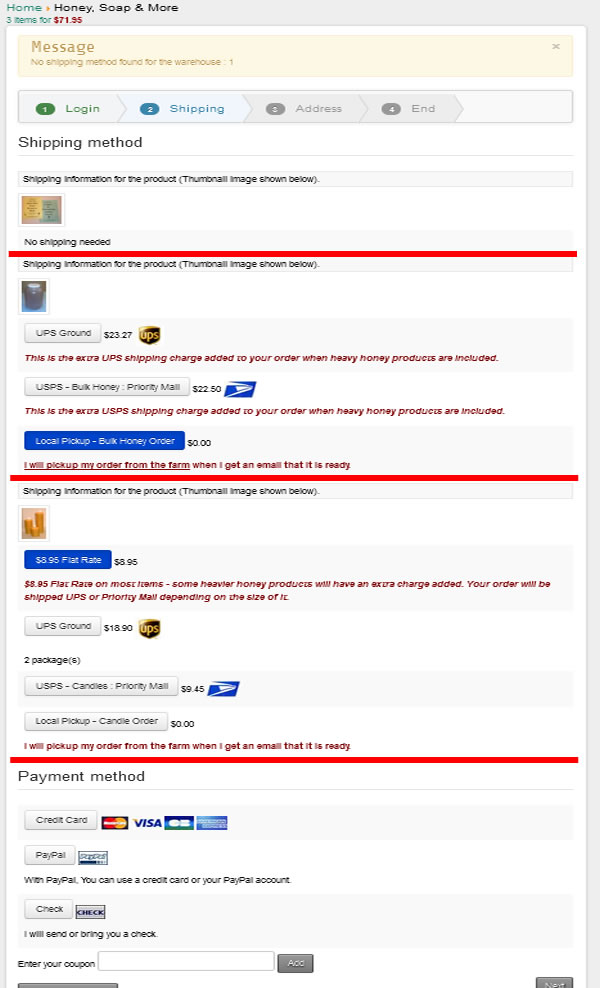
The image below is a screenshot of a sample order with:
1 - A free booklet item at the top that does not have any shipping method.
2 - Shipping area for a heavier item
3 - Shipping area for a standard flat rate shipping item
4 - The payment area
The problem is the page looks very jumbled together and customers sometimes get confused. I made some red lines between the areas in the image, but is there is anyway to make some division show up in the checkup page. A heavy line, a large space, a box around the areas? Do you have any ideas. My code writing skills are very limited, but I do a lot of cut and paste and tweaking.
The image below is a screenshot of a sample order with:
1 - A free booklet item at the top that does not have any shipping method.
2 - Shipping area for a heavier item
3 - Shipping area for a standard flat rate shipping item
4 - The payment area
The problem is the page looks very jumbled together and customers sometimes get confused. I made some red lines between the areas in the image, but is there is anyway to make some division show up in the checkup page. A heavy line, a large space, a box around the areas? Do you have any ideas. My code writing skills are very limited, but I do a lot of cut and paste and tweaking.
Please Log in or Create an account to join the conversation.
Less
More
- Posts: 12953
- Thank you received: 1778
10 years 7 months ago #230642
by Mohamed Thelji
Replied by Mohamed Thelji on topic Create a mixed system of shipping?
Hello,
The best solution will be to directly use some CSS code customization : www.hikashop.com/support/support/documen...the-display.html#css
Or to directly edit the "Shipping" file of the "Checkout" view of your front-end template via "Hikashop->Display->Views".
The best solution will be to directly use some CSS code customization : www.hikashop.com/support/support/documen...the-display.html#css
Or to directly edit the "Shipping" file of the "Checkout" view of your front-end template via "Hikashop->Display->Views".
Please Log in or Create an account to join the conversation.
Time to create page: 0.212 seconds