

- Posts: 17
- Thank you received: 0
Problem with Bpost shipping manager
10 years 3 months ago #244107
by Bram
Problem with Bpost shipping manager was created by Bram
-- url of the page with the problem -- :
www.hiphey.be
-- HikaShop version -- : 3.6.2
-- Joomla version -- : 3.5
First of all thank you Nicolas for the Bpost shipping manager.
I have one problem with it.
When the customer enters the Bpost shipping manager, they get an error 1211.
Error 1211 means : Order total prince contains invalid integer (must be in eurocent )
Now Bpost writes the following on there website about the error:
The value of the parameter orderTotalPrice should not contain any decimal limiters (, or .) and should be sent in eurocent.
In case the parameter contains a regular euro value, it should be multiplied by 100.
Where in de Bpost shipping manager plugin do i have to change it so it wil correct the error?
Kind regards
Bram
-- HikaShop version -- : 3.6.2
-- Joomla version -- : 3.5
First of all thank you Nicolas for the Bpost shipping manager.
I have one problem with it.
When the customer enters the Bpost shipping manager, they get an error 1211.
Error 1211 means : Order total prince contains invalid integer (must be in eurocent )
Now Bpost writes the following on there website about the error:
The value of the parameter orderTotalPrice should not contain any decimal limiters (, or .) and should be sent in eurocent.
In case the parameter contains a regular euro value, it should be multiplied by 100.
Where in de Bpost shipping manager plugin do i have to change it so it wil correct the error?
Kind regards
Bram
Please Log in or Create an account to join the conversation.

10 years 3 months ago #244109
by Jerome
Jerome - Obsidev.com
HikaMarket & HikaSerial developer / HikaShop core dev team.
Replied by Jerome on topic Problem with Bpost shipping manager
Hi,
Please be sure that you're using the latest HikaShop 2.6.3 package (you can re-download it to be sure).
The plugin bpost received some hot patches and I think that the latest version of the files should fix your issue.
Regards,
Please be sure that you're using the latest HikaShop 2.6.3 package (you can re-download it to be sure).
The plugin bpost received some hot patches and I think that the latest version of the files should fix your issue.
Regards,
Jerome - Obsidev.com
HikaMarket & HikaSerial developer / HikaShop core dev team.
Please Log in or Create an account to join the conversation.
10 years 3 months ago #244132
by Bram
Replied by Bram on topic Problem with Bpost shipping manager
Goodmorning,
I have installed the latest version of hikashop and joomla.

But i still get the same error.
The bpost plugin file that i use is this one:
github.com/HikaShop/hikashopshipping-bpost/releases
Is this the right one?
Kind regards
Bram
I have installed the latest version of hikashop and joomla.
But i still get the same error.
The bpost plugin file that i use is this one:
github.com/HikaShop/hikashopshipping-bpost/releases
Is this the right one?
Kind regards
Bram
Please Log in or Create an account to join the conversation.
10 years 3 months ago #244161
by Jerome
Jerome - Obsidev.com
HikaMarket & HikaSerial developer / HikaShop core dev team.
Replied by Jerome on topic Problem with Bpost shipping manager
Hi,
I see that Nicolas forgot to commit the modifications in the github repository.
I fixed that and you can find the latest version here (you can use the "download" button to get a zip archive) :
github.com/HikaShop/hikashopshipping-bpost
Regards,
I see that Nicolas forgot to commit the modifications in the github repository.
I fixed that and you can find the latest version here (you can use the "download" button to get a zip archive) :
github.com/HikaShop/hikashopshipping-bpost
Regards,
Jerome - Obsidev.com
HikaMarket & HikaSerial developer / HikaShop core dev team.
Please Log in or Create an account to join the conversation.
10 years 3 months ago #244190
by Bram
Replied by Bram on topic Problem with Bpost shipping manager
Hello Gerome,
Thank you for the new download link but there is another problem with it.
I get some weird error that has to do with the code on line 228 of the .php file

Kind regards
Bram
Thank you for the new download link but there is another problem with it.
I get some weird error that has to do with the code on line 228 of the .php file
Kind regards
Bram
Please Log in or Create an account to join the conversation.
10 years 3 months ago #244193
by Jerome
Jerome - Obsidev.com
HikaMarket & HikaSerial developer / HikaShop core dev team.
Replied by Jerome on topic Problem with Bpost shipping manager
Hi,
Thanks for the report. I fixed that typo.
You can replace the line 227, from
To
in order to fix that copy/paste mistake.
Regards,
Thanks for the report. I fixed that typo.
You can replace the line 227, from
Code:
$current_page = hikashop_currentURL
Code:
$current_page = hikashop_currentURL();
Regards,
Jerome - Obsidev.com
HikaMarket & HikaSerial developer / HikaShop core dev team.
Please Log in or Create an account to join the conversation.
10 years 3 months ago #244259
by Bram
Replied by Bram on topic Problem with Bpost shipping manager
Good morning,
I'm still experiencing problems with the shipping manager.
In the old version it went like follow:
Client add product to cart
Client goes to checkout
Client selects shipping method:

Client then would get the following screens:

and then could select from the b-post menu
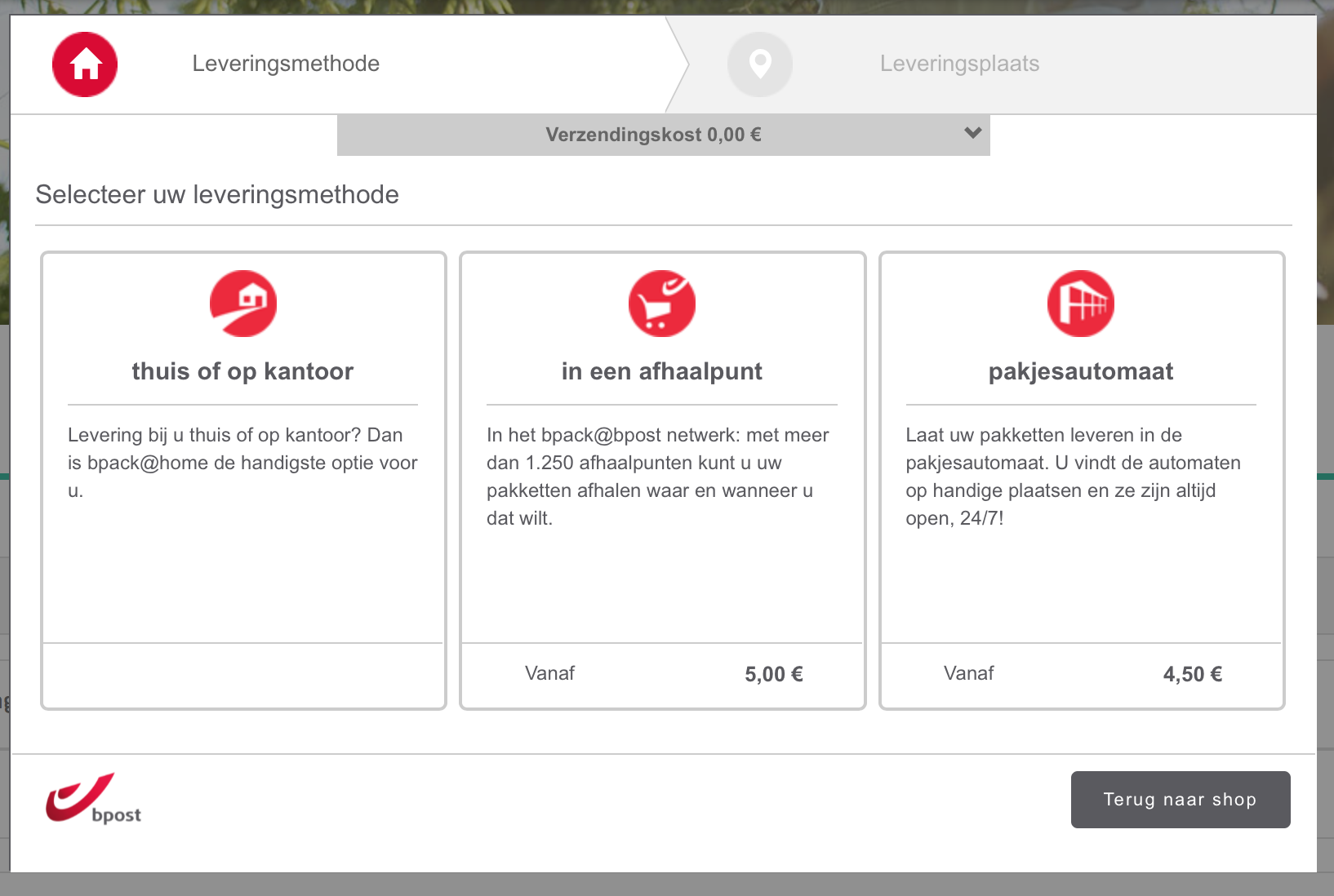
this was all happening using the old version of the plugin:

Now with the new version, well nothing happens it just send me back to the shipping method selection screen from hikashop. It doesnt show the bpost screen where client can select en order the way of shipping.
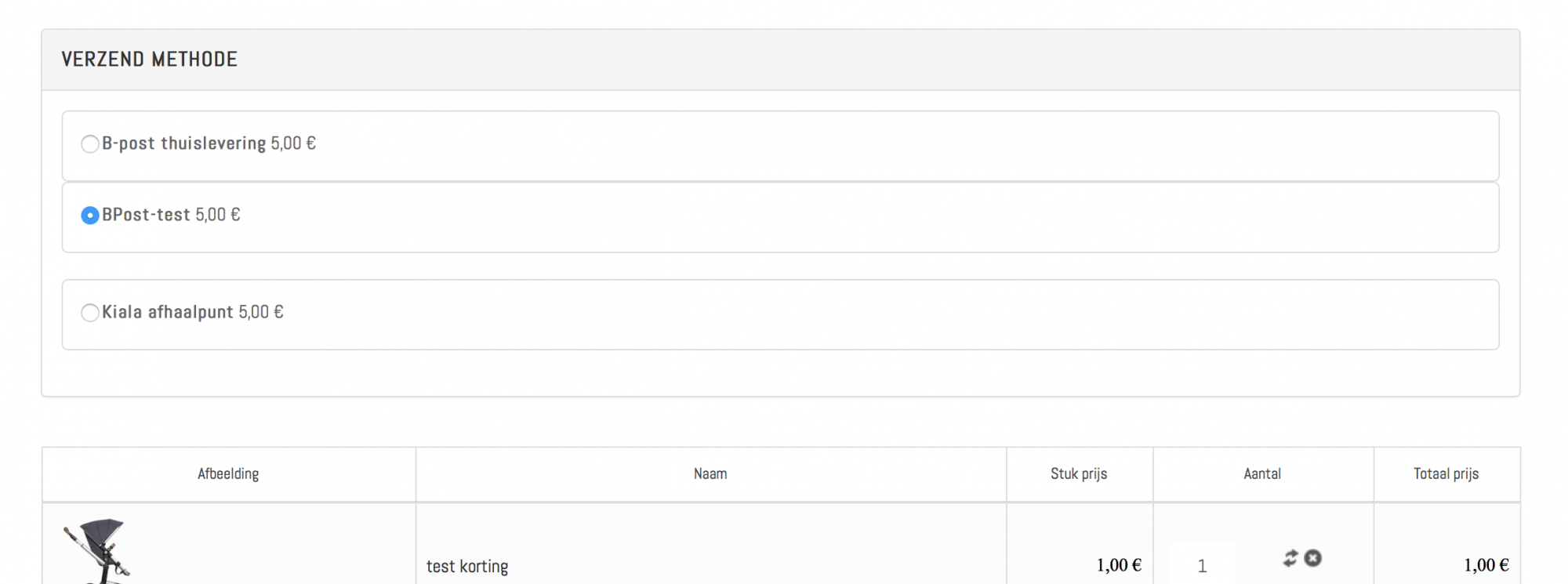
I am doing something wrong?
Kind regards
Bram
I'm still experiencing problems with the shipping manager.
In the old version it went like follow:
Client add product to cart
Client goes to checkout
Client selects shipping method:
Client then would get the following screens:
and then could select from the b-post menu
this was all happening using the old version of the plugin:
Now with the new version, well nothing happens it just send me back to the shipping method selection screen from hikashop. It doesnt show the bpost screen where client can select en order the way of shipping.
I am doing something wrong?
Kind regards
Bram
Please Log in or Create an account to join the conversation.

10 years 3 months ago #244406
by nicolas
Replied by nicolas on topic Problem with Bpost shipping manager
Hi,
No, there was another typo in the fixes.
I've updated the install package there.
The line:
parameters: '.$parameters.'
should be:
parameters: '.$parameters.',
in the bpost.php file.
No, there was another typo in the fixes.
I've updated the install package there.
The line:
parameters: '.$parameters.'
should be:
parameters: '.$parameters.',
in the bpost.php file.
Please Log in or Create an account to join the conversation.

10 years 2 months ago #248240
by Ch3vr0n
Replied by Ch3vr0n on topic Problem with Bpost shipping manager
a Bpost plugin? Awesome, where can i get it? Does there happen to be one for kiala(.be) as well?
Please Log in or Create an account to join the conversation.
10 years 2 months ago #248264
by Jerome
Jerome - Obsidev.com
HikaMarket & HikaSerial developer / HikaShop core dev team.
Replied by Jerome on topic Problem with Bpost shipping manager
Hi,
As usual, our plugins are listed in the documentation :
www.hikashop.com/support/documentation.html
Regards,
As usual, our plugins are listed in the documentation :
www.hikashop.com/support/documentation.html
Regards,
Jerome - Obsidev.com
HikaMarket & HikaSerial developer / HikaShop core dev team.
Please Log in or Create an account to join the conversation.
10 years 2 months ago #248324
by Ch3vr0n
Replied by Ch3vr0n on topic Problem with Bpost shipping manager
great found it. But there's no install instructions. How do i install it?
Please Log in or Create an account to join the conversation.
10 years 2 months ago #248326
by nicolas
Replied by nicolas on topic Problem with Bpost shipping manager
It's easy. Download the zip there, and install it via the Joomla installer, like any other extension. Then, you can configure it via the menu System>Shipping methods like other shipping methods.
Please Log in or Create an account to join the conversation.
10 years 2 months ago #248373
by Ch3vr0n
Replied by Ch3vr0n on topic Problem with Bpost shipping manager
Ok that worked, is there any type of documentation. I see specific information fields (customer ID, passphrase & cost center) but no idea where to get them
Please Log in or Create an account to join the conversation.
10 years 2 months ago #248374
by Jerome
Jerome - Obsidev.com
HikaMarket & HikaSerial developer / HikaShop core dev team.
Replied by Jerome on topic Problem with Bpost shipping manager
Jerome - Obsidev.com
HikaMarket & HikaSerial developer / HikaShop core dev team.
Please Log in or Create an account to join the conversation.
10 years 2 months ago #248453
by Ch3vr0n
Replied by Ch3vr0n on topic Problem with Bpost shipping manager
Thanks, now if only the page to request those details would actually work that be awsome, but that's not your problem  that's theirs
that's theirs Please Log in or Create an account to join the conversation.
10 years 1 month ago #248803
by Bram
Replied by Bram on topic Problem with Bpost shipping manager
Hey guys,
Sorry for the late reply but we got the loop problems fixed and also another bug. A bit in a hurry atm but i will write how we fixed it tonight.
I have yet another problem which is harder to fix. For some reason the Bpost SHM overwrites our shipping price. Is there a way to make sure that our shipping price is used and not the Bpost SHM?
Kind regards
Bram
Sorry for the late reply but we got the loop problems fixed and also another bug. A bit in a hurry atm but i will write how we fixed it tonight.
I have yet another problem which is harder to fix. For some reason the Bpost SHM overwrites our shipping price. Is there a way to make sure that our shipping price is used and not the Bpost SHM?
Kind regards
Bram
Please Log in or Create an account to join the conversation.
10 years 1 month ago #248830
by Jerome
Jerome - Obsidev.com
HikaMarket & HikaSerial developer / HikaShop core dev team.
Replied by Jerome on topic Problem with Bpost shipping manager
Hi,
I'm not sure to understand what you want to do.
But the fact that the shipping price change depending the BPost returned values is one of the goal of that plugin.
Neverthelss, you can modify the plugin code to not affect the shipping prices.
See code in the function "onShippingDisplay" for the set of the "shipping_price_with_tax"
github.com/HikaShop/hikashopshipping-bpo..._bpost/bpost.php#L37
Regards,
I'm not sure to understand what you want to do.
But the fact that the shipping price change depending the BPost returned values is one of the goal of that plugin.
Neverthelss, you can modify the plugin code to not affect the shipping prices.
See code in the function "onShippingDisplay" for the set of the "shipping_price_with_tax"
github.com/HikaShop/hikashopshipping-bpo..._bpost/bpost.php#L37
Regards,
Jerome - Obsidev.com
HikaMarket & HikaSerial developer / HikaShop core dev team.
Please Log in or Create an account to join the conversation.
10 years 1 month ago #248851
by Bram
Replied by Bram on topic Problem with Bpost shipping manager
Ill explain a bit better now.
What i have is that if people buy goods for lets say 50€ they get free shipping. If they have less the 50€ they pay shipping costs.
I have that set in Hikashop and that works great. But when bpost SHM comes in, well it doesnt care what the shipping price is. It just forces the price you have set in the Bpost SHM.
Bpost SHM also doesnt include an option to set if jou buy for certain amount, you get free shipping. And if you buy for less then that amount you pay shipping costs.
Thats the problem i have and some other people might have to.
Kind regards
Bram
What i have is that if people buy goods for lets say 50€ they get free shipping. If they have less the 50€ they pay shipping costs.
I have that set in Hikashop and that works great. But when bpost SHM comes in, well it doesnt care what the shipping price is. It just forces the price you have set in the Bpost SHM.
Bpost SHM also doesnt include an option to set if jou buy for certain amount, you get free shipping. And if you buy for less then that amount you pay shipping costs.
Thats the problem i have and some other people might have to.
Kind regards
Bram
Please Log in or Create an account to join the conversation.

10 years 1 month ago - 10 years 1 month ago #248903
by Philip
Replied by Philip on topic Problem with Bpost shipping manager
Hello,
Ok I understand what your needs, so as Jerome told you you have to edit your bpost.php file.
Find your "onShippingDisplay" function and replace this (around line 33) :
By this :
Important note : I give you this code in order to guide you, because I'm unable to process some test in order to check it.
Hope this will guide you.
Regards.
Ok I understand what your needs, so as Jerome told you you have to edit your bpost.php file.
Find your "onShippingDisplay" function and replace this (around line 33) :
Code:
...
if($rate->shipping_type != $this->name)
continue;
$usable_rates[$k]->shipping_name .= ' '.$order->cart_params->bpost->deliveryMethod;
$usable_rates[$k]->shipping_price_with_tax = $order->cart_params->bpost->deliveryMethodPriceDefault;
$round = $currencyClass->getRounding(@$usable_rates[$k]->shipping_currency_id, true);
...
Code:
...
if($rate->shipping_type != $this->name)
continue;
$usable_rates[$k]->shipping_name .= ' '.$order->cart_params->bpost->deliveryMethod;
// Custom code start after this :
if ( (int)($order->full_total->prices[0]->price_value_without_shipping_with_tax * 100) >= 50) {
$order->cart_params->bpost->deliveryMethodPriceDefault = 0;
}
$usable_rates[$k]->shipping_price_with_tax = $order->cart_params->bpost->deliveryMethodPriceDefault;
// Custom code ends here :
$round = $currencyClass->getRounding(@$usable_rates[$k]->shipping_currency_id, true);
...
Hope this will guide you.
Regards.
Last edit: 10 years 1 month ago by Philip.
Please Log in or Create an account to join the conversation.
Time to create page: 0.553 seconds