

- Posts: 19
- Thank you received: 0
Flat rate shipping with different rates for increased sales
9 years 7 months ago #264803
by dsrtrosy
My client charges a flat rate for every six products ordered (all products are the same size/shape/weight). So any order of from 1-6 total products costs $4 to ship, from 7-12 costs $8 to ship, etc. I can't for the life of me figure out how to set this up. Any help would be appreciated!
Please Log in or Create an account to join the conversation.

9 years 7 months ago #264804
by Jerome
Jerome - Obsidev.com
HikaMarket & HikaSerial developer / HikaShop core dev team.
Replied by Jerome on topic Flat rate shipping with different rates for increased sales
Hi,
You just have to use the "manual" shipping plugin and then use the restrictions
www.hikashop.com/support/documentation/6...t-sale.html#shipping
Regards,
You just have to use the "manual" shipping plugin and then use the restrictions
www.hikashop.com/support/documentation/6...t-sale.html#shipping
Regards,
Jerome - Obsidev.com
HikaMarket & HikaSerial developer / HikaShop core dev team.
Please Log in or Create an account to join the conversation.
9 years 7 months ago #264825
by dsrtrosy
Replied by dsrtrosy on topic Flat rate shipping with different rates for increased sales
I'm looking at that link and nowhere does it explain how to use the restrictions to set the shipping at different rates for different orders. Can you explain how that would be done? I already have the manual shipping plugin selected and the rate for the smallest order, but nowhere do I see a way to put in parameters for increasing it as orders increase.
Please Log in or Create an account to join the conversation.
9 years 7 months ago - 9 years 7 months ago #264830
by Rapid
Replied by Rapid on topic Flat rate shipping with different rates for increased sales
If I read you right...
You need more than 1 manual shipping plugin - so either make a copy your existing one (tick its checkbox in the list and Copy from mid/top menu or just create a new one for each variation - NEW from mid/top menu, select Manual Shipping Plugin.
Then just change/add the price and Minimum / Maximum Quantity in the restrictions: 1-7 , 7 - 12, 13 - 16 and so on.
You'll end up with multiple Manual Shipping plugins that will only display based on the number of products at the time of checkout.
Cheers.
You need more than 1 manual shipping plugin - so either make a copy your existing one (tick its checkbox in the list and Copy from mid/top menu or just create a new one for each variation - NEW from mid/top menu, select Manual Shipping Plugin.
Then just change/add the price and Minimum / Maximum Quantity in the restrictions: 1-7 , 7 - 12, 13 - 16 and so on.
You'll end up with multiple Manual Shipping plugins that will only display based on the number of products at the time of checkout.
Cheers.
Last edit: 9 years 7 months ago by Rapid.
Please Log in or Create an account to join the conversation.
9 years 7 months ago #264831
by dsrtrosy
Replied by dsrtrosy on topic Flat rate shipping with different rates for increased sales
Thanks, I'll give that a try.
Please Log in or Create an account to join the conversation.
9 years 7 months ago #264832
by Rapid
Replied by Rapid on topic Flat rate shipping with different rates for increased sales
Cool - Let me know how it works out.
Please Log in or Create an account to join the conversation.

9 years 7 months ago - 9 years 7 months ago #264829
by Philip
Replied by Philip on topic Flat rate shipping with different rates for increased sales
Hello,
You have to understand that for the same shipping plugin, you can create several shipping method.
Now let's focus on your needs :
- Create several Manual shipping methods to create your own way to process shipping.
- Have a look on restriction part, here :
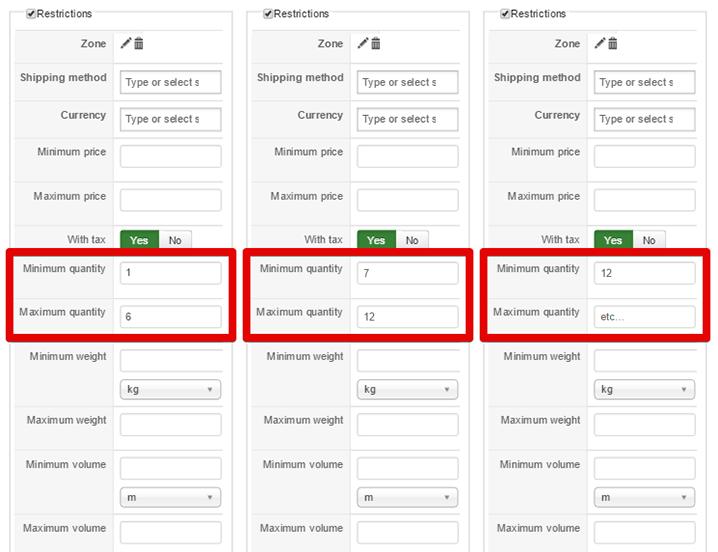
Here you see 3 shipping method from the manual shipping plugin.
- You have just to define for each conditions/restrictions the price for each shipping methods.
Then when your customer will fill his cart only the required (from item number in the cart) shipping method will be display.
Hope this will help you.
Regards
You have to understand that for the same shipping plugin, you can create several shipping method.
Now let's focus on your needs :
- Create several Manual shipping methods to create your own way to process shipping.
- Have a look on restriction part, here :
Here you see 3 shipping method from the manual shipping plugin.
- You have just to define for each conditions/restrictions the price for each shipping methods.
Then when your customer will fill his cart only the required (from item number in the cart) shipping method will be display.
Hope this will help you.
Regards
Last edit: 9 years 7 months ago by Philip.
Please Log in or Create an account to join the conversation.
Time to create page: 0.367 seconds