

- Posts: 51
- Thank you received: 0
Which Article Layout to use?
15 years 9 months ago #3987
by sidneyd
Which Article Layout to use? was created by sidneyd
Hi,
I have set up a menu item and selected Hikashop as the menu item type. However I can't seem to find which layout to use as when I preview my site, the page which should relate to the Hikashop store shows as a broken link.
I am setting up the shop to show currently 5 categories on the store page each with numerous product listings within the categories
Regards
I have set up a menu item and selected Hikashop as the menu item type. However I can't seem to find which layout to use as when I preview my site, the page which should relate to the Hikashop store shows as a broken link.
I am setting up the shop to show currently 5 categories on the store page each with numerous product listings within the categories
Regards
Please Log in or Create an account to join the conversation.

15 years 9 months ago #3989
by nicolas
Replied by nicolas on topic Re: Which Article Layout to use?
Hi,
Which version of joomla are you using ?
Could you provide a link to your website where we can see that broken link ?
Which version of joomla are you using ?
Could you provide a link to your website where we can see that broken link ?
Please Log in or Create an account to join the conversation.
15 years 9 months ago #3992
by sidneyd
Replied by sidneyd on topic Re: Which Article Layout to use?
Using Joomla 1.5. The site is currently on a local host in XAMPP so not yet live
Please Log in or Create an account to join the conversation.
15 years 9 months ago #3993
by nicolas
Replied by nicolas on topic Re: Which Article Layout to use?
Could you do a screenshot then ?
Please Log in or Create an account to join the conversation.
15 years 9 months ago #4025
by sidneyd
Replied by sidneyd on topic Re: Which Article Layout to use?
Hi Nicolas
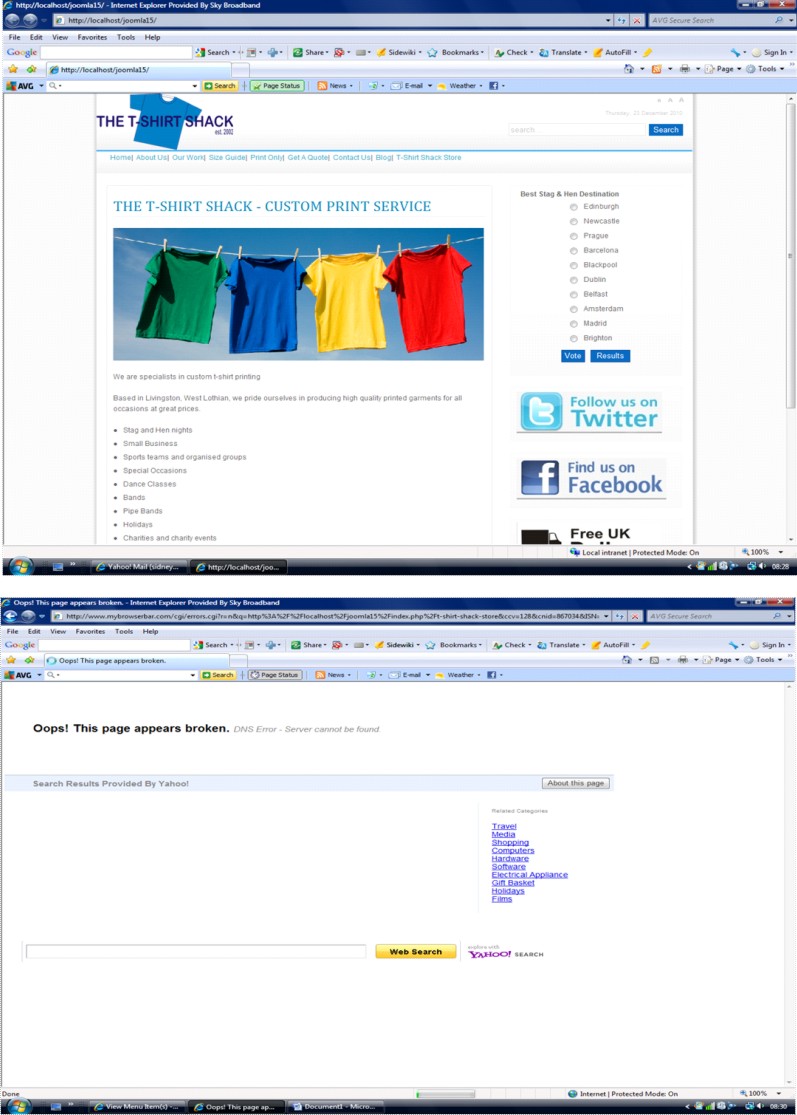
I have attached a word doc with a screenshot of the homepage. The menu item is T-Shirt Shack Store and the screenshot below it shows the result when clicked.
I currently have this menu item set up as Hikashop - Category Listing
I have attached a word doc with a screenshot of the homepage. The menu item is T-Shirt Shack Store and the screenshot below it shows the result when clicked.
I currently have this menu item set up as Hikashop - Category Listing
Please Log in or Create an account to join the conversation.
15 years 9 months ago #4026
by sidneyd
Replied by sidneyd on topic Re: Which Article Layout to use?
Sorry attachment didn't go through, try this
Please Log in or Create an account to join the conversation.
15 years 9 months ago #4027
by nicolas
Replied by nicolas on topic Re: Which Article Layout to use?
Could you copy/paste the link which is broken ?
Please Log in or Create an account to join the conversation.
15 years 9 months ago #4035
by sidneyd
Replied by sidneyd on topic Re: Which Article Layout to use?
Hi Nicolas
Its currently on a local host http://localhost/joomla15/index.php/t-shirt-shack-store
i think
Its currently on a local host http://localhost/joomla15/index.php/t-shirt-shack-store
i think
Please Log in or Create an account to join the conversation.
15 years 9 months ago #4039
by nicolas
Replied by nicolas on topic Re: Which Article Layout to use?
Could you temporarily deactivate SEF settings in the joomla configuration and copy/paste again the link from your menu ? That will give us the real link.
By the way, when you deactivate SEF, does the link work ?
By the way, when you deactivate SEF, does the link work ?
Please Log in or Create an account to join the conversation.
15 years 9 months ago #4041
by sidneyd
Replied by sidneyd on topic Re: Which Article Layout to use?
Hi Nicolas
I am out just now but will try that when I get it and send you the link
Colin
I am out just now but will try that when I get it and send you the link
Colin
Please Log in or Create an account to join the conversation.
15 years 9 months ago #4075
by sidneyd
Replied by sidneyd on topic Re: Which Article Layout to use?
Hi Nicolas
Where do I disable SEF in joomla? What is SEF?
Where do I disable SEF in joomla? What is SEF?
Please Log in or Create an account to join the conversation.
15 years 9 months ago #4078
by nicolas
Replied by nicolas on topic Re: Which Article Layout to use?
It's explained on that page of the joomla documentation:
docs.joomla.org/SEF_URLs_in_Joomla!_1.5
Please Log in or Create an account to join the conversation.
15 years 9 months ago #4219
by sidneyd
Replied by sidneyd on topic Re: Which Article Layout to use?
Hi Nicolas
I have turned off the SEF URLS and this is the url I get for the page -
http://localhost/joomla15/index.php?option=com_hikashop&view=category&layout=listing&Itemid=29
I have turned off the SEF URLS and this is the url I get for the page -
http://localhost/joomla15/index.php?option=com_hikashop&view=category&layout=listing&Itemid=29
Please Log in or Create an account to join the conversation.
15 years 8 months ago #4252
by sidneyd
Replied by sidneyd on topic Re: Which Article Layout to use?
Hi Nicolas
I have turned off the SEF URLS and this is the url I get for the page -
localhost/joomla15/index.php?option=com_...isting&Itemid=29
I have turned off the SEF URLS and this is the url I get for the page -
localhost/joomla15/index.php?option=com_...isting&Itemid=29
Please Log in or Create an account to join the conversation.
15 years 8 months ago #4253
by nicolas
Replied by nicolas on topic Re: Which Article Layout to use?
Does that link works when SEF is deactivated ?
Please Log in or Create an account to join the conversation.
15 years 8 months ago #4255
by sidneyd
Replied by sidneyd on topic Re: Which Article Layout to use?
No it doesn't
Please Log in or Create an account to join the conversation.
15 years 8 months ago #4256
by nicolas
Replied by nicolas on topic Re: Which Article Layout to use?
Could you do a screenshot of the page once you opened it ?
Please Log in or Create an account to join the conversation.
15 years 8 months ago #4263
by sidneyd
Replied by sidneyd on topic Re: Which Article Layout to use?
This is the message received
500 - View not found [name, type, prefix]: menu,html,menuView
You may not be able to visit this page because of:
1. an out-of-date bookmark/favourite
2. a search engine that has an out-of-date listing for this site
3. a mistyped address
4. you have no access to this page
5. The requested resource was not found.
6. An error has occurred while processing your request.
Please try one of the following pages:
* Home Page
If difficulties persist, please contact the System Administrator of this site.
View not found [name, type, prefix]: menu,html,menuView
This attachment is hidden for guests.
500 - View not found [name, type, prefix]: menu,html,menuView
You may not be able to visit this page because of:
1. an out-of-date bookmark/favourite
2. a search engine that has an out-of-date listing for this site
3. a mistyped address
4. you have no access to this page
5. The requested resource was not found.
6. An error has occurred while processing your request.
Please try one of the following pages:
* Home Page
If difficulties persist, please contact the System Administrator of this site.
View not found [name, type, prefix]: menu,html,menuView
This attachment is hidden for guests.
Please log in or register to see it.
Please Log in or Create an account to join the conversation.
15 years 8 months ago #4264
by nicolas
Replied by nicolas on topic Re: Which Article Layout to use?
Hi,
I remember that with an old version of HikaShop such error would happen on the front end if the option "Menu position" was set to "above the main area" in the configuration under the tab display. Could you check that option ? If that's the case, could you change it and see if it's better. Also, that was on an old version and should not happen with the latest version. Which version of HikaShop are you using ?
I remember that with an old version of HikaShop such error would happen on the front end if the option "Menu position" was set to "above the main area" in the configuration under the tab display. Could you check that option ? If that's the case, could you change it and see if it's better. Also, that was on an old version and should not happen with the latest version. Which version of HikaShop are you using ?
Please Log in or Create an account to join the conversation.
15 years 8 months ago #4410
by sidneyd
Replied by sidneyd on topic Re: Which Article Layout to use?
Hi Nicolas
OK, your suggestion worked and I can now see the store on my preview page. However now that I can see it, I have discovered I have display issues. When I clivk on a category, all the products are in a bit of a mess and all squeahed together, also thr thumbnail shows the default image rather than the product.
Also when I click on a product page, none of the chareteristics etc for the product are showing. for example I have created size and colour drop downs etc
Oh and happy new year
OK, your suggestion worked and I can now see the store on my preview page. However now that I can see it, I have discovered I have display issues. When I clivk on a category, all the products are in a bit of a mess and all squeahed together, also thr thumbnail shows the default image rather than the product.
Also when I click on a product page, none of the chareteristics etc for the product are showing. for example I have created size and colour drop downs etc
Oh and happy new year
Please Log in or Create an account to join the conversation.
Time to create page: 0.265 seconds