
Stripe payment "Invalid positive integer"
- cskmanagement
-
 Topic Author
- Offline
-- HikaShop version -- : 2.4.0
-- Joomla version -- : 3.3.6
-- PHP version -- : 5.6.4
-- Browser(s) name and version -- : Firefox 32
-- Error-message(debug-mod must be tuned on) -- : WARNING: JLIB_APPLICATION_ERROR_COMPONENT_NOT_LOADING
Stripe Payment error: Invalid positive integer
Hi
Hikashop 2.4.0 (Essential), Joomla 3.3.6
I have installed the Stripe Payment plugin, and it seems to work until the actual payment.
It returns two errors:
WARNING: JLIB_APPLICATION_ERROR_COMPONENT_NOT_LOADING
Stripe Payment error: Invalid positive integer (see attachment)
I have updated the API keys, I am in live mode, and I checked all data. I have used my own Credit Card to check but it failed.
I have checked my Stripe account using a different e-commerce solution, and it worked. So it must be something between Stripe and Hikashop.
Any idea?
Thanks,
Chris
The PayPal plugin works fine but I want to offer a non-PayPal option, tool
________________________________
CSK Management
www.cskmanagement.com
Please Log in or Create an account to join the conversation.

- Posts: 12953
- Thank you received: 1778
Can you tell me what was the price of your order that you were trying to pay when you had that error ?
Thanks.
Please Log in or Create an account to join the conversation.
- cskmanagement
-
Topic Author
- Offline
________________________________
CSK Management
www.cskmanagement.com
Please Log in or Create an account to join the conversation.
- cskmanagement
-
Topic Author
- Offline
But what do I need to do? I have entered the amount in the product under "price", and on the shop price, it looks fine, too.
________________________________
CSK Management
www.cskmanagement.com
Please Log in or Create an account to join the conversation.
- cskmanagement
-
Topic Author
- Offline
When I go into the Stripe log, I find this:
card: "tok_15hzqkBUmq3ZYDEfkah1F8MO"
amount: "0"
currency: "EUR"
This basically tells, me that Stripe received a payment request of EUR 0. This would exlplain the error.
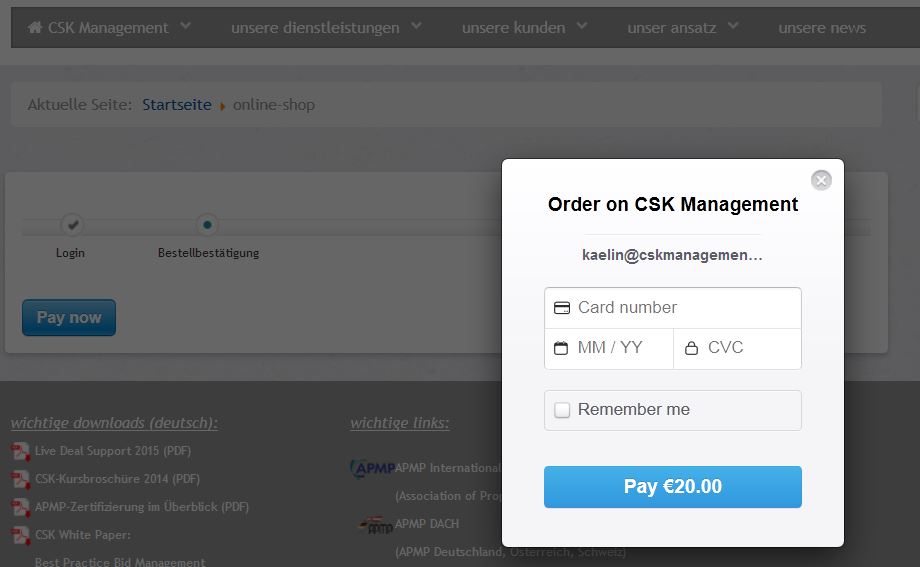
However, in the payment process, the popup from the Stripe payment plugin says "Pay EUR 20" (see screenshot attached).
No idea where the payment amount gets lost between Hikashop and Stripe...
________________________________
CSK Management
www.cskmanagement.com
Please Log in or Create an account to join the conversation.

Just to be sure ; you're using the "stripe" plugin from the HikaShop package or the "strip" plugin from cmstechs ?
In the stripe plugin from HikaShop ; there is just one single line which send the price to the Stripe lib (in the notification part) so I don't know how it could receive a "20€" if it got "0" in the amount.
That's why I don't understand the source of your issue.
Regards,
Jerome - Obsidev.com
HikaMarket & HikaSerial developer / HikaShop core dev team.
Please Log in or Create an account to join the conversation.
- cskmanagement
-
Topic Author
- Offline
I don't understand it, either. I even turned off all the caching.
Will buy the CMS Tech plugin. Hope the 79 USD investment pays out...
________________________________
CSK Management
www.cskmanagement.com
Please Log in or Create an account to join the conversation.
The Stripe plugin in the HikaShop should work ; It has been tested and is currently used by several users.
Would it be possible to have a more details about your plugin configuration ? Are you using the debug mode ?
Regards,
Jerome - Obsidev.com
HikaMarket & HikaSerial developer / HikaShop core dev team.
Please Log in or Create an account to join the conversation.
- cskmanagement
-
Topic Author
- Offline
Will send you my configuration after some more testing.
regards,
Chris
________________________________
CSK Management
www.cskmanagement.com
Please Log in or Create an account to join the conversation.
- cskmanagement
-
Topic Author
- Offline
Thanks for your support anyway.
regards,
Chris
________________________________
CSK Management
www.cskmanagement.com
Please Log in or Create an account to join the conversation.

Please Log in or Create an account to join the conversation.
The issue is not related to HikaShop but to the configuration of the plugin.
The error message is not provided by HikaShop or by our plugin ; the Stripe API return us the error message and the plugin display it.
That's why you can find the error message over the Internet:
stackoverflow.com/questions/27461021/str...stomer-id-using-lara
It looks like your secret key is invalid.
Regards,
Jerome - Obsidev.com
HikaMarket & HikaSerial developer / HikaShop core dev team.
Please Log in or Create an account to join the conversation.
They did make some changes to their API, and you now pass tokens upon charge or customer creation as 'source' instead of 'card.
That information came from Stripe directly. Could this be why tokens are not being sent?
Please Log in or Create an account to join the conversation.
Now the payment gateway are breaking the compatibility ; I think I have to renew my prozac prescription.
If I understand it right, the best is to update the stripe API using the version 1.18.0 which should continue to work according to the readme of the v2
github.com/stripe/stripe-php/tree/v1.18.0If you are using PHP 5.2, you can download v1.18.0 (zip, tar.gz) from our releases page.
This version will continue to work with new versions of the Stripe API for all common uses.
I don't know what is the current version of the library in the Stripe HikaShop plugin but it's not the 1.18.0 for sure.
Regards,
Jerome - Obsidev.com
HikaMarket & HikaSerial developer / HikaShop core dev team.
Please Log in or Create an account to join the conversation.

I've looked around for information regarding that and yes they did change that parameter with their recent API changes.
However, from what I could read from their documentation, and from what someone from Stripe support wrote here groups.google.com/a/lists.stripe.com/for...-discuss/-jURiizLOiU if you use an old library (which the HikaShop plugin do, it will use the old API and thus the old parameter "card" should be used in that case, as it was when the plugin was developed).
So I still believe that the issue is with your payment method settings, and not with the plugin, specially since others using the plugin are able to use it without changing anything in the code. So I strongly recommend you to check the issue with the Stripe support to make sure that you've setup the payment method properly.
Please Log in or Create an account to join the conversation.
Please Log in or Create an account to join the conversation.
The plugins "hikashoppayment / stripe" have a folder called "lib" ; this folder contain the original stripe library and you have to update these files.
Regards,
Jerome - Obsidev.com
HikaMarket & HikaSerial developer / HikaShop core dev team.
Please Log in or Create an account to join the conversation.
Or steer me to another reasonable priced Payment gateway that works well with Hikashop. I already have Paypal working well, but want to offer more options.
Thanks
Mac
Please Log in or Create an account to join the conversation.
We don't see any reason to update it for now. It's working well for everyone except for you, so everything points to a setup issue, not an update issue.
Regarding pricing, it's a difficult question. Each payment gateway has a different pricing structure, with different prices for different volumes of transactions, different setup fees, etc, and on top of that many of them will only work for some countries (for the merchant) so it makes it even more difficult to give an answer to that question.
It seems that you're from the USA, so in that case, I would recommend looking into Authorize.net It's the second most used payment plugin in the USA as far as I know.
Please Log in or Create an account to join the conversation.

- Posts: 32
- Thank you received: 0
cskmanagement wrote:
I would like to have the checkout proccess as you have, and like is this page (Pay with card button): stripe.com/docs/checkout
The blue button with the javascript popup, not integrated in the site itself, my customers don't like much.
All the best,
Fernando
Please Log in or Create an account to join the conversation.