
- Posts: 5
- Thank you received: 0
Hikashop Finish button does not work
- sarvesh3000
-
 Topic Author
- Offline
Less
More
11 years 2 months ago - 11 years 1 month ago #211113
by sarvesh3000
Hikashop Finish button does not work was created by sarvesh3000
THANK YOU EVERYONE FOR SUPPORT IT IS WORKING FINE.
-- url of the page with the problem -- : www.spiritualmantraonline.com/hikashop-m...ies-listing/checkout
-- HikaShop version -- : latest
-- Joomla version -- : 3.4.3
-- PHP version -- : 5.4.43
-- Browser(s) name and version -- : google chrome
-- Error-message(debug-mod must be tuned on) -- : NO ERROR MESSAGE !!!
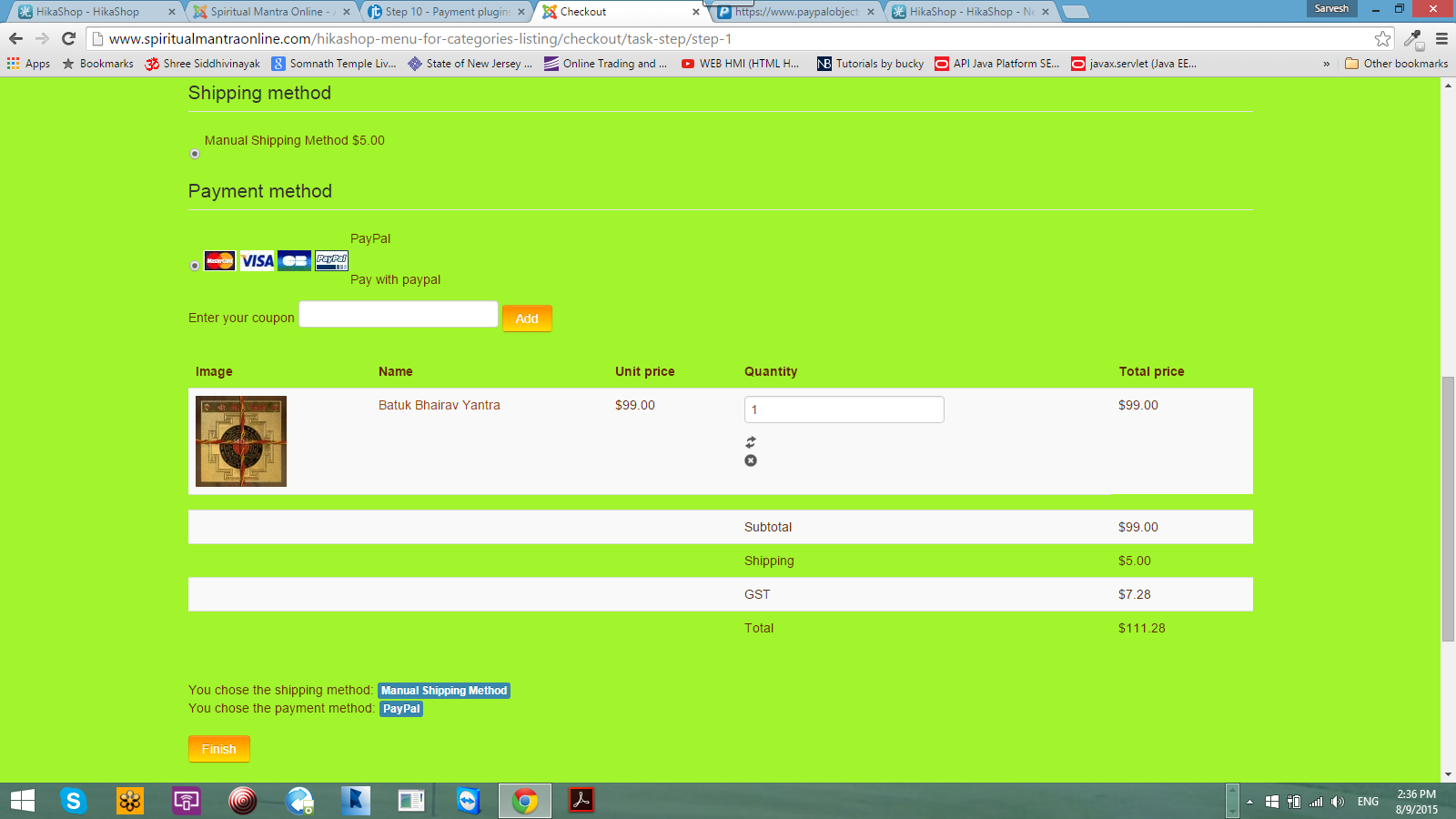
I can add the product, i can register, have shipping method, everything, and then i click " FINISH" it does not take me to paypal page for payment, instead it redirects me to the same page.
I do not get any error message, shipping is there, payment methods is there,
I do not see any proceed to paypal button but i have Finish button at the bottom when clicked it redirects me to the same page instead of taking me to paypal
website - www.spiritualmantraonline.com . i have products yantra under product category listing.
-- url of the page with the problem -- : www.spiritualmantraonline.com/hikashop-m...ies-listing/checkout
-- HikaShop version -- : latest
-- Joomla version -- : 3.4.3
-- PHP version -- : 5.4.43
-- Browser(s) name and version -- : google chrome
-- Error-message(debug-mod must be tuned on) -- : NO ERROR MESSAGE !!!
I can add the product, i can register, have shipping method, everything, and then i click " FINISH" it does not take me to paypal page for payment, instead it redirects me to the same page.
I do not get any error message, shipping is there, payment methods is there,
I do not see any proceed to paypal button but i have Finish button at the bottom when clicked it redirects me to the same page instead of taking me to paypal
website - www.spiritualmantraonline.com . i have products yantra under product category listing.
Last edit: 11 years 1 month ago by sarvesh3000.
Please Log in or Create an account to join the conversation.

11 years 2 months ago #211117
by nicolas
Replied by nicolas on topic Hikashop Finish button does not work
Hi,
Please make sure that your template is able to display error messages:
www.hikashop.com/support/support/documen...tibility-issues.html
That might be why you don't see error messages.
The simplest would be to do a checkout with the default template of Joomla and then you should see an error message at the end of the checkout if you can't finish it which will help us and you understand what's going on.
Please make sure that your template is able to display error messages:
www.hikashop.com/support/support/documen...tibility-issues.html
That might be why you don't see error messages.
The simplest would be to do a checkout with the default template of Joomla and then you should see an error message at the end of the checkout if you can't finish it which will help us and you understand what's going on.
Please Log in or Create an account to join the conversation.
- sarvesh3000
-
Topic Author
- Offline
Less
More
- Posts: 5
- Thank you received: 0
11 years 2 months ago #211154
by sarvesh3000
Replied by sarvesh3000 on topic Hikashop Finish button does not work
The template does display messages if i do not have payment or shipping method, but i have both the methods and finish button do, but the finish button keeps taking me to the same page, instead of paypal
Please Log in or Create an account to join the conversation.
- sarvesh3000
-
Topic Author
- Offline
Less
More
- Posts: 5
- Thank you received: 0
11 years 2 months ago #211185
by sarvesh3000
Replied by sarvesh3000 on topic Hikashop Finish button does not work
The Joomla template i am using is helix 2
HELIX - II
Joomla Templates Framework
Version: 2.1.9 Released On: 09 February 2013
HELIX - II
Joomla Templates Framework
Version: 2.1.9 Released On: 09 February 2013
Please Log in or Create an account to join the conversation.

11 years 2 months ago - 11 years 2 months ago #211158
by Jerome
Jerome - Obsidev.com
HikaMarket & HikaSerial developer / HikaShop core dev team.
Replied by Jerome on topic Hikashop Finish button does not work
Hi,
You have a javascript issue on the page.
take.ms/degs7
When you finish the checkout, there is a little script which update a value before submitting the form ; if that value is not updated, the checkout can't finish.
So if you have some javascript issues, it's possible that the script is not called and then, the checkout can't be completed.
Your template is completely compressing the javascript on the page so it's not possible to analyse it.
Please follow the recommendations of Nicolas and try a checkout with the default template of Joomla. If that works, I would also recommend to contact your template provider for help.
Regards,
You have a javascript issue on the page.
take.ms/degs7
When you finish the checkout, there is a little script which update a value before submitting the form ; if that value is not updated, the checkout can't finish.
So if you have some javascript issues, it's possible that the script is not called and then, the checkout can't be completed.
Your template is completely compressing the javascript on the page so it's not possible to analyse it.
Please follow the recommendations of Nicolas and try a checkout with the default template of Joomla. If that works, I would also recommend to contact your template provider for help.
Regards,
Jerome - Obsidev.com
HikaMarket & HikaSerial developer / HikaShop core dev team.
Last edit: 11 years 2 months ago by nicolas.
Please Log in or Create an account to join the conversation.
- sarvesh3000
-
Topic Author
- Offline
Less
More
- Posts: 5
- Thank you received: 0
11 years 2 months ago #211208
by sarvesh3000
Replied by sarvesh3000 on topic Hikashop Finish button does not work
Sir, I can share the admin user and password if you can help me , or fix the issue , i am new to hikashop, never used before,
my personal email - sarvesh3000@gmail.com
thank you
my personal email - sarvesh3000@gmail.com
thank you
Please Log in or Create an account to join the conversation.
11 years 2 months ago #211221
by nicolas
Replied by nicolas on topic Hikashop Finish button does not work
Hi,
Before that, please try to test your checkout with the default template of Joomla.
Before that, please try to test your checkout with the default template of Joomla.
Please Log in or Create an account to join the conversation.
- sarvesh3000
-
Topic Author
- Offline
Less
More
- Posts: 5
- Thank you received: 0
11 years 2 months ago #211277
by sarvesh3000
Replied by sarvesh3000 on topic Hikashop Finish button does not work
Everything works with paypal express check out, but does not work with standard paypal
Please Log in or Create an account to join the conversation.
11 years 2 months ago #211278
by Jerome
Jerome - Obsidev.com
HikaMarket & HikaSerial developer / HikaShop core dev team.
Replied by Jerome on topic Hikashop Finish button does not work
Hi,
For sure, Paypal express plugin does not require "hikashop.js" javascript file.
But for the rest of the HikaShop checkout that javascript file is required.
In my previous message I indicated you that you have a javascript issue ; I meant that you need to fix it if you want to be able to use the HikaShop checkout correctly.
With a deeper investigation we saw that the "hikashop.js" file was not include in the pages ; which means that a plugin or your template removed it.
That's why Mohamed asked you to use the default Joomla template.
So please follow our support indications because we are giving your the indications/solutions/answers for your issue.
If you do not follow them, I don't see the interest of our messages or the time we spent to help you for your issue with HikaShop starter ; issue which is currently not linked to HikaShop.
Regards,
For sure, Paypal express plugin does not require "hikashop.js" javascript file.
But for the rest of the HikaShop checkout that javascript file is required.
In my previous message I indicated you that you have a javascript issue ; I meant that you need to fix it if you want to be able to use the HikaShop checkout correctly.
With a deeper investigation we saw that the "hikashop.js" file was not include in the pages ; which means that a plugin or your template removed it.
That's why Mohamed asked you to use the default Joomla template.
So please follow our support indications because we are giving your the indications/solutions/answers for your issue.
If you do not follow them, I don't see the interest of our messages or the time we spent to help you for your issue with HikaShop starter ; issue which is currently not linked to HikaShop.
Regards,
Jerome - Obsidev.com
HikaMarket & HikaSerial developer / HikaShop core dev team.
Please Log in or Create an account to join the conversation.
11 years 2 months ago - 11 years 2 months ago #211807
by maujbigo
Replied by maujbigo on topic Hikashop Finish button does not work
Hi,
I am also having the same problem.
Before posting I test it with the default joomla propostar template as suggested above. When I click the button to submit the order it takes me to the top of the page but don't send the quote.
I noticed that the url goes from mysite.com/checkout to mysite.com/checkout/step-1
Only on the second click when step-1 is in the url it sends the order.
Please advise.
Thanks
Edit.: checkout/task-step/step-1 instead of checkout/step-1
I am also having the same problem.
Before posting I test it with the default joomla propostar template as suggested above. When I click the button to submit the order it takes me to the top of the page but don't send the quote.
I noticed that the url goes from mysite.com/checkout to mysite.com/checkout/step-1
Only on the second click when step-1 is in the url it sends the order.
Please advise.
Thanks
Edit.: checkout/task-step/step-1 instead of checkout/step-1
Last edit: 11 years 2 months ago by maujbigo.
Please Log in or Create an account to join the conversation.
11 years 2 months ago #211814
by nicolas
Replied by nicolas on topic Hikashop Finish button does not work
Hi,
Could you provide a link to a product page on your website so that we could have a look to your checkout ?
The result being the same doesn't necessarily means that the cause is the same and in that case, it is likely to be different which is why we need to also investigate on your website.
Could you provide a link to a product page on your website so that we could have a look to your checkout ?
The result being the same doesn't necessarily means that the cause is the same and in that case, it is likely to be different which is why we need to also investigate on your website.
Please Log in or Create an account to join the conversation.
11 years 2 months ago #211916
by maujbigo
Replied by maujbigo on topic Hikashop Finish button does not work
Hi NIcolas,
I understand.
I just PM you the details as you will need login to complete the checkout.
Thanks.
I understand.
I just PM you the details as you will need login to complete the checkout.
Thanks.
Please Log in or Create an account to join the conversation.

Less
More
- Posts: 12953
- Thank you received: 1778
11 years 2 months ago - 11 years 2 months ago #211949
by Mohamed Thelji
Replied by Mohamed Thelji on topic Hikashop Finish button does not work
Hi,
Note that without any payment method published or the "Payment" step removed from your "checkout workflow" via "Hikashop->System->Configuration->Checkout" we won't be able to test it.
Note that without any payment method published or the "Payment" step removed from your "checkout workflow" via "Hikashop->System->Configuration->Checkout" we won't be able to test it.
Last edit: 11 years 2 months ago by Mohamed Thelji.
Please Log in or Create an account to join the conversation.
11 years 2 months ago #212006
by maujbigo
Replied by maujbigo on topic Hikashop Finish button does not work
Hi Mohamed,
I can certainly publish a shipping method.
Can you please tell me which shipping method I should use when I do not required shipping as I use the system for quotes only.
Also I removed the shipping is so that the user does not need to select any thing.
If you indicate the method most appropriate for this case I will publish one and let you know.
Thanks
I can certainly publish a shipping method.
Can you please tell me which shipping method I should use when I do not required shipping as I use the system for quotes only.
Also I removed the shipping is so that the user does not need to select any thing.
If you indicate the method most appropriate for this case I will publish one and let you know.
Thanks
Please Log in or Create an account to join the conversation.
11 years 2 months ago #212228
by nicolas
Replied by nicolas on topic Hikashop Finish button does not work
Hi,
Mohamed was talking about payment methods not shipping methods.
If you don't need any payment methods, I suppose that you also removed the "payment" view from the checkout workflow.
I actually just tested your checkout and I was able to finish it without any issue. So I suppose that you must have already found the solution.
Mohamed was talking about payment methods not shipping methods.
If you don't need any payment methods, I suppose that you also removed the "payment" view from the checkout workflow.
I actually just tested your checkout and I was able to finish it without any issue. So I suppose that you must have already found the solution.
Please Log in or Create an account to join the conversation.
11 years 2 months ago #212342
by maujbigo
Replied by maujbigo on topic Hikashop Finish button does not work
Hi Nicolas,
I am sorry for the confusion. But actually I don't have payment in the checkout workflow. See attached image.
I am not quite sure what the problem is but when I hit the button to submit the order it redirect me to the top of the page and the /step-1
is added to the url.
Did you see that?
Thanks again
I am sorry for the confusion. But actually I don't have payment in the checkout workflow. See attached image.
I am not quite sure what the problem is but when I hit the button to submit the order it redirect me to the top of the page and the /step-1
is added to the url.
Did you see that?
Thanks again
Please Log in or Create an account to join the conversation.
11 years 2 months ago #212344
by nicolas
Replied by nicolas on topic Hikashop Finish button does not work
Hi,
I suppose that you must have seen the order I created on your website. So I'm able to finish the checkout on your website. So there doesn't seem to be any problem.
If HikaShop blocks you from finishing the checkout, it usually means that something isn't correct and it should be displaying an error message. If you don't see the error message, it's probably your Joomla template not displaying messages, so please check that:
www.hikashop.com/support/support/documen...tibility-issues.html
I suppose that you must have seen the order I created on your website. So I'm able to finish the checkout on your website. So there doesn't seem to be any problem.
If HikaShop blocks you from finishing the checkout, it usually means that something isn't correct and it should be displaying an error message. If you don't see the error message, it's probably your Joomla template not displaying messages, so please check that:
www.hikashop.com/support/support/documen...tibility-issues.html
Please Log in or Create an account to join the conversation.
11 years 2 months ago #212400
by maujbigo
Replied by maujbigo on topic Hikashop Finish button does not work
Hi Nicolas,
I am able to finish the checkout. The problem is that I need to click the button to submit the order twice, which is not right.
Once again, the first time I click the "finish" button it adds something like /step-1 to the url and only after that has being added to the url my second click will submit the order.
I test in 3 different computers and all have the same result.
Regarding the messaging and the template it seems to be working fine. If you try to login with a random login and pw it will display an error message. See attached.
I am able to finish the checkout. The problem is that I need to click the button to submit the order twice, which is not right.
Once again, the first time I click the "finish" button it adds something like /step-1 to the url and only after that has being added to the url my second click will submit the order.
I test in 3 different computers and all have the same result.
Regarding the messaging and the template it seems to be working fine. If you try to login with a random login and pw it will display an error message. See attached.
Please Log in or Create an account to join the conversation.
11 years 2 months ago #212408
by nicolas
Replied by nicolas on topic Hikashop Finish button does not work
Hi,
I do not reproduce. Steps I took:
1. I go on your website.
2. I add a product to my cart with the link provided
3. I login with the customer account you provided
4. I click on the button of the cart module to access the checkout
5. I click on the finish button of the checkout
6. I see the thank you message.
So please provide the steps to reproduce. Because again, the checkout process works fine for me, and I don't have to click twice on the button on your website.
I do not reproduce. Steps I took:
1. I go on your website.
2. I add a product to my cart with the link provided
3. I login with the customer account you provided
4. I click on the button of the cart module to access the checkout
5. I click on the finish button of the checkout
6. I see the thank you message.
So please provide the steps to reproduce. Because again, the checkout process works fine for me, and I don't have to click twice on the button on your website.
Please Log in or Create an account to join the conversation.
11 years 2 months ago #212466
by maujbigo
Replied by maujbigo on topic Hikashop Finish button does not work
Hi Nicolas,
That is very strange. I just pm you the link again. Could you confirm that is the site link you are accessing?
Thanks
That is very strange. I just pm you the link again. Could you confirm that is the site link you are accessing?
Thanks
Please Log in or Create an account to join the conversation.
Time to create page: 0.498 seconds