

- Posts: 65
- Thank you received: 3
Square Payment table does not allow input
3 years 10 months ago #346711
by notnilla
Square Payment table does not allow input was created by notnilla
-- HikaShop version -- : 4.7
-- Joomla version -- : 3.10.11
-- PHP version -- : 7.4.33
-- Browser(s) name and version -- : safari 16.1
We have found in opening our new season and updating Hikashop, that the square payment no longer allows customers to put in their information.
I am include attachments of Square Payment config settings in the plugin.
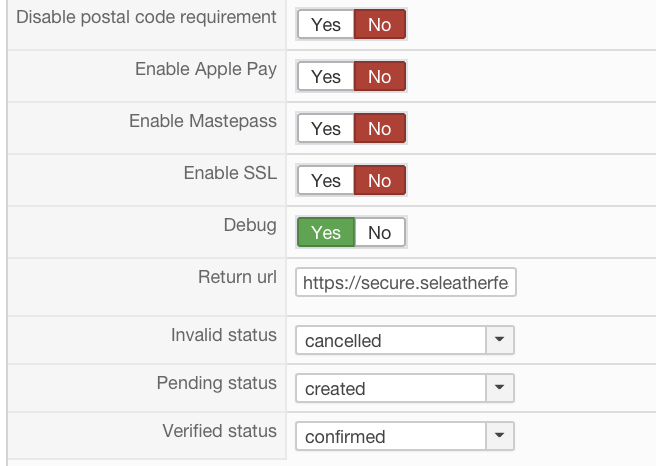
Thank you!
-- Joomla version -- : 3.10.11
-- PHP version -- : 7.4.33
-- Browser(s) name and version -- : safari 16.1
We have found in opening our new season and updating Hikashop, that the square payment no longer allows customers to put in their information.
I am include attachments of Square Payment config settings in the plugin.
Thank you!
Please Log in or Create an account to join the conversation.

3 years 10 months ago #346719
by Tsuki Dev
Kind regards,
Mohamed Thelji.
Tsuki Dev
contact[at]tsukidev[dot]com
Replied by Tsuki Dev on topic Square Payment table does not allow input
Hello,
Note that the square "Web Payments SDK" integration is deprecated, can you test it with the "Integration" option set to "Checkout API" via "Hikashop->System->Payment methods" ?
And if you're still having any issues, can you provide us with a temporary back-end and FTP access to your website via email (tsukidev.contact[at]gmail[dot]com) ? Thank you.
Note that the square "Web Payments SDK" integration is deprecated, can you test it with the "Integration" option set to "Checkout API" via "Hikashop->System->Payment methods" ?
And if you're still having any issues, can you provide us with a temporary back-end and FTP access to your website via email (tsukidev.contact[at]gmail[dot]com) ? Thank you.
Kind regards,
Mohamed Thelji.
Tsuki Dev
contact[at]tsukidev[dot]com
Please Log in or Create an account to join the conversation.
Less
More
- Posts: 10
- Thank you received: 1
3 years 10 months ago #346737
by karimhaddad
Replied by karimhaddad on topic Square Payment table does not allow input
I am having the same issue, but cannot find the Integration option in the Payment methods option.
Please post the solution here if you find one
Please post the solution here if you find one
Please Log in or Create an account to join the conversation.
3 years 10 months ago #346738
by notnilla
Replied by notnilla on topic Square Payment table does not allow input
You have to update your version of the payment plugin.
Please Log in or Create an account to join the conversation.
Less
More
- Posts: 10
- Thank you received: 1
3 years 10 months ago #346739
by karimhaddad
Replied by karimhaddad on topic Square Payment table does not allow input
The payment plugin I have is the Hikashop Square Payment Plugin. It seems to be the updated as it came with the Hikashop Business edition. Do I need to get the additional plugin? It has worked for a number of years beforehand, not sure why it has changed.
Please Log in or Create an account to join the conversation.

3 years 10 months ago #346750
by nicolas
Replied by nicolas on topic Square Payment table does not allow input
Hi,
HikaShop doesn't include any Square payment plugin. If you have a Square payment plugin, it means that you installed it separately from HikaShop. And thus, you need to update it separately. If you've never updated it, it means you have a really old version of the plugin and thus you should update it.
I can see you purchased it in 2019 on our website. So go in the menu My account>My orders, open the order for that plugin, and you'll find the download link for the latest version next to the name of the plugin. Download it, and install it on your website and you'll have the latest version. Then, please test again.
HikaShop doesn't include any Square payment plugin. If you have a Square payment plugin, it means that you installed it separately from HikaShop. And thus, you need to update it separately. If you've never updated it, it means you have a really old version of the plugin and thus you should update it.
I can see you purchased it in 2019 on our website. So go in the menu My account>My orders, open the order for that plugin, and you'll find the download link for the latest version next to the name of the plugin. Download it, and install it on your website and you'll have the latest version. Then, please test again.
The following user(s) said Thank You: karimhaddad
Please Log in or Create an account to join the conversation.
Less
More
- Posts: 10
- Thank you received: 1
3 years 10 months ago #346752
by karimhaddad
Replied by karimhaddad on topic Square Payment table does not allow input
Back working again,
Many Thanks
Many Thanks
Please Log in or Create an account to join the conversation.
3 years 10 months ago #346765
by notnilla
Replied by notnilla on topic Square Payment table does not allow input
Thank you. I paid $50 for the new version not realizing I could download it. I loaded the new version, loaded it, set it to the correct specs, and it did not work. Now I can't see a form at all and my cart pop-up is gone. I appreciate you. I've contacted Tsuki Dev and am crossing my fingers.
Please Log in or Create an account to join the conversation.
Less
More
- Posts: 10
- Thank you received: 1
3 years 10 months ago #346782
by karimhaddad
Replied by karimhaddad on topic Square Payment table does not allow input
I spoke too soon,
Square takes the payment but returns an error on returning to the webpage and makes the order as incomplete.
Not sure where the return url should go to to complete things
Square takes the payment but returns an error on returning to the webpage and makes the order as incomplete.
Not sure where the return url should go to to complete things
Please Log in or Create an account to join the conversation.
3 years 10 months ago #346836
by notnilla
Replied by notnilla on topic Square Payment table does not allow input
Hello, I have emailed you twice and have not received a reply. Are you able to help? Thank you in advance.
Please Log in or Create an account to join the conversation.
3 years 10 months ago #346893
by Tsuki Dev
Kind regards,
Mohamed Thelji.
Tsuki Dev
contact[at]tsukidev[dot]com
Replied by Tsuki Dev on topic Square Payment table does not allow input
Hello,
Of course, we just replied to your email.
If anyone is having an issue with the new version of the HIkashop Square payment plugin, note that you can directly contact us via email at :
tsukidev.contact[at]gmail[dot]com
That way, we'll be able to directly debug and fix it for you.
Of course, we just replied to your email.
If anyone is having an issue with the new version of the HIkashop Square payment plugin, note that you can directly contact us via email at :
tsukidev.contact[at]gmail[dot]com
That way, we'll be able to directly debug and fix it for you.
Kind regards,
Mohamed Thelji.
Tsuki Dev
contact[at]tsukidev[dot]com
Please Log in or Create an account to join the conversation.
3 years 10 months ago #346923
by Tsuki Dev
Kind regards,
Mohamed Thelji.
Tsuki Dev
contact[at]tsukidev[dot]com
Replied by Tsuki Dev on topic Square Payment table does not allow input
Hello,
For people having issue with the last version of the Square payment plugin, note that we just released a new version of the plugin, so can you download it through your Hikashop customer space, install it and test it again ? Thank you.
If you're still having issues, feel free to contact us via email.
For people having issue with the last version of the Square payment plugin, note that we just released a new version of the plugin, so can you download it through your Hikashop customer space, install it and test it again ? Thank you.
If you're still having issues, feel free to contact us via email.
Kind regards,
Mohamed Thelji.
Tsuki Dev
contact[at]tsukidev[dot]com
Please Log in or Create an account to join the conversation.
Time to create page: 0.326 seconds