
- Posts: 48
- Thank you received: 5
disable "cancel and choose another payment method" button in paypal checkout
- aromamassage
-
 Topic Author
- Offline
Less
More
1 year 8 months ago #365649
by aromamassage
disable "cancel and choose another payment method" button in paypal checkout was created by aromamassage
Hi, I wanted to know if it is possible to disable the "cancel and choose another payment method" button that is displayed on the PayPal payment screen.
Thanks
Thanks
Please Log in or Create an account to join the conversation.

1 year 8 months ago - 1 year 8 months ago #365650
by Philip
Replied by Philip on topic disable "cancel and choose another payment method" button in paypal checkout
Hello,
We aren't sure to understand you well can you provide an Url link in order to be sure to better understand your request.
And if required, a step by step process to reproduce the situation.
Regards
We aren't sure to understand you well can you provide an Url link in order to be sure to better understand your request.
And if required, a step by step process to reproduce the situation.
Regards
Last edit: 1 year 8 months ago by Philip.
Please Log in or Create an account to join the conversation.
- aromamassage
-
Topic Author
- Offline
Less
More
- Posts: 48
- Thank you received: 5
1 year 8 months ago - 1 year 8 months ago #365656
by aromamassage
Replied by aromamassage on topic disable "cancel and choose another payment method" button in paypal checkout
Hello, hi you're right i was a bit hasty.
the link is aroma-massage.it but to see the problem you should register and continue the purchase procedure.
i attach a screenshot
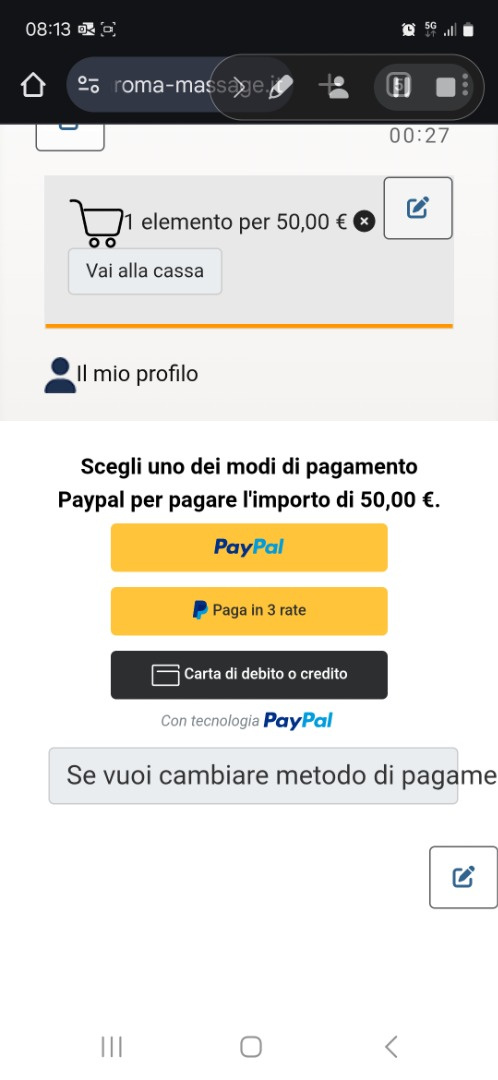 for convenience.
basically from the cart, choose paypal payment, and confirm the order, at this point a new window opens with the paypal buttons (paypal, pay in 3 and credit card) and another button translated by me that makes you cancel the order to change the payment method.
now i would like to understand two things:
1. is it possible to open the window directly on paypal or bypass it?
2. if the first request is not possible, is it possible to remove the order cancellation button?
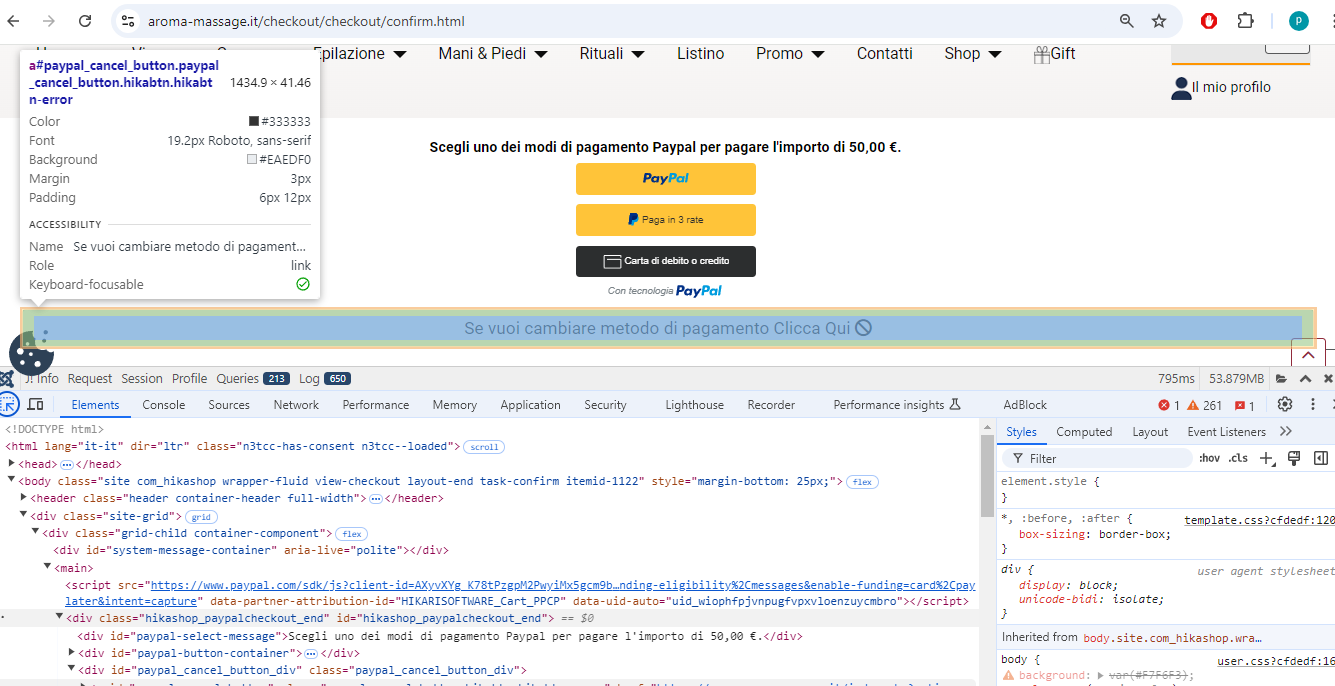
the link is aroma-massage.it but to see the problem you should register and continue the purchase procedure.
i attach a screenshot
basically from the cart, choose paypal payment, and confirm the order, at this point a new window opens with the paypal buttons (paypal, pay in 3 and credit card) and another button translated by me that makes you cancel the order to change the payment method.
now i would like to understand two things:
1. is it possible to open the window directly on paypal or bypass it?
2. if the first request is not possible, is it possible to remove the order cancellation button?
Last edit: 1 year 8 months ago by aromamassage.
Please Log in or Create an account to join the conversation.

1 year 8 months ago #365660
by nicolas
Replied by nicolas on topic disable "cancel and choose another payment method" button in paypal checkout
Hi,
1. It's not possible to open the PayPal popup. However, in the settings of your PayPal Checkout payment method, you can activate the credit card payment settings. In that case, the plugin will directly display a credit card form on that page, reducing the number of steps for customers paying with a credit card.
www.hikashop.com/support/documentation/4...alcheckout-form.html
2. You can easily hide that cancel button by adding such CSS code to your website:
www.hikashop.com/support/documentation/1...ize-the-display.html
1. It's not possible to open the PayPal popup. However, in the settings of your PayPal Checkout payment method, you can activate the credit card payment settings. In that case, the plugin will directly display a credit card form on that page, reducing the number of steps for customers paying with a credit card.
www.hikashop.com/support/documentation/4...alcheckout-form.html
2. You can easily hide that cancel button by adding such CSS code to your website:
Code:
#paypal_cancel_button_div{ display: none; }
Please Log in or Create an account to join the conversation.
Time to create page: 0.059 seconds