

- Posts: 86231
- Thank you received: 14224
Can not find the component/level to check...
15 years 6 months ago #10511
by nicolas
Replied by nicolas on topic Re: Can not find the component/level to check...
Do you have the HikaShop menu under the Components menu of joomla ? If that menu works you can disregard the message. Otherwise, it's because on an integrity problem in the jos_menus table which comes from a bug in joomla 1.6. Please edit that table via phpmyadmin and remove the entries related to hikashop and reinstall.
Please Log in or Create an account to join the conversation.

15 years 6 months ago #10522
by PANAGOT
Replied by PANAGOT on topic Re: Can not find the component/level to check...
I fixed it too ! You are the best ! 
Thanks !
Thanks !
Please Log in or Create an account to join the conversation.

15 years 6 months ago - 15 years 6 months ago #10683
by chemcat9
Replied by chemcat9 on topic Re: Can not find the component/level to check...
Dropped those entries and now I'm tossing new errors; all previous data entries are gone.

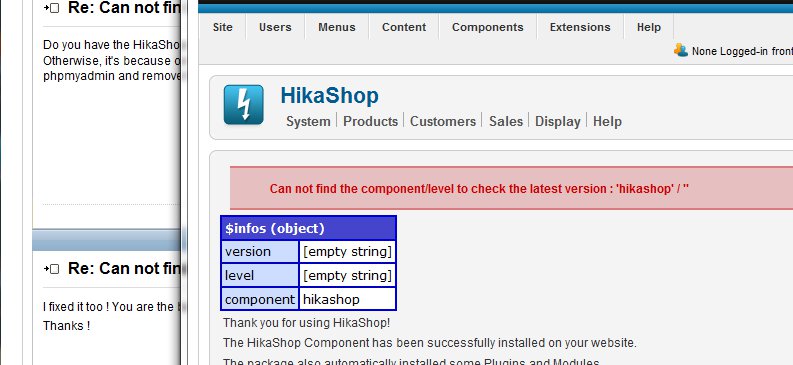
Upon reinstallation no table entries were made, nothing, nodda.
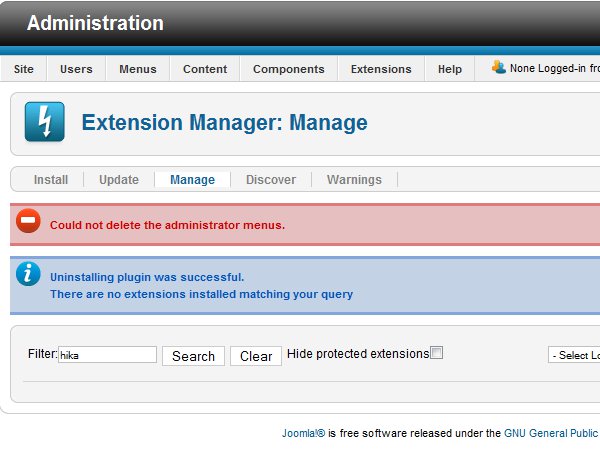
No entries for the hikashop were found in the jos_menu
Upon re-installation, no entries are found in the jos_menu were found for hikashop.
Help?
Upon reinstallation no table entries were made, nothing, nodda.
No entries for the hikashop were found in the jos_menu
Upon re-installation, no entries are found in the jos_menu were found for hikashop.
Help?
Last edit: 15 years 6 months ago by chemcat9.
Please Log in or Create an account to join the conversation.
15 years 6 months ago #10684
by nicolas
Replied by nicolas on topic Re: Can not find the component/level to check...
First make sure that you use mysql 4.1 at least. Then, extract the tables.sql file from the back folder of the hikashop install package. There replace the prefix of the tables so that they start with jos_hikashop instead of #__hikashop (assuming that you use the default prefix). Then, import the tables.sql file in your database. Then, edit the table jos_menu and remove the menus related to hikashop. Finally, reinstall and it should work.
Please Log in or Create an account to join the conversation.
15 years 6 months ago - 15 years 6 months ago #10692
by chemcat9
Replied by chemcat9 on topic Re: Can not find the component/level to check...
nicolas wrote:
* Apache/2.2.12 (Ubuntu)
* MySQL client version: 5.1.37
* PHP extension: mysql
* phpMyAdmin Version information: 3.2.4
tables.sql extracted, #__hikashop replaced with jos__hikashop
tables.sql imported into database
** the jos_menu did not have any entries related to hikashop **
** reinstalling only results in the same admin module error **
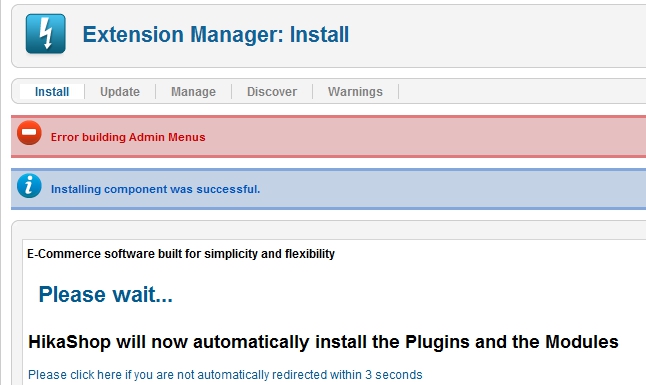
Issue remains unresolved. Still no admin menu under "Components"
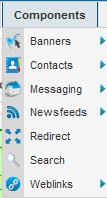
Please advise.
Thanks,
Ralph.
**Update**
I stand corrected ... there were three entries in the jos_menu overlooked. These were deleted. With re-installation the component menu is now correct!
Yeah! ... now to rebuilt the cart items. Guess I should have built them in a spreadsheet and imported
Thank you for your help and rapid replies!
Ralph.
First make sure that you use mysql 4.1 at least. Then, extract the tables.sql file from the back folder of the hikashop install package. There replace the prefix of the tables so that they start with jos_hikashop instead of #__hikashop (assuming that you use the default prefix). Then, import the tables.sql file in your database. Then, edit the table jos_menu and remove the menus related to hikashop. Finally, reinstall and it should work.
* Apache/2.2.12 (Ubuntu)
* MySQL client version: 5.1.37
* PHP extension: mysql
* phpMyAdmin Version information: 3.2.4
tables.sql extracted, #__hikashop replaced with jos__hikashop
tables.sql imported into database
** the jos_menu did not have any entries related to hikashop **
** reinstalling only results in the same admin module error **
Issue remains unresolved. Still no admin menu under "Components"
Please advise.
Thanks,
Ralph.
**Update**
I stand corrected ... there were three entries in the jos_menu overlooked. These were deleted. With re-installation the component menu is now correct!
Yeah! ... now to rebuilt the cart items. Guess I should have built them in a spreadsheet and imported
Thank you for your help and rapid replies!
Ralph.
Last edit: 15 years 6 months ago by chemcat9.
Please Log in or Create an account to join the conversation.
15 years 6 months ago #10694
by nicolas
Replied by nicolas on topic Re: Can not find the component/level to check...
Here is the same problem with akeeba backup on joomla 1.6:
www.akeebabackup.com/support/forum/topic...ng-admin-menusq.html
There are several solutions proposed. You can just replace akeeba with hikashop and it's the same...
They also suggest to update to 1.6.1 which might fix such issues. The problem definitely comes from joomla.
Finally, I also found that page:
joomlacode.org/gf/project/joomla/tracker...racker_item_id=23674
Where someone propose to add view="something" in the hikashop.xml file of the install package in the menu tag to circumvent the problem.
As the developer of akeeba, we were not able to reproduce the problem on our end
www.akeebabackup.com/support/forum/topic...ng-admin-menusq.html
There are several solutions proposed. You can just replace akeeba with hikashop and it's the same...
They also suggest to update to 1.6.1 which might fix such issues. The problem definitely comes from joomla.
Finally, I also found that page:
joomlacode.org/gf/project/joomla/tracker...racker_item_id=23674
Where someone propose to add view="something" in the hikashop.xml file of the install package in the menu tag to circumvent the problem.
As the developer of akeeba, we were not able to reproduce the problem on our end
Please Log in or Create an account to join the conversation.
Less
More
- Posts: 15
- Thank you received: 0
15 years 6 months ago #11563
by Cool Hand Fluke
Replied by Cool Hand Fluke on topic Re: Can not find the component/level to check...
I have the same problems and the same errors with Hika Shop as well trying to install it on my Go Daddy Servers. I had hika shop previously installed, couldn't get it to work at all, totally blew away my joomla files on my server, reinstalled Joomla and now cannot install hika shop without the errors listed above.
I am no way comfortable editing Jos files or anything else for that matter to make something work.
I have wasted 4 days of my life with zen cart and now two weeks of my life with hika shop on something that should be simple.

I am no way comfortable editing Jos files or anything else for that matter to make something work.
I have wasted 4 days of my life with zen cart and now two weeks of my life with hika shop on something that should be simple.
Please Log in or Create an account to join the conversation.
15 years 6 months ago #11565
by nicolas
Replied by nicolas on topic Re: Can not find the component/level to check...
I understand your frustration but we unfortunately cannot do anything in HikaShop to prevent it. The problem is between the way your server is setup and the joomla installer of joomla 1.6 which apparently has some glitches. The problem is also with other components so you might want to stick with joomla 1.5 for now.
We posted the solutions above which apparently solved the problem for the previous users so it should work for you as well.
We posted the solutions above which apparently solved the problem for the previous users so it should work for you as well.
Please Log in or Create an account to join the conversation.
Time to create page: 0.223 seconds