
- Posts: 164
- Thank you received: 0
Export to CSV, import to Google Shopping
- Rollerskate
-
 Topic Author
- Offline
Less
More
14 years 10 months ago - 14 years 10 months ago #28751
by Rollerskate
Replied by Rollerskate on topic Re: Export to CSV, import to Google Shopping
hm, still won't let me. If you want it, I can send it to you via email.
Last edit: 14 years 10 months ago by Rollerskate.
Please Log in or Create an account to join the conversation.

14 years 10 months ago #28765
by nicolas
Replied by nicolas on topic Re: Export to CSV, import to Google Shopping
You can zip the file and upload the zip. Php files are of course not uploadable (otherwise, you would be able to run any code on our server by just uploading the php file and then running it from your browser.
Please Log in or Create an account to join the conversation.
- Rollerskate
-
Topic Author
- Offline
Less
More
- Posts: 164
- Thank you received: 0
14 years 10 months ago #28796
by Rollerskate
Replied by Rollerskate on topic Re: Export to CSV, import to Google Shopping
After I used this .php file, it shut down my site.
This attachment is hidden for guests.
This attachment is hidden for guests.
Please log in or register to see it.
Please Log in or Create an account to join the conversation.
14 years 10 months ago #28818
by kippax
Replied by kippax on topic Re: Export to CSV, import to Google Shopping
nicolas wrote:
Im getting similar issues here. When i first submitted our test feed xml we were getting error reports on the mpn, catergory, and brand attributes. Ive followed the above advice and edited the googleproducts.php and have switched the 'add product code' option to 'on' but im still getting the error 'Missing recommended attribute: brand' when uploading to google. Ive tried leaving the brand field blank and ive tried filling it in and im still getting the same errors.
Ive attached my xml file if that helps.
I was just wondering if you could help clarify something for me. Is the brand field in my xml the same as the manufactures that ive defined in my hikashop products area? All my shop products have the their manufacture listed, i would have though this and the 'brand' field in the google product field are the same thing?
Thanks in advance for the help.
The mpn attribute is only added when the "add product code" option is turned on in the plugin so you should do that.
the brand attribute is only added when you have something in the "brand" input field of the plugin's options. I see that you had it filled in your screenshot. Did you empty it since then ?
The "google product category" option is not implemented at all in the plugin. That's because like for the other two parameters they are optional. It's strange that you get these errors.
For that last warning, the only way to remove it will be to add a line like this:
$xml.="\t".'<g:google_product_category>CATEGORY</g:google_product_category>'."\n";
where CATEGORY is the name of your category based on the explanations there (you need to choose between the list of possible categories on that page):
www.google.com/support/merchants/bin/ans...?answer=160081&hl=en
You can place that line of code just before the line:
$xml.="\t".'<g:shipping_weight>'.$product->product_weight.' '.$product->product_weight_unit.'</g:shipping_weight>'."\n";
in the file plugins/hikashop/google_product.php
Then, try to download again the xml and import it in google again. These error messages should not display anymore.
Im getting similar issues here. When i first submitted our test feed xml we were getting error reports on the mpn, catergory, and brand attributes. Ive followed the above advice and edited the googleproducts.php and have switched the 'add product code' option to 'on' but im still getting the error 'Missing recommended attribute: brand' when uploading to google. Ive tried leaving the brand field blank and ive tried filling it in and im still getting the same errors.
Ive attached my xml file if that helps.
I was just wondering if you could help clarify something for me. Is the brand field in my xml the same as the manufactures that ive defined in my hikashop products area? All my shop products have the their manufacture listed, i would have though this and the 'brand' field in the google product field are the same thing?
Thanks in advance for the help.
Please Log in or Create an account to join the conversation.
14 years 10 months ago #28819
by kippax
Replied by kippax on topic Re: Export to CSV, import to Google Shopping
Sorry forgot to attach the xml :huh:
This attachment is hidden for guests.
This attachment is hidden for guests.
Please log in or register to see it.
Please Log in or Create an account to join the conversation.
14 years 10 months ago #28836
by nicolas
Replied by nicolas on topic Re: Export to CSV, import to Google Shopping
@Rollerskate :
You added the code:
instead of:
That's why it doesn't work anymore.
When we made that plugin, HikaShop didn't had any manufacturers system built in so that's why there is only one brand setting for all the products. Nevertheless, I tried on my end and if I set the brand parameter, it gets correctly added to the xml. I don't see why that would be the case for you.
Did you save the plugin's options after you added the brand and before clicking on the link to get the xml ?
You added the code:
Code:
$xml.="\t".'<g:google_product_category>Arts & Entertainment > Artwork > Photographs</g:google_product_category>'."\n";
}
Code:
$xml.="\t".'<g:google_product_category>Arts & Entertainment > Artwork > Photographs</g:google_product_category>'."\n";
When we made that plugin, HikaShop didn't had any manufacturers system built in so that's why there is only one brand setting for all the products. Nevertheless, I tried on my end and if I set the brand parameter, it gets correctly added to the xml. I don't see why that would be the case for you.
Did you save the plugin's options after you added the brand and before clicking on the link to get the xml ?
Please Log in or Create an account to join the conversation.
- Rollerskate
-
Topic Author
- Offline
Less
More
- Posts: 164
- Thank you received: 0
14 years 10 months ago #28889
by Rollerskate
Replied by Rollerskate on topic Re: Export to CSV, import to Google Shopping
Ok, I fixed the code you mentioned, re-uploaded and my site is still live...yay.
I was also able to again successfully download the triggered .xml file from the plugin.
After uploading it, I received these errors now (2 down, 2 to go).
This value must be one of the values stated in the data feed instructions for attribute: condition (25 errors)
Missing recommended attribute: brand (25 warnings)
While items missing recommended attributes will process successfully, we recommend including relevant attributes if they are available.
I don't know about the brand you mentioned, but I don't see it as a problem anymore, perhaps that's fixed.
I was also able to again successfully download the triggered .xml file from the plugin.
After uploading it, I received these errors now (2 down, 2 to go).
This value must be one of the values stated in the data feed instructions for attribute: condition (25 errors)
Missing recommended attribute: brand (25 warnings)
While items missing recommended attributes will process successfully, we recommend including relevant attributes if they are available.
I don't know about the brand you mentioned, but I don't see it as a problem anymore, perhaps that's fixed.
Please Log in or Create an account to join the conversation.
14 years 10 months ago #28926
by nicolas
Replied by nicolas on topic Re: Export to CSV, import to Google Shopping
Well, the message speaks for itself. You didn't put a valid value for the "condition" option.
It should be "new" or "used" or "refurbished" :
www.google.com/support/merchants/bin/answer.py?answer=160606
It should be "new" or "used" or "refurbished" :
www.google.com/support/merchants/bin/answer.py?answer=160606
Please Log in or Create an account to join the conversation.
- Rollerskate
-
Topic Author
- Offline
Less
More
- Posts: 164
- Thank you received: 0
14 years 10 months ago #28934
by Rollerskate
Replied by Rollerskate on topic Re: Export to CSV, import to Google Shopping
Ok, that worked.
"Nov 2, 2011 4:52 pm PDT - 25 of 25 items inserted "
But I still have an issue:
Item Warnings - 25 items with warnings 25 items affected25
Missing recommended attribute: brand (25 warnings)
While items missing recommended attributes will process successfully, we recommend including relevant attributes if they are available.
Examples: Examples:
Item ID Line Nr.
19 53 Show Item
37 98 Show Item
49 128 Show Item
67 173 Show Item
97 248 Show Item
ideas?
"Nov 2, 2011 4:52 pm PDT - 25 of 25 items inserted "
But I still have an issue:
Item Warnings - 25 items with warnings 25 items affected25
Missing recommended attribute: brand (25 warnings)
While items missing recommended attributes will process successfully, we recommend including relevant attributes if they are available.
Examples: Examples:
Item ID Line Nr.
19 53 Show Item
37 98 Show Item
49 128 Show Item
67 173 Show Item
97 248 Show Item
ideas?
Please Log in or Create an account to join the conversation.
14 years 10 months ago #28936
by nicolas
Replied by nicolas on topic Re: Export to CSV, import to Google Shopping
That's just a warning and not a real error.
It will work like that even without a brand attribute in the xml file.
So the import of the xml file to google products is working. All that's left if you change your products often and want to update them on google products is to make sure that the automatic update of google products via the cron works.
It will work like that even without a brand attribute in the xml file.
So the import of the xml file to google products is working. All that's left if you change your products often and want to update them on google products is to make sure that the automatic update of google products via the cron works.
Please Log in or Create an account to join the conversation.
- Rollerskate
-
Topic Author
- Offline
Less
More
- Posts: 164
- Thank you received: 0
14 years 10 months ago #28985
by Rollerskate
Replied by Rollerskate on topic Re: Export to CSV, import to Google Shopping
Ok, I have my Google Plugin set to update Frequency 3600, which, after reading up, is in seconds. So, this should update every hour then. I've added two more products and added descriptions for the rest, but these changes are not on google yet.
Please Log in or Create an account to join the conversation.
14 years 10 months ago #29015
by nicolas
Replied by nicolas on topic Re: Export to CSV, import to Google Shopping
Make sure that you activate the email notification of the cron in the configuration as explained in the documentation. To goal is to receive an email each time the cron is triggered.
If you don't receive the emails regularly, it means that your cron is not setup properly.
If you don't receive the emails regularly, it means that your cron is not setup properly.
Please Log in or Create an account to join the conversation.
- Rollerskate
-
Topic Author
- Offline
Less
More
- Posts: 164
- Thank you received: 0
14 years 10 months ago #29026
by Rollerskate
Replied by Rollerskate on topic Re: Export to CSV, import to Google Shopping
I checked my email address, it is correct.
But if you look earlier in this thread, I reported to your (with a screen shot) of the first time I saved it I got an error. You said it wasn't anything to worry about.
I saved it again, and didn't get an error, but I'm wondering about that first error I got and if that could be the culprit.
But if you look earlier in this thread, I reported to your (with a screen shot) of the first time I saved it I got an error. You said it wasn't anything to worry about.
I saved it again, and didn't get an error, but I'm wondering about that first error I got and if that could be the culprit.
Please Log in or Create an account to join the conversation.
14 years 10 months ago #29034
by nicolas
Replied by nicolas on topic Re: Export to CSV, import to Google Shopping
If you don't have the error when you save it again, then it's OK.
So you say that you checked your email address ? Does that mean that you're receiving one email each time the cron is triggered ?
In the Cron tab of the configuration, on the Report area, you can see an option to have HikaShop sending you a report each time it is triggered. Please make sure that this option is turned on.
If you don't receive emails, it means that the cron task is not working and you should follow these indications:
Make sure your website can be triggered via your browser:
Click on your cron url. That will trigger it manually via your browser so you will see if this url can be reached or not.
If you use a third-party SEF component, your website may redirect the current page to the SEF one which will break our own cron service.
So you can either configure your SEF component to not transform non-SEF into SEF urls or directly write your sef cron url on our cron interface.
Make sure your website can be triggered by the outside:
If you have an .htaccess with password protection, your website will obviously not accept to be triggered by an anonymous user.
If you configured your cron task on your own server, check the report of your own cron task and you may also want to apply this workaround:
Create a php file at the root of your joomla website with the code below in it where you will replace yourwebsite.com by your website.
<?php
header("Location: www.yourwebsite.com/index2.php?option=com_hikashop>ask=cron ");
exit();
?>
Then, instead of calling the hikashop cron page, you will call your php file you just created. Like that, for example:
wget -O /dev/null " www.yourwebsite.com/myfile.php " > /dev/null
If you use our own server to trigger your website, please make sure you enabled our server IP to trigger your website every X minutes! (you might block it if you have some security checks on the number of connections per IP)
So you say that you checked your email address ? Does that mean that you're receiving one email each time the cron is triggered ?
In the Cron tab of the configuration, on the Report area, you can see an option to have HikaShop sending you a report each time it is triggered. Please make sure that this option is turned on.
If you don't receive emails, it means that the cron task is not working and you should follow these indications:
Make sure your website can be triggered via your browser:
Click on your cron url. That will trigger it manually via your browser so you will see if this url can be reached or not.
If you use a third-party SEF component, your website may redirect the current page to the SEF one which will break our own cron service.
So you can either configure your SEF component to not transform non-SEF into SEF urls or directly write your sef cron url on our cron interface.
Make sure your website can be triggered by the outside:
If you have an .htaccess with password protection, your website will obviously not accept to be triggered by an anonymous user.
If you configured your cron task on your own server, check the report of your own cron task and you may also want to apply this workaround:
Create a php file at the root of your joomla website with the code below in it where you will replace yourwebsite.com by your website.
<?php
header("Location: www.yourwebsite.com/index2.php?option=com_hikashop>ask=cron ");
exit();
?>
Then, instead of calling the hikashop cron page, you will call your php file you just created. Like that, for example:
wget -O /dev/null " www.yourwebsite.com/myfile.php " > /dev/null
If you use our own server to trigger your website, please make sure you enabled our server IP to trigger your website every X minutes! (you might block it if you have some security checks on the number of connections per IP)
Please Log in or Create an account to join the conversation.
- Rollerskate
-
Topic Author
- Offline
Less
More
- Posts: 164
- Thank you received: 0
14 years 10 months ago #29057
by Rollerskate
Replied by Rollerskate on topic Re: Export to CSV, import to Google Shopping
Correct, I have not received an email saying that my cron task has gone through.
I can access the cron url just fine:
www.therollerskate.com/index.php?option=com_hikashop&ctrl=cron
And I don't know about the rest. Can you look at my htaccess file and see if it is requiring a password?
I can access the cron url just fine:
www.therollerskate.com/index.php?option=com_hikashop&ctrl=cron
And I don't know about the rest. Can you look at my htaccess file and see if it is requiring a password?
Please Log in or Create an account to join the conversation.
- Rollerskate
-
Topic Author
- Offline
Less
More
- Posts: 164
- Thank you received: 0
14 years 10 months ago #29058
by Rollerskate
Replied by Rollerskate on topic Re: Export to CSV, import to Google Shopping
htaccess zip attached
This attachment is hidden for guests.
This attachment is hidden for guests.
Please log in or register to see it.
Please Log in or Create an account to join the conversation.
14 years 10 months ago #29075
by kippax
Replied by kippax on topic Re: Export to CSV, import to Google Shopping
nicolas wrote:
Thats just the piece of info im looking for. Was worried that my feed wasnt working properly because of the errors. This is the 1st time ive used google product feed so i was a bit unsure.
Thanks for the help nicolas
That's just a warning and not a real error.
It will work like that even without a brand attribute in the xml file.
So the import of the xml file to google products is working. All that's left if you change your products often and want to update them on google products is to make sure that the automatic update of google products via the cron works.
Thats just the piece of info im looking for. Was worried that my feed wasnt working properly because of the errors. This is the 1st time ive used google product feed so i was a bit unsure.
Thanks for the help nicolas
Please Log in or Create an account to join the conversation.
14 years 10 months ago #29095
by nicolas
Replied by nicolas on topic Re: Export to CSV, import to Google Shopping
@Rollerskate :
I checked your cron on our end and it's registered and working properly.
Could you do a screenshot of the cron tab in the configuration of HikaShop so that we can see how you set it up ?
When you trigger the cron manually, does that update the products on google products ? If not, are you sure that you setup the username and password properly in the google products plugin options ? Do you have the same file name as in your products configuration ?
I checked your cron on our end and it's registered and working properly.
Could you do a screenshot of the cron tab in the configuration of HikaShop so that we can see how you set it up ?
When you trigger the cron manually, does that update the products on google products ? If not, are you sure that you setup the username and password properly in the google products plugin options ? Do you have the same file name as in your products configuration ?
Please Log in or Create an account to join the conversation.
- Rollerskate
-
Topic Author
- Offline
Less
More
- Posts: 164
- Thank you received: 0
14 years 10 months ago #29296
by Rollerskate
Replied by Rollerskate on topic Re: Export to CSV, import to Google Shopping
I think it's all setup correctly, but how do you trigger the cron manually?
Screen shot of an error is attached (probably the same error I had earlier).
Username may have been off, I think I fixed it. But after I fixed the username, the error was still there.
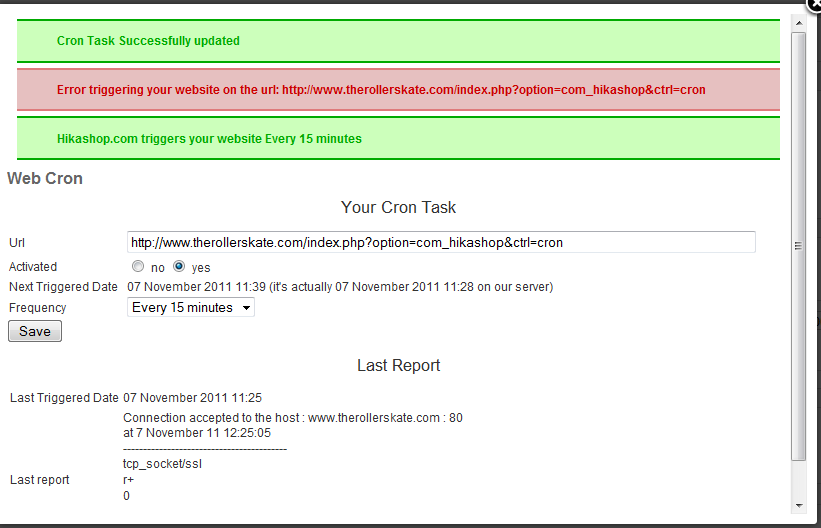
Screen shot of an error is attached (probably the same error I had earlier).
Username may have been off, I think I fixed it. But after I fixed the username, the error was still there.
Please Log in or Create an account to join the conversation.
14 years 10 months ago #29320
by nicolas
Replied by nicolas on topic Re: Export to CSV, import to Google Shopping
That is just a display error on our end. It should be fixed now.
If the products are not updated on google products, it must be something else: the configuration of the google products plugin which is not correct and namely the username and password.
If the products are not updated on google products, it must be something else: the configuration of the google products plugin which is not correct and namely the username and password.
Please Log in or Create an account to join the conversation.
Time to create page: 0.315 seconds