

- Posts: 120
- Thank you received: 1
Filters Error after upgrade to 2.2.0
13 years 2 months ago #114768
by watashi
Filters Error after upgrade to 2.2.0 was created by watashi
After upgrade the following issue started to occur when I try to apply a filter at the front-end:
Error: 0 - SQL=SELECT DISTINCT b.* FROM xxxxx_hikashop_product_category AS a LEFT JOIN xxxxx_hikashop_product AS b ON a.product_id=b.product_id WHERE b.product_published=1 AND b.product_type = 'main' AND a.category_id IN (18) AND b.product_quantity!=0 AND (b.product_access = 'all' OR b.product_access LIKE '%,9,%') AND (b.sizedresseu LIKE '%36%') ORDER BY filter_6 DESC LIMIT 0, 200
I have switched on debug mode, but no errors were detected.
My provider's server logs show no errors.
However, the Developer Tool in Google Chrome shows following lines:
Request URL:http://www.xxxxxxxx.com.ua/products/coats
Request Method:GET
Status Code:500 Internal Server Error
Request Headersview source
Do you have any idea?...
Error: 0 - SQL=SELECT DISTINCT b.* FROM xxxxx_hikashop_product_category AS a LEFT JOIN xxxxx_hikashop_product AS b ON a.product_id=b.product_id WHERE b.product_published=1 AND b.product_type = 'main' AND a.category_id IN (18) AND b.product_quantity!=0 AND (b.product_access = 'all' OR b.product_access LIKE '%,9,%') AND (b.sizedresseu LIKE '%36%') ORDER BY filter_6 DESC LIMIT 0, 200
I have switched on debug mode, but no errors were detected.
My provider's server logs show no errors.
However, the Developer Tool in Google Chrome shows following lines:
Request URL:http://www.xxxxxxxx.com.ua/products/coats
Request Method:GET
Status Code:500 Internal Server Error
Request Headersview source
Do you have any idea?...
Please Log in or Create an account to join the conversation.

13 years 2 months ago #114772
by nicolas
Replied by nicolas on topic Filters Error after upgrade to 2.2.0
Hi,
We would need to know the MySQL error message to be able to understand what's going on because this query looks fine.
That is a bug of Joomla 3.0 which doesn't display MySQL errors:
joomlacode.org/gf/project/joomla/tracker...racker_item_id=29345
It has normally been fixed for Joomla 3.1 (make sure that you use the MySQLi driver in the joomla configuration in order to see the error).
So you an either update joomla or apply the patch in the bugtracker to display the error message.
We would need to know the MySQL error message to be able to understand what's going on because this query looks fine.
That is a bug of Joomla 3.0 which doesn't display MySQL errors:
joomlacode.org/gf/project/joomla/tracker...racker_item_id=29345
It has normally been fixed for Joomla 3.1 (make sure that you use the MySQLi driver in the joomla configuration in order to see the error).
So you an either update joomla or apply the patch in the bugtracker to display the error message.
Please Log in or Create an account to join the conversation.
13 years 2 months ago #114779
by watashi
Replied by watashi on topic Filters Error after upgrade to 2.2.0
Hi Nocolas,
Thanks for very quick support!
I am actually using the latest version of Joomla (3.1.1 Stable).
I have changed MySQL to MySQLi under Global Configuration/Server/Database Settings.
I have enabled Debug System under Global Configuration/System.
Still I can't get a error. (It actually shows many wrapped text inside, but I can't see nothing special there.
I am quite sure it was working before the upgrade...
As for the link provided, I could not find location of file mysqli.diff... Definitely I don't understand something..
joomlacode.org/gf/project/joomla/tracker...racker_item_id=29345
Regards,
Thanks for very quick support!
I am actually using the latest version of Joomla (3.1.1 Stable).
I have changed MySQL to MySQLi under Global Configuration/Server/Database Settings.
I have enabled Debug System under Global Configuration/System.
Still I can't get a error. (It actually shows many wrapped text inside, but I can't see nothing special there.
I am quite sure it was working before the upgrade...
As for the link provided, I could not find location of file mysqli.diff... Definitely I don't understand something..
joomlacode.org/gf/project/joomla/tracker...racker_item_id=29345
Regards,
Please Log in or Create an account to join the conversation.

13 years 2 months ago #114781
by Jerome
Jerome - Obsidev.com
HikaMarket & HikaSerial developer / HikaShop core dev team.
Also helping the HikaShop support team when having some time or couldn't sleep.
By the way, do not send me private message, use the "contact us" form instead.
Replied by Jerome on topic Filters Error after upgrade to 2.2.0
Hi,
My pull request (for mysqli) has been integrated into Joomla 3.1.0
github.com/joomla/joomla-platform/pull/1554/files
Otherwise, you can use the "hikamysqli" driver:
www.hikashop.com/en/forum/2-general-talk...p-20-beta.html#72321
Regards,
My pull request (for mysqli) has been integrated into Joomla 3.1.0
github.com/joomla/joomla-platform/pull/1554/files
Otherwise, you can use the "hikamysqli" driver:
www.hikashop.com/en/forum/2-general-talk...p-20-beta.html#72321
Regards,
Jerome - Obsidev.com
HikaMarket & HikaSerial developer / HikaShop core dev team.
Also helping the HikaShop support team when having some time or couldn't sleep.
By the way, do not send me private message, use the "contact us" form instead.
Please Log in or Create an account to join the conversation.
13 years 2 months ago #114783
by watashi
Replied by watashi on topic Filters Error after upgrade to 2.2.0
Another sort of error generated by filters:
Error: 1054 - Unknown column 'filter_6' in 'order clause' SQL=SELECT DISTINCT b.* FROM xxxxx_hikashop_product_category AS a LEFT JOIN xxxxx_hikashop_product AS b ON a.product_id=b.product_id INNER JOIN xxxxx_hikashop_category AS filter_22 ON filter_22.category_id=a.category_id AND b.product_manufacturer_id IN (17) WHERE b.product_published=1 AND b.product_type = 'main' AND a.category_id IN (12) AND b.product_quantity!=0 AND (b.product_access = 'all' OR b.product_access LIKE '%,9,%') ORDER BY filter_6 DESC LIMIT 0, 200
But this page does not generate any errors in the debug area as well (of course, Debug System is on...
Error: 1054 - Unknown column 'filter_6' in 'order clause' SQL=SELECT DISTINCT b.* FROM xxxxx_hikashop_product_category AS a LEFT JOIN xxxxx_hikashop_product AS b ON a.product_id=b.product_id INNER JOIN xxxxx_hikashop_category AS filter_22 ON filter_22.category_id=a.category_id AND b.product_manufacturer_id IN (17) WHERE b.product_published=1 AND b.product_type = 'main' AND a.category_id IN (12) AND b.product_quantity!=0 AND (b.product_access = 'all' OR b.product_access LIKE '%,9,%') ORDER BY filter_6 DESC LIMIT 0, 200
But this page does not generate any errors in the debug area as well (of course, Debug System is on...
Please Log in or Create an account to join the conversation.
13 years 2 months ago #114785
by nicolas
Replied by nicolas on topic Filters Error after upgrade to 2.2.0
Great ! That's what we need.
So filter_6 doesn't exist.
Could you do a screenshot of the options your filter with the problem ? Is its id 6 ?
So filter_6 doesn't exist.
Could you do a screenshot of the options your filter with the problem ? Is its id 6 ?
Please Log in or Create an account to join the conversation.
13 years 2 months ago #114790
by watashi
Replied by watashi on topic Filters Error after upgrade to 2.2.0
Ooopph..
You are great guys there! I have localized the issue.
Whatever filter I try to select, it always shows me message Unknown column 'filter_6' in 'order clause'.
Filter with ID 6 is a simple sort by price.
After I have disabled that filter, everything works just fine!
I have created another sort-by-price filter with same settings and I have started to get same errors again.
I believe it is a bug. Please see my filter settings on the screenshot attached hereto.
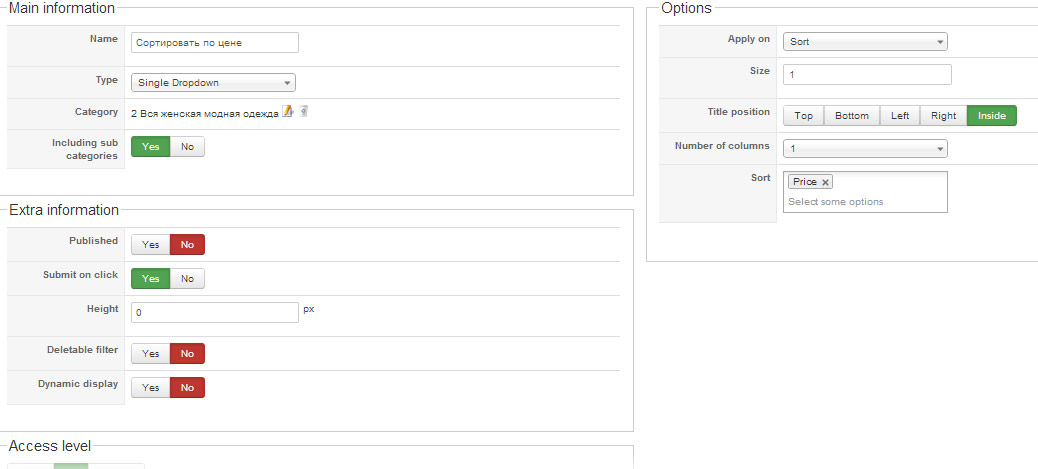
You are great guys there! I have localized the issue.
Whatever filter I try to select, it always shows me message Unknown column 'filter_6' in 'order clause'.
Filter with ID 6 is a simple sort by price.
After I have disabled that filter, everything works just fine!
I have created another sort-by-price filter with same settings and I have started to get same errors again.
I believe it is a bug. Please see my filter settings on the screenshot attached hereto.
Please Log in or Create an account to join the conversation.
13 years 2 months ago #114791
by nicolas
Replied by nicolas on topic Filters Error after upgrade to 2.2.0
I can't reproduce the issue.
I'll need a backend and FTP access to look at that directly on the website with the problem.
For now, I recommend to simply keep it unpbulished until we can debug it during the weekend once you provide the necessary accesses.
I'll need a backend and FTP access to look at that directly on the website with the problem.
For now, I recommend to simply keep it unpbulished until we can debug it during the weekend once you provide the necessary accesses.
Please Log in or Create an account to join the conversation.
13 years 2 months ago #114850
by watashi
Replied by watashi on topic Filters Error after upgrade to 2.2.0
Hi Nikolas,
I have sent a PM with admin credentials to you. Please, kindly check.
Regards,
I have sent a PM with admin credentials to you. Please, kindly check.
Regards,
Please Log in or Create an account to join the conversation.

13 years 2 months ago #115033
by Eliot
Replied by Eliot on topic Filters Error after upgrade to 2.2.0
Hi there,
I just took a look and it was a strange bug since there was a value in your session for this specific filter. After cleaning it, it's working fine.
Maybe you totally changed this filter after few try with another filter type (but on the same id) ending in causing this issue.
Anyway, tell us if it's fine on your end but I think it's ok now.
I just took a look and it was a strange bug since there was a value in your session for this specific filter. After cleaning it, it's working fine.
Maybe you totally changed this filter after few try with another filter type (but on the same id) ending in causing this issue.
Anyway, tell us if it's fine on your end but I think it's ok now.
Please Log in or Create an account to join the conversation.
13 years 2 months ago #115143
by watashi
Replied by watashi on topic Filters Error after upgrade to 2.2.0
Hi Eliot,
A few clicks it was working. The next click it showed the same error again:
I don't understand what you say about a value for my session. However, I am trying same in private (incognito) mode of Google Chrome. Same issue comes out again.

A few clicks it was working. The next click it showed the same error again:
Code:
Error: 1054 - SQL Error Unknown column 'filter_6' in 'order clause'
SELECT DISTINCT b.* FROM xxxxx_hikashop_product_category AS a LEFT JOIN xxxxx_hikashop_product AS b ON a.product_id=b.product_id WHERE b.product_published=1 AND b.product_type = 'main' AND a.category_id IN (13) AND b.product_quantity!=0 AND (b.product_access = 'all' OR b.product_access LIKE '%,9,%') ORDER BY filter_6 DESC LIMIT 0, 200
I don't understand what you say about a value for my session. However, I am trying same in private (incognito) mode of Google Chrome. Same issue comes out again.
Please Log in or Create an account to join the conversation.
13 years 2 months ago #115208
by Eliot
Replied by Eliot on topic Filters Error after upgrade to 2.2.0
Indeed, there was a real bug.
It took me a certain time but it's fixed!
For those who experience the same issue, you have to edit the file filter.php in administrator/components/com_hikashop/classes and change these lines:
to these:
It took me a certain time but it's fixed!
For those who experience the same issue, you have to edit the file filter.php in administrator/components/com_hikashop/classes and change these lines:
Code:
if($filter->filter_options['title_position']=='inside'){
$html.='<OPTION VALUE="'.$filter->filter_namekey.'">'.$filter->filter_name.'</OPTION>';
to these:
Code:
if($filter->filter_options['title_position']=='inside' && $filter->filter_data=='sort'){
$html.='<OPTION VALUE="none">'.$filter->filter_name.'</OPTION>';
The following user(s) said Thank You: watashi
Please Log in or Create an account to join the conversation.
13 years 2 months ago #115343
by watashi
Replied by watashi on topic Filters Error after upgrade to 2.2.0
Hi Eliot,
The fix works!!
Thank you!
Regards
The fix works!!
Thank you!
Regards
Please Log in or Create an account to join the conversation.
Time to create page: 0.228 seconds