

- Posts: 29
- Thank you received: 0
Order Total incorrect on Site
12 years 8 months ago #144378
by debodle
Order Total incorrect on Site was created by debodle
-- url of the page with the problem -- :
www.equicooldown.com
-- HikaShop version -- : 2.3.0
-- Joomla version -- : 2.5.17
-- PHP version -- : 5.3.3
-- Browser(s) name and version -- : IE 10
-- Error-message(debug-mod must be tuned on) -- : Error_message
Since I have had no update where I originally posted this issue in the "Checkout" forum and I believe this is a true bug in the software, I'm reposting in hopes that someone will look into this problem.
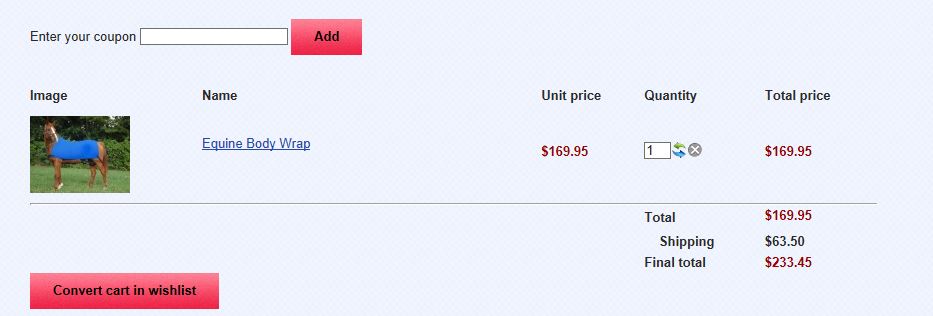
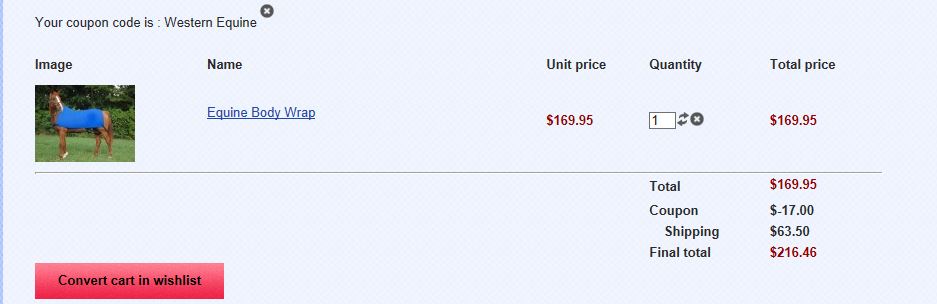
We are using a 10% off coupon and when the order is totaled in the checkout portion, it is not correct. Below are screenshots that clearly show the problem:
Order with shipping only - no coupon. Totals correctly:
Order with coupon applied. Total is incorrect:
-- HikaShop version -- : 2.3.0
-- Joomla version -- : 2.5.17
-- PHP version -- : 5.3.3
-- Browser(s) name and version -- : IE 10
-- Error-message(debug-mod must be tuned on) -- : Error_message
Since I have had no update where I originally posted this issue in the "Checkout" forum and I believe this is a true bug in the software, I'm reposting in hopes that someone will look into this problem.
We are using a 10% off coupon and when the order is totaled in the checkout portion, it is not correct. Below are screenshots that clearly show the problem:
Order with shipping only - no coupon. Totals correctly:
Order with coupon applied. Total is incorrect:
Please Log in or Create an account to join the conversation.

12 years 8 months ago #144480
by Jerome
Jerome - Obsidev.com
HikaMarket & HikaSerial developer / HikaShop core dev team.
Replied by Jerome on topic Order Total incorrect on Site
Hi,
Are you using an option in order to "round" the prices ?
Regards,
Are you using an option in order to "round" the prices ?
Regards,
Jerome - Obsidev.com
HikaMarket & HikaSerial developer / HikaShop core dev team.
Please Log in or Create an account to join the conversation.
12 years 8 months ago #144483
by debodle
Replied by debodle on topic Order Total incorrect on Site
Yes - I previously had an issue with taxes when I wasn't rounding when it sent details to PayPal. The suggestion (from forum moderator) was made to either not send details to PayPal (which I don't like - I want the details in PayPal) or to set the "round prices during calculations" option.
The prices are rounding (taxes and 10% discount), but not totaling correctly.
The prices are rounding (taxes and 10% discount), but not totaling correctly.
Please Log in or Create an account to join the conversation.

12 years 8 months ago #144520
by nicolas
Replied by nicolas on topic Order Total incorrect on Site
We would need a FTP access in order to put traces in the code and figure out if there is a problem.
Please Log in or Create an account to join the conversation.
12 years 8 months ago #144521
by debodle
Replied by debodle on topic Order Total incorrect on Site
I will send you the access in a private message, however, I'm wondering if you've tried to replicate this in your own environment. I am using this hikashop out if the box and have not messed with or customized any of the code. The only thing I've done is to change the words VAT to TAX in the language file.
Please Log in or Create an account to join the conversation.
12 years 8 months ago #145053
by onyc
Replied by onyc on topic Order Total incorrect on Site
Hello, this is kind of urgent. :ohmy:
I am running a special and have discount code that I forced to an affiliate.
For some reason, the code is taking more than it should.
The code is for 10% off but below are the subtotal and the amoumt deducted wjich is clearly more than 10%
Subtotal : $819.96
Coupon : $-111.99
Attached image is how I have the setting.
Your earliest response will be appreciated.
Thanks
I am running a special and have discount code that I forced to an affiliate.
For some reason, the code is taking more than it should.
The code is for 10% off but below are the subtotal and the amoumt deducted wjich is clearly more than 10%
Subtotal : $819.96
Coupon : $-111.99
Attached image is how I have the setting.
Your earliest response will be appreciated.
Thanks
Please Log in or Create an account to join the conversation.
12 years 8 months ago #145171
by onyc
Replied by onyc on topic Order Total incorrect on Site
Hello, can you guys really help me on these problems because it is really urgent 
Please Log in or Create an account to join the conversation.
12 years 8 months ago #145292
by debodle
Replied by debodle on topic Order Total incorrect on Site
Can I get confirmation that someone is working on my issue?
Please Log in or Create an account to join the conversation.
12 years 8 months ago #145370
by onyc
Replied by onyc on topic Order Total incorrect on Site
CAN someone get to me on this??
Please Log in or Create an account to join the conversation.
12 years 8 months ago #145384
by debodle
Replied by debodle on topic Order Total incorrect on Site
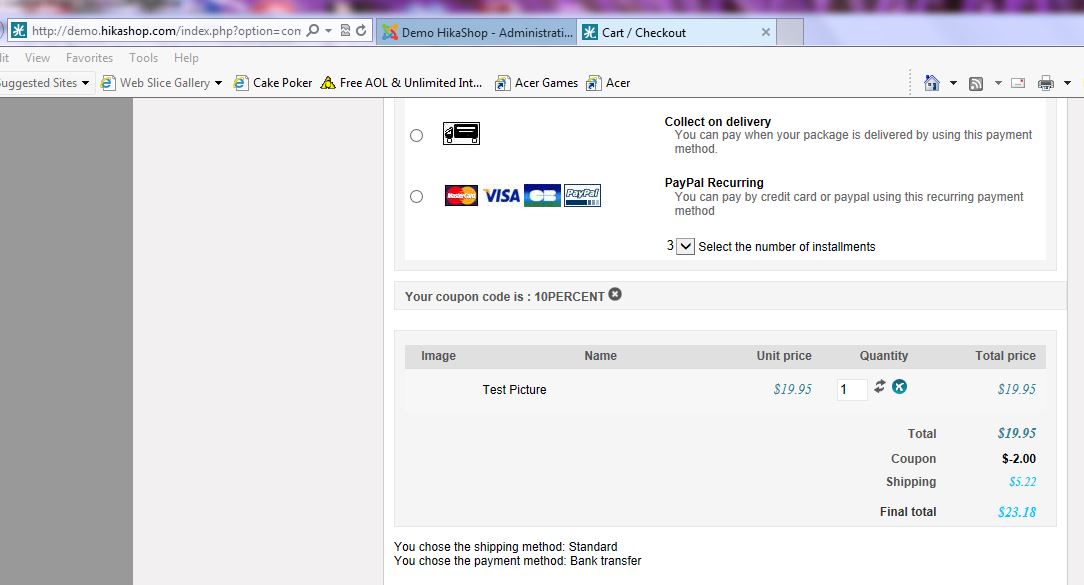
I have just confirmed that my issue with the coupon and cart calculations is DEFINITELY a bug in your software. I used your own DEMO site and replicated the coupon I have on my site. I've provided a screenshot of the cart calculations from your DEMO. I am really a bit disappointed that I've had no response to this issue in almost a week!
Please Log in or Create an account to join the conversation.
12 years 8 months ago #145617
by nicolas
Replied by nicolas on topic Order Total incorrect on Site
Hi,
This is indeed a bug. We need time to debug such issue as it's really complex. Unfortunately, last week was a high load week on support and we didn't had the time to put the half a day of work required for such issue.
I hope we have more time in the next few days to look at it and we'll keep you posted once we find the problem.
Thanks for bearing with us.
This is indeed a bug. We need time to debug such issue as it's really complex. Unfortunately, last week was a high load week on support and we didn't had the time to put the half a day of work required for such issue.
I hope we have more time in the next few days to look at it and we'll keep you posted once we find the problem.
Thanks for bearing with us.
The following user(s) said Thank You: debodle
Please Log in or Create an account to join the conversation.
12 years 8 months ago #145713
by debodle
Replied by debodle on topic Order Total incorrect on Site
I would add this note in a PM to you, but you didn't answer my last one
When you tell me that last week was a "high load week on support", I was one of the support requests from last week and was either lost in the shuffle or not prioritized. It took me all of about 10 minutes to replicate my issue in your demo environment as it was actually very simple - set round calculations on and add a 10 percent coupon. My last post to you was that I had not touched any code and was using your product as delivered.
To me...this should have been a prioritized issue last week, even with a high load since it does have to do with a total amount in an ecommerce system - even if the total is only off by 1 cent. I would probably be much more understanding if you had posted this same message within a couple of days - but that was not the case. So, I remain disappointed.
When you tell me that last week was a "high load week on support", I was one of the support requests from last week and was either lost in the shuffle or not prioritized. It took me all of about 10 minutes to replicate my issue in your demo environment as it was actually very simple - set round calculations on and add a 10 percent coupon. My last post to you was that I had not touched any code and was using your product as delivered.
To me...this should have been a prioritized issue last week, even with a high load since it does have to do with a total amount in an ecommerce system - even if the total is only off by 1 cent. I would probably be much more understanding if you had posted this same message within a couple of days - but that was not the case. So, I remain disappointed.
Please Log in or Create an account to join the conversation.
12 years 7 months ago #146429
by debodle
Replied by debodle on topic Order Total incorrect on Site
When can I expect to get an update on this bug?
Please Log in or Create an account to join the conversation.
12 years 7 months ago #146719
by nicolas
Replied by nicolas on topic Order Total incorrect on Site
Hi,
I got some time today to debug the issue and went on, thanks to your FTP access. However, The access that you provided didn't had the permission to modify the files, so I couldn't add any trace to the code on your website:
Then I went on to try to reproduce the issue on my end for the past 2 hours but I was unsuccessful. On my end, the total was correct 100% of the time. So I really need to be able to put traces in the code on your website.
I got some time today to debug the issue and went on, thanks to your FTP access. However, The access that you provided didn't had the permission to modify the files, so I couldn't add any trace to the code on your website:
Code:
Status: Starting upload of C:\Users\Nicolas\AppData\Local\Temp\fz3temp-8\cart.php
Status: Retrieving directory listing...
Command: ls
Status: Listing directory /administrator/components/com_hikashop/classes/
Command: put "C:\Users\Nicolas\AppData\Local\Temp\fz3temp-8\cart.php" "cart.php"
Error: /administrator/components/com_hikashop/classes/cart.php: open for write: permission denied
Error: File transfer failed
Please Log in or Create an account to join the conversation.
12 years 7 months ago #146720
by debodle
Replied by debodle on topic Order Total incorrect on Site
I was able to replicate the issue in your Demo environment though...
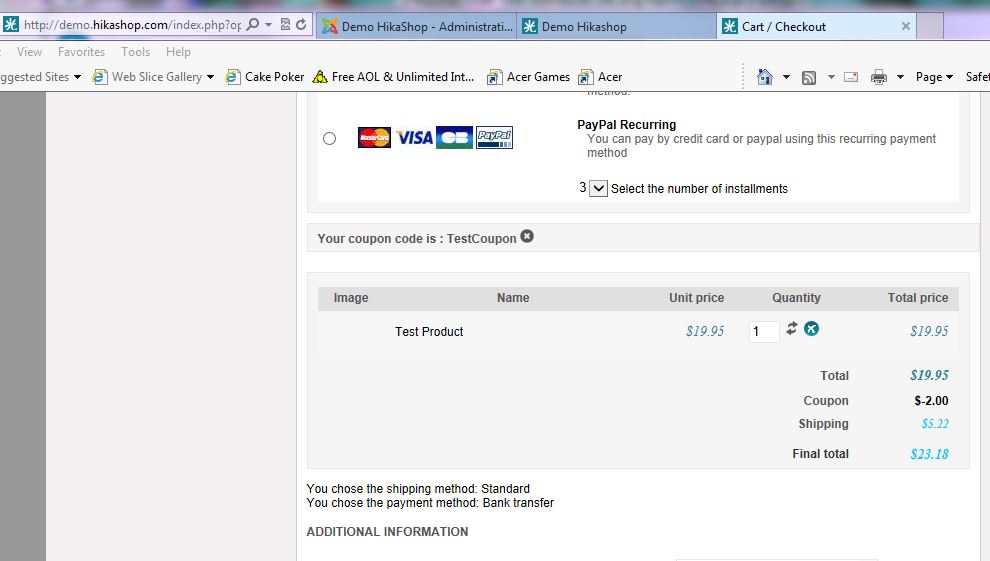
Here are the steps I took to replicate my issue in your demo:
1. I added a new product, price $19.95 USD. to the Fashion, Men category called Test Product
2. Changed Main Currency to USD
3. Check that Round prices during calculations is set to yes.
4. Created a 10% off coupon called TestCoupon
In the Demo shop, add one Test Product to the cart, then go to checkout. Apply the TestCoupon at checkout.
Price will be off one cent.
Here are the steps I took to replicate my issue in your demo:
1. I added a new product, price $19.95 USD. to the Fashion, Men category called Test Product
2. Changed Main Currency to USD
3. Check that Round prices during calculations is set to yes.
4. Created a 10% off coupon called TestCoupon
In the Demo shop, add one Test Product to the cart, then go to checkout. Apply the TestCoupon at checkout.
Price will be off one cent.
Please Log in or Create an account to join the conversation.
12 years 7 months ago #146744
by nicolas
Replied by nicolas on topic Order Total incorrect on Site
Hi,
Thank you for the exact step by step.
I was able to reproduce the problem now.
Please add the code:
after:
in the file administrator/components/com_hikashop/classes/discount.php and that will fix that rounding issue with percentage coupons with the rounding option turned on when the coupon has .several decimals after the rounding number.
Thank you for the exact step by step.
I was able to reproduce the problem now.
Please add the code:
Code:
$config =& hikashop_config();
if($config->get('round_calculations',0)){
$currencyHelper = hikashop_get('class.currency');
$coupon->discount_flat_amount = round($coupon->discount_flat_amount,$currencyHelper->getRounding($coupon->discount_currency_id));
}
Code:
if (bccomp($coupon->discount_flat_amount, 0, 5)) {
$coupon->discount_percent_amount = 0;
$coupon->discount_coupon_nodoubling = null;
}
Please Log in or Create an account to join the conversation.
12 years 7 months ago #146786
by debodle
Replied by debodle on topic Order Total incorrect on Site
I added your code to the discount.php, but I still have the same results. Here is the code:
if (bccomp($coupon->discount_flat_amount, 0, 5)) {
$coupon->discount_percent_amount = 0;
$coupon->discount_coupon_nodoubling = null;
}
$config =& hikashop_config();
if($config->get('round_calculations',0)){
$currencyHelper = hikashop_get('class.currency');
$coupon->discount_flat_amount =
round($coupon->discount_flat_amount,$currencyHelper->getRounding($coupon->discount_currency_id));
}
}
}
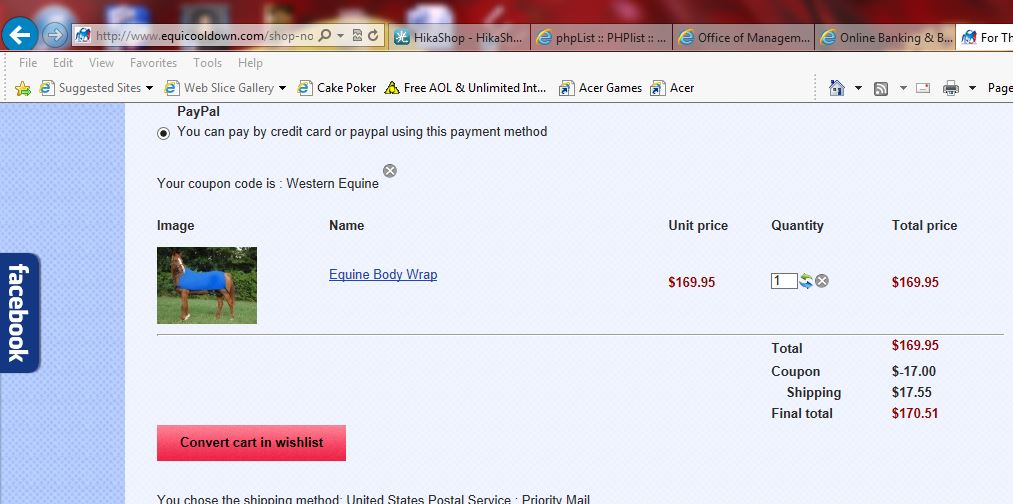
Here is a screenshot from my shopping cart after adding your code:
if (bccomp($coupon->discount_flat_amount, 0, 5)) {
$coupon->discount_percent_amount = 0;
$coupon->discount_coupon_nodoubling = null;
}
$config =& hikashop_config();
if($config->get('round_calculations',0)){
$currencyHelper = hikashop_get('class.currency');
$coupon->discount_flat_amount =
round($coupon->discount_flat_amount,$currencyHelper->getRounding($coupon->discount_currency_id));
}
}
}
Here is a screenshot from my shopping cart after adding your code:
Please Log in or Create an account to join the conversation.
12 years 7 months ago #146859
by nicolas
Replied by nicolas on topic Order Total incorrect on Site
That's why I said that we need to look directly on your website...
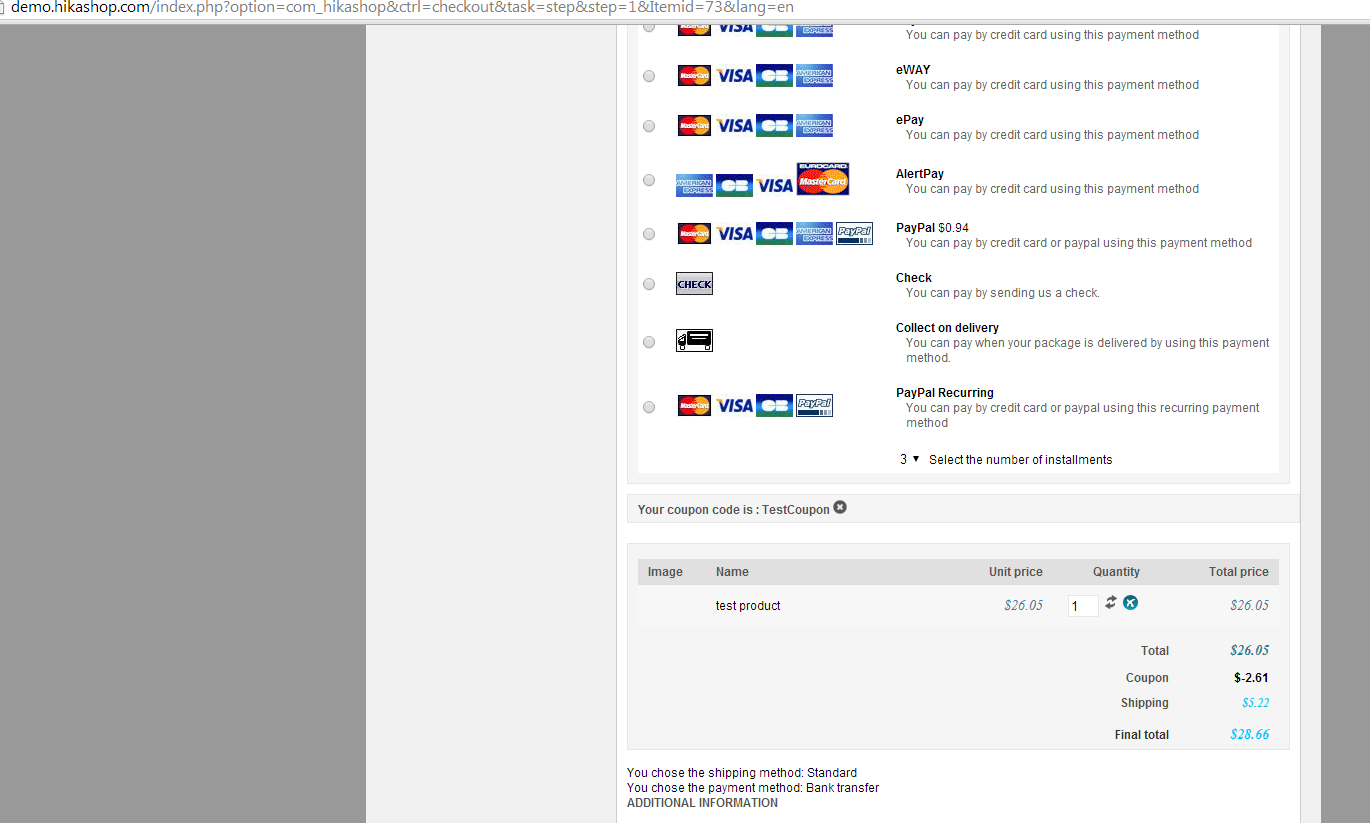
It's working fine on our demo website with that fix:
Now could you please provide a FTP access with write permissions so that we can add traces on your website in order to understand the problem that you have ?
It's working fine on our demo website with that fix:
Now could you please provide a FTP access with write permissions so that we can add traces on your website in order to understand the problem that you have ?
Please Log in or Create an account to join the conversation.
12 years 7 months ago #146862
by debodle
Replied by debodle on topic Order Total incorrect on Site
Please use the same access I provided before, but tell me where you will need to add your traces so that I can change ownership. Currently everything is owned by apache owner and group as it works well that way and I don't run into issues when installing new components.
Currently, I changed the com_hikashop folder recursively in the administrator/components folder to give you write access. Please let me know if there is anywhere else.
Again, I can't see how this is possibly specific to my install since I have not customized any of your code...
Thanks and please let me know if there is anything else I can do to help you have the write access you need.
Currently, I changed the com_hikashop folder recursively in the administrator/components folder to give you write access. Please let me know if there is anywhere else.
Again, I can't see how this is possibly specific to my install since I have not customized any of your code...
Thanks and please let me know if there is anything else I can do to help you have the write access you need.
Please Log in or Create an account to join the conversation.
12 years 7 months ago #147018
by nicolas
Replied by nicolas on topic Order Total incorrect on Site
I found the problem in your case.
Replacing the lines:
if(empty($tax)) return $price;
by:
if(empty($tax)) return $this->_round($price,$round);
in the file administrator/components/com_hikashop/classes/currency.php solves the problem.
Replacing the lines:
if(empty($tax)) return $price;
by:
if(empty($tax)) return $this->_round($price,$round);
in the file administrator/components/com_hikashop/classes/currency.php solves the problem.
Please Log in or Create an account to join the conversation.
Time to create page: 0.601 seconds