

- Posts: 128
- Thank you received: 3
Registration field problems
10 years 7 months ago #228258
by deuce4884
Registration field problems was created by deuce4884
-- HikaShop version -- : 2.5.0
-- Joomla version -- : 3.4.1
-- PHP version -- : 5.3.24
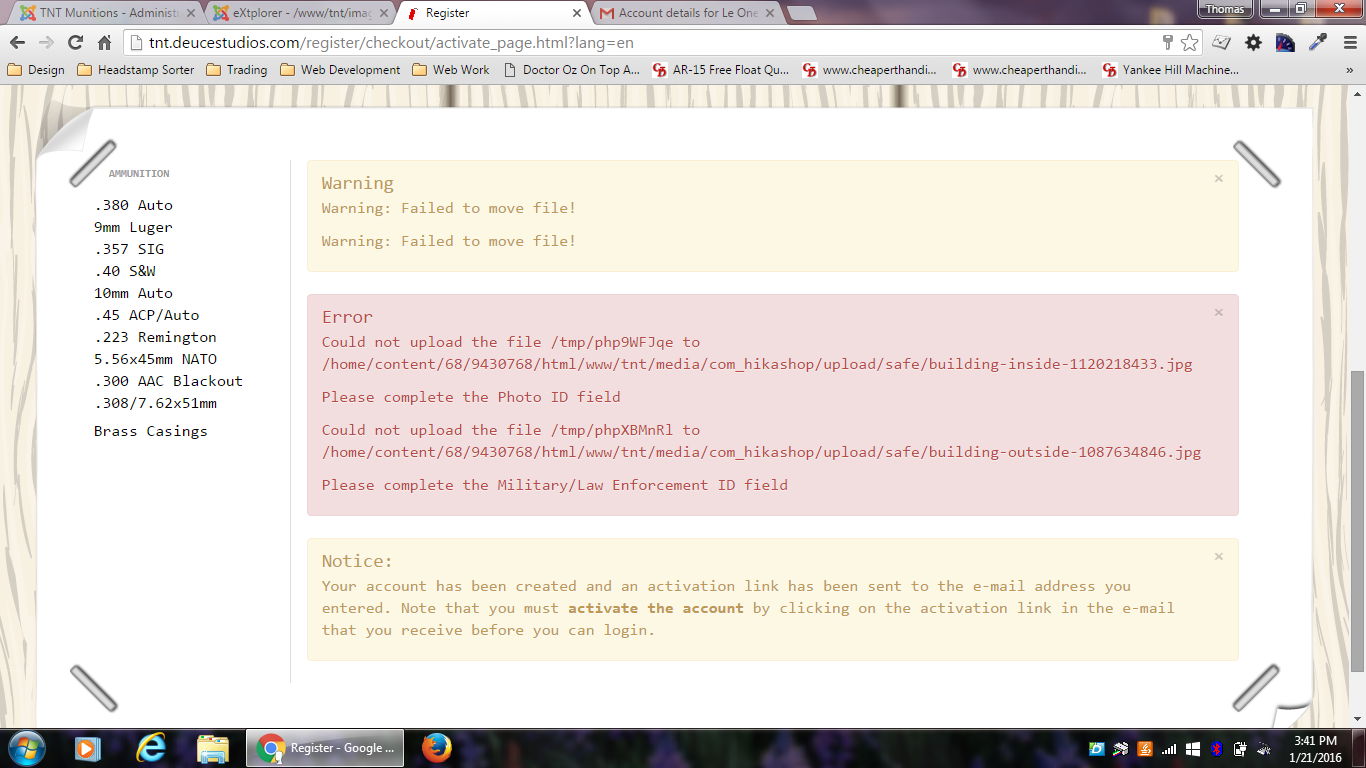
I'm having a couple different problems with my registration fields. The first is I have a few different fields that are set as Display Limited To my State field, which is a zone type field. When I set this there is no option for me to select the value for which they display. Example, I need some custom text to display if someone selects New York on the state field, but I can't select New York as the option in the back end. The second problem I'm having may be related with my server, but I'm not sure. I have image fields in my form and when someone uploads them when registering I get a notice saying the file could not be moved from one folder to the safe folder set in the Hikashop configuration. I've looked in the files on the server and they have moved even though I get the error. I've attached a screenshot of the notices. Any ideas on this?
-- Joomla version -- : 3.4.1
-- PHP version -- : 5.3.24
I'm having a couple different problems with my registration fields. The first is I have a few different fields that are set as Display Limited To my State field, which is a zone type field. When I set this there is no option for me to select the value for which they display. Example, I need some custom text to display if someone selects New York on the state field, but I can't select New York as the option in the back end. The second problem I'm having may be related with my server, but I'm not sure. I have image fields in my form and when someone uploads them when registering I get a notice saying the file could not be moved from one folder to the safe folder set in the Hikashop configuration. I've looked in the files on the server and they have moved even though I get the error. I've attached a screenshot of the notices. Any ideas on this?
Please Log in or Create an account to join the conversation.

10 years 7 months ago #228277
by nicolas
Replied by nicolas on topic Registration field problems
Hi,
1.
The state field displays based on the country field selection on the registration/address form. When you are in the backend, with the "display limited to" setting, there is no country field so the state field cannot work properly.
Add the code:
after the code:
in the file administrator/components/com_hikashop/views/field/tmpl/form.php and the code
after the code
in the file administrator/components/com_hikashop/controllers/field.php and that will allow you to select the state you want in your field. Note however that this isn't a perfect solution as after you save the system won't be able to display the selected value. This means that once you select the value and save the field, if you save again the field, you'll loose the selected value unless you select it again and save it.
But here, we're at the limits of the system, so I would recommend to seek for an alternative, like always display the input text. It's safer for future maintenance of your website.
2.
Maybe the files are created but empty ?
If you download them via FTP, can you open them ?
Usually, these issues come from a permission issue. So check the permissions of that safe folder so that it is writable by the apache user.
1.
The state field displays based on the country field selection on the registration/address form. When you are in the backend, with the "display limited to" setting, there is no country field so the state field cannot work properly.
Add the code:
Code:
<script type="text/javascript">
if(window.Oby){
window.Oby.registerAjax("hikashop.stateupdated", function(id,elem){
if(typeof id != "object")
id = document.getElementById(id);
if(id.id == "field_options_parent_value")
document.getElementById(id.id).setAttribute("name","field_options[parent_value]");
});
}
</script>
Code:
<td class="key">
<?php echo JText::_( 'DISPLAY_LIMITED_TO' ); ?>
</td>
<td>
Code:
if($field->field_type == 'zone' && !empty($field->field_options['zone_type']) && $field->field_options['zone_type'] == 'state'){
$null = null;
$fields = $fieldClass->getFields('',$null,$type);
$countryField = null;
foreach($fields as $brotherField){
if($brotherField->field_type == 'zone' && !empty($brotherField->field_options['zone_type']) && $brotherField->field_options['zone_type'] == 'country'){
$countryField = $brotherField;
break;
}
}
if($countryField){
$baseUrl = JURI::base().'index.php?option=com_hikashop&ctrl=field&task=state&tmpl=component';
$currentUrl = strtolower(hikashop_currentUrl());
if(substr($currentUrl, 0, 8) == 'https://') {
$domain = substr($currentUrl, 0, strpos($currentUrl, '/', 9));
} else {
$domain = substr($currentUrl, 0, strpos($currentUrl, '/', 8));
}
if(substr($baseUrl, 0, 8) == 'https://') {
$baseUrl = $domain . substr($baseUrl, strpos($baseUrl, '/', 9));
} else {
$baseUrl = $domain . substr($baseUrl, strpos($baseUrl, '/', 8));
}
$countryField->field_url = $baseUrl . '&';
echo $fieldClass->display($countryField,$countryField->field_default,'field_options_parent_value',false,'',true);
}
}
Code:
$fieldClass = hikashop_get('class.field');
$field = $fieldClass->getField($namekey,$type);
But here, we're at the limits of the system, so I would recommend to seek for an alternative, like always display the input text. It's safer for future maintenance of your website.
2.
Maybe the files are created but empty ?
If you download them via FTP, can you open them ?
Usually, these issues come from a permission issue. So check the permissions of that safe folder so that it is writable by the apache user.
Please Log in or Create an account to join the conversation.
10 years 7 months ago #228465
by deuce4884
Replied by deuce4884 on topic Registration field problems
Thanks for the help with the code but I think I may have found an alternative like you suggested since what I'm asking is at the limits of the system. On the second issue I was able to download the file through ftp and it does open, so nothing is wrong with the file and it is in the safe directory. The permissions of the safe directory are 755. One thing I did notice is there is a htaccess file inside the safe directory that only reads deny from all. Could this have something to do with it, or is it something else?
Please Log in or Create an account to join the conversation.
10 years 7 months ago #228587
by nicolas
Replied by nicolas on topic Registration field problems
Hi,
I don't think that the htaccess is linked to that.
Just in case, can you set the permissions of the safe directory to 777 and try again ?
HikaShop is using the Joomla library to copy the file over to the safe directory and if the permissions of the file cannot be changed by the Joomla library after the copy, it will fail like this. That the only I see where the file is copied to the safe folder but it results in a failure.
If it's still doesn't work with the 777 access rights on the folder, then I would recommend to add the line:
$ret = true; after the line:
JLog::add(JText::_('JLIB_FILESYSTEM_ERROR_WARNFS_ERR01'), JLog::WARNING, 'jerror');
in the file libraries/joomla/filesystem/file.php
I don't think that the htaccess is linked to that.
Just in case, can you set the permissions of the safe directory to 777 and try again ?
HikaShop is using the Joomla library to copy the file over to the safe directory and if the permissions of the file cannot be changed by the Joomla library after the copy, it will fail like this. That the only I see where the file is copied to the safe folder but it results in a failure.
If it's still doesn't work with the 777 access rights on the folder, then I would recommend to add the line:
$ret = true; after the line:
JLog::add(JText::_('JLIB_FILESYSTEM_ERROR_WARNFS_ERR01'), JLog::WARNING, 'jerror');
in the file libraries/joomla/filesystem/file.php
Please Log in or Create an account to join the conversation.
10 years 7 months ago #229332
by deuce4884
Replied by deuce4884 on topic Registration field problems
Hey nicolas,
I tried all this and I'm still getting the exact same errors and warnings. What can be causing this?
I tried all this and I'm still getting the exact same errors and warnings. What can be causing this?
Please Log in or Create an account to join the conversation.
10 years 7 months ago #229365
by nicolas
Replied by nicolas on topic Registration field problems
Hi,
do you have the FTP layer of Joomla activated in the Joomla configuration ? If so could you deactivate it and try again ?
do you have the FTP layer of Joomla activated in the Joomla configuration ? If so could you deactivate it and try again ?
Please Log in or Create an account to join the conversation.
10 years 7 months ago #229413
by deuce4884
Replied by deuce4884 on topic Registration field problems
The "enable ftp" setting in joomla global configuration is currently set to no
Please Log in or Create an account to join the conversation.
10 years 7 months ago #229429
by nicolas
Replied by nicolas on topic Registration field problems
Ok. So what if you activate it with your FTP credentials ? Does it work ?
Please Log in or Create an account to join the conversation.
10 years 7 months ago #229495
by deuce4884
Replied by deuce4884 on topic Registration field problems
I don't know because for some reason I can't get it to connect via ftp. I've never used this setting before. Isn't it the ftp settings that I use to connect to the server. I'm able to connect via the program Filezilla with the same credentials, so I don't know what's going on.
Please Log in or Create an account to join the conversation.
10 years 7 months ago #229777
by nicolas
Replied by nicolas on topic Registration field problems
Hi,
Ok, let's try something else.
Remove the code:
from the file administrator/components/com_hikashop/class/file.php
That will remove the error when Joomla says that the file cannot be uploaded (even though it seems to be uploaded in the folder).
Hopefully, that should be enough to circumvent the issue with your folder permissions.
Ok, let's try something else.
Remove the code:
Code:
$app->enqueueMessage(JText::sprintf( 'FAIL_UPLOAD',$file['tmp_name'],$uploadPath . $file_path), 'error');
return false;
That will remove the error when Joomla says that the file cannot be uploaded (even though it seems to be uploaded in the folder).
Hopefully, that should be enough to circumvent the issue with your folder permissions.
Please Log in or Create an account to join the conversation.
10 years 7 months ago #231171
by deuce4884
Replied by deuce4884 on topic Registration field problems
I havent had much time lately to try this until today. I used the extplorer component to go into this file and commented out these lines and saved the file. The first test I tried everything worked great: photo id file was uploaded and moved and it could be opened and no errors on the front end. I tried it a second time immediately after and got the error codes again. I then used extplorer to go back into the file and noticed that where I had commented out these lines the comments were gone. I then removed the lines and saved the file. Reopened the file just to check again and it had rewritten the lines back in. What is going on here. It works with these lines not there, but it's almost like every time the file is accessed it rewrites itself.
Please Log in or Create an account to join the conversation.
10 years 7 months ago #231172
by deuce4884
Replied by deuce4884 on topic Registration field problems
Well I tried a different ftp file editor and commented out the lines and saved the file and now it seems to be keeping the changes and working each time, so hopefully this issue is fixed. One other quick question relating to file and image upload fields. The current maximum file size on these fields is 32M. Are there settings in hikashop to change this to say 2M or is this set by the server settings?
Please Log in or Create an account to join the conversation.
10 years 7 months ago #231217
by nicolas
Replied by nicolas on topic Registration field problems
Hi,
The upload limit is defined in the php.ini file of your web server.
The upload limit is defined in the php.ini file of your web server.
Please Log in or Create an account to join the conversation.
10 years 7 months ago #231292
by deuce4884
Replied by deuce4884 on topic Registration field problems
ok thanks. I registered another user just a few minutes ago just to check everything. For the photo id image file I used the same file I had used for another user. I noticed that it did not change the file name on the server after the registration. In fact there's only the one file there. My question is what if 2 different people upload 2 different files that have the same file name. Will the file name to one of them be changed once uploaded to the server?
Please Log in or Create an account to join the conversation.
10 years 7 months ago #231319
by nicolas
Replied by nicolas on topic Registration field problems
Hi,
Yes, in that case, a random number is appended to the new file's name so that you don't loose the first one.
Yes, in that case, a random number is appended to the new file's name so that you don't loose the first one.
Please Log in or Create an account to join the conversation.
10 years 6 months ago #234372
by deuce4884
Replied by deuce4884 on topic Registration field problems
hey nicolas,
I thought I had this warning for the file move issue solved. I was doing some final checks on my site and registered a user. I got the warnings as showed in the screenshot above, but not the errors. I have commented out the lines in the file that you stated above and the upload/safe folder permissions are set to 777. The image is in the safe folder and can be viewed and downloaded. Why am I still get these errors and what else can I do? very frustrated with this. thanks for the help
I thought I had this warning for the file move issue solved. I was doing some final checks on my site and registered a user. I got the warnings as showed in the screenshot above, but not the errors. I have commented out the lines in the file that you stated above and the upload/safe folder permissions are set to 777. The image is in the safe folder and can be viewed and downloaded. Why am I still get these errors and what else can I do? very frustrated with this. thanks for the help
Please Log in or Create an account to join the conversation.
10 years 6 months ago #234382
by nicolas
Replied by nicolas on topic Registration field problems
Hi,
The warning comes from Joomla. And you didn't get it anymore because you had made that change:
www.hikashop.com/forum/integrations/8819...problems.html#228587
I suppose that you must have updated Joomla, and thus you lost your change in the Joomla file and thus you get that error again.
The warning comes from Joomla. And you didn't get it anymore because you had made that change:
www.hikashop.com/forum/integrations/8819...problems.html#228587
I suppose that you must have updated Joomla, and thus you lost your change in the Joomla file and thus you get that error again.
Please Log in or Create an account to join the conversation.
10 years 6 months ago - 10 years 6 months ago #234439
by deuce4884
Replied by deuce4884 on topic Registration field problems
I have not updated Joomla or Hikashop. I've tried a combination of everything I can think of including:
The registration is here . I'm really at a loss here and feel like ripping my hair out . I can create a superuser for you if you need it, but I really need to figure out what is going on here and get it fixed. I really appreciate all your help.
- changing safe folder permissions
- adding $ret = true; after the line: JLog::add(JText::_('JLIB_FILESYSTEM_ERROR_WARNFS_ERR01'), JLog::WARNING, 'jerror'); in the file libraries/joomla/filesystem/file.php
- commenting out the lines $app->enqueueMessage(JText::sprintf( 'FAIL_UPLOAD',$file,$uploadPath . $file_path), 'error'); return false; in the file administrator/components/com_hikashop/class/file.php
- I do not have ftp layer on
- add a trailing slash to my temp folder in the system settings. did this after doing some research and someone said this solved their problem
This attachment is hidden for guests.
Please log in or register to see it.
Please log in or register to see it.
The registration is here . I'm really at a loss here and feel like ripping my hair out
. I can create a superuser for you if you need it, but I really need to figure out what is going on here and get it fixed. I really appreciate all your help.
Last edit: 10 years 6 months ago by deuce4884.
Please Log in or Create an account to join the conversation.
10 years 6 months ago #234441
by nicolas
Replied by nicolas on topic Registration field problems
Hi,
As I said, this message comes from Joomla, not HikaShop.
You'll get it if the folder of the upload directory is not writable or if PHP is not able to move the file from the tmp folder to that folder.
If it's just the message that's bothering you, and that you think that your permissions are setup properly and that the rest is working properly, then remove the line:
JLog::add(JText::_('JLIB_FILESYSTEM_ERROR_WARNFS_ERR02'), JLog::WARNING, 'jerror');
in libraries/joomla/filesystem/file.php and that will remove it.
As I said, this message comes from Joomla, not HikaShop.
You'll get it if the folder of the upload directory is not writable or if PHP is not able to move the file from the tmp folder to that folder.
If it's just the message that's bothering you, and that you think that your permissions are setup properly and that the rest is working properly, then remove the line:
JLog::add(JText::_('JLIB_FILESYSTEM_ERROR_WARNFS_ERR02'), JLog::WARNING, 'jerror');
in libraries/joomla/filesystem/file.php and that will remove it.
Please Log in or Create an account to join the conversation.
Time to create page: 0.253 seconds