

- Posts: 73
- Thank you received: 0
Cannot be paid anymore message when click paynow
10 years 9 months ago #227124
by melprok
Cannot be paid anymore message when click paynow was created by melprok
-- HikaShop version -- : 2.6.0
-- Joomla version -- : 3.x
Hi,
When the user pay with paypal the notification email has
a pay now link. When click that link I have this message:
"The order 0000000069 cannot be paid anymore."
Any idea?
-- Joomla version -- : 3.x
Hi,
When the user pay with paypal the notification email has
a pay now link. When click that link I have this message:
"The order 0000000069 cannot be paid anymore."
Any idea?
Please Log in or Create an account to join the conversation.

10 years 9 months ago #227126
by Jerome
Jerome - Obsidev.com
HikaMarket & HikaSerial developer / HikaShop core dev team.
Replied by Jerome on topic Cannot be paid anymore message when click paynow
Hi,
I don't understand why your notification email have such "pay now" link.
It is not something provided by default in HikaShop.
Please see the "order" section of the HikaShop configuration documentation to get more details about feature to let the customer pay for unpaid orders :
www.hikashop.com/support/support/documen...nfig.html#main_order
Regards,
I don't understand why your notification email have such "pay now" link.
It is not something provided by default in HikaShop.
Please see the "order" section of the HikaShop configuration documentation to get more details about feature to let the customer pay for unpaid orders :
www.hikashop.com/support/support/documen...nfig.html#main_order
Regards,
Jerome - Obsidev.com
HikaMarket & HikaSerial developer / HikaShop core dev team.
Please Log in or Create an account to join the conversation.
10 years 9 months ago #227216
by melprok
Replied by melprok on topic Cannot be paid anymore message when click paynow
Hi, I think this links appears because this setting: Payment of orders not paid immediately
Please Log in or Create an account to join the conversation.
10 years 9 months ago #227219
by Jerome
Jerome - Obsidev.com
HikaMarket & HikaSerial developer / HikaShop core dev team.
Replied by Jerome on topic Cannot be paid anymore message when click paynow
Hi,
After checking the order creation notification email preload part ; that's right.
There is the addition of a link when the setting "Payment of orders not paid immediately" is activated.
I personally not found about that behavior and I'll create a ticket issue about that.
In your case, I suggest you to unpublish the "order creation notification" email.
Because the user is redirect to paypal to pay the order ; he will receive the confirmation email but he does not need the creation one.
Regards,
After checking the order creation notification email preload part ; that's right.
There is the addition of a link when the setting "Payment of orders not paid immediately" is activated.
I personally not found about that behavior and I'll create a ticket issue about that.
In your case, I suggest you to unpublish the "order creation notification" email.
Because the user is redirect to paypal to pay the order ; he will receive the confirmation email but he does not need the creation one.
Regards,
Jerome - Obsidev.com
HikaMarket & HikaSerial developer / HikaShop core dev team.
Please Log in or Create an account to join the conversation.
10 years 8 months ago #227926
by melprok
Replied by melprok on topic Cannot be paid anymore message when click paynow
Ok, Let me know...
Because if for any reason, the user can't pay at the moment, how the user can pay later in paypal?
Thanks,
Because if for any reason, the user can't pay at the moment, how the user can pay later in paypal?
Thanks,
Please Log in or Create an account to join the conversation.
10 years 8 months ago #227938
by Jerome
Jerome - Obsidev.com
HikaMarket & HikaSerial developer / HikaShop core dev team.
Replied by Jerome on topic Cannot be paid anymore message when click paynow
Hi,
If the order has already been paid ; you can re-pay it.
But if the order hasn't been paid ; it's a different story.
Regards,
If the order has already been paid ; you can re-pay it.
But if the order hasn't been paid ; it's a different story.
Regards,
Jerome - Obsidev.com
HikaMarket & HikaSerial developer / HikaShop core dev team.
Please Log in or Create an account to join the conversation.
10 years 8 months ago - 10 years 8 months ago #228062
by melprok
Replied by melprok on topic Cannot be paid anymore message when click paynow
Ok. So let me know. You said, that you create a ticket.
Because If I set Payment of orders not paid immediately to yes. The client can pay later with the link in the email.
Because If I set Payment of orders not paid immediately to yes. The client can pay later with the link in the email.
Last edit: 10 years 8 months ago by melprok.
Please Log in or Create an account to join the conversation.
10 years 8 months ago #228074
by Jerome
Jerome - Obsidev.com
HikaMarket & HikaSerial developer / HikaShop core dev team.
Replied by Jerome on topic Cannot be paid anymore message when click paynow
Hi,
I created a ticket for an "improvement", not for a bug. I think that there is things to improve in these modifications made in the email.
So, we can't provide any schedule for that because bugs are treated in priority in the list (and there is no bug here).
Regards,
I created a ticket for an "improvement", not for a bug. I think that there is things to improve in these modifications made in the email.
So, we can't provide any schedule for that because bugs are treated in priority in the list (and there is no bug here).
Regards,
Jerome - Obsidev.com
HikaMarket & HikaSerial developer / HikaShop core dev team.
Please Log in or Create an account to join the conversation.
10 years 8 months ago #230555
by melprok
Replied by melprok on topic Cannot be paid anymore message when click paynow
Hi, Sorry, but I don't understand you very well...
If for any reason, when the client its redirect to paypal, he cannot pay at that moment, how the user can pay later in paypal?
If for any reason, when the client its redirect to paypal, he cannot pay at that moment, how the user can pay later in paypal?
Please Log in or Create an account to join the conversation.

10 years 8 months ago #230597
by nicolas
Replied by nicolas on topic Cannot be paid anymore message when click paynow
Hi,
The link will work only if the status of the order is in the list of "unpaid order statuses" of the HikaShop configuration.
When the order is created and the email is sent, the order is still unpaid, and thus the link works. If the order is paid by the customer, the order is not "unpaid" anymore, and thus the link doesn't work anymore. Of course, you can't remove a link from an email that has already been sent. So instead you get that error message.
If you want, you can modify it to tell the customer "You can't pay for that order because it has already been paid", using a translation override:
www.hikashop.com/download/languages.html#modify
The link will work only if the status of the order is in the list of "unpaid order statuses" of the HikaShop configuration.
When the order is created and the email is sent, the order is still unpaid, and thus the link works. If the order is paid by the customer, the order is not "unpaid" anymore, and thus the link doesn't work anymore. Of course, you can't remove a link from an email that has already been sent. So instead you get that error message.
If you want, you can modify it to tell the customer "You can't pay for that order because it has already been paid", using a translation override:
www.hikashop.com/download/languages.html#modify
Please Log in or Create an account to join the conversation.
10 years 8 months ago #231276
by melprok
Replied by melprok on topic Cannot be paid anymore message when click paynow
Hi, Ok. I attach a print screen.
I created the order and the system redirect to Paypal but I have not paid yet in paypal.
Then I click the link in the email to pay, login to My Account, and I see the messasge "The order 0000000081 cannot be paid anymore."
You see the print screen, I have no paid the order yet.
I created the order and the system redirect to Paypal but I have not paid yet in paypal.
Then I click the link in the email to pay, login to My Account, and I see the messasge "The order 0000000081 cannot be paid anymore."
You see the print screen, I have no paid the order yet.
Please Log in or Create an account to join the conversation.
10 years 8 months ago #231277
by nicolas
Replied by nicolas on topic Cannot be paid anymore message when click paynow
Hi,
So maybe it's a bug in that case.
What if you udpate to HikaShop 2.6.1 ? Do you still have the problem ?
So maybe it's a bug in that case.
What if you udpate to HikaShop 2.6.1 ? Do you still have the problem ?
Please Log in or Create an account to join the conversation.
10 years 7 months ago #231394
by melprok
Replied by melprok on topic Cannot be paid anymore message when click paynow
Hi, I already have the 2.6.1. version.
Please Log in or Create an account to join the conversation.

10 years 7 months ago - 10 years 7 months ago #231618
by Philip
Replied by Philip on topic Cannot be paid anymore message when click paynow
Hello,
From what you give us, we are unable to find the root of the issue.
So in order to progress can you provide us a backend access AND a user account to test it by ourself, of course with this we required an URL.
For this, use our "Contact Us" form.
Please, note that you must use this topic subject to fill in your message subject, in order to keep the link.
Regards,
From what you give us, we are unable to find the root of the issue.
So in order to progress can you provide us a backend access AND a user account to test it by ourself, of course with this we required an URL.
For this, use our "Contact Us" form.
Please, note that you must use this topic subject to fill in your message subject, in order to keep the link.
Regards,
Last edit: 10 years 7 months ago by Philip.
Please Log in or Create an account to join the conversation.
Less
More
- Posts: 10
- Thank you received: 0
10 years 7 months ago #232411
by thepetglider
Replied by thepetglider on topic Cannot be paid anymore message when click paynow
We have this same problem with PayPal orders that don't get paid. Has this bug been resolved yet?
Please Log in or Create an account to join the conversation.
10 years 7 months ago #232471
by nicolas
Replied by nicolas on topic Cannot be paid anymore message when click paynow
Hi,
Are you sure that you have the same problem ?
What is the status of the orders ?
Could you provide the information Philippe asked here: www.hikashop.com/forum/customers/881677-...k-paynow.html#231618 ? And provide a procedure to reproduce the issue on your website ?
Are you sure that you have the same problem ?
What is the status of the orders ?
Could you provide the information Philippe asked here: www.hikashop.com/forum/customers/881677-...k-paynow.html#231618 ? And provide a procedure to reproduce the issue on your website ?
Please Log in or Create an account to join the conversation.
10 years 7 months ago #232507
by melprok
Replied by melprok on topic Cannot be paid anymore message when click paynow
Hi, I sent you the information right now.
Thanks,
Jose
Thanks,
Jose
Please Log in or Create an account to join the conversation.
Less
More
- Posts: 10
- Thank you received: 0
10 years 7 months ago #232524
by thepetglider
Replied by thepetglider on topic Cannot be paid anymore message when click paynow
Are you saying you sent information to me? If so, where did you send it? I don't see any PMs.
Please Log in or Create an account to join the conversation.
10 years 7 months ago - 10 years 7 months ago #232597
by Philip
Replied by Philip on topic Cannot be paid anymore message when click paynow
Hello,
I had a little look of your configuration and for a reason or another in your main configuration
Components => HikaShop => Configuration, Main tab and Order part
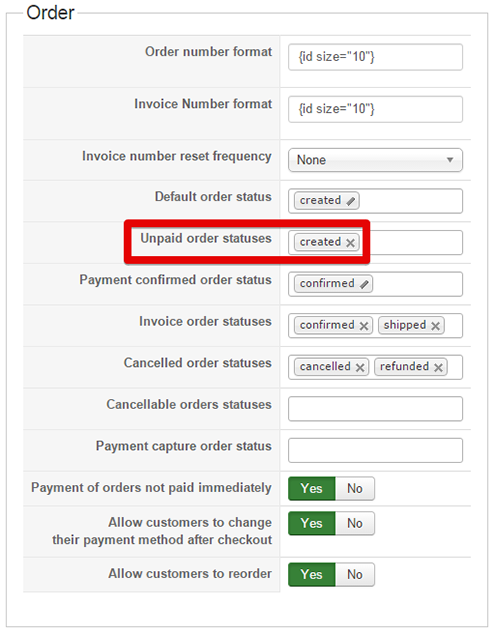
If your option Unpaid order statuses isn't set, as it was before.
Because, HikaShop before allow customer to pay check unpaid status order, and if your order haven't a status that's won't works
thepetglider : melprok sent us backend access to check his HikaShop configuration, you can check the same point that has shown in the screenshot above.
Best regards,
I had a little look of your configuration and for a reason or another in your main configuration
Components => HikaShop => Configuration, Main tab and Order part
If your option Unpaid order statuses isn't set, as it was before.
Because, HikaShop before allow customer to pay check unpaid status order, and if your order haven't a status that's won't works
thepetglider : melprok sent us backend access to check his HikaShop configuration, you can check the same point that has shown in the screenshot above.
Best regards,
Last edit: 10 years 7 months ago by Philip.
Please Log in or Create an account to join the conversation.
10 years 7 months ago - 10 years 7 months ago #232654
by melprok
Replied by melprok on topic Cannot be paid anymore message when click paynow
H thepetglideri, I mean, the login information to Hikashop.
Last edit: 10 years 7 months ago by melprok.
Please Log in or Create an account to join the conversation.
Time to create page: 0.621 seconds