

- Posts: 58
- Thank you received: 2
Giving Accounts Person Access to Orders
11 years 2 months ago #211335
by rcadmin
Giving Accounts Person Access to Orders was created by rcadmin
-- HikaShop version -- : 2.5.2
-- Joomla version -- : 3.4.3
Is one able to give our accounts person access to the dashboard so that they can manage the payments? If so how is this done?
-- Joomla version -- : 3.4.3
Is one able to give our accounts person access to the dashboard so that they can manage the payments? If so how is this done?
Please Log in or Create an account to join the conversation.

11 years 2 months ago #211340
by nicolas
Replied by nicolas on topic Giving Accounts Person Access to Orders
Hi,
You could give them access to your website backend. In Joomla, you can configure the ACLs so that they can only access HikaShop, and in the HikaShop configuration's access level tab, you can configure the ACLs so that they can only access the orders in HikaShop.
Otherwise, you can also use HikaMarket frontend in order to give them access to the orders management from the frontend of your website:
www.hikashop.com/extensions/hikamarket-front-end.html
You could give them access to your website backend. In Joomla, you can configure the ACLs so that they can only access HikaShop, and in the HikaShop configuration's access level tab, you can configure the ACLs so that they can only access the orders in HikaShop.
Otherwise, you can also use HikaMarket frontend in order to give them access to the orders management from the frontend of your website:
www.hikashop.com/extensions/hikamarket-front-end.html
The following user(s) said Thank You: rcadmin
Please Log in or Create an account to join the conversation.
11 years 2 months ago #211403
by rcadmin
Replied by rcadmin on topic Giving Accounts Person Access to Orders
Hi, HikaMarket worked great 
Just a last question regarding this. Is it possible to set things up so that when the accounts lady sends a payment confirmed e-mail that and e-mail can also be sent to the person who managers that product i.e. we would like to have a custom field with each product that has a teacher's e-mail address. When the payment received notification goes out, the e-mail in that custom field also gets the notification.
Thanks again
Just a last question regarding this. Is it possible to set things up so that when the accounts lady sends a payment confirmed e-mail that and e-mail can also be sent to the person who managers that product i.e. we would like to have a custom field with each product that has a teacher's e-mail address. When the payment received notification goes out, the e-mail in that custom field also gets the notification.
Thanks again
Please Log in or Create an account to join the conversation.

11 years 2 months ago #211405
by Jerome
Jerome - Obsidev.com
HikaMarket & HikaSerial developer / HikaShop core dev team.
Replied by Jerome on topic Giving Accounts Person Access to Orders
Hi,
HikaMarket have a powerful ACL system.
In these ACL, there is the "order / notification" one ; which allow the user to be notified for the orders.
See : www.hikashop.com/support/documentation/2...tml#tuto_your_vendor
Please note that you also have to configure the filter setting for the order notification.
www.hikashop.com/support/documentation/1...ml#config_main_email
Regards,
HikaMarket have a powerful ACL system.
In these ACL, there is the "order / notification" one ; which allow the user to be notified for the orders.
See : www.hikashop.com/support/documentation/2...tml#tuto_your_vendor
Please note that you also have to configure the filter setting for the order notification.
www.hikashop.com/support/documentation/1...ml#config_main_email
Regards,
Jerome - Obsidev.com
HikaMarket & HikaSerial developer / HikaShop core dev team.
Please Log in or Create an account to join the conversation.
11 years 2 months ago #212097
by rcadmin
Replied by rcadmin on topic Giving Accounts Person Access to Orders
Thanks for that but just one more question. I have created some products but I now need to assign them to different users/vendors so that the right person get the notification e-mail on confirmation. I have edited the product but can't see how to link it to the particular user/vendor
Please Log in or Create an account to join the conversation.
11 years 2 months ago #212115
by nicolas
Replied by nicolas on topic Giving Accounts Person Access to Orders
Here is a screenshot of the product edition page of a product on our demo website:
take.ms/uqajM
You can see the vendor option there in order to see/select/change the vendor of the product.
take.ms/uqajM
You can see the vendor option there in order to see/select/change the vendor of the product.
Please Log in or Create an account to join the conversation.
11 years 2 months ago #212260
by rcadmin
Replied by rcadmin on topic Giving Accounts Person Access to Orders
Hi, I have HikaMarket installed but my product does not have that option.
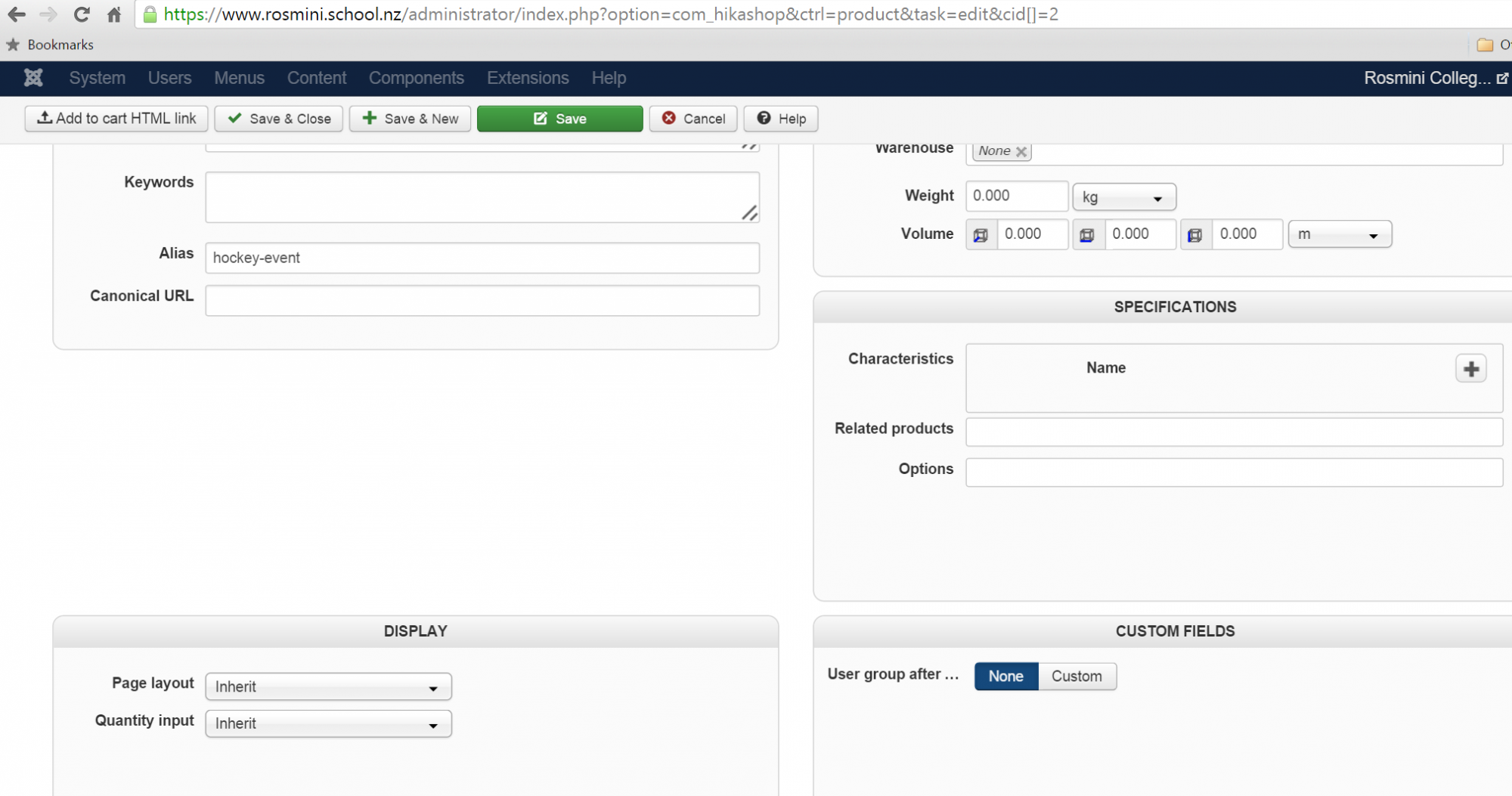
Please Log in or Create an account to join the conversation.
11 years 2 months ago #212354
by nicolas
Replied by nicolas on topic Giving Accounts Person Access to Orders
Hi,
This requires HikaMarket Multivendor, not HikaMarket Frontend.
With HikaMarket Frontend, you only have one vendor and thus no need to select a vendor in the products.
It seems that you're using HikaMarket Frontend, which would explain the issue.
You would need to upgrade your HikaMarket in that case:
hikashop.com/component/hikashop/product/cid-194.html
This requires HikaMarket Multivendor, not HikaMarket Frontend.
With HikaMarket Frontend, you only have one vendor and thus no need to select a vendor in the products.
It seems that you're using HikaMarket Frontend, which would explain the issue.
You would need to upgrade your HikaMarket in that case:
hikashop.com/component/hikashop/product/cid-194.html
The following user(s) said Thank You: rcadmin
Please Log in or Create an account to join the conversation.
11 years 2 months ago - 11 years 2 months ago #212366
by rcadmin
Replied by rcadmin on topic Giving Accounts Person Access to Orders
Ok so I have now also purchased multivendor.
I am just confused about more thing.. what is the difference between the Vendors list and the user list under HikaMarket configuration (Your Vendor)?
I am just confused about more thing.. what is the difference between the Vendors list and the user list under HikaMarket configuration (Your Vendor)?
Last edit: 11 years 2 months ago by rcadmin.
Please Log in or Create an account to join the conversation.
11 years 2 months ago #212367
by Jerome
Jerome - Obsidev.com
HikaMarket & HikaSerial developer / HikaShop core dev team.
Replied by Jerome on topic Giving Accounts Person Access to Orders
Hi,
I'll recommend you that tutorial documentation page :
www.hikashop.com/support/documentation/1...-multi-tutorial.html
With HikaMarket multi-vendor, you can have several vendors in your store and for each vendor, you can assign several users with different permissions.
Each vendor have an administrator : you can configure HikaMarket to automatically create vendor accounts for each user, but you can also create manually your vendors for some specific accounts.
If you have questions about HikaMarket ; you can use the dedicated forum section.
Regards,
I'll recommend you that tutorial documentation page :
www.hikashop.com/support/documentation/1...-multi-tutorial.html
With HikaMarket multi-vendor, you can have several vendors in your store and for each vendor, you can assign several users with different permissions.
Each vendor have an administrator : you can configure HikaMarket to automatically create vendor accounts for each user, but you can also create manually your vendors for some specific accounts.
If you have questions about HikaMarket ; you can use the dedicated forum section.
Regards,
Jerome - Obsidev.com
HikaMarket & HikaSerial developer / HikaShop core dev team.
Please Log in or Create an account to join the conversation.
Time to create page: 0.083 seconds