
addrees fields on the invoice

6 years 3 months ago - 6 years 2 months ago #321798
by Nowweb
Best regards
Brian
addrees fields on the invoice was created by Nowweb
-- url of the page with the problem -- :
www.studsgaard-minihal.dk/
-- Joomla version -- : 3.9.19
-- PHP version -- : 7.3
Hi
i cant figure out what i should write when i want to have extra fields i have made in the checkout.
i have added 3 new address fields.
goal:
Getting it to the invoice and in the backend in orders.
Do you have an guide i can use ?
-- Joomla version -- : 3.9.19
-- PHP version -- : 7.3
Hi
i cant figure out what i should write when i want to have extra fields i have made in the checkout.
i have added 3 new address fields.
goal:
Getting it to the invoice and in the backend in orders.
Do you have an guide i can use ?
Best regards
Brian
Last edit: 6 years 2 months ago by Nowweb.
Please Log in or Create an account to join the conversation.

6 years 3 months ago - 6 years 3 months ago #321811
by Philip
Replied by Philip on topic addrees fields on the invoice
Hello,
Even if I read that you want add an address custom field, maybe you are going to have to used an Order type custom field.
After, you can put your fields block close to address block in your Checkout Workflow settings.
The advantage of Order custom filed is that it can be displayed in several view, and among this possibilities Invoice and backend page.
Note : Have a look on this documentation about display option per custom field type.
Hope this will fit your needs
Regards
Even if I read that you want add an address custom field, maybe you are going to have to used an Order type custom field.
After, you can put your fields block close to address block in your Checkout Workflow settings.
The advantage of Order custom filed is that it can be displayed in several view, and among this possibilities Invoice and backend page.
Note : Have a look on this documentation about display option per custom field type.
Hope this will fit your needs
Regards
Last edit: 6 years 3 months ago by Philip.
Please Log in or Create an account to join the conversation.
6 years 3 months ago #321849
by Nowweb
Best regards
Brian
Replied by Nowweb on topic addrees fields on the invoice
i have made this in the administrator notification mail
And i have made this in the Display > Custom fields

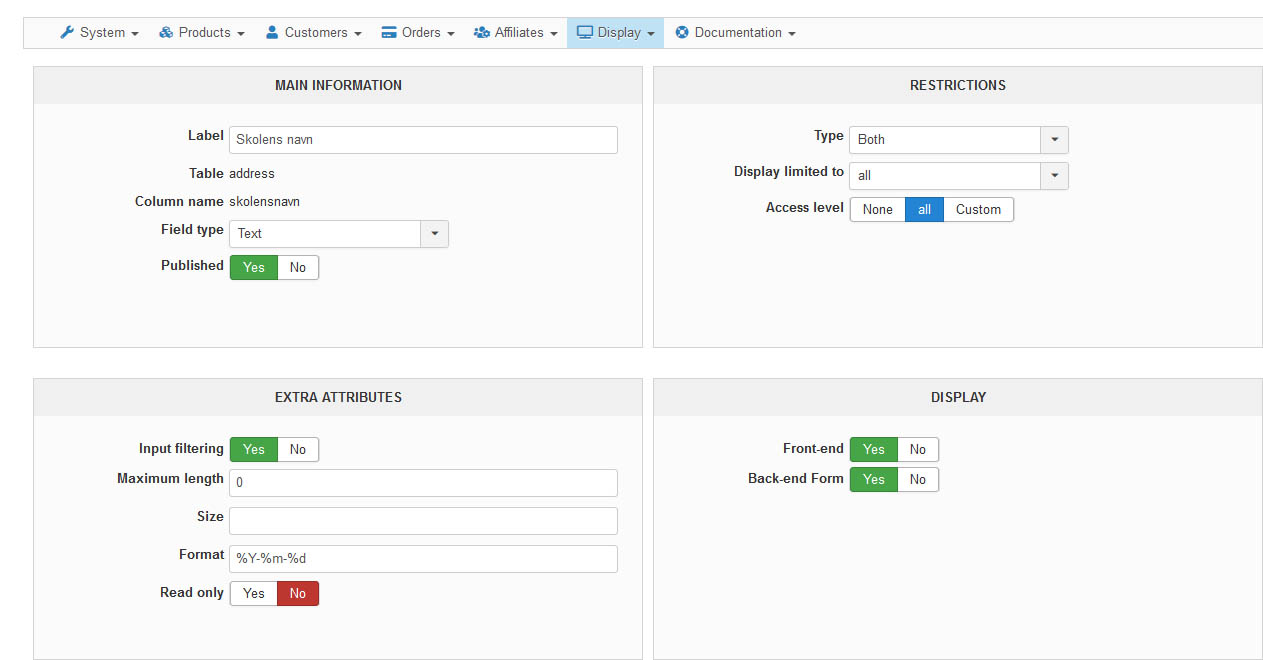
What do i do wrong here ?
I do not get the {VAR: } on the email fot the administrator notification
Code:
</p>
<p>
<span style="color:#1c8faf !important;font-weight:bold;">{TXT:Elev} :</span> {VAR:elevensnavn}
</p>
<p>
<span style="color:#1c8faf !important;font-weight:bold;">{TXT:Skolens navn} :</span> {VAR:skolensnavn}
</p>
<p>
<span style="color:#1c8faf !important;font-weight:bold;">{TXT:Klassetrin} :</span> {VAR:klassetrin}
</p>
What do i do wrong here ?
I do not get the {VAR: } on the email fot the administrator notification
Best regards
Brian
Please Log in or Create an account to join the conversation.
6 years 3 months ago - 6 years 3 months ago #321856
by Philip
Replied by Philip on topic addrees fields on the invoice
Hello,
As said in my previous message you have to use order type custom field, address type can't be used in email (and several other HikaShop pages).
Keep same idea, but with order type custom field.
Regards
As said in my previous message you have to use order type custom field, address type can't be used in email (and several other HikaShop pages).
Keep same idea, but with order type custom field.
Regards
Last edit: 6 years 3 months ago by Philip.
Please Log in or Create an account to join the conversation.
6 years 3 months ago #322095
by Nowweb
Best regards
Brian
Replied by Nowweb on topic addrees fields on the invoice
now i have tried as you told me.
It still not come with the ORDER_ADMIN_NOTIFICATION_SUBJECTe-mail. What do i do wrong?
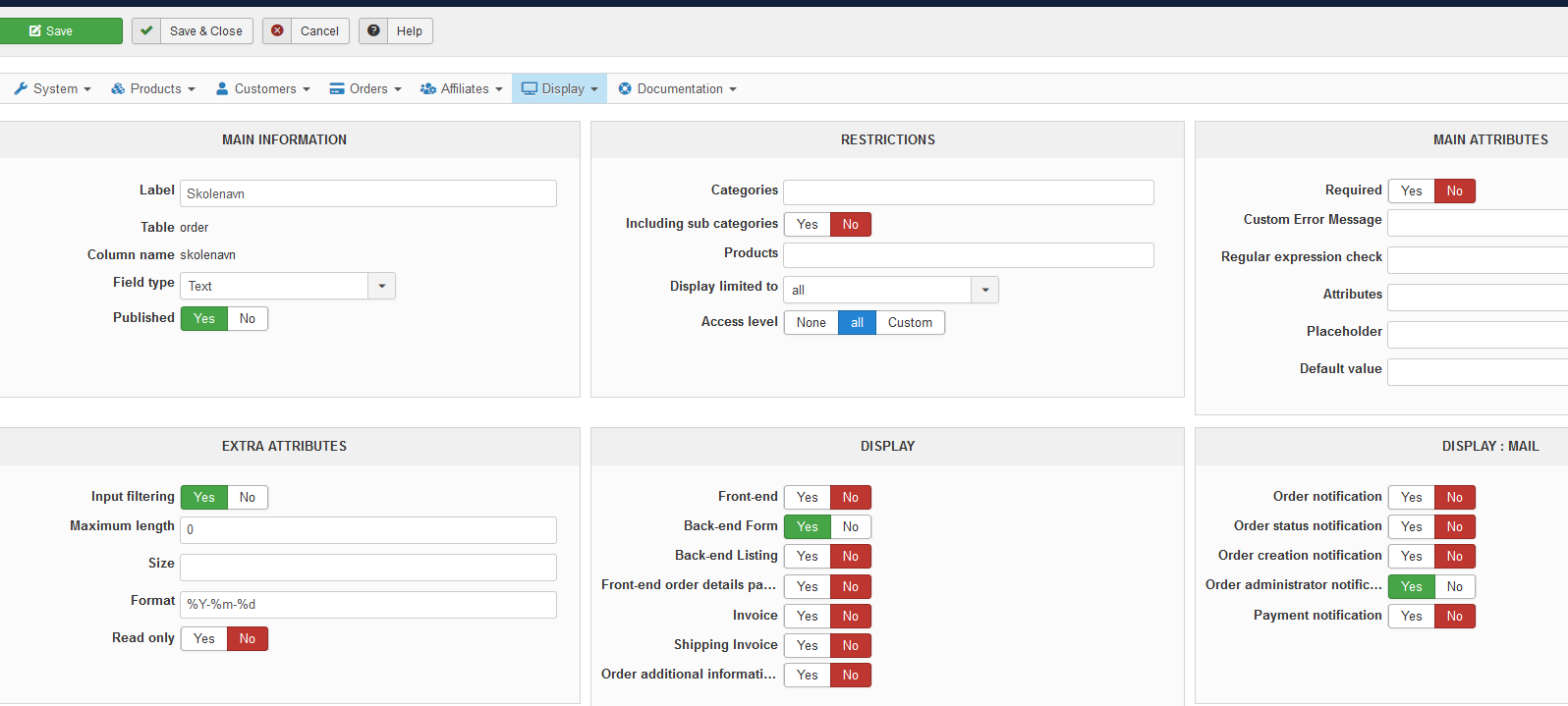

It still not come with the ORDER_ADMIN_NOTIFICATION_SUBJECTe-mail. What do i do wrong?
Best regards
Brian
Please Log in or Create an account to join the conversation.
6 years 3 months ago - 6 years 3 months ago #322097
by Philip
Replied by Philip on topic addrees fields on the invoice
Hello,
When you click on the "List of available tags" button, there are a part where you can see how to proceed for add your custom field in your email, see my screenshot :

Hope this will help you to achieved what you need
Regards
When you click on the "List of available tags" button, there are a part where you can see how to proceed for add your custom field in your email, see my screenshot :
Hope this will help you to achieved what you need
Regards
Last edit: 6 years 3 months ago by Philip.
Please Log in or Create an account to join the conversation.
6 years 3 months ago #322450
by Nowweb
Best regards
Brian
Replied by Nowweb on topic addrees fields on the invoice
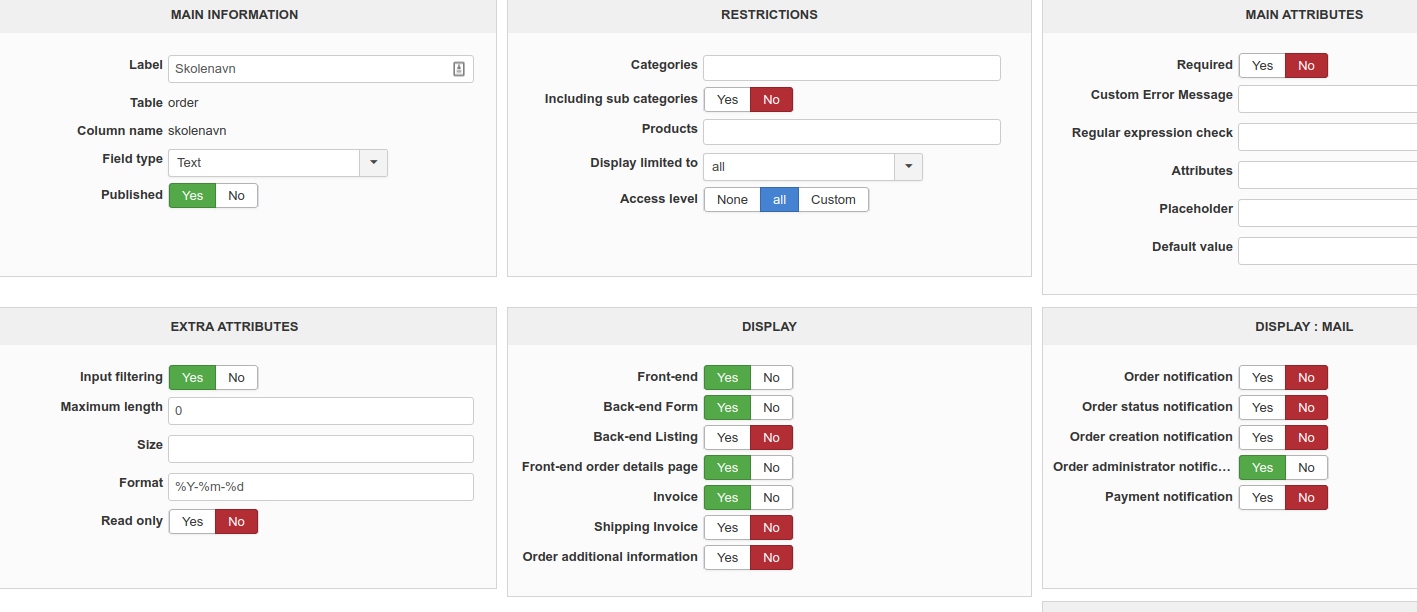
Now i have tryed to change the line to {LINEVAR:item.elevnavn} and {LINEVAR:product.elevnavn}
but it does not show on the administrator e-mail notification.
I have done your suggestions and followed the instructions on the website.
What am i missing or misunderstood.
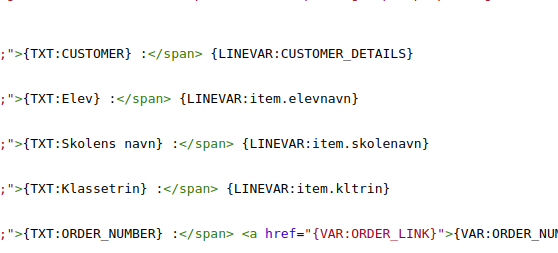

but it does not show on the administrator e-mail notification.
I have done your suggestions and followed the instructions on the website.
What am i missing or misunderstood.
Best regards
Brian
Please Log in or Create an account to join the conversation.
6 years 3 months ago - 6 years 3 months ago #322451
by Philip
Replied by Philip on topic addrees fields on the invoice
Hello,
As your custom field is an order type (or table), you have to follow to build your email tag, example :
{LINEVAR:TABLE.XXX}
=> In your case to follow your example :
{LINEVAR:order.skolenavn}
Regards
As your custom field is an order type (or table), you have to follow to build your email tag, example :
{LINEVAR:TABLE.XXX}
=> In your case to follow your example :
{LINEVAR:order.skolenavn}
Regards
Last edit: 6 years 3 months ago by Philip.
Please Log in or Create an account to join the conversation.
6 years 2 months ago #322871
by Nowweb
Best regards
Brian
Replied by Nowweb on topic addrees fields on the invoice
Hi
i still cant it to work
I have made the code like this
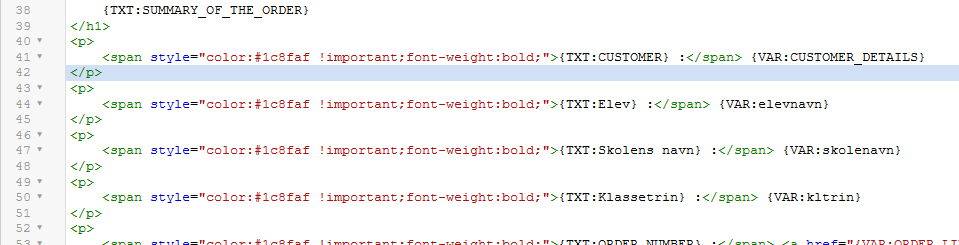
then i have made the custom fields like this

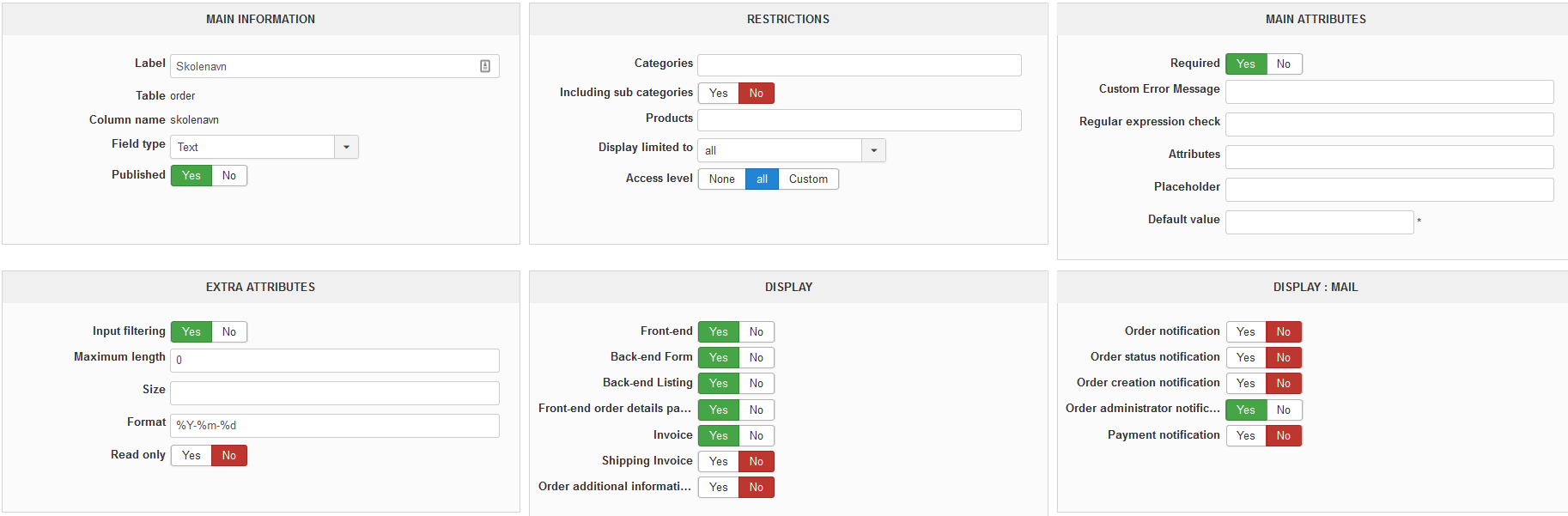
now the email notification look like this, the goal is the get the text from the buttom to the top.. but that do not work.
What can i do for move the text up??
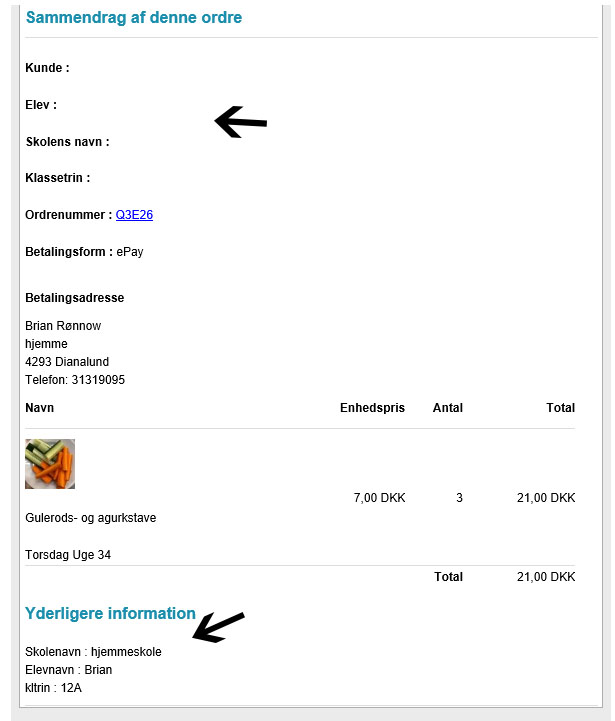
i still cant it to work
I have made the code like this
Code:
<p>
<span style="color:#1c8faf !important;font-weight:bold;">{TXT:Elev} :</span> {LINEVAR:order.elevnavn}
</p>
<p>
<span style="color:#1c8faf !important;font-weight:bold;">{TXT:Skolens navn} :</span> {LINEVAR:order.skolenavn}
</p>
<p>
<span style="color:#1c8faf !important;font-weight:bold;">{TXT:Klassetrin} :</span> {LINEVAR:order.kltrin}
</p>
now the email notification look like this, the goal is the get the text from the buttom to the top.. but that do not work.
What can i do for move the text up??
Best regards
Brian
Please Log in or Create an account to join the conversation.
6 years 2 months ago - 6 years 2 months ago #322874
by Philip
Replied by Philip on topic addrees fields on the invoice
Hello,
Among your elements there are something that I really don't understand, which is how you can have a "format" in Extra Attribute part, this type of parameter is normally only for date type custom filed...
we don't understand how it's possible, for some reason it looks like your custom field is "malformed", database manipulation, bug while you created it, so far we don't know...
The best move is to recreate your custom field, can you try this please ?
Regards
Among your elements there are something that I really don't understand, which is how you can have a "format" in Extra Attribute part, this type of parameter is normally only for date type custom filed...
we don't understand how it's possible, for some reason it looks like your custom field is "malformed", database manipulation, bug while you created it, so far we don't know...
The best move is to recreate your custom field, can you try this please ?
Regards
Last edit: 6 years 2 months ago by Philip.
Please Log in or Create an account to join the conversation.
6 years 2 months ago #322903
by Nowweb
Best regards
Brian
Replied by Nowweb on topic addrees fields on the invoice
Thanks you, now it i solved.
Best regards
Brian
The following user(s) said Thank You: Philip
Please Log in or Create an account to join the conversation.
Time to create page: 0.236 seconds