

- Posts: 89
- Thank you received: 2
Product with Options not on Customer Order
5 years 10 months ago - 5 years 10 months ago #325666
by Uriel
Product with Options not on Customer Order was created by Uriel
-- Joomla version -- : 3.9.22
-- PHP version -- : 7.2
-- Browser(s) name and version -- : Firefox
-- Error-message(debug-mod must be tuned on) -- : N/A
Good day People! I hope you are doing well?
I have a Product with Characteristics (Sizes and some of the sizes have a different Price)
The Same Product also has a Related Product (Which is another Product with Wood Types) that the client can choose from.
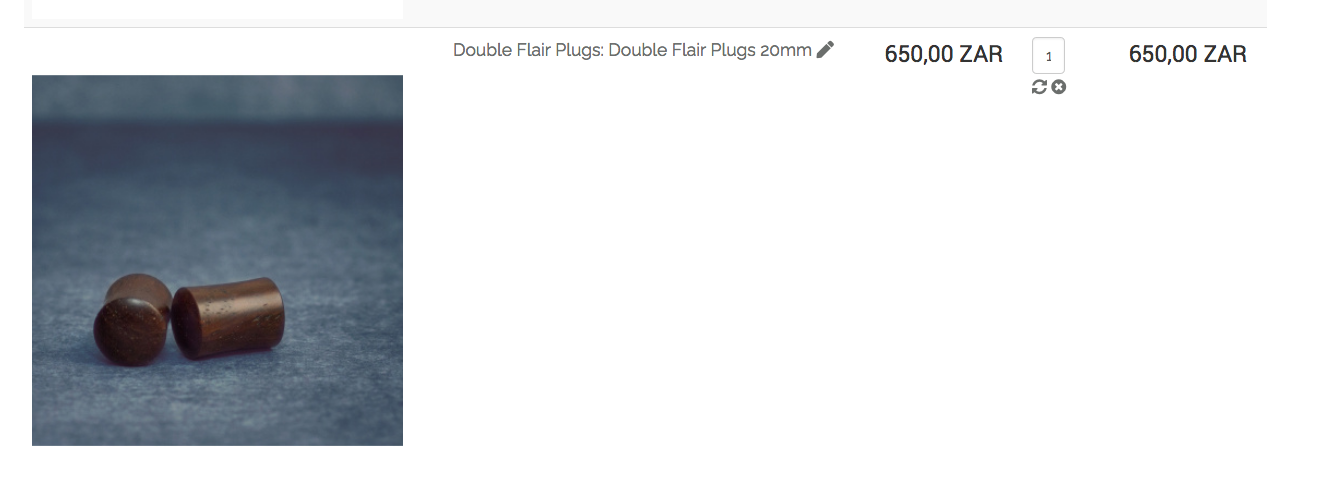
All is well up until Ordering - The Charactheristics of the Related Product chosen - is not displayed in the Order?
There is no way of telling what the client Selected...?
Please can you assist me to get this Functoional?
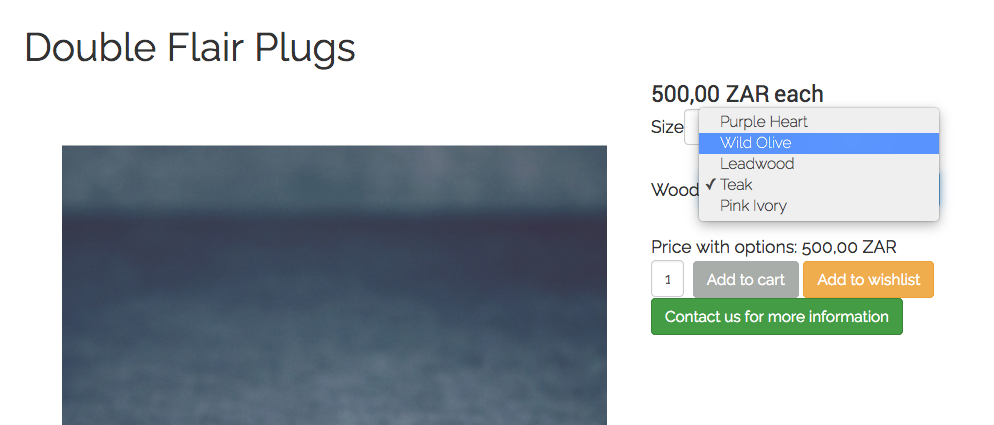
The Order :
-- PHP version -- : 7.2
-- Browser(s) name and version -- : Firefox
-- Error-message(debug-mod must be tuned on) -- : N/A
Good day People! I hope you are doing well?
I have a Product with Characteristics (Sizes and some of the sizes have a different Price)
The Same Product also has a Related Product (Which is another Product with Wood Types) that the client can choose from.
All is well up until Ordering - The Charactheristics of the Related Product chosen - is not displayed in the Order?
There is no way of telling what the client Selected...?
Please can you assist me to get this Functoional?
The Order :
Last edit: 5 years 10 months ago by Uriel.
Please Log in or Create an account to join the conversation.

5 years 10 months ago - 5 years 10 months ago #325673
by Philip
Replied by Philip on topic Product with Options not on Customer Order
Hello,
You have to add in your variant name information relative to Characteristics.
Have a look on my screenshot to better understand what I mean :

If your proceed like this, when your customer will select this configuration, to the regular product name will be added, here green 4.5.
Hope this will help you to get what you need.
Regards
You have to add in your variant name information relative to Characteristics.
Have a look on my screenshot to better understand what I mean :
If your proceed like this, when your customer will select this configuration, to the regular product name will be added, here green 4.5.
Hope this will help you to get what you need.
Regards
Last edit: 5 years 10 months ago by Philip.
Please Log in or Create an account to join the conversation.
5 years 10 months ago #325698
by Uriel
Replied by Uriel on topic Product with Options not on Customer Order
Hi Phillip, thank you for your reply...
Does this mean I have to combine each 25 Variants with 5 different wood types on all Products?
Thats 125 Variants on each Product?
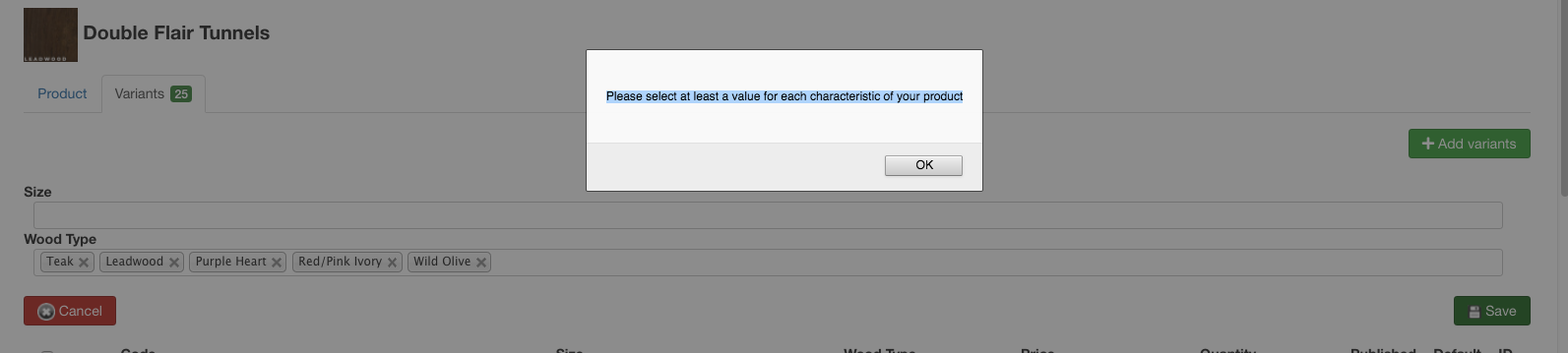
Surely there is a way to add Product Options a client can choose from that doesn't ammend the price but shows in the Order?
Does this mean I have to combine each 25 Variants with 5 different wood types on all Products?
Thats 125 Variants on each Product?
Surely there is a way to add Product Options a client can choose from that doesn't ammend the price but shows in the Order?
Please Log in or Create an account to join the conversation.
5 years 10 months ago - 5 years 10 months ago #325699
by Uriel
Replied by Uriel on topic Product with Options not on Customer Order
Furthermore I am also trying to achieve this by using Custom Fields as explained in your Tutorial here:
www.hikashop.com/support/documentation/4...shop-field-form.html
I believe I have set this up correctly and this is what displays on the Product in the Backend:
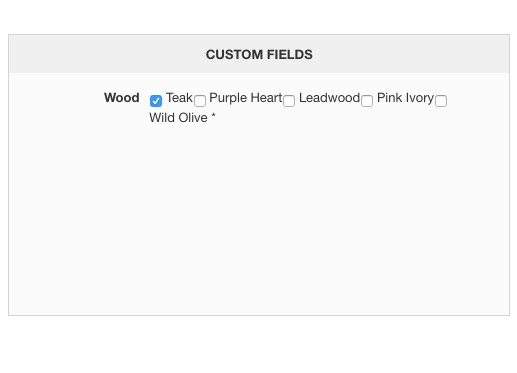
This is however what I get in the Front End:
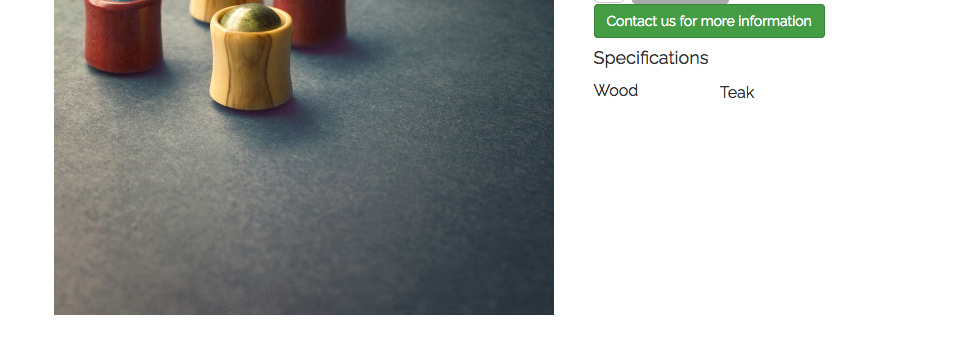
Why is it that this is not working?
Will using Custom Fields give me the values I need on the Order when a Client chooses an option?
I feel a little disapointed that Hikashop is not making these very simple things, simple!
I mean Products with Options is a very real everyday thing... Why is it not simple in Hikashop?
www.hikashop.com/support/documentation/4...shop-field-form.html
I believe I have set this up correctly and this is what displays on the Product in the Backend:
This is however what I get in the Front End:
Why is it that this is not working?
Will using Custom Fields give me the values I need on the Order when a Client chooses an option?
I feel a little disapointed that Hikashop is not making these very simple things, simple!
I mean Products with Options is a very real everyday thing... Why is it not simple in Hikashop?
Last edit: 5 years 10 months ago by Uriel.
Please Log in or Create an account to join the conversation.
5 years 10 months ago #325711
by Uriel
Replied by Uriel on topic Product with Options not on Customer Order
Don't stress about this Phillip - I had to buy the Business Version and that seems to be the only Version that is able to do this without issues.
Please Log in or Create an account to join the conversation.

5 years 10 months ago - 5 years 10 months ago #325715
by nicolas
Replied by nicolas on topic Product with Options not on Customer Order
Hi,
Well, there are several things here:
- You created a custom field of the table "product" which allows you to select one or several values in the backend product edition to be displayed on the product page, like here with the "specifications" area:
demo.hikashop.com/index.php/en/hikashop/.../with-specifications
As explained in the link you gave from the documentation, what you want to use is custom fields of the table "item":
demo.hikashop.com/index.php/en/hikashop/product-page/with-form
I can see that you have the Essential edition, which doesn't allow you to use custom fields of the table "item", so I suppose that's why you got confused with custom fields of the table "product".
- If you want to use a characteristic for the size and a characteristic for the wood type, you would indeed need to generate the combinations from both characteristic. So that would indeed be 25 * 5 combinations.
- However, I think that what you want is actually easy to do but you need to use the "options" feature of HikaShop:
demo.hikashop.com/index.php/en/hikashop/...ct-page/with-options
www.hikashop.com/support/documentation/i...ct-form.html#options
So what you can do is keep only the size characteristic in your Double Flair Plugs product. Then, create an unpublished category, and create a product "wood type" in that in that category, with the "wood type" characteristic added to it with the 58 variants you want.
Then, add that wood type product in the "options" setting of the Double Flair Plugs product and make sure that the "group options with product" setting is activated in the HikaShop configuration and it should work like you want.
PS: And no, doing this doesn't require you to upgrade to the Business edition.
Well, there are several things here:
- You created a custom field of the table "product" which allows you to select one or several values in the backend product edition to be displayed on the product page, like here with the "specifications" area:
demo.hikashop.com/index.php/en/hikashop/.../with-specifications
As explained in the link you gave from the documentation, what you want to use is custom fields of the table "item":
And that will allow you to have fields on the product details page on the frontend, like here:With the item custom fields (business edition only), you will be able to personalize the information you can gather from your customers when they order something on your store. The custom fields will appear on the products page where you will be able to ask the user information related to the product he wants to buy. It's useful when you sell personalized goods like for example a shirts selling website where the customers can upload an image to be printed on the shirts.
demo.hikashop.com/index.php/en/hikashop/product-page/with-form
I can see that you have the Essential edition, which doesn't allow you to use custom fields of the table "item", so I suppose that's why you got confused with custom fields of the table "product".
- If you want to use a characteristic for the size and a characteristic for the wood type, you would indeed need to generate the combinations from both characteristic. So that would indeed be 25 * 5 combinations.
- However, I think that what you want is actually easy to do but you need to use the "options" feature of HikaShop:
demo.hikashop.com/index.php/en/hikashop/...ct-page/with-options
www.hikashop.com/support/documentation/i...ct-form.html#options
So what you can do is keep only the size characteristic in your Double Flair Plugs product. Then, create an unpublished category, and create a product "wood type" in that in that category, with the "wood type" characteristic added to it with the 58 variants you want.
Then, add that wood type product in the "options" setting of the Double Flair Plugs product and make sure that the "group options with product" setting is activated in the HikaShop configuration and it should work like you want.
PS: And no, doing this doesn't require you to upgrade to the Business edition.
Last edit: 5 years 10 months ago by nicolas.
Please Log in or Create an account to join the conversation.
5 years 10 months ago #325751
by Uriel
Replied by Uriel on topic Product with Options not on Customer Order
Thank you Nicolas.
I hear what you are saying and the best way forward for me is to keep things tidy and not have a buch of variants like that per Product.
Only the Business edition allows me to add the "Item" Custom field and this is the only way to not have a mess on each product with an additional pile of variants...
I hear what you are saying and the best way forward for me is to keep things tidy and not have a buch of variants like that per Product.
Only the Business edition allows me to add the "Item" Custom field and this is the only way to not have a mess on each product with an additional pile of variants...
Please Log in or Create an account to join the conversation.
5 years 10 months ago #325761
by nicolas
Replied by nicolas on topic Product with Options not on Customer Order
Hi,
The options feature won't add a pile of variants to your products. You'll have only the variants of the size, and then the variants for the wood type.
Now the custom item fields is the best to reduce the variants since it doesn't use variants at all.
While this might be good for your need, it's not necessarily the best since you can't have different prices for different values of a custom item field, and you can't manage the stock per value of a custom item field, etc.
So each feature: characteristic, option, custom item field has its use based on what you need to do in your shop.
The options feature won't add a pile of variants to your products. You'll have only the variants of the size, and then the variants for the wood type.
Now the custom item fields is the best to reduce the variants since it doesn't use variants at all.
While this might be good for your need, it's not necessarily the best since you can't have different prices for different values of a custom item field, and you can't manage the stock per value of a custom item field, etc.
So each feature: characteristic, option, custom item field has its use based on what you need to do in your shop.
Please Log in or Create an account to join the conversation.
5 years 10 months ago - 5 years 10 months ago #325780
by Uriel
Replied by Uriel on topic Product with Options not on Customer Order
Hi Nicolas,
Thank you for your input.
I have paid for Hikashop Business and I find that the Product Custom Fields is doing what I wanted.
A last question on Styling of the Custom Field please...
There is an Asterisk when a Custom Field is Required and I can not find a way to CSS it....
It is not looking great :
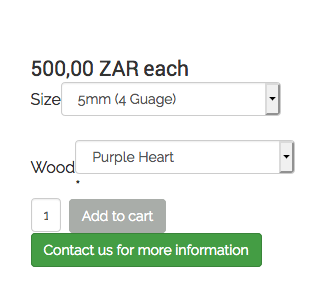
It states this in the Firefox Inspect Code :
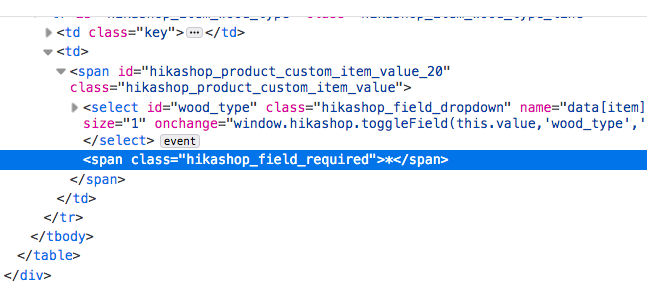
You can look on ANY product on my site and they all have them
How can I style this so it looks professional please?
I have tried :
.hikashop_field_required_label {
display: none !important ;
}
In my Template Overides but nothing seems to work
Thank you for your input.
I have paid for Hikashop Business and I find that the Product Custom Fields is doing what I wanted.
A last question on Styling of the Custom Field please...
There is an Asterisk when a Custom Field is Required and I can not find a way to CSS it....
It is not looking great :
It states this in the Firefox Inspect Code :
You can look on ANY product on my site and they all have them
How can I style this so it looks professional please?
I have tried :
.hikashop_field_required_label {
display: none !important ;
}
In my Template Overides but nothing seems to work
Last edit: 5 years 10 months ago by Uriel.
Please Log in or Create an account to join the conversation.
5 years 10 months ago #325783
by nicolas
Replied by nicolas on topic Product with Options not on Customer Order
Hi,
By default the star goes on the side of the select. However, your template has CSS styling on the select elements which forces the star on a second line.
You need to use the class hikashop_field_required and not hikashop_field_required_label in your CSS.
By default the star goes on the side of the select. However, your template has CSS styling on the select elements which forces the star on a second line.
You need to use the class hikashop_field_required and not hikashop_field_required_label in your CSS.
The following user(s) said Thank You: Uriel
Please Log in or Create an account to join the conversation.
5 years 10 months ago #325816
by Uriel
 That works! Thank you Nicolas
Replied by Uriel on topic Product with Options not on Customer Order
That works! Thank you Nicolas Please Log in or Create an account to join the conversation.
Time to create page: 0.227 seconds