
- Posts: 15
- Thank you received: 0
export order information
- jonathan.lee
-
 Topic Author
- Offline
Less
More
12 years 2 months ago - 12 years 2 months ago #165948
by jonathan.lee
export order information was created by jonathan.lee
I only need a few, such as order number, customer, date, product and quantity, order status, total, and order id (basically the same column as you see in the screenshot) so the CSV file will only export the information I need, instead of all the information.

Im having a hard time trying to modify the code in
C:\xampp\apps\joomla\htdocs\administrator\components\com_hikashop\views\order\tmpl\export.php
I end up getting order number, customer, date, order status, and total to work, but still missing order_product_name and order_product_quantity

This is what I have as of now
please give me some hint so I can finish it.
Thank you
Im having a hard time trying to modify the code in
C:\xampp\apps\joomla\htdocs\administrator\components\com_hikashop\views\order\tmpl\export.php
I end up getting order number, customer, date, order status, and total to work, but still missing order_product_name and order_product_quantity
This is what I have as of now
Code:
$new_row = array();
foreach ($row as $key => $value)
{
if(in_array($key,array('order_number','name','order_created','order_full_price','order_product_name')))
$new_row[$key] = $value;
}
if($maxProd && !empty($productFields)){
for($i=1;$i<=$maxProd;$i++)
{
$prod =& $row->products[$i-1];
foreach($productFields as $field)
{
if(in_array($field,array('order_product_quantity','order_product_name')))
$n = 'item_'.$i.'_'.$field;
$new_row->$n = @$prod->$field;
}
}
}
$export->writeLine($new_row);
please give me some hint so I can finish it.
Thank you
Last edit: 12 years 2 months ago by jonathan.lee.
Please Log in or Create an account to join the conversation.

12 years 2 months ago #165950
by Xavier
Replied by Xavier on topic export order information
Hi,
What about the mass actions ?
Via System > Mass action you will be able to export only the desired fields in the csv file
hikashop.com/support/support/documentati...massaction-form.html
What about the mass actions ?
Via System > Mass action you will be able to export only the desired fields in the csv file
hikashop.com/support/support/documentati...massaction-form.html
The following user(s) said Thank You: jonathan.lee
Please Log in or Create an account to join the conversation.
- jonathan.lee
-
Topic Author
- Offline
Less
More
- Posts: 15
- Thank you received: 0
12 years 2 months ago - 12 years 2 months ago #166323
by jonathan.lee
Replied by jonathan.lee on topic export order information
Thanks, that works too.
but the export button under the order tab is easier to use, just one click.
I end up fixing the code myself heres what I have :

but, is it possible to format the file so that instead of one columns for each product: item1_order_product_name, item2_order_product_name, item3_order_product_name......
I want item_order_product_name and item_order_product_quantity to list all the item in different row like this so its more excel friendly :
Thanks again
but the export button under the order tab is easier to use, just one click.
I end up fixing the code myself heres what I have :
Code:
foreach($this->orders as $row)
{
//format date
if(!empty($row->user_created)) $row->user_created = hikashop_getDate($row->user_created,'%Y-%m-%d %H:%M:%S');
if(!empty($row->order_created)) $row->order_created = hikashop_getDate($row->order_created,'%Y-%m-%d %H:%M:%S');
if(!empty($row->order_modified)) $row->order_modified = hikashop_getDate($row->order_modified,'%Y-%m-%d %H:%M:%S');
//info
$new_row = array();
foreach ($row as $key => $value)
{
if(in_array($key,array('order_number','name','order_created','order_full_price','order_product_name')))
$new_row[$key] = $value;
}
//info for item
if($maxProd && !empty($productFields))
{
for($i=1;$i<=$maxProd;$i++)
{
$prod =& $row->products[$i-1];
foreach($productFields as $field)
{
if(in_array($field,array('order_product_quantity','order_product_name')))
{
$new_row[] = @$prod->$field;
}
}
}
}
$export->writeLine($new_row);
but, is it possible to format the file so that instead of one columns for each product: item1_order_product_name, item2_order_product_name, item3_order_product_name......
I want item_order_product_name and item_order_product_quantity to list all the item in different row like this so its more excel friendly :
Thanks again
Last edit: 12 years 2 months ago by jonathan.lee.
Please Log in or Create an account to join the conversation.

12 years 2 months ago #166349
by nicolas
Replied by nicolas on topic export order information
Hi,
Nothing is impossible. However, it will require to completely change the algorithm of the export view file so that the foreach of the products encompass the whole line of the order. If you only know a bit of PHP, it's gonna be quite hard, but if you're a skilled PHP developer that shouldn't be a problem.
We've developed a CSV export override plugin for QuickBooks which actually generates a CSV with one product per order per line: www.hikashop.com/forum/2-general-talk-ab...tegration.html#93276
So maybe you want to inspire yourself from it, or even use the plugin and customize it to you needs instead of the export view file.
Nothing is impossible. However, it will require to completely change the algorithm of the export view file so that the foreach of the products encompass the whole line of the order. If you only know a bit of PHP, it's gonna be quite hard, but if you're a skilled PHP developer that shouldn't be a problem.
We've developed a CSV export override plugin for QuickBooks which actually generates a CSV with one product per order per line: www.hikashop.com/forum/2-general-talk-ab...tegration.html#93276
So maybe you want to inspire yourself from it, or even use the plugin and customize it to you needs instead of the export view file.
Please Log in or Create an account to join the conversation.
- jonathan.lee
-
Topic Author
- Offline
Less
More
- Posts: 15
- Thank you received: 0
12 years 2 months ago #166432
by jonathan.lee
Replied by jonathan.lee on topic export order information
Hi, I tried using the plugin you gave me.
but theres a glitch.
No matter what I changed there will always be a title "product" on row 1 column 1.

This is throwing my format off.
Heres the code for the plug in I been using
please help me with it.
Thanks
but theres a glitch.
No matter what I changed there will always be a title "product" on row 1 column 1.
This is throwing my format off.
Heres the code for the plug in I been using
Code:
<?php
/**
* @package HikaShop Vendor Zip Filter
* @version 1.0.0
* @author Obsidev S.A.R.L.
* @copyright (C) 2012-2013 OBSIDEV. All rights reserved.
* @license GNU/GPLv3 http://www.gnu.org/licenses/gpl-3.0.html
*/
defined('_JEXEC') or die('Restricted access');
?><?php
class plgHikaShopQuickbooksexport extends JPlugin {
/**
*
*/
function __construct(&$subject, $config) {
parent::__construct($subject, $config);
}
/**
*
*/
function onBeforeOrderExport(&$rows, &$obj) {
// Load options
//
$activated = false;
$pluginsClass = hikashop_get('class.plugins');
$plugin = $pluginsClass->getByName('hikashop','quickbooksexport');
if(!empty($plugin) ) {
if(!empty($plugin->params['opt_activated'])) {
$activated = ($plugin->params['opt_activated'] == '1');
}
}
if(!$activated)
return;
// Do export
//
$this->exportOrders($rows, $obj);
}
/**
*
*/
function onOrderExportList(&$exports) {
$exports[] = 'quickbooksexport';
}
/**
*
*/
function exportOrders(&$rows, &$obj) {
$fields = array(
'order_full_price',
'order_number',
'name',
'item_order_product_quantity',
'item_order_product_name',
'order_created'
);
$stripFields = array(
'order_full_price',
'order_number',
'name',
'item_order_product_quantity',
'item_order_product_name',
'order_created'
);
$newRows = array();
foreach($rows as $k => $order)
{
$data = new stdClass();
$data->products = array();
if(empty($order))
continue;
foreach($order as $k => $v)
{
if(in_array($k, $fields))
{
$data->$k = $v;
}
}
if(!empty($order->products)) {
foreach($order->products as $product)
{
foreach($product as $k => $v)
{
$ik = 'item_'.$k;
if(in_array($ik, $fields))
{
$data->$ik = $v;
}
if(in_array($ik, $stripFields))
{
$data->$ik = strip_tags($data->$ik);
}
}
$newRows[] = (PHP_VERSION < 5) ? $data : clone($data);
}
} else {
$newRows[] = $data;
}
unset($order);
$rows[$k] = null;
}
$rows = $newRows;
}
}
please help me with it.
Thanks
Please Log in or Create an account to join the conversation.

12 years 2 months ago #166465
by Jerome
Jerome - Obsidev.com
HikaMarket & HikaSerial developer / HikaShop core dev team.
Replied by Jerome on topic export order information
Hi,
Please re-download the plugin ( www.hikashop.com/en/component/updateme/c...uickbooksexport.html ) which has been updated.
Regards,
Please re-download the plugin ( www.hikashop.com/en/component/updateme/c...uickbooksexport.html ) which has been updated.
Regards,
Jerome - Obsidev.com
HikaMarket & HikaSerial developer / HikaShop core dev team.
The following user(s) said Thank You: jonathan.lee
Please Log in or Create an account to join the conversation.

10 years 11 months ago #218823
by river
Replied by river on topic export order information
Hikashop 2.5.0
Joomla 3.4.4
Latest exportplugin version
The export function works fine.
But I have one problem.
I have customers that have only ordered one time.
But some order get listed multiple times after one another, and some only one time.
Even tough they have only created one order.
se image:
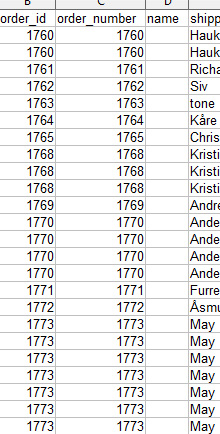
You can see the order number gets repeated.
I have not done any modification to the file.
Any solution ?
Joomla 3.4.4
Latest exportplugin version
The export function works fine.
But I have one problem.
I have customers that have only ordered one time.
But some order get listed multiple times after one another, and some only one time.
Even tough they have only created one order.
se image:
You can see the order number gets repeated.
I have not done any modification to the file.
Any solution ?
Please Log in or Create an account to join the conversation.
10 years 11 months ago #218828
by nicolas
Replied by nicolas on topic export order information
Hi,
If you're using the QuickBooks export plugin, that's normal.
The format of QuickBooks is that you get one row per product. So if you have an order with 3 products, you'll get 3 rows in your exported file.
If you're using the QuickBooks export plugin, that's normal.
The format of QuickBooks is that you get one row per product. So if you have an order with 3 products, you'll get 3 rows in your exported file.
Please Log in or Create an account to join the conversation.
Less
More
- Posts: 165
- Thank you received: 3
10 years 5 months ago - 10 years 5 months ago #237884
by jschroeder
Replied by jschroeder on topic export order information
Hi I am having the same issue as above I am using this plugin and it is adding a "products column" in the first column of the csv which is throwing the formatting off so everything is off one column to the left because of this.
Last edit: 10 years 5 months ago by jschroeder.
Please Log in or Create an account to join the conversation.
Less
More
- Posts: 165
- Thank you received: 3
10 years 5 months ago - 10 years 5 months ago #237892
by jschroeder
Replied by jschroeder on topic export order information
It would be really good for this to be fixed with first column not being "products" because I need this extension to be working by Monday. I have a presentation with a client to show them how to export orders and without this working I cannot do this.
Last edit: 10 years 5 months ago by jschroeder.
Please Log in or Create an account to join the conversation.
10 years 5 months ago #237914
by nicolas
Replied by nicolas on topic export order information
Hi,
Thank you for your feedback.
We've added a modification to fix that. Please redownload the plugin through the same link:
www.hikashop.com/en/component/updateme/c...uickbooksexport.html
and install it on your website. It will add the fix for that.
Thank you for your feedback.
We've added a modification to fix that. Please redownload the plugin through the same link:
www.hikashop.com/en/component/updateme/c...uickbooksexport.html
and install it on your website. It will add the fix for that.
Please Log in or Create an account to join the conversation.
Less
More
- Posts: 165
- Thank you received: 3
10 years 5 months ago #238137
by jschroeder
Replied by jschroeder on topic export order information
Hi, thank you so much that fixed it. However, I have another issue. It appears that when using this override for the products it does not show custom fields that are attached to the product which is a problem. How do I get it to export the custom fields to this?
Thanks,
Josh
Thanks,
Josh
Please Log in or Create an account to join the conversation.
Less
More
- Posts: 165
- Thank you received: 3
10 years 5 months ago #238138
by jschroeder
Replied by jschroeder on topic export order information
I forgot to mention when you use the normal export this is not an issue, however when you use the quickbooks override the custom fields do not show.
Please Log in or Create an account to join the conversation.
10 years 5 months ago #238146
by nicolas
Replied by nicolas on topic export order information
Hi,
What kind of custom fields are you talking about ?
Could you provide a screenshot of how you configured them ?
What kind of custom fields are you talking about ?
Could you provide a screenshot of how you configured them ?
Please Log in or Create an account to join the conversation.
Less
More
- Posts: 165
- Thank you received: 3
10 years 5 months ago - 10 years 5 months ago #238613
by jschroeder
Replied by jschroeder on topic export order information
Hi, I figured it out now, but I have another question. I attached my plugin files which are working fine.. I added to the plugin pretty substantially based off the clients needs.
I basically have 3 options, a shipping export, order export and export individual columns.
if ( $plugin->params == '1' || $plugin->params == '2'){
However, when I select if $plugin->params == '0' I would like it to remove duplicate rows with the same order id. The problem is the customer has a sheet that they export that only has shipping information and because of that they only want the following exported which works fine with my code. However, it still shows multiple rows with the same order id. They do not want multiple rows because they are updated the tracking information and status. Is there a way to strip the duplicate rows before the file export with the same order id and inforatmion when the person selects the parameter if $plugin->params == '0'
$order_id
$order_status
$tracking_number
$shipping_address_firstname
$shipping_address_lastname
$shipping_address_street
$shipping_address_post_code
$shipping_address_city
$shipping_address_telephone
$shipping_address_state
$shipping_address_country
Thanks,
Josh
I basically have 3 options, a shipping export, order export and export individual columns.
if ( $plugin->params == '1' || $plugin->params == '2'){
However, when I select if $plugin->params == '0' I would like it to remove duplicate rows with the same order id. The problem is the customer has a sheet that they export that only has shipping information and because of that they only want the following exported which works fine with my code. However, it still shows multiple rows with the same order id. They do not want multiple rows because they are updated the tracking information and status. Is there a way to strip the duplicate rows before the file export with the same order id and inforatmion when the person selects the parameter if $plugin->params == '0'
$order_id
$order_status
$tracking_number
$shipping_address_firstname
$shipping_address_lastname
$shipping_address_street
$shipping_address_post_code
$shipping_address_city
$shipping_address_telephone
$shipping_address_state
$shipping_address_country
Thanks,
Josh
Last edit: 10 years 5 months ago by jschroeder. Reason: added extra code by accident
Please Log in or Create an account to join the conversation.
10 years 5 months ago #238616
by nicolas
Replied by nicolas on topic export order information
Hi,
Turn off the plugin and you'll get one row per order.
And if you want to choose which fields to included or not, I would recommend to actually use a mass action with an action "CSV export" on the order data. It will also allow you to export a CSV of the orders with one row per order and to choose which columns to export.
Turn off the plugin and you'll get one row per order.
And if you want to choose which fields to included or not, I would recommend to actually use a mass action with an action "CSV export" on the order data. It will also allow you to export a CSV of the orders with one row per order and to choose which columns to export.
Please Log in or Create an account to join the conversation.
Less
More
- Posts: 165
- Thank you received: 3
10 years 5 months ago - 10 years 5 months ago #238728
by jschroeder
Hi thank you for the response. However, that solution is not going to work. I am aware that the normal export does 1 row per order. That is essentially what I am asking. With the 3rd option of the parameter set to zero it can turn the plugin code off or ignore this code. Then, how would I modify the existing code in the main export sheet inside orders>>export to only select with columns to use above or how can i add the export code to the quickbooks plugin i attached to do this?
I cannot use mass actions because I do not want the clients to have access to this section. There are too many people processing orders on this site and it leaves to much room for error or messing up the site if I give them access to the mass actions section. Also, you cannot select a date range with the date picker like you can when exporting orders in the order section. In the mass action section there is no date range selectors for exporting csv's for orders which is a requirement for this client.
The solution has to be an all in one solution that does as I wanted above that is why i was asking how to do it all in the plugin alone and that way i do not have to override core files. Also, all the parameters for the export have to be in 1 spot like they are now in the plugin. I have everything working correctly with the files I attached previously other than exporting the shipping fields with 1 row per order which I listed above. I get that the quickbook plugin overrides and causes the 1 product per row, but there has to be a way to add the code into the plugin when I select the shipping options which is option 0 in my parameters to look at the non quickbooks code and then have the ability for it to only export the fields I listed above with 1 row per order.
Again this is a very large client and they were very specific on how they needed it to work and export. Can you give me any guidance on how I would go about this based off of my current code? Thanks for the help.
Replied by jschroeder on topic export order information
nicolas wrote: Hi,
Turn off the plugin and you'll get one row per order.
And if you want to choose which fields to included or not, I would recommend to actually use a mass action with an action "CSV export" on the order data. It will also allow you to export a CSV of the orders with one row per order and to choose which columns to export.
Hi thank you for the response. However, that solution is not going to work. I am aware that the normal export does 1 row per order. That is essentially what I am asking. With the 3rd option of the parameter set to zero it can turn the plugin code off or ignore this code. Then, how would I modify the existing code in the main export sheet inside orders>>export to only select with columns to use above or how can i add the export code to the quickbooks plugin i attached to do this?
I cannot use mass actions because I do not want the clients to have access to this section. There are too many people processing orders on this site and it leaves to much room for error or messing up the site if I give them access to the mass actions section. Also, you cannot select a date range with the date picker like you can when exporting orders in the order section. In the mass action section there is no date range selectors for exporting csv's for orders which is a requirement for this client.
The solution has to be an all in one solution that does as I wanted above that is why i was asking how to do it all in the plugin alone and that way i do not have to override core files. Also, all the parameters for the export have to be in 1 spot like they are now in the plugin. I have everything working correctly with the files I attached previously other than exporting the shipping fields with 1 row per order which I listed above. I get that the quickbook plugin overrides and causes the 1 product per row, but there has to be a way to add the code into the plugin when I select the shipping options which is option 0 in my parameters to look at the non quickbooks code and then have the ability for it to only export the fields I listed above with 1 row per order.
Again this is a very large client and they were very specific on how they needed it to work and export. Can you give me any guidance on how I would go about this based off of my current code? Thanks for the help.
Last edit: 10 years 5 months ago by jschroeder.
Please Log in or Create an account to join the conversation.
10 years 5 months ago #238758
by nicolas
Replied by nicolas on topic export order information
Hi,
It's this code in the plugin which generates the extra rows:
so simply change the first if to check on your new setting and it will do what you want.
It's this code in the plugin which generates the extra rows:
Code:
if(!empty($order->products)) {
foreach($order->products as $product) {
foreach($product as $k => $v) {
$ik = 'item_'.$k;
if(in_array($ik, $fields)) {
$data->$ik = $v;
}
if(in_array($ik, $stripFields)) {
$data->$ik = strip_tags($data->$ik);
}
}
// Special support
//
$data->item_tax_code = 'S4';
if(empty($data->item_order_product_tax))
$data->item_tax_code = 'Z';
$newRows[] = (!HIKASHOP_PHP5) ? $data : clone($data);
}
} else {
Please Log in or Create an account to join the conversation.
Less
More
- Posts: 45
- Thank you received: 0
10 years 5 months ago #239696
by Squashtoppertje
Replied by Squashtoppertje on topic export order information
Hi,
I believe the Quickbooksexport plugin would just do what I need. Only I do not want to manually start the export. Is there a way to combine this with the mass actions? Or maybe by using cron-function?
Problem with the mass actions is that in the export of the orders, the order-rows are displayed in columns and I need it in rows like the Quickbooksexport.
Thanks!
I believe the Quickbooksexport plugin would just do what I need. Only I do not want to manually start the export. Is there a way to combine this with the mass actions? Or maybe by using cron-function?
Problem with the mass actions is that in the export of the orders, the order-rows are displayed in columns and I need it in rows like the Quickbooksexport.
Thanks!
Please Log in or Create an account to join the conversation.
10 years 5 months ago #239707
by nicolas
Replied by nicolas on topic export order information
Hi,
There is no option to do that automatically for now. We have on our todo list the feature of exporting as order-rows like in that plugin but we didn't had time yet to work on it.
So for now, the simplest would be to modify the quickbooks export plugin to implement the onHikashopCronTrigger trigger:
www.hikashop.com/support/documentation/6...nHikashopCronTrigger
and in it, load the orders you want and call and do the generation of the CSV yourself.
If you need a developer to work on that four you, you can contact our partners:
www.hikashop.com/home/our-partners.html
There is no option to do that automatically for now. We have on our todo list the feature of exporting as order-rows like in that plugin but we didn't had time yet to work on it.
So for now, the simplest would be to modify the quickbooks export plugin to implement the onHikashopCronTrigger trigger:
www.hikashop.com/support/documentation/6...nHikashopCronTrigger
and in it, load the orders you want and call and do the generation of the CSV yourself.
If you need a developer to work on that four you, you can contact our partners:
www.hikashop.com/home/our-partners.html
Please Log in or Create an account to join the conversation.
Time to create page: 0.523 seconds