
- Posts: 303
- Thank you received: 18
Google Analytics E-Commerce Referrals not Logged Properly
- mojooutdoors-holden
-
 Topic Author
- Offline
Less
More
6 years 8 months ago #315361
by mojooutdoors-holden
-- HikaShop version -- : 4.2.1
-- Joomla version -- : 3.9.14
-- PHP version -- : 7.3
Not sure if this is on the Hikashop side or GA side.
Description of problem:
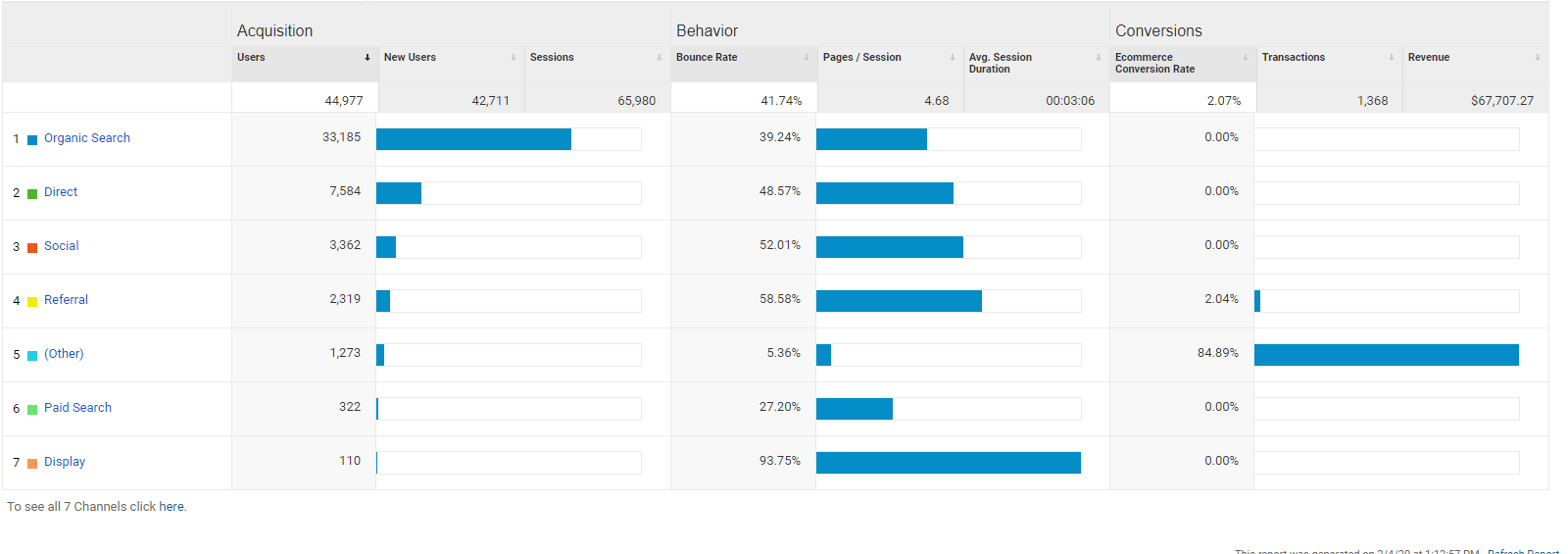
Google analytics reporting lumps all sales on website into the "Other" category. Upon further inspection, 99% of these are logged as "(not set)", implying there's either a lot of users using ad blocker, something is breaking in the direct call or there's some other thing going on with our checkout or GA that's preventing the correct logging.
Screenshot of data logged in GA:
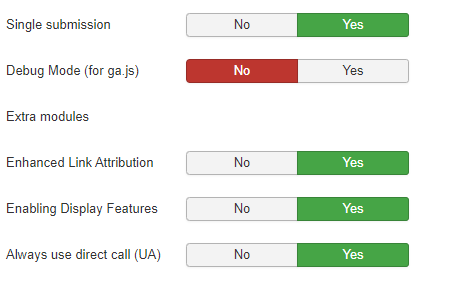
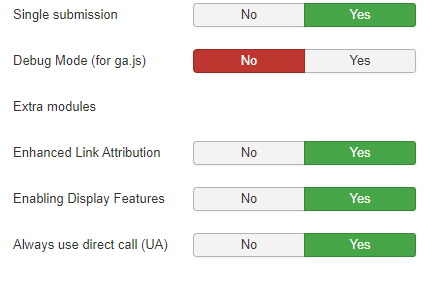
Screenshot of Hikashop GA plugin:
Most other statistics on referral traffic to the site are being tracked properly. The only delta seems to be the actual transactions. E.g., our facebook pixel tracks all traffic from watching ads or viewing our facebook page that get funneled to our website and converts to a sale. This accounts for a large number of sales on our website. By this logic, we should have a large percentage of transactions from Facebook. However, we do not.
Any help with this issue or things i should check to T/S would be appreciated.
Thanks!
Holden
-- Joomla version -- : 3.9.14
-- PHP version -- : 7.3
Not sure if this is on the Hikashop side or GA side.
Description of problem:
Google analytics reporting lumps all sales on website into the "Other" category. Upon further inspection, 99% of these are logged as "(not set)", implying there's either a lot of users using ad blocker, something is breaking in the direct call or there's some other thing going on with our checkout or GA that's preventing the correct logging.
Screenshot of data logged in GA:
Screenshot of Hikashop GA plugin:
Most other statistics on referral traffic to the site are being tracked properly. The only delta seems to be the actual transactions. E.g., our facebook pixel tracks all traffic from watching ads or viewing our facebook page that get funneled to our website and converts to a sale. This accounts for a large number of sales on our website. By this logic, we should have a large percentage of transactions from Facebook. However, we do not.
Any help with this issue or things i should check to T/S would be appreciated.
Thanks!
Holden
Please Log in or Create an account to join the conversation.

6 years 8 months ago #315368
by nicolas
Replied by nicolas on topic Google Analytics E-Commerce Referrals not Logged Properly
Hi,
We actually fixed that with the 4.2.2. So I would recommend updating your HikaShop.
We actually fixed that with the 4.2.2. So I would recommend updating your HikaShop.
Please Log in or Create an account to join the conversation.
- mojooutdoors-holden
-
Topic Author
- Offline
Less
More
- Posts: 303
- Thank you received: 18
6 years 8 months ago #315573
by mojooutdoors-holden
Replied by mojooutdoors-holden on topic Google Analytics E-Commerce Referrals not Logged Properly
Hi Nicolas,
It seems like this is still occurring after update to 4.2.2. From my understanding, UTM params are not needed for direct or organic search and only necessary for ads/social/email campaigns. However, (not set) implies something is not being passed to GA properly.
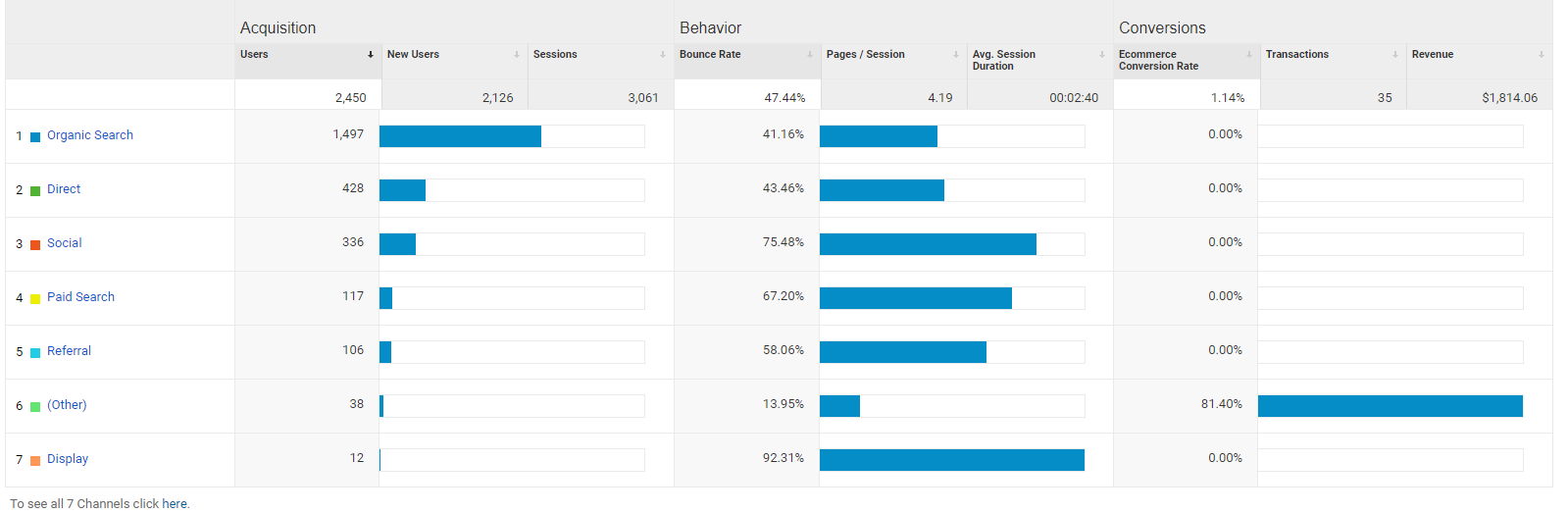
Any thoughts or suggestions to further T/S?
Thanks!
Holden
It seems like this is still occurring after update to 4.2.2. From my understanding, UTM params are not needed for direct or organic search and only necessary for ads/social/email campaigns. However, (not set) implies something is not being passed to GA properly.
Any thoughts or suggestions to further T/S?
Thanks!
Holden
Please Log in or Create an account to join the conversation.
- mojooutdoors-holden
-
Topic Author
- Offline
Less
More
- Posts: 303
- Thank you received: 18
6 years 8 months ago - 6 years 8 months ago #315583
by mojooutdoors-holden
Replied by mojooutdoors-holden on topic Google Analytics E-Commerce Referrals not Logged Properly
Also, here's what shows in the most recent order in the hikashop_order table in the order_payment_params column:
Not sure what to make of it. As i drilled down further, it appears that most of the revenue is coming from a (not set) hostname, which doesn't seem to be the ideal case. 40 of the 42 transactions over the last 5 days shows to have a hostname of (not set) which implies something isn't properly sent/logged in hikashop?
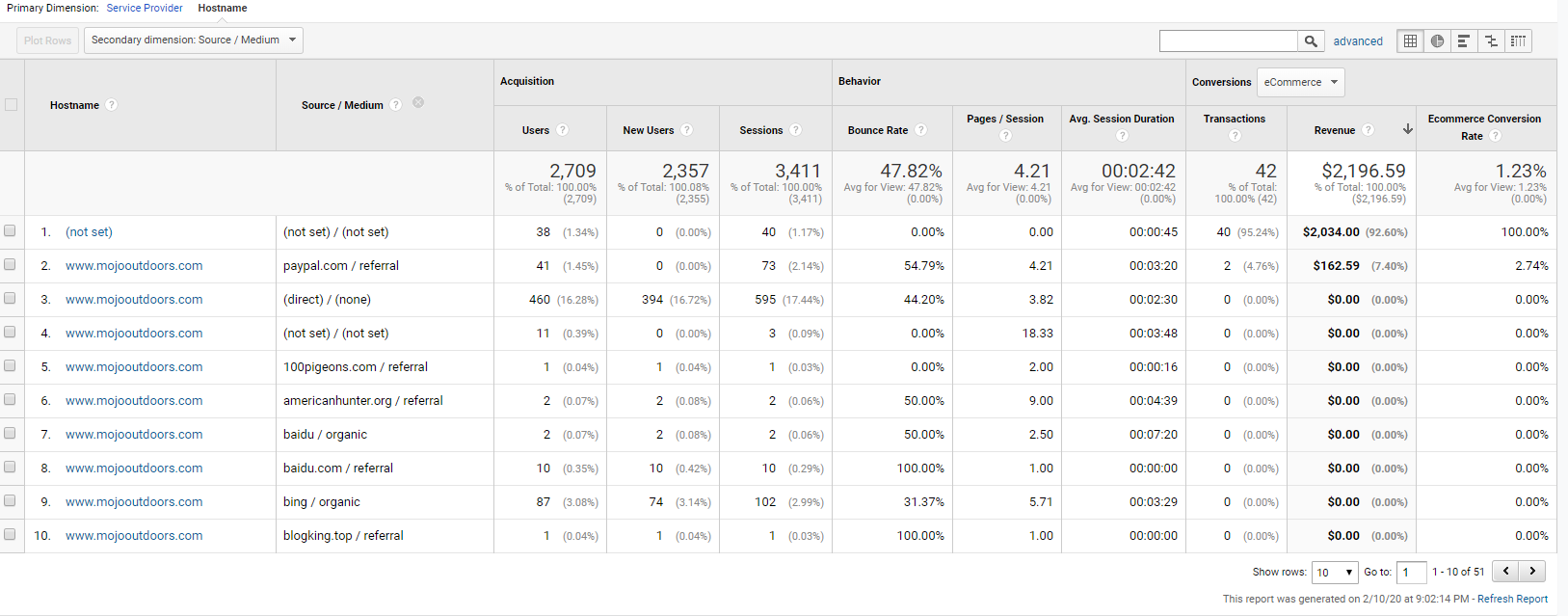
Also, it's a huge concern, but the other two transactions (2/42) are showing up with referral of paypal.com and not the actual referrer.
I can provide backend credentials or logs if that helps.
Thanks,
Holden
Code:
O:8:"stdClass":1:{s:12:"analytics_ga";s:44:"{"uuid":"484801840.1581374906","ul":"en-us"}";}
Not sure what to make of it. As i drilled down further, it appears that most of the revenue is coming from a (not set) hostname, which doesn't seem to be the ideal case. 40 of the 42 transactions over the last 5 days shows to have a hostname of (not set) which implies something isn't properly sent/logged in hikashop?
Also, it's a huge concern, but the other two transactions (2/42) are showing up with referral of paypal.com and not the actual referrer.
I can provide backend credentials or logs if that helps.
Thanks,
Holden
Last edit: 6 years 8 months ago by mojooutdoors-holden.
Please Log in or Create an account to join the conversation.
6 years 8 months ago #315588
by nicolas
Replied by nicolas on topic Google Analytics E-Commerce Referrals not Logged Properly
Hi,
The GA plugin in HikaShop simply sends the data in the utm parameters of the URL you use to access the page to GA when it notifies it of a payment.
So if you don't have utm parameters in the URLs it's normal it doesn't find them and cannot provide them to GA.
I don't know of any other method to send the utm data to GA.
I don't understand what you mean.UTM params are not needed for direct or organic search and only necessary for ads/social/email campaigns
The GA plugin in HikaShop simply sends the data in the utm parameters of the URL you use to access the page to GA when it notifies it of a payment.
So if you don't have utm parameters in the URLs it's normal it doesn't find them and cannot provide them to GA.
I don't know of any other method to send the utm data to GA.
Please Log in or Create an account to join the conversation.
- mojooutdoors-holden
-
Topic Author
- Offline
Less
More
- Posts: 303
- Thank you received: 18
6 years 8 months ago - 6 years 8 months ago #315613
by mojooutdoors-holden
Replied by mojooutdoors-holden on topic Google Analytics E-Commerce Referrals not Logged Properly
Hi Nicolas,
If user enters website from search engine, traffic should show up as organic. If a user types the URL in the browser to access the website, it should show up as direct. Referrals are the only ones that should require UTM parameters.
(not set) implies that something is breaking the logic which determines if organic or direct. I've made a test purchase with a designated referral with UTM params and that works perfectly. It's very odd that most of the transactions show as (not set). It's just the direct/organic conversions that seem to be breaking. This sounds like something is breaking between the time the user arrives on the site and finishes checkout.
Does this make more sense? Maybe you can test on your end direct vs organic.
If user enters website from search engine, traffic should show up as organic. If a user types the URL in the browser to access the website, it should show up as direct. Referrals are the only ones that should require UTM parameters.
(not set) implies that something is breaking the logic which determines if organic or direct. I've made a test purchase with a designated referral with UTM params and that works perfectly. It's very odd that most of the transactions show as (not set). It's just the direct/organic conversions that seem to be breaking. This sounds like something is breaking between the time the user arrives on the site and finishes checkout.
Does this make more sense? Maybe you can test on your end direct vs organic.
Last edit: 6 years 8 months ago by mojooutdoors-holden.
Please Log in or Create an account to join the conversation.
- mojooutdoors-holden
-
Topic Author
- Offline
Less
More
- Posts: 303
- Thank you received: 18
6 years 8 months ago - 6 years 8 months ago #315615
by mojooutdoors-holden
Replied by mojooutdoors-holden on topic Google Analytics E-Commerce Referrals not Logged Properly
Looks like it's breaking in the after_end view for some of the cases. Majority still shows as (not set) for landing page.
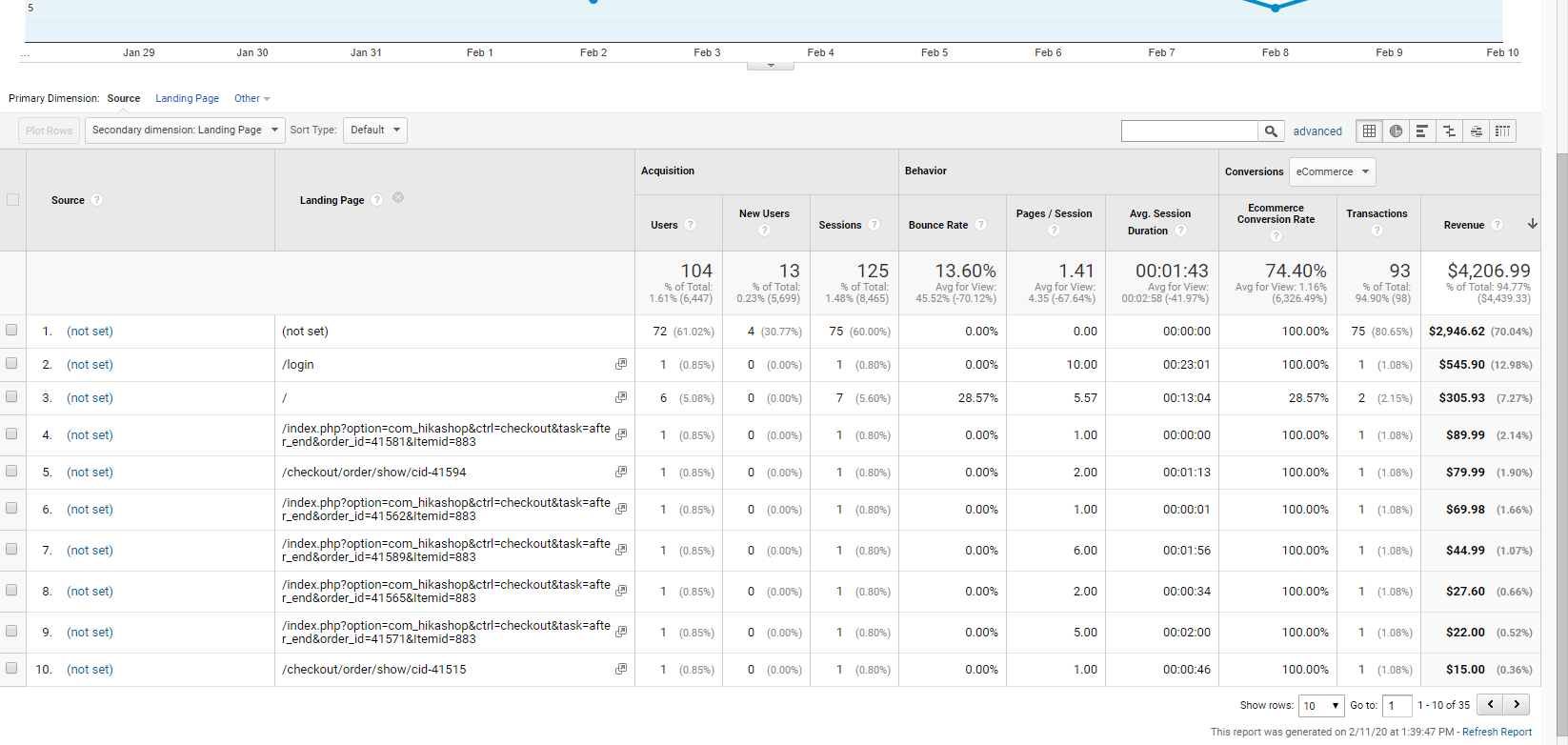
However, that still doesn't explain why typing the URL in the browser and purchasing a product doesn't result in a source = "Direct" or if a clicked google search result and purchase a product does not result in source = "organic". I can provide backend if necessary. It's almost like the cookies are being broken somewhere along the way?
If you would like to take a look at the checkout to see if there's anything obvious: www.mojooutdoors.com/new-products/mojo-pocket-pick-stick and just add to cart and go through checkout.
The order_params appear to be populating, but i only see
However, that still doesn't explain why typing the URL in the browser and purchasing a product doesn't result in a source = "Direct" or if a clicked google search result and purchase a product does not result in source = "organic". I can provide backend if necessary. It's almost like the cookies are being broken somewhere along the way?
If you would like to take a look at the checkout to see if there's anything obvious: www.mojooutdoors.com/new-products/mojo-pocket-pick-stick and just add to cart and go through checkout.
The order_params appear to be populating, but i only see
Code:
<input type="hidden" id="hikashop_checkout_analytics_field_ga" name="checkout[analytics][ga]" value="{"uuid":"1339775496.1544826346","ul":"en-us"}">
Last edit: 6 years 8 months ago by mojooutdoors-holden.
Please Log in or Create an account to join the conversation.
- mojooutdoors-holden
-
Topic Author
- Offline
Less
More
- Posts: 303
- Thank you received: 18
6 years 8 months ago #315616
by mojooutdoors-holden
Replied by mojooutdoors-holden on topic Google Analytics E-Commerce Referrals not Logged Properly
After some further investigation, i noticed my current GA plugin wasn't reporting the campaign, source, etc. properly. I unpublished the current one (Google Analytics Pro by Peter Bui) and reverted back to the Nice google analytics plugin.
After using the google analytics debugger, the campaign, source, etc. seems to be showing properly. However, after this change, the order_params are now missing (traded one problem for another).
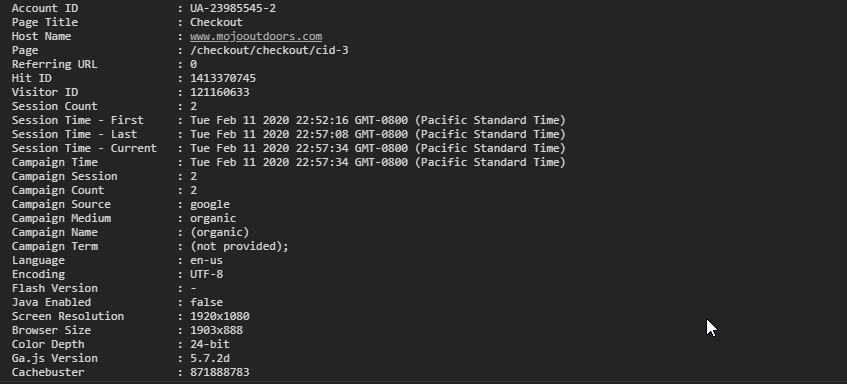

While this did not fix the problem, it at least shows the behavior can be changed through the GA plugin. Maybe there's some conflict in my Hikashop GA plugin settings? I'm using universal with the following settings:
GA analytics Pro by Peter Bui settings:
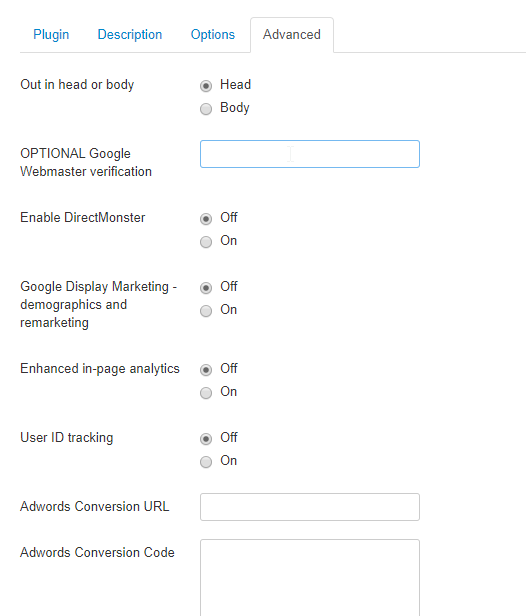
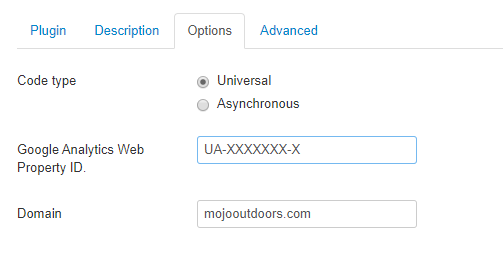
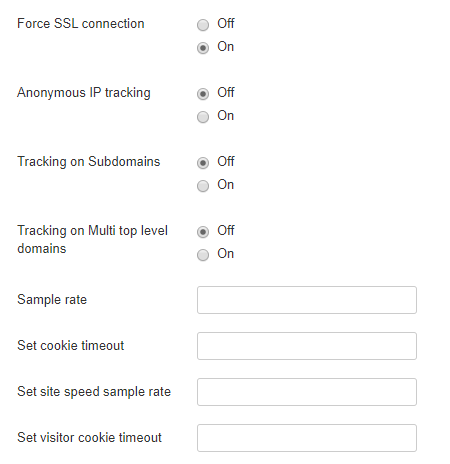
Please let me know if you need any further data.
After using the google analytics debugger, the campaign, source, etc. seems to be showing properly. However, after this change, the order_params are now missing (traded one problem for another).
While this did not fix the problem, it at least shows the behavior can be changed through the GA plugin. Maybe there's some conflict in my Hikashop GA plugin settings? I'm using universal with the following settings:
GA analytics Pro by Peter Bui settings:
Please let me know if you need any further data.
Please Log in or Create an account to join the conversation.
6 years 8 months ago #315619
by nicolas
Replied by nicolas on topic Google Analytics E-Commerce Referrals not Logged Properly
Hi,
Since you have the direct call forced, after the payment a cURL request is sent to GA by the plugin with the information of the order along with the utm parameters it found in the order if any.
In that case, the link between the customer and that cURL request is lost since GA cannot link the user in his browser with his cookies and the cURL request on the server side.
To b able to keep the link between the too, the only solution I know of is to turn off the direct call so that a javascript code is run on the customer's browser after he comes back on your website on the thank you page.
That's actually done by plugin but it requires that you use the default thank you page of Hikashop and that the customer actually goes back on the website after the payment which might not be the case. And it won't work either for orders confirmed from the backend. So it's far from perfect. And I don't know any ways to be able to pass the information of the user to the direct call made with curl on the server side.
I searched a lot online but couldn't come up with any other solution.
Since you have the direct call forced, after the payment a cURL request is sent to GA by the plugin with the information of the order along with the utm parameters it found in the order if any.
In that case, the link between the customer and that cURL request is lost since GA cannot link the user in his browser with his cookies and the cURL request on the server side.
To b able to keep the link between the too, the only solution I know of is to turn off the direct call so that a javascript code is run on the customer's browser after he comes back on your website on the thank you page.
That's actually done by plugin but it requires that you use the default thank you page of Hikashop and that the customer actually goes back on the website after the payment which might not be the case. And it won't work either for orders confirmed from the backend. So it's far from perfect. And I don't know any ways to be able to pass the information of the user to the direct call made with curl on the server side.
I searched a lot online but couldn't come up with any other solution.
Please Log in or Create an account to join the conversation.
- mojooutdoors-holden
-
Topic Author
- Offline
Less
More
- Posts: 303
- Thank you received: 18
6 years 8 months ago - 6 years 8 months ago #315633
by mojooutdoors-holden
Replied by mojooutdoors-holden on topic Google Analytics E-Commerce Referrals not Logged Properly
Thanks for the detailed analysis!
Are other hikashop users on 4.2.2 also affected by this issue? Seems like pretty standard settings and would imply that everyone else would be having this issue.
Or is this inherit to the payment plugin i'm using? I.e., if i turn off the direct call and use a different paypal method that doesn't force the user to redirect to the paypal website (maybe Paypal express checkout that comes up in modal). This way the user stays on our website.
UPDATE: I tried turning off direct call with no luck, but starting tracking the GA params between checkout steps. On the very first step, it looks like there's a missing parentheses and quotation mark in the hikashop_analytics.php file. I found the issue with the quotation mark:
where
should be changed to:
but this change seems to break other pieces of the code. The GA call doesn't work at all when this is corrected. However, without the quotation mark the GA call is made but nothing is transmitted except for:
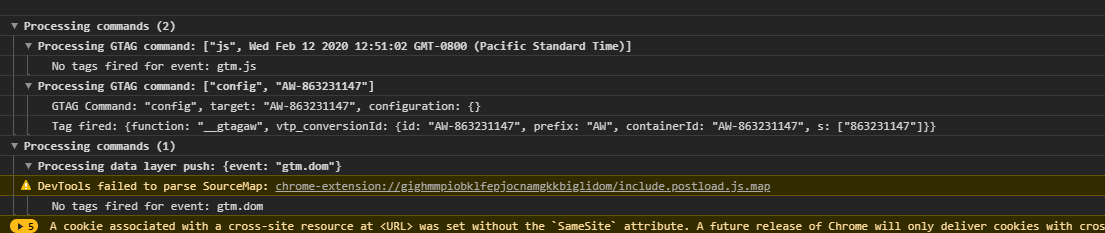
and this is still showing up on the checkout pages:
Uncaught SyntaxError: missing ) after argument list
Something seems to be broken somewhere on the hikashop GA side? I'll continue to update if i find anything else.
Are other hikashop users on 4.2.2 also affected by this issue? Seems like pretty standard settings and would imply that everyone else would be having this issue.
Or is this inherit to the payment plugin i'm using? I.e., if i turn off the direct call and use a different paypal method that doesn't force the user to redirect to the paypal website (maybe Paypal express checkout that comes up in modal). This way the user stays on our website.
UPDATE: I tried turning off direct call with no luck, but starting tracking the GA params between checkout steps. On the very first step, it looks like there's a missing parentheses and quotation mark in the hikashop_analytics.php file. I found the issue with the quotation mark:
Code:
ga("ecommerce:addTransaction", {
"id": "' . $order->order_id.'",
"affiliation": "' . str_replace(array('\\','"'), array('\\\\', '\\\"'), $siteName) . '",
"revenue": "' . round($order->order_full_price, 2) . '",
"shipping": "' . round($order->order_shipping_price, 2) . '",
"tax": "' . round($tax, 2) . '",
"currency: "'.$currencyInfo->currency_code.'"
});
';
where
Code:
"currency: "'.$currencyInfo->currency_code.'"
should be changed to:
Code:
"currency:" "'.$currencyInfo->currency_code.'"
but this change seems to break other pieces of the code. The GA call doesn't work at all when this is corrected. However, without the quotation mark the GA call is made but nothing is transmitted except for:
and this is still showing up on the checkout pages:
Uncaught SyntaxError: missing ) after argument list
Something seems to be broken somewhere on the hikashop GA side? I'll continue to update if i find anything else.
Last edit: 6 years 8 months ago by mojooutdoors-holden.
Please Log in or Create an account to join the conversation.
- mojooutdoors-holden
-
Topic Author
- Offline
Less
More
- Posts: 303
- Thank you received: 18
6 years 8 months ago #315644
by mojooutdoors-holden
Replied by mojooutdoors-holden on topic Google Analytics E-Commerce Referrals not Logged Properly
UPDATE:
Made the "currency" fix in the hikashopanalytics.php file. Also, reinstalled my GA plugin and now i can see most of the GA tracking info throughout checkout:
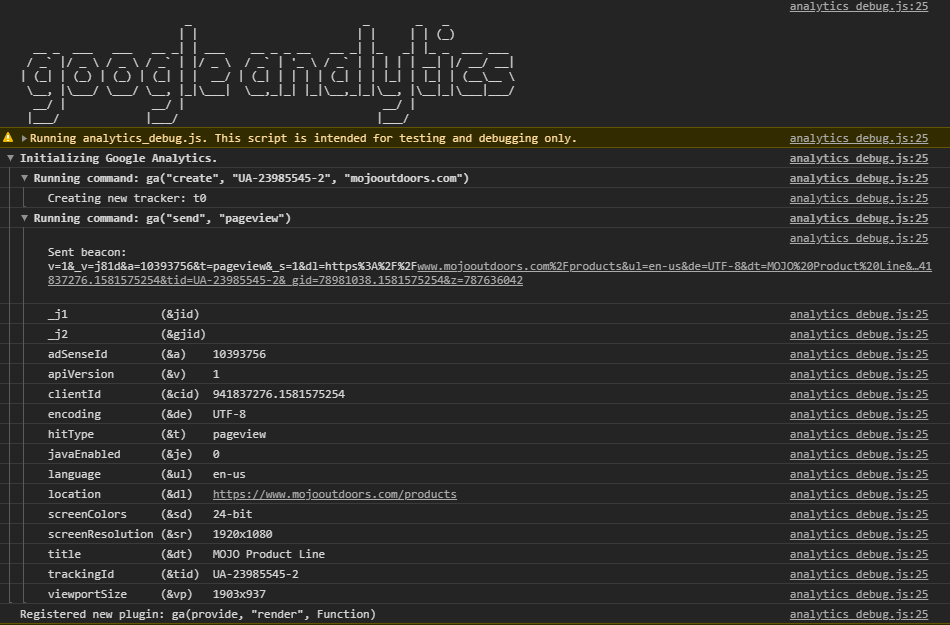
Now, there are no uncaught exceptions. However, this did not return the intended behavior that prompted this thread (still showing in GA as not set with no information other than transaction info -- no source, campaign, medium info).
Also, i turned off the "direct call" option in the GA per your recommendation for paypal plugin. I went through checkout -> paypal -> and returned to the after_end view. Still observe the same behavior.
Is this something inherent to the basic Paypal plugin where the user has to leave the website to use paypal? If i were to use a CC processor like first data or use paypal advanced checkout (modal login to paypal), would the same behavior occur?
Made the "currency" fix in the hikashopanalytics.php file. Also, reinstalled my GA plugin and now i can see most of the GA tracking info throughout checkout:
Now, there are no uncaught exceptions. However, this did not return the intended behavior that prompted this thread (still showing in GA as not set with no information other than transaction info -- no source, campaign, medium info).
Also, i turned off the "direct call" option in the GA per your recommendation for paypal plugin. I went through checkout -> paypal -> and returned to the after_end view. Still observe the same behavior.
Is this something inherent to the basic Paypal plugin where the user has to leave the website to use paypal? If i were to use a CC processor like first data or use paypal advanced checkout (modal login to paypal), would the same behavior occur?
Please Log in or Create an account to join the conversation.
6 years 8 months ago #315653
by nicolas
Replied by nicolas on topic Google Analytics E-Commerce Referrals not Logged Properly
Hi,
That's a good point. The code should actually be:
We'll change that on our end.
I think it would be the same regardless of the payment method.
I don't know of any ways we can change the code to have GA know the source.
Normally, in js mode it should already know the source itself. So I don't know why it's not picking it up.
And in direct call, I don't know of any way to get and pass some parameter to know the source, besides the utm parameters.
That's a good point. The code should actually be:
Code:
"currency": "'.$currencyInfo->currency_code.'"
I think it would be the same regardless of the payment method.
I don't know of any ways we can change the code to have GA know the source.
Normally, in js mode it should already know the source itself. So I don't know why it's not picking it up.
And in direct call, I don't know of any way to get and pass some parameter to know the source, besides the utm parameters.
Please Log in or Create an account to join the conversation.
- mojooutdoors-holden
-
Topic Author
- Offline
Less
More
- Posts: 303
- Thank you received: 18
6 years 8 months ago - 6 years 8 months ago #315681
by mojooutdoors-holden
Replied by mojooutdoors-holden on topic Google Analytics E-Commerce Referrals not Logged Properly
Google and most other search engines are automatically tagged by GA for organic and GA should know that the user accessed the website directly (bookmark or typing URL in browser). UTM parameters in this case are not necessary (according to GA docs). For social, referrer, ads, etc., UTM parameters must be present for GA to properly assign each session/pageview/conversion.
With that being said, I'm not exactly sure how GA tags as organic or direct but it appears this information is lost either as soon as the user lands on our website (e.g., clicking google search result or typing www.mojooutdoors.com in browser). I've done these two tests multiple times and cannot see organic or direct as source after the purchase is made.
After speaking with Google Analytics rep and seeing what each piece of the GIF request that is sent back to GA, it appears that the campaign, source, and medium values are stored within the 'utmz' variable.
__utmz identifies traffic sources, campaign, medium, etc.:
springest.io/anatomy-of-google-analytics-cookies
An example from our website using omnibug plugin for chrome:
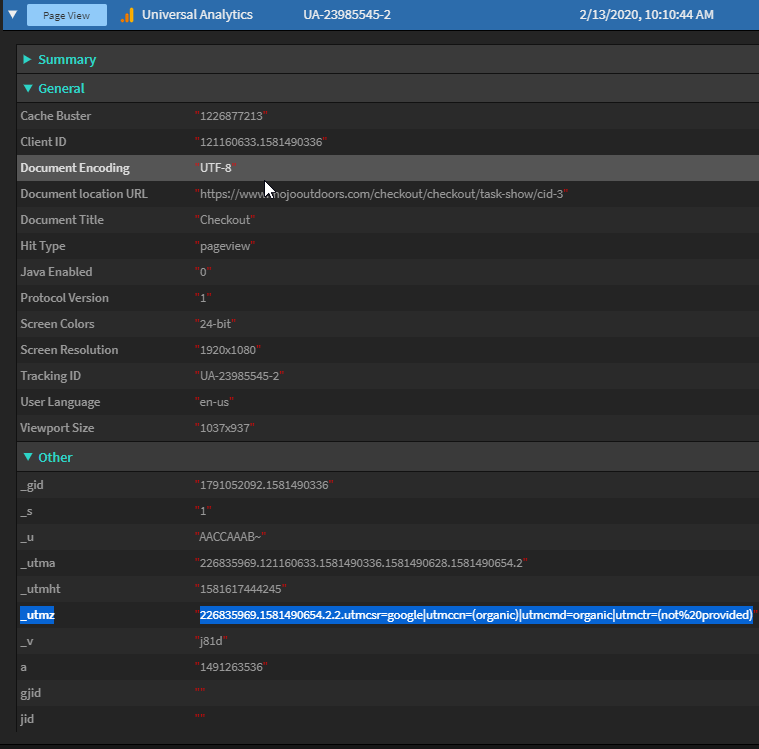
In this case, i have accessed the product via google search and it is properly identifying as (organic), but this info is not being passed back to GA after checkout is complete (from Hikashop side). Not entirely sure how you guys handle passing the data back to GA. I see in the plugin file that you look for utm_source, utm_campaign, etc. but not for the other utm parameters to pull this information. Is it possible that the hikashop plugin is overwriting the already collected utm parameters?
I can see with omnibug that even after redirect back to website from paypal, i still retain __utmz with the source, campaign, etc. The content of this variable is probably what needs to be transmitted from hikashop google analytics plugin to GA.
More info:
developers.google.com/analytics/resource...eptsTrackingOverview
Let me know what you think?
With that being said, I'm not exactly sure how GA tags as organic or direct but it appears this information is lost either as soon as the user lands on our website (e.g., clicking google search result or typing www.mojooutdoors.com in browser). I've done these two tests multiple times and cannot see organic or direct as source after the purchase is made.
After speaking with Google Analytics rep and seeing what each piece of the GIF request that is sent back to GA, it appears that the campaign, source, and medium values are stored within the 'utmz' variable.
__utmz identifies traffic sources, campaign, medium, etc.:
springest.io/anatomy-of-google-analytics-cookies
An example from our website using omnibug plugin for chrome:
In this case, i have accessed the product via google search and it is properly identifying as (organic), but this info is not being passed back to GA after checkout is complete (from Hikashop side). Not entirely sure how you guys handle passing the data back to GA. I see in the plugin file that you look for utm_source, utm_campaign, etc. but not for the other utm parameters to pull this information. Is it possible that the hikashop plugin is overwriting the already collected utm parameters?
I can see with omnibug that even after redirect back to website from paypal, i still retain __utmz with the source, campaign, etc. The content of this variable is probably what needs to be transmitted from hikashop google analytics plugin to GA.
More info:
developers.google.com/analytics/resource...eptsTrackingOverview
Let me know what you think?
Last edit: 6 years 8 months ago by mojooutdoors-holden.
Please Log in or Create an account to join the conversation.
- mojooutdoors-holden
-
Topic Author
- Offline
Less
More
- Posts: 303
- Thank you received: 18
6 years 8 months ago - 6 years 8 months ago #315689
by mojooutdoors-holden
Replied by mojooutdoors-holden on topic Google Analytics E-Commerce Referrals not Logged Properly
I found this document very useful for what needs to go through the analytics.js to send GA data through the browser upon checkout confirmation:
developers.google.com/analytics/devguide...nalyticsjs/ecommerce
EDIT/UPDATE:
Inset up a Google analytics goal which is triggered when the after_end page is triggered and pulls in the medium, source and campaign. Assuming the problem is related to the cURL request from payment redirect, this goal would also result in (not set). However, it properly registers as Google / organic (although not registering as a transaction). Seems to me like whatever is transmitted from Hikashop to GA for the transaction is scrambling the data so GA doesn't know how to handle.
EDIT/UPDATE:
Inset up a Google analytics goal which is triggered when the after_end page is triggered and pulls in the medium, source and campaign. Assuming the problem is related to the cURL request from payment redirect, this goal would also result in (not set). However, it properly registers as Google / organic (although not registering as a transaction). Seems to me like whatever is transmitted from Hikashop to GA for the transaction is scrambling the data so GA doesn't know how to handle.
Last edit: 6 years 8 months ago by mojooutdoors-holden.
Please Log in or Create an account to join the conversation.
6 years 8 months ago #315695
by nicolas
Replied by nicolas on topic Google Analytics E-Commerce Referrals not Logged Properly
Hi,
Thanks for the information. I've just wrote to you by email with a new version of the plugin with code modifications to support the __utmz parameters in the cookies.
Please install that new plugin and let me know how it goes.
Thanks for the information. I've just wrote to you by email with a new version of the plugin with code modifications to support the __utmz parameters in the cookies.
Please install that new plugin and let me know how it goes.
Please Log in or Create an account to join the conversation.
- mojooutdoors-holden
-
Topic Author
- Offline
Less
More
- Posts: 303
- Thank you received: 18
6 years 8 months ago - 6 years 8 months ago #315714
by mojooutdoors-holden
Replied by mojooutdoors-holden on topic Google Analytics E-Commerce Referrals not Logged Properly
Hi Nicolas,
Can you please send to my personal email? For some reason I never get emails at my mojooutdoors.com address from Hikashop (including reply notifications).
Can you please send to my personal email? For some reason I never get emails at my mojooutdoors.com address from Hikashop (including reply notifications).
Last edit: 6 years 8 months ago by nicolas.
Please Log in or Create an account to join the conversation.
6 years 8 months ago #315716
by nicolas
Replied by nicolas on topic Google Analytics E-Commerce Referrals not Logged Properly
Hi,
It's done.
It's done.
Please Log in or Create an account to join the conversation.
Less
More
- Posts: 1
- Thank you received: 0
5 years 10 months ago #326628
by tommix1987
Replied by tommix1987 on topic Google Analytics E-Commerce Referrals not Logged Properly
Has this ever been solved "for everyone"? I have exactly the same problem - and I see that there was some "secret" version send to the original reporter. How do I solve this? Just to baseline I have exactly the same problem:
1. I'm running a Google Ads campaign
2. Google is correctly setting up query params/cookies when someone clicks the ad.
3. I can see incoming traffic from this ad in my google analytics.
4. I know people are "converting" - I've set up a custom conversion in GA which fires off on confirmation screen.
5. E-commerce tracking in principal works - I can see the orders information in GA.
6. None of the transactions are marked as coming from my ad - even though I know thanks to point 4 - that actually some of them bought something (but with simple conversation tracking I don't know how much they have spent - this is where I need HikaShop's E-commerce tracking).
Help!
1. I'm running a Google Ads campaign
2. Google is correctly setting up query params/cookies when someone clicks the ad.
3. I can see incoming traffic from this ad in my google analytics.
4. I know people are "converting" - I've set up a custom conversion in GA which fires off on confirmation screen.
5. E-commerce tracking in principal works - I can see the orders information in GA.
6. None of the transactions are marked as coming from my ad - even though I know thanks to point 4 - that actually some of them bought something (but with simple conversation tracking I don't know how much they have spent - this is where I need HikaShop's E-commerce tracking).
Help!
Please Log in or Create an account to join the conversation.
5 years 8 months ago #329601
by mojweb
Replied by mojweb on topic Google Analytics E-Commerce Referrals not Logged Properly
I found this topic and have same problem. All transactions are as "Other" acquisition.
Have latest Hikashop.
Have you manage to solve this?
Have latest Hikashop.
Have you manage to solve this?
Please Log in or Create an account to join the conversation.
5 years 8 months ago #329635
by nicolas
Replied by nicolas on topic Google Analytics E-Commerce Referrals not Logged Properly
Hi,
Your issue might be related to this thread:
www.hikashop.com/forum/payment-methods/9...entation.html#327659
We actually added the patch a few days ago to HikaShop 4.4.1.
So if you still have HikaShop 4.4.0 (as we didn't activate yet the auto update for the 4.4.1) then you don't have the patch mentionned there and manually updating to the 4.4.1 by downloading the install package on our website and installing on yours will add the patch and maybe help.
Your issue might be related to this thread:
www.hikashop.com/forum/payment-methods/9...entation.html#327659
We actually added the patch a few days ago to HikaShop 4.4.1.
So if you still have HikaShop 4.4.0 (as we didn't activate yet the auto update for the 4.4.1) then you don't have the patch mentionned there and manually updating to the 4.4.1 by downloading the install package on our website and installing on yours will add the patch and maybe help.
Please Log in or Create an account to join the conversation.
Time to create page: 0.288 seconds