
- Posts: 610
- Thank you received: 13
Mass Actions Sort Error
- mohairbears
-
 Topic Author
- Offline
Less
More
3 years 8 months ago #349687
by mohairbears
Mass Actions Sort Error was created by mohairbears
-- HikaShop version -- : 4.7.1
-- Joomla version -- : 4.2.8
-- PHP version -- : 8.1.16
-- Browser(s) name and version -- : google
-- Error-message(debug-mod must be tuned on) -- : none
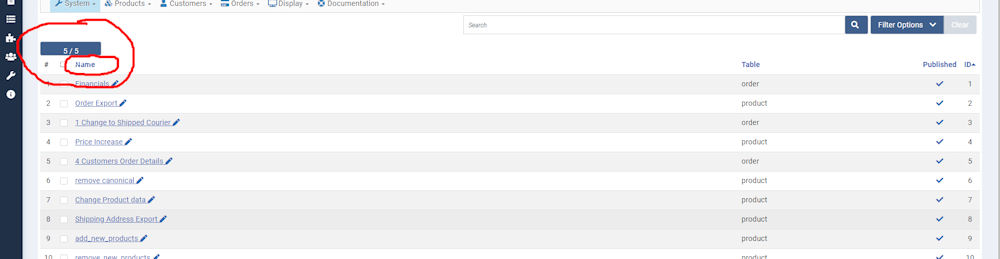
Hi, Since updating to 4.2.8 we now cannot sort tables by 'Name' in Mass Actions (a single click on name used to sort tables) there is something that was not there before, I have noticed this is also in the products and seems pointless to me as you can filter by using filter options?
-- Joomla version -- : 4.2.8
-- PHP version -- : 8.1.16
-- Browser(s) name and version -- : google
-- Error-message(debug-mod must be tuned on) -- : none
Hi, Since updating to 4.2.8 we now cannot sort tables by 'Name' in Mass Actions (a single click on name used to sort tables) there is something that was not there before, I have noticed this is also in the products and seems pointless to me as you can filter by using filter options?
Please Log in or Create an account to join the conversation.

3 years 8 months ago #349692
by nicolas
Replied by nicolas on topic Mass Actions Sort Error
Hi,
The "5 / 5" button there allows you to disable / enable colmns on the listing. You can see an animated image of this new feature here:
www.hikashop.com/home/blog/492-hikashop-4-7-1.html#dropdown
As you can see between your screenshot and the images in our blog article, the button on your website is not at the correct place and the text is not correct on your website. I suspect the fact your can click on the "name" title below the button is also linked to this.
It indicates you must be missing CSS code for the system to work properly.
Is the "CSS on backend" setting under the Display tab of the HikaShop configuration page set to "default" ? If it's set to "custom", it means you've customized it, and the customization is probably based on an old version of HikaShop which doesn't have the extra CSS to handle this new feature properly.
So first check that setting.
If it's set to default and you still have the issue, then download again the install package of the 4.7.1 on our website and install it on yours. Then, clear your browser's cache and try again.
If that still doesn't help, we'll need a backend access in order to check on the situation.
The "5 / 5" button there allows you to disable / enable colmns on the listing. You can see an animated image of this new feature here:
www.hikashop.com/home/blog/492-hikashop-4-7-1.html#dropdown
As you can see between your screenshot and the images in our blog article, the button on your website is not at the correct place and the text is not correct on your website. I suspect the fact your can click on the "name" title below the button is also linked to this.
It indicates you must be missing CSS code for the system to work properly.
Is the "CSS on backend" setting under the Display tab of the HikaShop configuration page set to "default" ? If it's set to "custom", it means you've customized it, and the customization is probably based on an old version of HikaShop which doesn't have the extra CSS to handle this new feature properly.
So first check that setting.
If it's set to default and you still have the issue, then download again the install package of the 4.7.1 on our website and install it on yours. Then, clear your browser's cache and try again.
If that still doesn't help, we'll need a backend access in order to check on the situation.
The following user(s) said Thank You: mohairbears
Please Log in or Create an account to join the conversation.
- mohairbears
-
Topic Author
- Offline
Less
More
- Posts: 610
- Thank you received: 13
3 years 8 months ago #349715
by mohairbears
Replied by mohairbears on topic Mass Actions Sort Error
Yes its the custom css thank you
Please Log in or Create an account to join the conversation.
Time to create page: 0.046 seconds