
- Posts: 82
- Thank you received: 1
Setting up an import with Options and Multiple...
- FreshIdeas
-
 Topic Author
- Offline
Less
More
15 years 4 months ago #17274
by FreshIdeas
Replied by FreshIdeas on topic Re: Setting up an import with Options and Multiple...
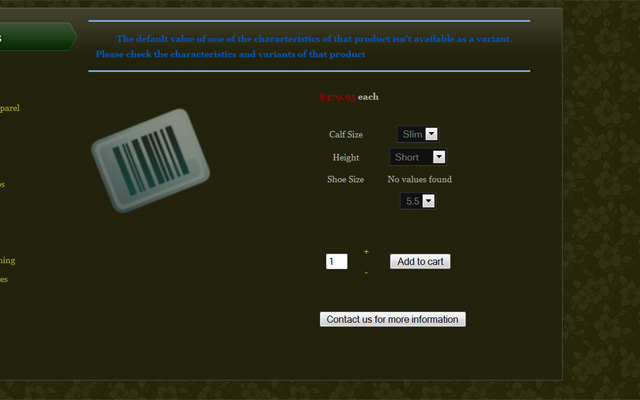
I uploaded the file exactly as you sent it: Got this result
Please Log in or Create an account to join the conversation.

15 years 4 months ago #17275
by nicolas
Replied by nicolas on topic Re: Setting up an import with Options and Multiple...
The product_parent_id was actually not the good one for some variants...bad copy/paste...
This attachment is hidden for guests.
This attachment is hidden for guests.
Please log in or register to see it.
Please Log in or Create an account to join the conversation.
- FreshIdeas
-
Topic Author
- Offline
Less
More
- Posts: 82
- Thank you received: 1
15 years 4 months ago #17276
by FreshIdeas
Replied by FreshIdeas on topic Re: Setting up an import with Options and Multiple...
Still getting same error.
Please Log in or Create an account to join the conversation.
15 years 4 months ago #17278
by nicolas
Replied by nicolas on topic Re: Setting up an import with Options and Multiple...
I just tried on one of our test websites and it works fine...
Are you sure that you created the characteristics with the values before importing the CSV ?
Did you deleted the previous products with the same product_code before trying ?
Are you sure that you created the characteristics with the values before importing the CSV ?
Did you deleted the previous products with the same product_code before trying ?
Please Log in or Create an account to join the conversation.
- FreshIdeas
-
Topic Author
- Offline
Less
More
- Posts: 82
- Thank you received: 1
15 years 4 months ago #17279
by FreshIdeas
Replied by FreshIdeas on topic Re: Setting up an import with Options and Multiple...
Yes. The characteristics are there. I have well over 100 characteristics loaded and id #'s recorded for them
yes,I deleted the product before I uploaded again. Have become quite well-versed in deleting
Via the support ticket I provided temporary credentials. Can you take a look at the site and help me understand what I didn't do correctly?
yes,I deleted the product before I uploaded again. Have become quite well-versed in deleting
Via the support ticket I provided temporary credentials. Can you take a look at the site and help me understand what I didn't do correctly?
Please Log in or Create an account to join the conversation.
- FreshIdeas
-
Topic Author
- Offline
Less
More
- Posts: 82
- Thank you received: 1
15 years 4 months ago #17280
by FreshIdeas
Replied by FreshIdeas on topic Re: Setting up an import with Options and Multiple...
Yes. The characteristics are there. I have well over 100 characteristics loaded and id #'s recorded for them
yes,I deleted the product before I uploaded again. Have become quite well-versed in deleting
Via the support ticket I provided temporary credentials. Can you take a look at the site and help me understand what I didn't do correctly?
yes,I deleted the product before I uploaded again. Have become quite well-versed in deleting
Via the support ticket I provided temporary credentials. Can you take a look at the site and help me understand what I didn't do correctly?
Please Log in or Create an account to join the conversation.
15 years 4 months ago #17281
by nicolas
Replied by nicolas on topic Re: Setting up an import with Options and Multiple...
If you go on the "manage variants" area of your product on your website, you can see that the system couldn't associate the variants with the characteristic "shoe size". But that worked for me on our test website.
So I went to your characteristics and I saw that you had several characteristics which had the same values.
That is a problem as the import system might take the value from another characteristic and mismatch them during the import.
I think that it's what is happening on your website.
The shoe size value 5.5 can be found in different characteristics and the system doesn't pick the correct one. Thus, the problem you're having...
So I went to your characteristics and I saw that you had several characteristics which had the same values.
That is a problem as the import system might take the value from another characteristic and mismatch them during the import.
I think that it's what is happening on your website.
The shoe size value 5.5 can be found in different characteristics and the system doesn't pick the correct one. Thus, the problem you're having...
Please Log in or Create an account to join the conversation.
- FreshIdeas
-
Topic Author
- Offline
Less
More
- Posts: 82
- Thank you received: 1
15 years 4 months ago #17282
by FreshIdeas
Replied by FreshIdeas on topic Re: Setting up an import with Options and Multiple...
That doesn't make much sense.
So you're saying that because i have a "shoe size" of 5.5, I can't use the value 5.5 in any other characteristic?
I have Bit Size that has a 5 1/2 and a stirrup size that has a 5 1/2.
So you're saying that because i have a "shoe size" of 5.5, I can't use the value 5.5 in any other characteristic?
I have Bit Size that has a 5 1/2 and a stirrup size that has a 5 1/2.
Please Log in or Create an account to join the conversation.
15 years 4 months ago #17283
by nicolas
Replied by nicolas on topic Re: Setting up an import with Options and Multiple...
Well, we just didn't thought about that case when building the import system.
So far, no one had such case.
Most of the time, users create one "size" characteristic and put all the sizes possibilities in it and that's it.
I've made some changes to the import system so that it can handle several characteristics with the same values.
Please replace the file administrator/components/com_hikashop/helpers/import.php by the one in the archive enclosed and try again.
This attachment is hidden for guests.
So far, no one had such case.
Most of the time, users create one "size" characteristic and put all the sizes possibilities in it and that's it.
I've made some changes to the import system so that it can handle several characteristics with the same values.
Please replace the file administrator/components/com_hikashop/helpers/import.php by the one in the archive enclosed and try again.
This attachment is hidden for guests.
Please log in or register to see it.
Please Log in or Create an account to join the conversation.
- FreshIdeas
-
Topic Author
- Offline
Less
More
- Posts: 82
- Thank you received: 1
15 years 4 months ago #17286
by FreshIdeas
Replied by FreshIdeas on topic Re: Setting up an import with Options and Multiple...
Imagine a brick wall...now imagine my head bouncing off of it!
Now the data doesn't appear AT ALL!
Now the data doesn't appear AT ALL!
Please Log in or Create an account to join the conversation.
15 years 4 months ago #17293
by nicolas
Replied by nicolas on topic Re: Setting up an import with Options and Multiple...
Ok, I saw that you have uppercases on your characteristics names where you don't have uppercases in the CSV. I think it comes from that because I have the same case on my tests and that works...
Here is an archive which includes both a new import which should handle the cases differences and a new CSV which fixes a small copy/paste glitch of the previous version. Please try with them on your website.
Again, I tried on my end and it works fine so I hope this time it's gonna work on your end too.
This attachment is hidden for guests.
Here is an archive which includes both a new import which should handle the cases differences and a new CSV which fixes a small copy/paste glitch of the previous version. Please try with them on your website.
Again, I tried on my end and it works fine so I hope this time it's gonna work on your end too.
This attachment is hidden for guests.
Please log in or register to see it.
Please Log in or Create an account to join the conversation.
- FreshIdeas
-
Topic Author
- Offline
Less
More
- Posts: 82
- Thank you received: 1
15 years 4 months ago - 15 years 4 months ago #17335
by FreshIdeas
Replied by FreshIdeas on topic Re: Setting up an import with Options and Multiple...
So darn close!
I took your file and added more sizes. While I don't get the error, I get 2 drop down boxes for shoe size and no option labels. See "HHIssue1" image.
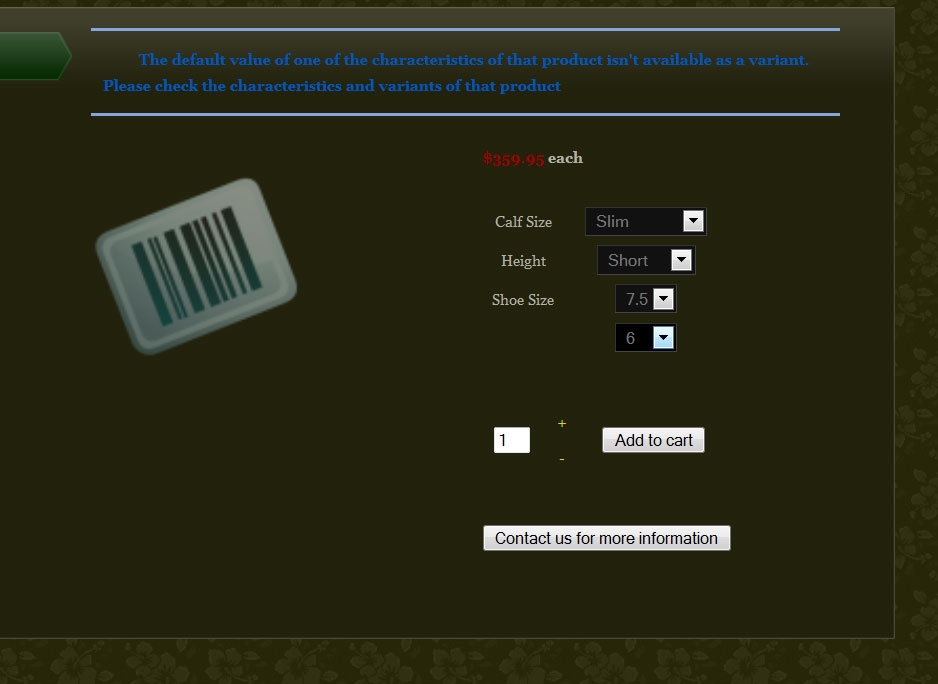
So I took the same file and added the default variants in line 1. See "HHIsue2" image. I get 2 drop down boxes for shoe size, but I did get option labels. And I get the error message "The default value of one of the characteristics of that product isn't available as a variant. Please check the characteristics and variants of that product"
Progress
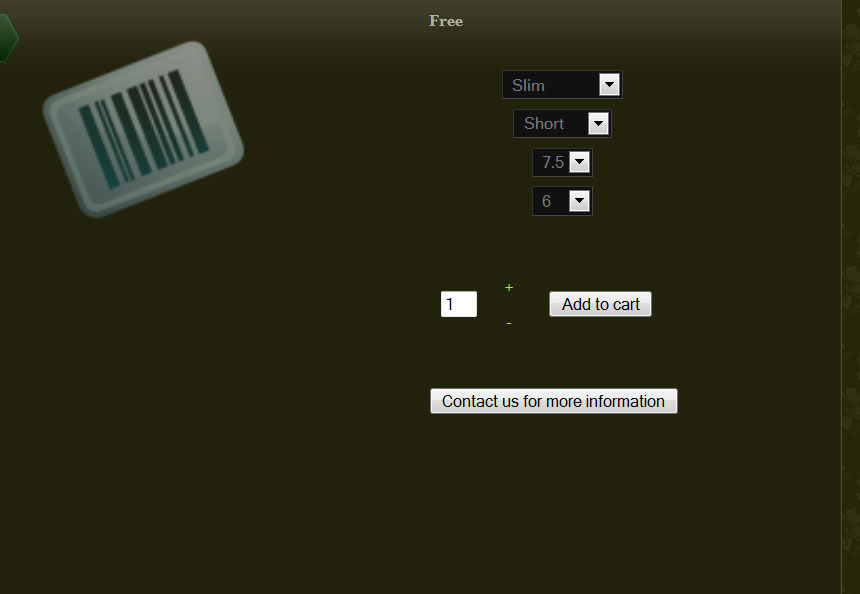
I took your file and added more sizes. While I don't get the error, I get 2 drop down boxes for shoe size and no option labels. See "HHIssue1" image.
So I took the same file and added the default variants in line 1. See "HHIsue2" image. I get 2 drop down boxes for shoe size, but I did get option labels. And I get the error message "The default value of one of the characteristics of that product isn't available as a variant. Please check the characteristics and variants of that product"
Progress
Last edit: 15 years 4 months ago by FreshIdeas.
Please Log in or Create an account to join the conversation.
15 years 4 months ago #17342
by nicolas
Replied by nicolas on topic Re: Setting up an import with Options and Multiple...
Did you delete the previous product and its variants ?
Could you provide your CSV ?
I don't understand how you're able to get that extra dropdown... I don't get it on my end and I've never seen such issue with the import...
Could you provide your CSV ?
I don't understand how you're able to get that extra dropdown... I don't get it on my end and I've never seen such issue with the import...
Please Log in or Create an account to join the conversation.
- FreshIdeas
-
Topic Author
- Offline
Less
More
- Posts: 82
- Thank you received: 1
15 years 4 months ago - 15 years 4 months ago #17345
by FreshIdeas
Replied by FreshIdeas on topic Re: Setting up an import with Options and Multiple...
Yes, we deleted the previous products. Where do we delete the previous variants? maybe this is the issue?
We can tell this is an issue because the variant sku is growing in number!
Here are the spreadsheets.
This attachment is hidden for guests.
This attachment is hidden for guests.
This attachment is hidden for guests.
We can tell this is an issue because the variant sku is growing in number!
Here are the spreadsheets.
This attachment is hidden for guests.
Please log in or register to see it.
This attachment is hidden for guests.
Please log in or register to see it.
This attachment is hidden for guests.
Please log in or register to see it.
Last edit: 15 years 4 months ago by FreshIdeas.
Please Log in or Create an account to join the conversation.
15 years 4 months ago #17356
by nicolas
Replied by nicolas on topic Re: Setting up an import with Options and Multiple...
So that might be the problem. The product code (sku) of variants are in the CSV so they shouldn't "grow". You can delete the variants of a product by going in the "manage variant" area of the product and deleting all the variants there. Then, you can delete the main product.
Your first CSV is good, however the second one does not contain the default values for the characteristics of the product.
Your first CSV is good, however the second one does not contain the default values for the characteristics of the product.
Please Log in or Create an account to join the conversation.
- FreshIdeas
-
Topic Author
- Offline
Less
More
- Posts: 82
- Thank you received: 1
15 years 3 months ago #18353
by FreshIdeas
Replied by FreshIdeas on topic Re: Setting up an import with Options and Multiple...
I'm still getting this issue -- with the multiple drop down boxes -- randomly. I've already PRELOADED tons of characteristics. Randomly it will include drop down boxes and then I have to delete everything...delete the entire characteristic (some have quite a few option) and re-enter the characteristic.
NOW I uploaded a file, after re-adding GIRTH SIZE (for the THIRD TIME) and I don't have an add to cart option - it says "no stock". ARGHHHHH
[url=http://http://174.121.38.60/~hhware/index.php?option=com_hikashop&ctrl=product&task=show&cid=62567&name=edgewood-1-end-overlay-fancy-girth&Itemid=815&category_pathway=95] 174.121.38.60/~hhware/index.php?option=c...&category_pathway=95 [/url]
NOW I uploaded a file, after re-adding GIRTH SIZE (for the THIRD TIME) and I don't have an add to cart option - it says "no stock". ARGHHHHH
[url=http://http://174.121.38.60/~hhware/index.php?option=com_hikashop&ctrl=product&task=show&cid=62567&name=edgewood-1-end-overlay-fancy-girth&Itemid=815&category_pathway=95] 174.121.38.60/~hhware/index.php?option=c...&category_pathway=95 [/url]
Please Log in or Create an account to join the conversation.
15 years 3 months ago #18372
by nicolas
Replied by nicolas on topic Re: Setting up an import with Options and Multiple...
You should not have to delete characteristics. Why would you have to do that ?
If you add the characteristics to a product in several times, the variants won't be recreated automatically for the product so you will have to delete the variants, remove the characteristics from the product, save, and add them again so that the system regenerates everything properly. So, what you should do is to add all three characteristics at once to each product.
If you add the characteristics to a product in several times, the variants won't be recreated automatically for the product so you will have to delete the variants, remove the characteristics from the product, save, and add them again so that the system regenerates everything properly. So, what you should do is to add all three characteristics at once to each product.
Please Log in or Create an account to join the conversation.
- FreshIdeas
-
Topic Author
- Offline
Less
More
- Posts: 82
- Thank you received: 1
15 years 3 months ago #18391
by FreshIdeas
Replied by FreshIdeas on topic Re: Setting up an import with Options and Multiple...
My point exactly. I am having to DELETE ALL THE CHARACTERISTICS.
Let's say I upload Girths. The Girth Size has 12 sizes. The particular product line uses 4 of them. They are rendering FIRST with multiple drop down boxes and the error about not a valid variant EVEN THOUGH IT'S ALREADY IN THE CHARACTERISTICS. I have to first delete the characteristic associated with each product, then delete the products. If I upload the file again, I get the same error. If I delete that entire characteristic and all the variants, then re-enter them, the file works.
Also, Please note my other comment about it showing "no stock available" that's a new one!
Let's say I upload Girths. The Girth Size has 12 sizes. The particular product line uses 4 of them. They are rendering FIRST with multiple drop down boxes and the error about not a valid variant EVEN THOUGH IT'S ALREADY IN THE CHARACTERISTICS. I have to first delete the characteristic associated with each product, then delete the products. If I upload the file again, I get the same error. If I delete that entire characteristic and all the variants, then re-enter them, the file works.
Also, Please note my other comment about it showing "no stock available" that's a new one!
Please Log in or Create an account to join the conversation.
15 years 3 months ago #18398
by nicolas
Replied by nicolas on topic Re: Setting up an import with Options and Multiple...
Nowhere did I mention the deletion of characteristics. I only talked about removing the link between the product and the characteristics. And that's only if you have a problem with the variants being out of sync with the characteristics of the products. If you have that problem just after an import, the only reason is that your CSV is not correct.
In the latest version of HikaShop we added an export of products in CSV on the products listing... You should take example on the CSVs generated by it from working products...
I can't saying anything about the no stock available... Your link is not working. If that message appears, that's because you have a quantity set to 0 in your product, or in your variants (if you have characteristics)
In the latest version of HikaShop we added an export of products in CSV on the products listing... You should take example on the CSVs generated by it from working products...
I can't saying anything about the no stock available... Your link is not working. If that message appears, that's because you have a quantity set to 0 in your product, or in your variants (if you have characteristics)
Please Log in or Create an account to join the conversation.
- FreshIdeas
-
Topic Author
- Offline
Less
More
- Posts: 82
- Thank you received: 1
15 years 3 months ago #18406
by FreshIdeas
Replied by FreshIdeas on topic Re: Setting up an import with Options and Multiple...
Here is the link again.. I think it was truncated last time.
There was nothing about stock or quantity in the CSV...which is attached!
This attachment is hidden for guests.
There was nothing about stock or quantity in the CSV...which is attached!
This attachment is hidden for guests.
Please log in or register to see it.
Please Log in or Create an account to join the conversation.
Time to create page: 0.303 seconds