
- Posts: 22
- Thank you received: 0
Shipping Method Not Showing
- gordanorfc
-
 Topic Author
- Offline
Less
More
15 years 10 months ago #2146
by gordanorfc
Shipping Method Not Showing was created by gordanorfc
Please Log in or Create an account to join the conversation.

15 years 10 months ago #2147
by nicolas
Replied by nicolas on topic Re: Shipping Method Not Showing
Hi,
Please follow our FAQ which explains point by point what could cause the shipping methods not to show: www.hikashop.com/support/documentation/i...ual-listing.html#faq
Please follow our FAQ which explains point by point what could cause the shipping methods not to show: www.hikashop.com/support/documentation/i...ual-listing.html#faq
Please Log in or Create an account to join the conversation.
- gordanorfc
-
Topic Author
- Offline
Less
More
- Posts: 22
- Thank you received: 0
15 years 10 months ago #2167
by gordanorfc
Replied by gordanorfc on topic Re: Shipping Method Not Showing
Hi,
I have gone through the FAQ's and still no luck. I've change my shipping method to have no zone but it still doesn't show. It did when someone had logged in?
Andy
I have gone through the FAQ's and still no luck. I've change my shipping method to have no zone but it still doesn't show. It did when someone had logged in?
Andy
Please Log in or Create an account to join the conversation.
15 years 10 months ago #2175
by nicolas
Replied by nicolas on topic Re: Shipping Method Not Showing
Hi,
I've placed an order on your website and ordered the product "WASTE NOT Refuse Sacks". On the address selection screen, I was only able to select a billing address and not a shipping address. That means that the system didn't detect any shippable goods in my cart. The system decides whether a good is shippable or not by looking at its weight. If you don't set a weight, the system consider the good as virtual (like software downloads for instance) and won't propose any shipping methods.
Please make sure you set a weight in your products information.
I've placed an order on your website and ordered the product "WASTE NOT Refuse Sacks". On the address selection screen, I was only able to select a billing address and not a shipping address. That means that the system didn't detect any shippable goods in my cart. The system decides whether a good is shippable or not by looking at its weight. If you don't set a weight, the system consider the good as virtual (like software downloads for instance) and won't propose any shipping methods.
Please make sure you set a weight in your products information.
Please Log in or Create an account to join the conversation.
14 years 10 months ago #31131
by sdce
Replied by sdce on topic Re: Shipping Method Not Showing
Hi,
I have downloadable files for purchase, that the system does not automatically detect as 0 weight to allow purchase to be completed. What might the error be?
I have downloadable files for purchase, that the system does not automatically detect as 0 weight to allow purchase to be completed. What might the error be?
Please Log in or Create an account to join the conversation.
14 years 10 months ago #31150
by nicolas
Replied by nicolas on topic Re: Shipping Method Not Showing
Hi,
That's probably because you turn on the option "Force shipping regardless of weight" in the checkout tab of the configuration.
That's probably because you turn on the option "Force shipping regardless of weight" in the checkout tab of the configuration.
Please Log in or Create an account to join the conversation.
14 years 10 months ago #31208
by sdce
Replied by sdce on topic Re: Shipping Method Not Showing
I have it turned off.
I still get the following error for a downloadable product:
'Weight OR volume not found for the products in your cart'
I still get the following error for a downloadable product:
'Weight OR volume not found for the products in your cart'
Please Log in or Create an account to join the conversation.
14 years 10 months ago #31215
by sdce
Replied by sdce on topic Re: Shipping Method Not Showing
I resolved part one of the issue where the error shows. The problem comes from the ups plugin which does not handle virtual goods properly.
Part two of the problem is when payment is made by credit card, the product email message says the order is created, not confirmed. And the product download does not show up.
Part two of the problem is when payment is made by credit card, the product email message says the order is created, not confirmed. And the product download does not show up.
Please Log in or Create an account to join the conversation.
14 years 10 months ago #31250
by nicolas
Replied by nicolas on topic Re: Shipping Method Not Showing
Do you mean that you use the credit card payment plugin ?
That plugin is an "offline" payment plugin. That means that no transaction occurs during the checkout. You just get the credit card information on your end so that you can manually process the payment via a payment terminal and validate the order at that point.
If you use other payment plugins, like paypal pro for example, you can directly process the credit card transaction automatically during the checkout and the order will be validated automatically and the product download will show automatically.
That plugin is an "offline" payment plugin. That means that no transaction occurs during the checkout. You just get the credit card information on your end so that you can manually process the payment via a payment terminal and validate the order at that point.
If you use other payment plugins, like paypal pro for example, you can directly process the credit card transaction automatically during the checkout and the order will be validated automatically and the product download will show automatically.
Please Log in or Create an account to join the conversation.
14 years 10 months ago #32827
by sdce
Replied by sdce on topic Re: Shipping Method Not Showing
Okay, that works. Thank you!
Please Log in or Create an account to join the conversation.
14 years 4 months ago #50887
by bubiny
Replied by bubiny on topic Re: Shipping Method Not Showing
I also have a problem with shipping methods not showing. It is strange, because they show up when I am logged in, but when I use the no registration checkout method my shipping methods are empty. I am using only one zone which is the one that I use for my no registration form, not using weights for products at all and have the option force shipping regardless of weight set to "yes". What could be the problem?
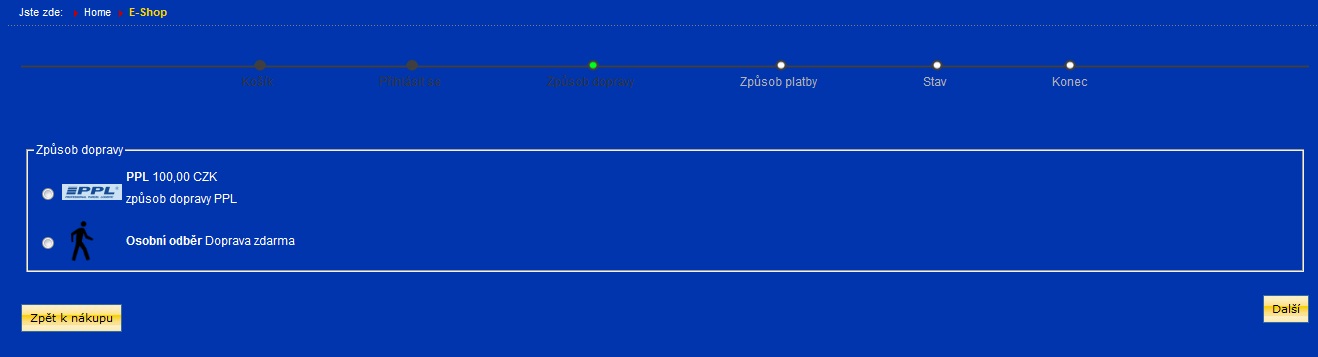

Thank you
Thank you
Please Log in or Create an account to join the conversation.
14 years 4 months ago #50999
by nicolas
Replied by nicolas on topic Re: Shipping Method Not Showing
Your shipping methods must not be configured properly.
Please check all the points in the FAQ:
www.hikashop.com/support/documentation/i...ual-listing.html#faq
It must be one of them.
If you don't find it, please do screenshots of your shipping methods options.
Please check all the points in the FAQ:
www.hikashop.com/support/documentation/i...ual-listing.html#faq
It must be one of them.
If you don't find it, please do screenshots of your shipping methods options.
Please Log in or Create an account to join the conversation.
14 years 4 months ago #51022
by bubiny
Replied by bubiny on topic Re: Shipping Method Not Showing
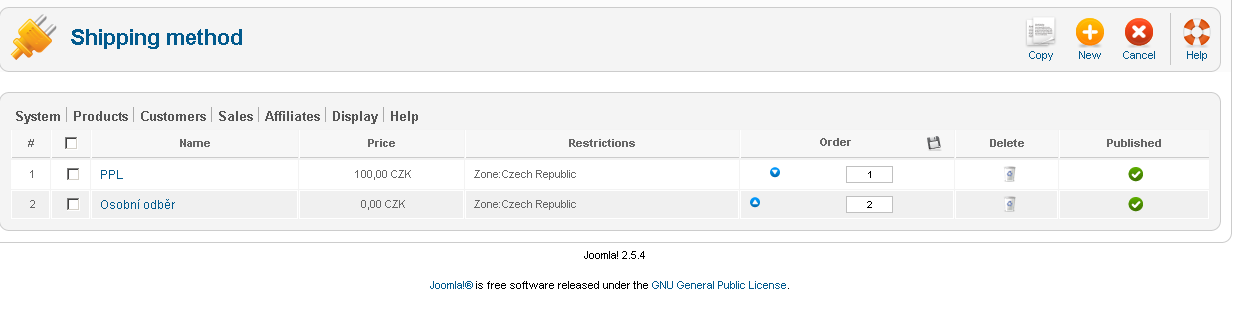
Still did not find my misconfiguration. When I login it shows without any problems, but when I use the no registration form it is than empty.
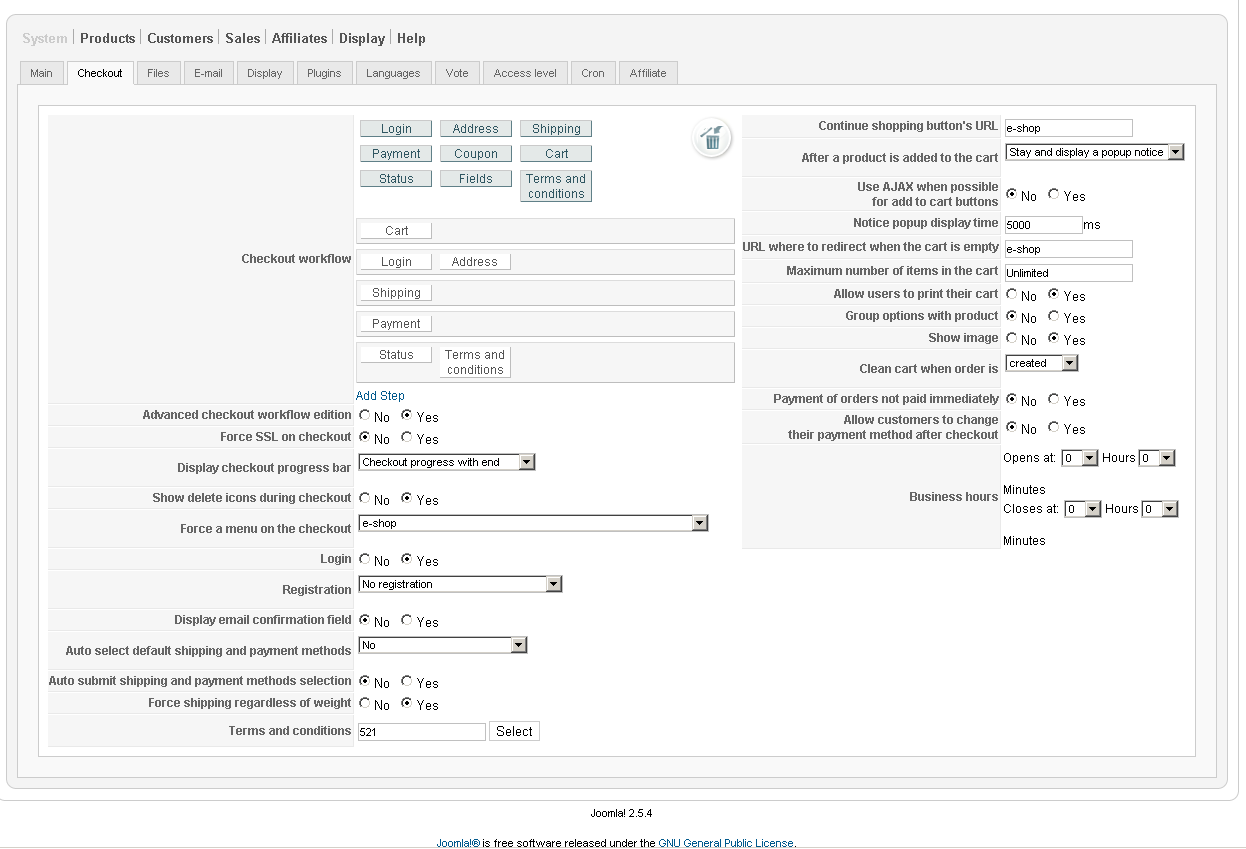
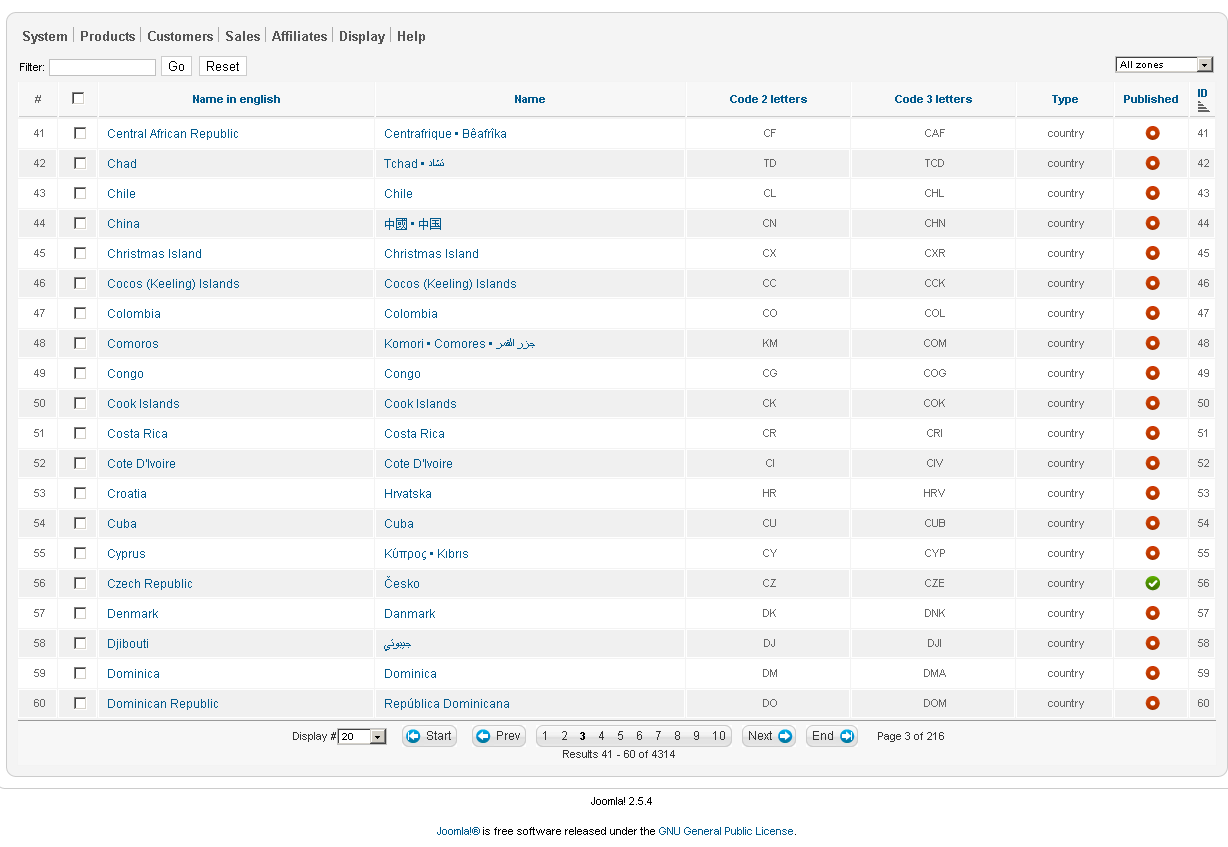
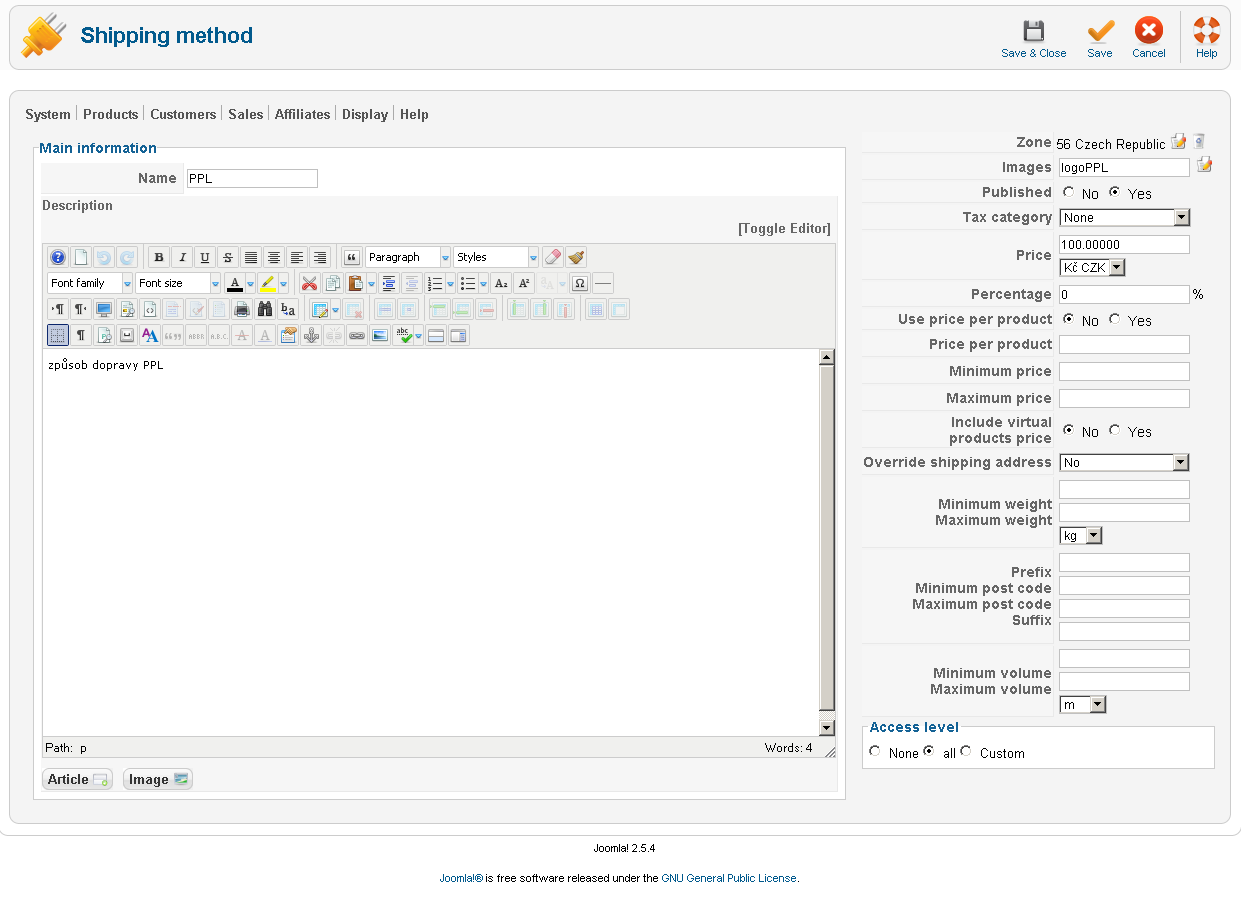
Please Log in or Create an account to join the conversation.
14 years 4 months ago #51111
by nicolas
Replied by nicolas on topic Re: Shipping Method Not Showing
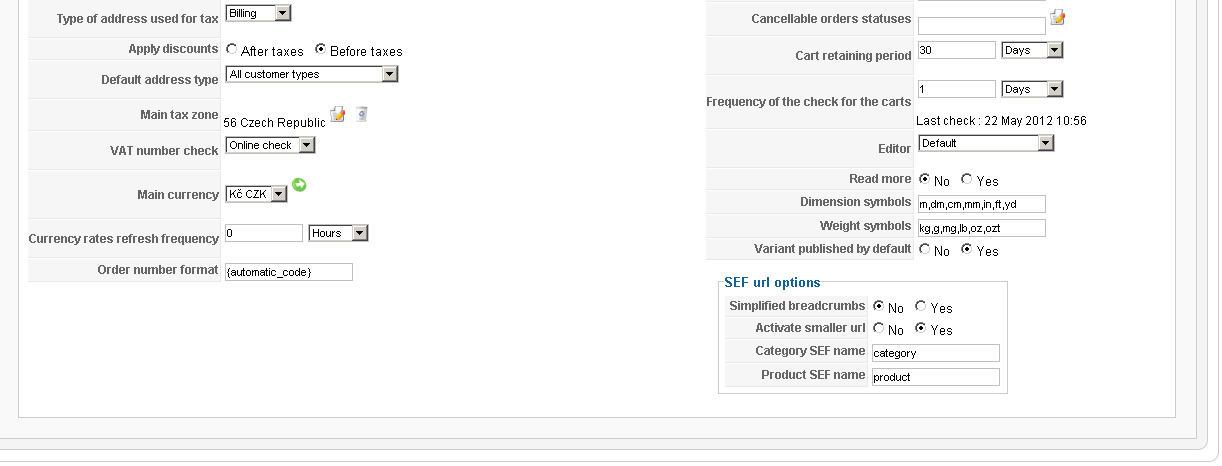
I see that you restricted your shipping methods to the czech republic. Please make sure that:
1. Your user address is in czech
2. That the "main tax zone" option of the configuration is also czech
After correcting that, logout/login and try again.
1. Your user address is in czech
2. That the "main tax zone" option of the configuration is also czech
After correcting that, logout/login and try again.
Please Log in or Create an account to join the conversation.
14 years 4 months ago #51133
by bubiny
Replied by bubiny on topic Re: Shipping Method Not Showing
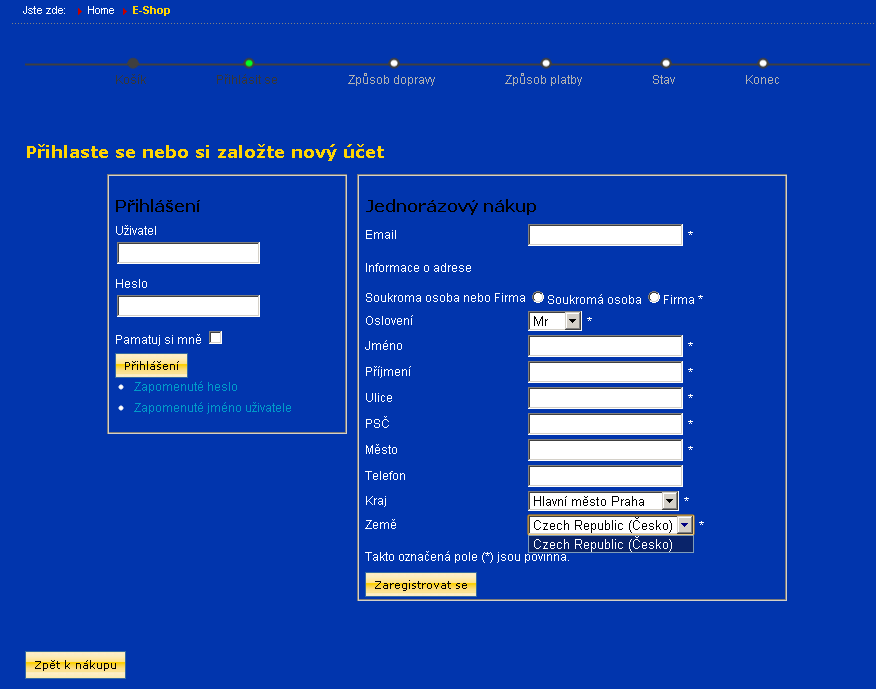
Again, I am using the no registration checkout method. Login/logout does not apply. See screenshot
Please Log in or Create an account to join the conversation.
14 years 4 months ago #51214
by nicolas
Replied by nicolas on topic Re: Shipping Method Not Showing
Then there must be something else.
It it's only for the "no registration" mode, maybe it's because you have some caching activated on your website ? Try to:
Disable the cache in Joomla configuration.
Site -> global configuration -> system -> "Cache settings".
Disable, if it's enabled, a joomla cache plugin.
Check your template' options for a potential cache option and deactivate it.
It it's only for the "no registration" mode, maybe it's because you have some caching activated on your website ? Try to:
Disable the cache in Joomla configuration.
Site -> global configuration -> system -> "Cache settings".
Disable, if it's enabled, a joomla cache plugin.
Check your template' options for a potential cache option and deactivate it.
Please Log in or Create an account to join the conversation.
14 years 4 months ago #51258
by bubiny
Replied by bubiny on topic Re: Shipping Method Not Showing
I had my joomla caching disabled from before. No caching for my template JSN Epic. I deleted all history and cache from browser before trying.
Other ideas?
Other ideas?
Please Log in or Create an account to join the conversation.
14 years 4 months ago #51351
by nicolas
Replied by nicolas on topic Re: Shipping Method Not Showing
I'm out of ideas.
Please provide a back end access to your website so that we can look at the problem.
Please provide a back end access to your website so that we can look at the problem.
Please Log in or Create an account to join the conversation.
14 years 4 months ago #51496
by nicolas
Replied by nicolas on topic Re: Shipping Method Not Showing
I couldn't find the problem.
Could you please provide an FTP access to your website ?
Could you please provide an FTP access to your website ?
Please Log in or Create an account to join the conversation.
14 years 4 months ago #51733
by nicolas
Replied by nicolas on topic Re: Shipping Method Not Showing
We found the problem. You had set the access of the manual plugin to "special" instead of "public" in the joomla plugins manager...
I'll add that to the list of things which have to be checked in the FAQ
I'll add that to the list of things which have to be checked in the FAQ
Please Log in or Create an account to join the conversation.
Time to create page: 0.328 seconds