
- Posts: 93
- Thank you received: 5
Related Products to Show under current product?
15 years 10 months ago #2665
by reace
you Guys are Awesome and have excellent Support! Keep up the great Work!.
Related Products to Show under current product? was created by reace
nicolas wrote:
Hi nicolas ,
I seem to be having a small problem with following instructions.
if I goto display > views (there is no button indicating 'New' module)
thinking cognitively I went to Display Modules , which indeed I can add a new module.
Secondly becasue of the vast array of options inside the add module dialog box I looked around for the synchronized section which I also could not find.
what am I doing wrong here? Do you have a Tutorial somewhere for this kind of thing.
Cheers
:blink:
I know JoomSEF built a plugin for HikaShop and we have the sef file for 404 directly in HikaShop so you shouldn't have problems using them.
In each product, you can add related products on the back end. Then, you can go to Display->Views and create a new module. Set it to be synchronized and to display related products on the product page. Then, go the configuration, under the tab display and for the option "modules on the product page" you can add that moduel you just created. Then, you should see it under the product page when you have products related to the main product displayed.
Hi nicolas ,
I seem to be having a small problem with following instructions.
if I goto display > views (there is no button indicating 'New' module)
thinking cognitively I went to Display Modules , which indeed I can add a new module.
Secondly becasue of the vast array of options inside the add module dialog box I looked around for the synchronized section which I also could not find.
what am I doing wrong here? Do you have a Tutorial somewhere for this kind of thing.
Cheers
:blink:
you Guys are Awesome and have excellent Support! Keep up the great Work!.
Please Log in or Create an account to join the conversation.
15 years 10 months ago - 15 years 10 months ago #2666
by reace
you Guys are Awesome and have excellent Support! Keep up the great Work!.
Replied by reace on topic Re: Related Products to Show under current product?
ok it would seem that I overlooked the "Synchronize with currently
displayed item when possible " which is indeed in the Display > Modules > New Module Dialog Box.
just working through the rest of the instructions now.
displayed item when possible " which is indeed in the Display > Modules > New Module Dialog Box.
just working through the rest of the instructions now.
you Guys are Awesome and have excellent Support! Keep up the great Work!.
Last edit: 15 years 10 months ago by reace.
Please Log in or Create an account to join the conversation.
15 years 10 months ago - 15 years 10 months ago #2670
by reace
you Guys are Awesome and have excellent Support! Keep up the great Work!.
Replied by reace on topic Re: Related Products to Show under current product?
ok next minor problem , the related products module only seems to work if I tell it to publish on all pages , which I am curious about because 'a' I do-not wish to publish it on all pages & 'b' selecting only selected pages does not work.
it would only seem logical to publish this module on pages that have 'products' inside of them , however it would be advantageous to be able to display various products on other pages as well.
I can only assume that their are some pages missing from the 'Menu Assignment' Module in the 'Module Manager'.
as this would explain why 'All Menus' Works but 'Select Menu Item(s) from the List' does not , even if all menu's are selected.

couple of other things worth noting about the related products module setup;
When following your instructions above it does not actually show that the module is in use beside the : 'Modules under the product page' [button].
it would only seem logical to publish this module on pages that have 'products' inside of them , however it would be advantageous to be able to display various products on other pages as well.
I can only assume that their are some pages missing from the 'Menu Assignment' Module in the 'Module Manager'.
as this would explain why 'All Menus' Works but 'Select Menu Item(s) from the List' does not , even if all menu's are selected.
couple of other things worth noting about the related products module setup;
When following your instructions above it does not actually show that the module is in use beside the : 'Modules under the product page' [button].
you Guys are Awesome and have excellent Support! Keep up the great Work!.
Last edit: 15 years 10 months ago by reace.
Please Log in or Create an account to join the conversation.

15 years 10 months ago #2688
by nicolas
Replied by nicolas on topic Re: Related Products to Show under current product?
Sorry, I indeed wanted you to go to Display->Content modules 
You found the synchronize option , good
You want to set the module on all the pages but keep it unpublished and then add it to the "Modules under the product page" option.
That way, joomla won't display the module because it is unpublished. However, when building the product page, hikashop will get the module regardless of the published option.
For the fact that you don't see the module name next to the option once you add the module: that's indeed the case. But if you click on the select button, you should see which one is selected and which one isn't.
You found the synchronize option , good
You want to set the module on all the pages but keep it unpublished and then add it to the "Modules under the product page" option.
That way, joomla won't display the module because it is unpublished. However, when building the product page, hikashop will get the module regardless of the published option.
For the fact that you don't see the module name next to the option once you add the module: that's indeed the case. But if you click on the select button, you should see which one is selected and which one isn't.
The following user(s) said Thank You: max.mandias
Please Log in or Create an account to join the conversation.

15 years 9 months ago #5194
by serenajo
Replied by serenajo on topic Re: Related Products to Show under current product?
I created a new content module entitled Related Products, left it unpublished, synchronized it with current product, set it to show under the product, set two products related to each other in my products, but nothing shows! Please help.
Please Log in or Create an account to join the conversation.
15 years 9 months ago #5195
by nicolas
Replied by nicolas on topic Re: Related Products to Show under current product?
Which version of HikaShop are you using ?
Could you post the URL of the product page where you have related product ?
Could you also post a screenshot of your related module configuration ?
Could you post the URL of the product page where you have related product ?
Could you also post a screenshot of your related module configuration ?
Please Log in or Create an account to join the conversation.
15 years 9 months ago #5196
by serenajo
Replied by serenajo on topic Re: Related Products to Show under current product?
I am using the Starter version. The first three books listed under the Books (Top menu) are related items and I would like them to show on each of the respective pages.
Here is the url:
www.urbansitedesigns.com/books/sex-and-the-bible
Here is the url:
www.urbansitedesigns.com/books/sex-and-the-bible
Please Log in or Create an account to join the conversation.
15 years 9 months ago #5198
by serenajo
Replied by serenajo on topic Re: Related Products to Show under current product?
Here is the screenshot.
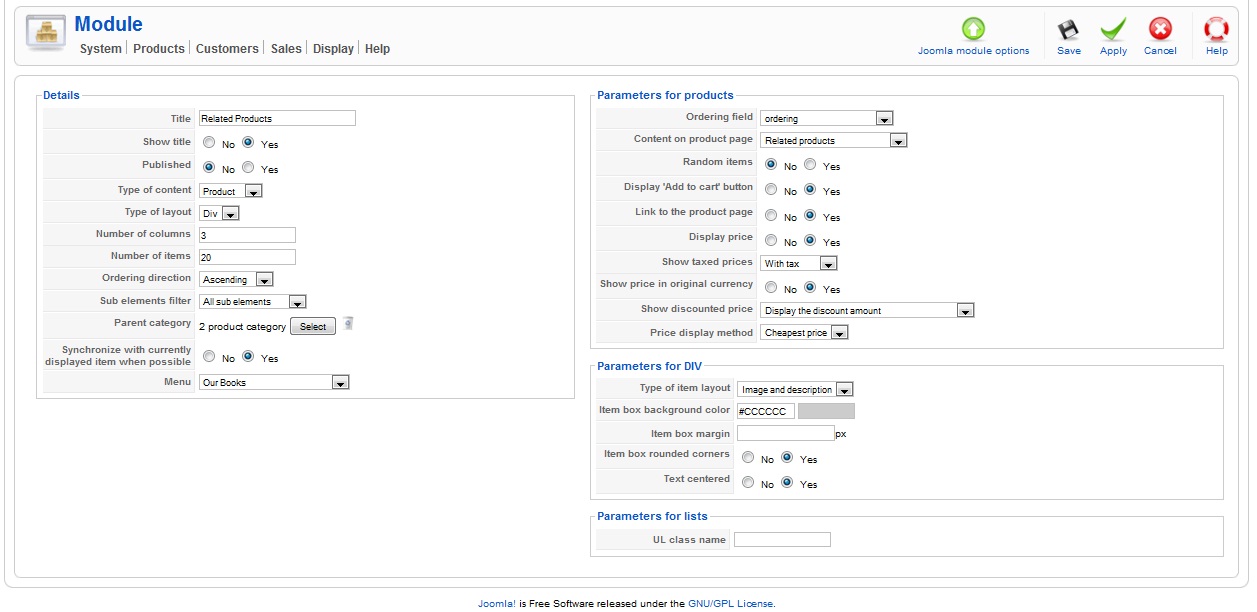
Please Log in or Create an account to join the conversation.
15 years 9 months ago #5210
by nicolas
Replied by nicolas on topic Re: Related Products to Show under current product?
The options sound ok.
Could you make sure that your products are published and that your module is published in the option "modules under the product page".
Could you make sure that your products are published and that your module is published in the option "modules under the product page".
Please Log in or Create an account to join the conversation.
15 years 9 months ago #5212
by serenajo
Replied by serenajo on topic Re: Related Products to Show under current product?
That is what I did not do. It works now! However, why are all the products displaying and not just the ones I stated where related?
Please Log in or Create an account to join the conversation.
15 years 9 months ago #5214
by serenajo
Replied by serenajo on topic Re: Related Products to Show under current product?
Also can I display just the images of the related products and the "add to cart" and not the descriptions?
Thank you so much for your help!!!!!!!
Thank you so much for your help!!!!!!!
Please Log in or Create an account to join the conversation.
15 years 9 months ago #5216
by nicolas
Replied by nicolas on topic Re: Related Products to Show under current product?
Mmm. I think that the related option isn't taken into account because you link directly your products from a joomla menu and the product id isn't directly in the URL but in the menu options.
Could try to edit the file components/com_hikashop/views/product/view.html.php and add the line:
just after the line:
And then try again ?
In your module options, you set the item layout to "image and description". If you just want the images, you should set it to "image"
Could try to edit the file components/com_hikashop/views/product/view.html.php and add the line:
Code:
JRequest::setVar('product_id',$product_id);
Code:
$product_id = $category_params->get('product_id');
In your module options, you set the item layout to "image and description". If you just want the images, you should set it to "image"
Please Log in or Create an account to join the conversation.
15 years 9 months ago #5218
by serenajo
Replied by serenajo on topic Re: Related Products to Show under current product?
I would never have figured this out without your help!! Thank you!!!!!!!!! Awesome support for a free product. Must upgrade.
Please Log in or Create an account to join the conversation.
15 years 9 months ago #6134
by JIK
Replied by JIK on topic Re: Related Products to Show under current product?
A bug in 1.4.4 maybe??
I have Essentials and just loaded version 1.4.4.
When I click on System > Configuration > Display and click the "Modules under the product page" Select button it opens a lightbox with my Hikashop content modules listed. When I click on a module name it opens a new window and instance of the Joomla administration backend. Then no matter what I do the selected module is not saved in System > Configuration > Display.
???
I have Essentials and just loaded version 1.4.4.
When I click on System > Configuration > Display and click the "Modules under the product page" Select button it opens a lightbox with my Hikashop content modules listed. When I click on a module name it opens a new window and instance of the Joomla administration backend. Then no matter what I do the selected module is not saved in System > Configuration > Display.
???
Please Log in or Create an account to join the conversation.
15 years 9 months ago #6145
by nicolas
Replied by nicolas on topic Re: Related Products to Show under current product?
You need to set the published option to yes in the popup of that option. Clicking on the module will just direct you to the module's joomla options.
Please Log in or Create an account to join the conversation.
15 years 8 months ago #9254
by agrfoto
Sorry to butt in on this thread but I'm having similar issues.
Can you clarify which of the "Modules under the product page" option you are referring to - General Display Options, Modules Main Default Options or both.
Thanks
Replied by agrfoto on topic Re: Related Products to Show under current product?
You want to set the module on all the pages but keep it unpublished and then add it to the "Modules under the product page" option.
That way, joomla won't display the module because it is unpublished. However, when building the product page, hikashop will get the module regardless of the published option.
Sorry to butt in on this thread but I'm having similar issues.
Can you clarify which of the "Modules under the product page" option you are referring to - General Display Options, Modules Main Default Options or both.
Thanks
Please Log in or Create an account to join the conversation.
15 years 8 months ago #9256
by nicolas
Replied by nicolas on topic Re: Related Products to Show under current product?
It's the one under "General Display Options"
Please Log in or Create an account to join the conversation.
15 years 8 months ago #9261
by agrfoto
Replied by agrfoto on topic Re: Related Products to Show under current product?
OK thanks.
I want only two related products to appear below all print products, they are two kinds of framing services. At present this is what I have but the two related products show up on product pages where I have NOT added related products in the product edit page.
This includes the two frame service products too, which is obviously wrong to display the same product as a related product.
Therefore something is amiss somewhere. Here's some more screen shots of the settings for you:
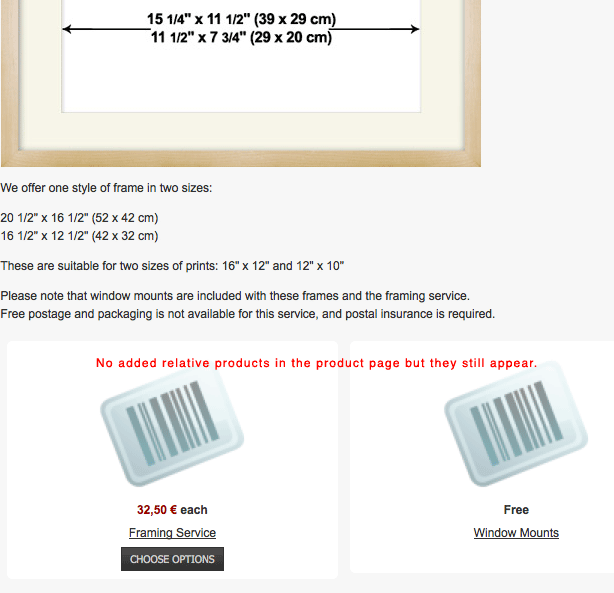
I want only two related products to appear below all print products, they are two kinds of framing services. At present this is what I have but the two related products show up on product pages where I have NOT added related products in the product edit page.
This includes the two frame service products too, which is obviously wrong to display the same product as a related product.
Therefore something is amiss somewhere. Here's some more screen shots of the settings for you:
Please Log in or Create an account to join the conversation.
15 years 8 months ago #9262
by agrfoto
Replied by agrfoto on topic Re: Related Products to Show under current product?
Module settings:
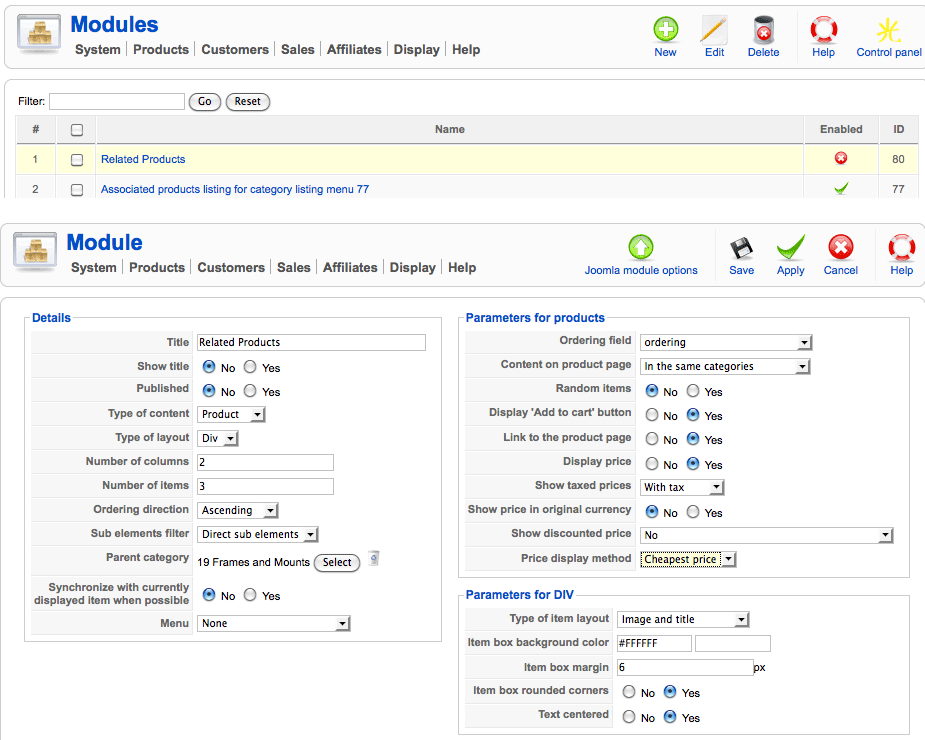
Please Log in or Create an account to join the conversation.
15 years 8 months ago - 15 years 8 months ago #9263
by agrfoto
Replied by agrfoto on topic Re: Related Products to Show under current product?
Config --> Display settings:
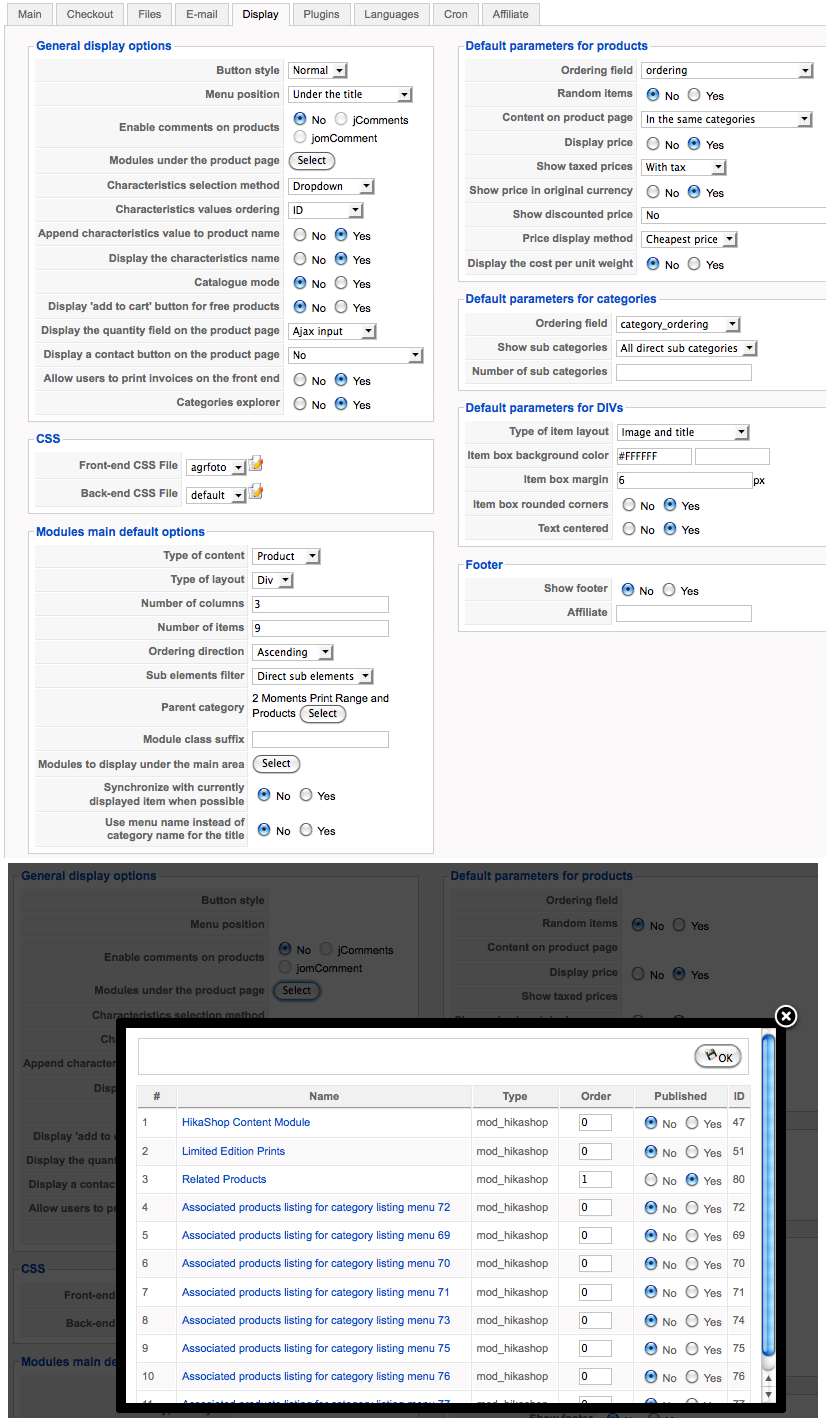
The "modules main default options" have no "module display..." selected.
The "modules main default options" have no "module display..." selected.
Last edit: 15 years 8 months ago by agrfoto.
Please Log in or Create an account to join the conversation.
Time to create page: 0.551 seconds