

- Posts: 86273
- Thank you received: 14258
Incremental Custom Field
12 years 1 month ago #172112
by nicolas
Replied by nicolas on topic How to enable a custom field on a product?
Hi,
Ok, could you change the line:
to:
in the file components/com_hikashop/views/product/view.html.php and see if that helps ?
Ok, could you change the line:
Code:
$catQuery = 'SELECT * FROM '.hikashop_table('category').' AS a LEFT JOIN '.hikashop_table('product_category').' AS b ON a.category_id = b.category_id WHERE b.product_id IN ('.implode(',',$ids).') GROUP BY b.product_id';
Code:
$catQuery = 'SELECT * FROM '.hikashop_table('category').' AS a LEFT JOIN '.hikashop_table('product_category').' AS b ON a.category_id = b.category_id WHERE b.product_id IN ('.implode(',',$ids).');';
The following user(s) said Thank You: pepecortez
Please Log in or Create an account to join the conversation.

Less
More
- Posts: 171
- Thank you received: 9
12 years 1 month ago #172183
by pepecortez
Works like a charm...
Thank you!
Replied by pepecortez on topic How to enable a custom field on a product?
nicolas wrote: Hi,
Ok, could you change the line:to:Code:$catQuery = 'SELECT * FROM '.hikashop_table('category').' AS a LEFT JOIN '.hikashop_table('product_category').' AS b ON a.category_id = b.category_id WHERE b.product_id IN ('.implode(',',$ids).') GROUP BY b.product_id';in the file components/com_hikashop/views/product/view.html.php and see if that helps ?Code:$catQuery = 'SELECT * FROM '.hikashop_table('category').' AS a LEFT JOIN '.hikashop_table('product_category').' AS b ON a.category_id = b.category_id WHERE b.product_id IN ('.implode(',',$ids).');';
Works like a charm...
Thank you!
Please Log in or Create an account to join the conversation.
11 years 2 months ago - 11 years 2 months ago #211571
by Ziggy
Replied by Ziggy on topic How to enable a custom field on a product?
Dear customer,
I red a lot about this issue, but there is something i don't get.
I created a date picker like:
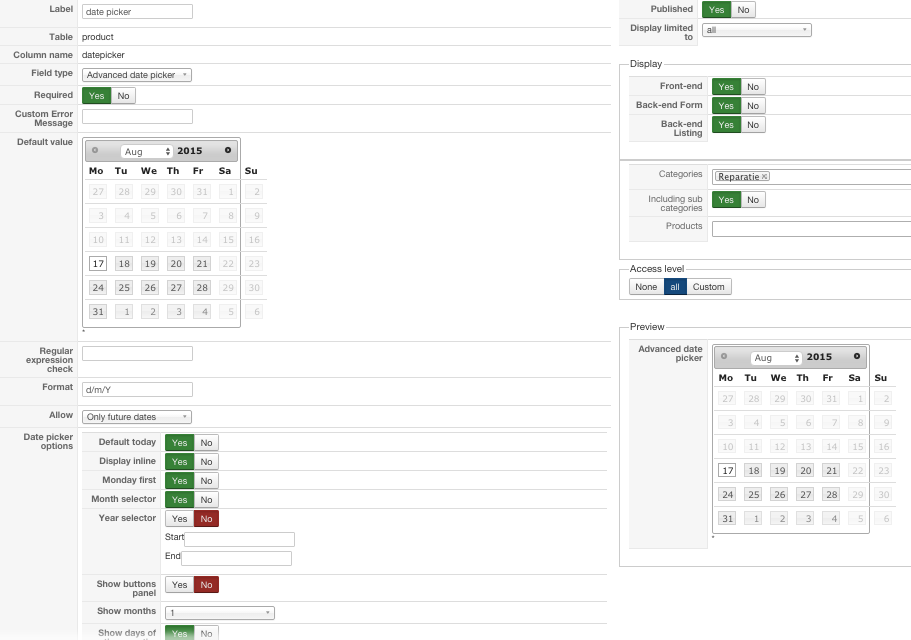
but now i want to add this picker to the products of the category "reparatie".
What do you i have to do to see the date picker in:
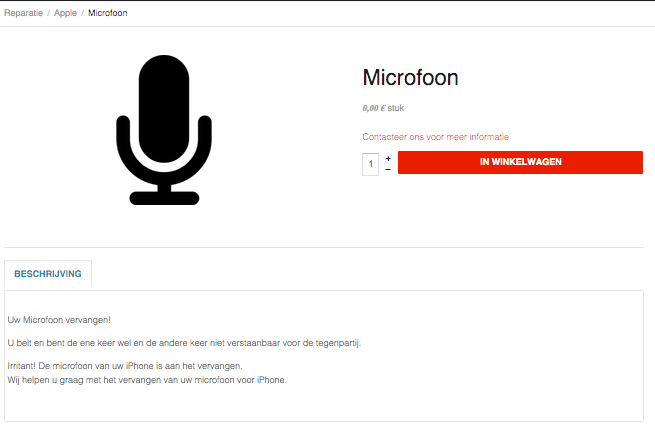
extra info:
Most recent version of hikashop business (rsgsm.nl)
I red a lot about this issue, but there is something i don't get.
I created a date picker like:
but now i want to add this picker to the products of the category "reparatie".
What do you i have to do to see the date picker in:
extra info:
Most recent version of hikashop business (rsgsm.nl)
Last edit: 11 years 2 months ago by Ziggy.
Please Log in or Create an account to join the conversation.
11 years 2 months ago #211579
by nicolas
Replied by nicolas on topic How to enable a custom field on a product?
Hi,
You created a custom field of the table "product" and that will display the field when you edit your product.
If you want to display the field when the customer displays the product page, you instead need to create a custom field of the table "item" via the menu Display>Custom fields.
You created a custom field of the table "product" and that will display the field when you edit your product.
If you want to display the field when the customer displays the product page, you instead need to create a custom field of the table "item" via the menu Display>Custom fields.
The following user(s) said Thank You: Ziggy
Please Log in or Create an account to join the conversation.
11 years 2 months ago #211595
by Ziggy
Replied by Ziggy on topic How to enable a custom field on a product?
Thnx a lot. I should have misunderstood the explanation of the field types.
Please Log in or Create an account to join the conversation.
10 years 11 months ago #217961
by Joeri
Replied by Joeri on topic How to enable a custom field on a product?
Hello, i read all this topics, but find no answer for my own problem.
I want to have 3 fields so that customers can put in a value.
Like this length x width = total dimension
The last field (total dimension) as an example 10m² must correspond to the price per sqm. so the customer can settle the adjusted price
I want to have 3 fields so that customers can put in a value.
Like this length x width = total dimension
The last field (total dimension) as an example 10m² must correspond to the price per sqm. so the customer can settle the adjusted price
Please Log in or Create an account to join the conversation.

Less
More
- Posts: 12953
- Thank you received: 1778
10 years 11 months ago #217962
by Mohamed Thelji
Replied by Mohamed Thelji on topic How to enable a custom field on a product?
Hello,
Note that you'll probably find a solution through that thread : www.hikashop.com/forum/product-category-...er-square-meter.html
Note that you'll probably find a solution through that thread : www.hikashop.com/forum/product-category-...er-square-meter.html
You can sell you products per m2 by creating product per m2, but another solution can be to use the following plugin, and create a "width" and "length" custom ITEM fields which will be used with that plugin. So your that your customers will just have to set a width/length and the price will be automatically calculated.
Please Log in or Create an account to join the conversation.
10 years 11 months ago #218108
by Joeri
Replied by Joeri on topic How to enable a custom field on a product?
Thanks i have created the length en width item fields.
its working, but automatically calculated not the price.
Any idea what's wrong??
its working, but automatically calculated not the price.
Any idea what's wrong??
Please Log in or Create an account to join the conversation.

10 years 11 months ago #218111
by Jerome
Jerome - Obsidev.com
HikaMarket & HikaSerial developer / HikaShop core dev team.
Replied by Jerome on topic How to enable a custom field on a product?
Hi,
I'm sorry but I don't understand your sentence
And no ; we can't know what is wrong because we do not have any information about your website, your field configuration, if you have installed the plugin, if the plugin is published, if the fields are right named, etc.
Regards
I'm sorry but I don't understand your sentence
Please clarify.its working, but automatically calculated not the price.
And no ; we can't know what is wrong because we do not have any information about your website, your field configuration, if you have installed the plugin, if the plugin is published, if the fields are right named, etc.
Regards
Jerome - Obsidev.com
HikaMarket & HikaSerial developer / HikaShop core dev team.
Please Log in or Create an account to join the conversation.
10 years 11 months ago - 10 years 11 months ago #218180
by Joeri
Replied by Joeri on topic How to enable a custom field on a product?
Hi,
I installed the plugin and is published.
I make the item fields and they are published.
Only what's not working is calculating the price after i push the add to cart button.
I send some printscreens to clarify.
I installed the plugin and is published.
I make the item fields and they are published.
Only what's not working is calculating the price after i push the add to cart button.
I send some printscreens to clarify.
Last edit: 10 years 11 months ago by Joeri. Reason: vergot
Please Log in or Create an account to join the conversation.

10 years 11 months ago #218475
by Xavier
Replied by Xavier on topic How to enable a custom field on a product?
Hi,
The issue come from the "Kolom Naam", there it must be "width" and "length" and not "breedte" and "lengte".
That's why it is not working as expected.
If you want to keep these Kolom naam, so you can edit the plugin directly and replace the occurrences of "width" and "length".
The issue come from the "Kolom Naam", there it must be "width" and "length" and not "breedte" and "lengte".
That's why it is not working as expected.
If you want to keep these Kolom naam, so you can edit the plugin directly and replace the occurrences of "width" and "length".
The following user(s) said Thank You: Joeri
Please Log in or Create an account to join the conversation.
10 years 11 months ago - 10 years 11 months ago #218546
by Joeri
Replied by Joeri on topic How to enable a custom field on a product?
Thank you after restart it works fine now.
:woohoo: :woohoo:
:woohoo: :woohoo:
Last edit: 10 years 11 months ago by Joeri. Reason: change answer
Please Log in or Create an account to join the conversation.
9 years 1 month ago #277437
by cthixton
Replied by cthixton on topic How to enable a custom field on a product?
We have been using Hikashop for several years now and upgraded to 3.1.1 business this summer and it broke part of our site.
We sell 3 types of bus tickets.
1) Two have variants with the year, month and route along with a custom field asking for the card holder's name to put on the bus card.
2) The third has no variants and only asks for the card holder's name (it is just a book of tickets which can be used at any time).
Everything worked fine after the upgrade until we noticed that the card holder's name info was not being stored on the first two types of tickets (#1 which also ask for the year, month and route), while the card holder's name is saved on the third type (#2 the book) even though for all three, the card holder's name is required when adding the product to the cart.
All 3 products look to be setup the same and we cannot see any category or permission differences between them.
Additionally, when drilling down into an order, for #1 types, the field for the card holder's name is missing, while on #2, it is there (see attached).
This only broke since the upgrade to business. Any ideas? Thx.
We sell 3 types of bus tickets.
1) Two have variants with the year, month and route along with a custom field asking for the card holder's name to put on the bus card.
2) The third has no variants and only asks for the card holder's name (it is just a book of tickets which can be used at any time).
Everything worked fine after the upgrade until we noticed that the card holder's name info was not being stored on the first two types of tickets (#1 which also ask for the year, month and route), while the card holder's name is saved on the third type (#2 the book) even though for all three, the card holder's name is required when adding the product to the cart.
All 3 products look to be setup the same and we cannot see any category or permission differences between them.
Additionally, when drilling down into an order, for #1 types, the field for the card holder's name is missing, while on #2, it is there (see attached).
This only broke since the upgrade to business. Any ideas? Thx.
Please Log in or Create an account to join the conversation.
9 years 1 month ago #277575
by nicolas
Replied by nicolas on topic How to enable a custom field on a product?
Hi,
First, please update to HikaShop 3.2.0.
It contains a few patches for the custom fields.
Also, edit your custom fields and make sure that the display settings of the custom fields are correct.
First, please update to HikaShop 3.2.0.
It contains a few patches for the custom fields.
Also, edit your custom fields and make sure that the display settings of the custom fields are correct.
Please Log in or Create an account to join the conversation.
6 years 10 months ago - 6 years 10 months ago #313523
by dvddvd
Replied by dvddvd on topic Incremental Custom Field
How can I put an incremental auto field in the custom field entries section?
I need to number the tickets for a raffle
This field has started since 1
I also don't know how to add these custom fields to the invoice, since this option does not appear.I also don't know how to add these custom fields to the invoice, since this option does not appear.
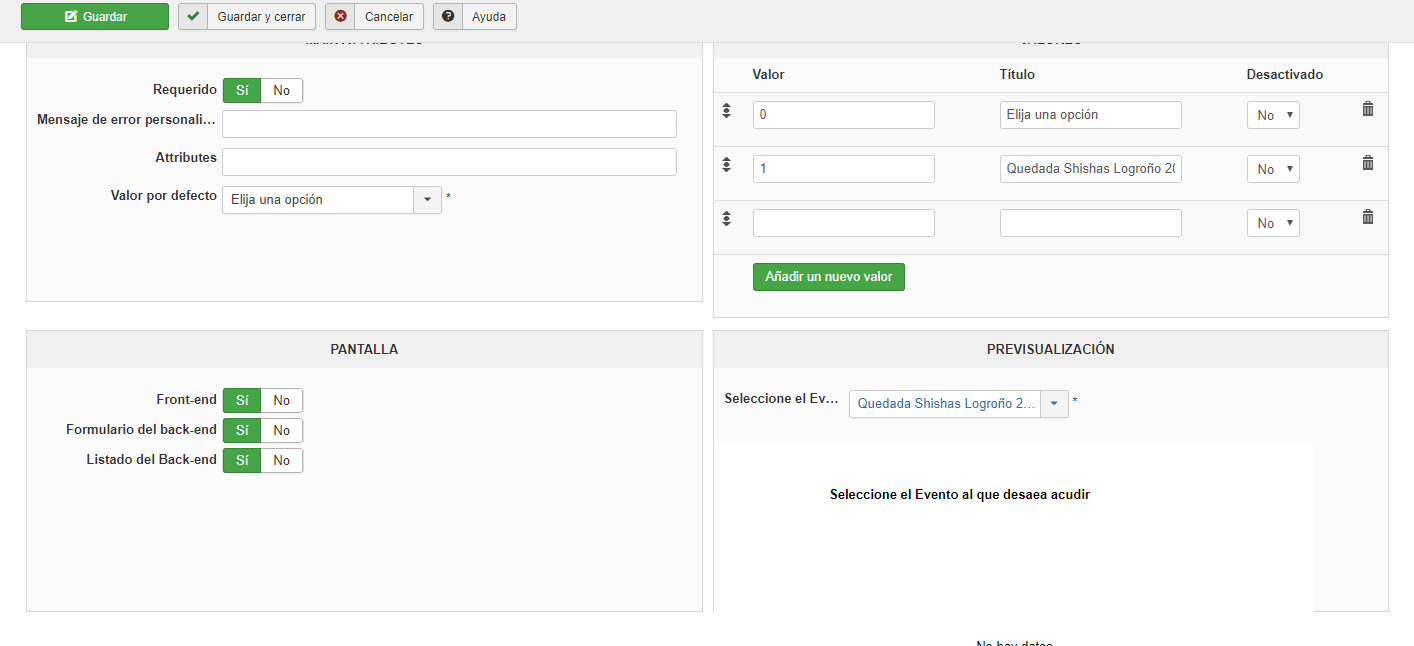
Thnaks Nicolas
I need to number the tickets for a raffle
This field has started since 1
I also don't know how to add these custom fields to the invoice, since this option does not appear.I also don't know how to add these custom fields to the invoice, since this option does not appear.
Thnaks Nicolas
Last edit: 6 years 10 months ago by dvddvd.
Please Log in or Create an account to join the conversation.
6 years 10 months ago #313526
by nicolas
Replied by nicolas on topic Incremental Custom Field
Hi,
There is already an incremental unique number for each entry.
It's the column entry_id in the hikashop_entry table.
For each entry added, an entry_id will be generated automatically.
You'll find that value on the right column of the entries listing in your backend:
monosnap.com/file/6XDC2RKpBO56ljVVW2uAhNVx63Bfjl
There is already an incremental unique number for each entry.
It's the column entry_id in the hikashop_entry table.
For each entry added, an entry_id will be generated automatically.
You'll find that value on the right column of the entries listing in your backend:
monosnap.com/file/6XDC2RKpBO56ljVVW2uAhNVx63Bfjl
Please Log in or Create an account to join the conversation.
Time to create page: 0.214 seconds