

- Posts: 11
- Thank you received: 0
Problem with shipping/billing address fields
15 years 9 months ago #2764
by gratef
Problem with shipping/billing address fields was created by gratef
OK, I am trying to understand what Hika is doing with the billing and shipping addresses and I can tell you it is mighty confusing.
I add product to cart and now go to the address page. The adventure begins.
1. So I click 'New' for a new Billing address and create a new billing address. So far so good.
2. I see that the box 'Use same address as billing' is automatically checked. So I uncheck this and instantly my billing address appears! What is my billing address doing in the shipping address column? That's not right so I delete it. But now it appears that I've deleted my original Billing address. So now I have to input that information again. Arrrhh
3. So now I have to create my Billing address again. Wiser now, I click 'New' under Shipping address and input my new Shipping address. Click OK and what happens? My new Shipping address is not under Shipping address but appears under Billing address. Now I have two addresses under Billing address and I see that the 'Use same address as billing' box is checked again. Why would that happen? I just input a new Shipping address!!! Arrrhh.
4. OK, so I see I have to uncheck that box again. So after I uncheck it, both addresses are now listed under both Billing address and Shipping address and the radio buttons are checked wrong. And I wondering why my Shipping address is listed under Billing address and my Billing address is listed under my Shipping address. Arrrhh.
5. I have to study this carefully because now I'm really confused. I'm now getting the sense that this website merchant is a bonehead and maybe I'll rethink this purchase. Arrrhh.
6. OK, I checked the correct radio buttons and finally that ordeal is over. So I click 'Next' down below and what happens? Both addresses under the Shipping address are now gone!!!! The 'Use same address as billing' is now checked again!!! And now my Shipping address is chosen for me under Billing address!!!!! This is definitely not right. What's going on? Arrrhh.
7. When I click 'Next' the 'Use same address as billing' box get checked.
8. Finally, I find out that no matter how many times I click the 'Next' button below, I go nowhere. I stay here on this page, lost in purgatory.
Please tell me this is an easy fix.
: :huh:
I add product to cart and now go to the address page. The adventure begins.
1. So I click 'New' for a new Billing address and create a new billing address. So far so good.
2. I see that the box 'Use same address as billing' is automatically checked. So I uncheck this and instantly my billing address appears! What is my billing address doing in the shipping address column? That's not right so I delete it. But now it appears that I've deleted my original Billing address. So now I have to input that information again. Arrrhh
3. So now I have to create my Billing address again. Wiser now, I click 'New' under Shipping address and input my new Shipping address. Click OK and what happens? My new Shipping address is not under Shipping address but appears under Billing address. Now I have two addresses under Billing address and I see that the 'Use same address as billing' box is checked again. Why would that happen? I just input a new Shipping address!!! Arrrhh.
4. OK, so I see I have to uncheck that box again. So after I uncheck it, both addresses are now listed under both Billing address and Shipping address and the radio buttons are checked wrong. And I wondering why my Shipping address is listed under Billing address and my Billing address is listed under my Shipping address. Arrrhh.
5. I have to study this carefully because now I'm really confused. I'm now getting the sense that this website merchant is a bonehead and maybe I'll rethink this purchase. Arrrhh.
6. OK, I checked the correct radio buttons and finally that ordeal is over. So I click 'Next' down below and what happens? Both addresses under the Shipping address are now gone!!!! The 'Use same address as billing' is now checked again!!! And now my Shipping address is chosen for me under Billing address!!!!! This is definitely not right. What's going on? Arrrhh.
7. When I click 'Next' the 'Use same address as billing' box get checked.
8. Finally, I find out that no matter how many times I click the 'Next' button below, I go nowhere. I stay here on this page, lost in purgatory.
Please tell me this is an easy fix.
: :huh:
Please Log in or Create an account to join the conversation.

15 years 9 months ago - 15 years 9 months ago #2765
by nicolas
Replied by nicolas on topic Re: Problem with shipping/billing address fields
Hi,
Thank you for your feedback. It's amazing that for two months no one reported us those issues.
When you create a new address it becomes a new address entity. Then, you can select it for shipping and/or billing. You don't really create a shipping or a billing address but an address which can be affected as billing address and/or shipping address on the checkout.
That's why you got a bit confused with the process in the beginning.
Apart from that, there are indeed issues with the addresses handling. Thanks to your thorough report, we were able to reproduce all the problems on one of our test website and fix them. They will be included in next release.
In the mean time here is what to do to fix them manually (assuming that you have the latest version 1.3.9) :
First, you need to replace the file components/com_hikashop/views/checkout/tmpl/address.php with the file in the archive enclosed in this post
This attachment is hidden for guests.
Then, you need to edit the file components/com_hikashop/views/checkout/view.html.php and near line 285, in the function address, replace the code
by the code
Finally, you need to edit the file components/com_hikashop/controllers/checkout.php and near line 640, in the function address, replace the code
by the code
That will fix the behavior of the address selection.
Last problem you talked about: the fact that you can't complete the order. That's either because you don't have any payment methods displayed for selection or you don't have any shipping methods displayed for selection. Usually, you should get an error message when that happen but if your template is missing the jdoc include message tag, it won't be displayed.
I invite you to read our FAQ regarding shipping and payment methods issues: www.hikashop.com/support/documentation/i...ins-listing.html#faq
Thank you for your feedback. It's amazing that for two months no one reported us those issues.
When you create a new address it becomes a new address entity. Then, you can select it for shipping and/or billing. You don't really create a shipping or a billing address but an address which can be affected as billing address and/or shipping address on the checkout.
That's why you got a bit confused with the process in the beginning.
Apart from that, there are indeed issues with the addresses handling. Thanks to your thorough report, we were able to reproduce all the problems on one of our test website and fix them. They will be included in next release.
In the mean time here is what to do to fix them manually (assuming that you have the latest version 1.3.9) :
First, you need to replace the file components/com_hikashop/views/checkout/tmpl/address.php with the file in the archive enclosed in this post
This attachment is hidden for guests.
Please log in or register to see it.
Then, you need to edit the file components/com_hikashop/views/checkout/view.html.php and near line 285, in the function address, replace the code
Code:
$shipping_address=$app->getUserState( HIKASHOP_COMPONENT.'.shipping_address' );
if(empty($billing_address) && count($addresses)){
Code:
$billing_address=$app->getUserState( HIKASHOP_COMPONENT.'.billing_address' );
if(empty($billing_address) && count($addresses)){
Finally, you need to edit the file components/com_hikashop/controllers/checkout.php and near line 640, in the function address, replace the code
Code:
if(JRequest::getString('same_address','yes')=='yes'||empty($shipping)){
$shipping = $billing;
}
$app =& JFactory::getApplication();
$oldShippingAddress=$app->getUserState( HIKASHOP_COMPONENT.'.shipping_address' );
$app->setUserState( HIKASHOP_COMPONENT.'.shipping_address',$shipping );
$app->setUserState( HIKASHOP_COMPONENT.'.billing_address',$billing );
if($shipping!=$oldShippingAddress){
if(strpos($this->checkout_workflow,'shipping')!==false){
$this->before_shipping();
}
if(strpos($this->checkout_workflow,'payment')!==false){
$this->before_payment();
}
}
Code:
if(JRequest::getString('same_address','')=='yes'||empty($shipping)){
$shipping = $billing;
}
$app =& JFactory::getApplication();
$oldShippingAddress=$app->getUserState( HIKASHOP_COMPONENT.'.shipping_address' );
$oldBillingAddress=$app->getUserState( HIKASHOP_COMPONENT.'.billing_address' );
$app->setUserState( HIKASHOP_COMPONENT.'.shipping_address',$shipping );
$app->setUserState( HIKASHOP_COMPONENT.'.billing_address',$billing );
if($shipping!=$oldShippingAddress){
if(strpos($this->checkout_workflow,'shipping')!==false){
$this->before_shipping();
}
if(strpos($this->checkout_workflow,'payment')!==false){
$this->before_payment();
}
return false;
}elseif($billing!=$oldBillingAddress){
return false;
}
That will fix the behavior of the address selection.
Last problem you talked about: the fact that you can't complete the order. That's either because you don't have any payment methods displayed for selection or you don't have any shipping methods displayed for selection. Usually, you should get an error message when that happen but if your template is missing the jdoc include message tag, it won't be displayed.
I invite you to read our FAQ regarding shipping and payment methods issues: www.hikashop.com/support/documentation/i...ins-listing.html#faq
Last edit: 15 years 9 months ago by nicolas.
Please Log in or Create an account to join the conversation.
15 years 9 months ago #2769
by gratef
Replied by gratef on topic Re: Problem with shipping/billing address fields
- I replaced the address.php file as instructed
- I also replaced code as instructed, but the last code (near line 640) looks like this now:
(checking to see if that last 'return true' is correct)
}
$this->_checkToken();
$shipping = JRequest::getInt('hikashop_address_shipping',0);
if(JRequest::getString('same_address','')=='yes'||empty($shipping)){
$shipping = $billing;
}
$app =& JFactory::getApplication();
$oldShippingAddress=$app->getUserState( HIKASHOP_COMPONENT.'.shipping_address' );
$oldBillingAddress=$app->getUserState( HIKASHOP_COMPONENT.'.billing_address' );
$app->setUserState( HIKASHOP_COMPONENT.'.shipping_address',$shipping );
$app->setUserState( HIKASHOP_COMPONENT.'.billing_address',$billing );
if($shipping!=$oldShippingAddress){
if(strpos($this->checkout_workflow,'shipping')!==false){
$this->before_shipping();
}
if(strpos($this->checkout_workflow,'payment')!==false){
$this->before_payment();
}
return false;
}elseif($billing!=$oldBillingAddress){
return false;
}
return true;
}
- I also replaced code as instructed, but the last code (near line 640) looks like this now:
(checking to see if that last 'return true' is correct)
}
$this->_checkToken();
$shipping = JRequest::getInt('hikashop_address_shipping',0);
if(JRequest::getString('same_address','')=='yes'||empty($shipping)){
$shipping = $billing;
}
$app =& JFactory::getApplication();
$oldShippingAddress=$app->getUserState( HIKASHOP_COMPONENT.'.shipping_address' );
$oldBillingAddress=$app->getUserState( HIKASHOP_COMPONENT.'.billing_address' );
$app->setUserState( HIKASHOP_COMPONENT.'.shipping_address',$shipping );
$app->setUserState( HIKASHOP_COMPONENT.'.billing_address',$billing );
if($shipping!=$oldShippingAddress){
if(strpos($this->checkout_workflow,'shipping')!==false){
$this->before_shipping();
}
if(strpos($this->checkout_workflow,'payment')!==false){
$this->before_payment();
}
return false;
}elseif($billing!=$oldBillingAddress){
return false;
}
return true;
}
Please Log in or Create an account to join the conversation.
15 years 9 months ago #2770
by nicolas
Replied by nicolas on topic Re: Problem with shipping/billing address fields
Yes. That's is.
Please Log in or Create an account to join the conversation.
15 years 9 months ago #2771
by gratef
Replied by gratef on topic Re: Problem with shipping/billing address fields
The code substitution has not worked. Or maybe it has worked but I cannot tell.
- Because now when I click 'add to cart' I go to a blank page. Nothing works now.
- Because now when I click 'add to cart' I go to a blank page. Nothing works now.
Please Log in or Create an account to join the conversation.
15 years 9 months ago #2772
by nicolas
Replied by nicolas on topic Re: Problem with shipping/billing address fields
Could you activate the debug mode of joomla and try again? If you still have a blank page, then look at the blank page section of that page:
www.hikashop.com/en/support/documentation/59.html#errors
That will enable you to display the error message so that we can know what is happening. Also, you should double check the code you added, it could well be that you missed something at one point and thus PHP cannot parse properly the file.
That will enable you to display the error message so that we can know what is happening. Also, you should double check the code you added, it could well be that you missed something at one point and thus PHP cannot parse properly the file.
Please Log in or Create an account to join the conversation.
15 years 9 months ago #2866
by nicolas
Replied by nicolas on topic Re: Problem with shipping/billing address fields
Hi,
Today, we worked on the checkout and tested further the shipping address selection. We found some more issues. To make it easy to fix all that, we will publish a new version of HikaShop tomorrow or Monday if we can't make it tomorrow. I hope you can bear with us in the mean time.
Today, we worked on the checkout and tested further the shipping address selection. We found some more issues. To make it easy to fix all that, we will publish a new version of HikaShop tomorrow or Monday if we can't make it tomorrow. I hope you can bear with us in the mean time.
Please Log in or Create an account to join the conversation.

15 years 7 months ago #6621
by chatmautr
Replied by chatmautr on topic Re: Problem with shipping/billing address fields
I am having exactly the same problem, but am running the latest stable version, 1.4.4. I tried the manual fix, with the address.php, but that just took away the option to fill in an address. Please help, since I have no idea how to fix it and I've been trying for a while now.
Please Log in or Create an account to join the conversation.
15 years 7 months ago #6622
by nicolas
Replied by nicolas on topic Re: Problem with shipping/billing address fields
HikaShop 1.4.4 doesn't have any known issue on the shipping and billing addresses selection interface. The quirks of that thread were all fixed in previous versions.
Could you explain what problem you have ? Maybe make some screenshots or give a link to your website ? It's probably another problem...
Could you explain what problem you have ? Maybe make some screenshots or give a link to your website ? It's probably another problem...
Please Log in or Create an account to join the conversation.
15 years 7 months ago #6623
by chatmautr
Replied by chatmautr on topic Re: Problem with shipping/billing address fields
The website is
www.cardronamerino.com
. It is the same problem described above. If I want to change the shipping address it changes the billing address.
Please Log in or Create an account to join the conversation.
15 years 7 months ago #6624
by nicolas
Replied by nicolas on topic Re: Problem with shipping/billing address fields
I was able to place an order on your website with one address for the billing address and a different address for the shipping address. Everything worked as expected. You can check the order on your back end to see that you have different addresses for the billing and shipping...
Please Log in or Create an account to join the conversation.
15 years 7 months ago - 15 years 7 months ago #6625
by chatmautr
Replied by chatmautr on topic Re: Problem with shipping/billing address fields
So do you think it might be a caching problem on my end? Since it doesn't work on 2 of my computers... I see that you were able to do it, so I assume it is fine...
Thanks for the quick reply
Thanks for the quick reply
Last edit: 15 years 7 months ago by chatmautr.
Please Log in or Create an account to join the conversation.
15 years 7 months ago #6626
by nicolas
Replied by nicolas on topic Re: Problem with shipping/billing address fields
You don't seem to have any caching activated.
Could you try with different browsers ? Also, could you do some screenshots of what you're doing step by step so that we can understand where lies the problem on your end ? It might be because you're using it in a way we didn't think of...
Could you try with different browsers ? Also, could you do some screenshots of what you're doing step by step so that we can understand where lies the problem on your end ? It might be because you're using it in a way we didn't think of...
Please Log in or Create an account to join the conversation.
15 years 7 months ago #6627
by chatmautr
Replied by chatmautr on topic Re: Problem with shipping/billing address fields
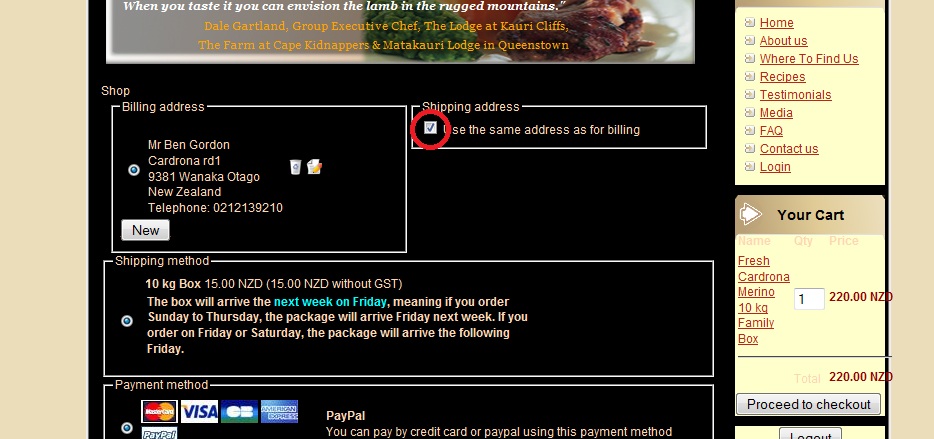
Here is a zip with how I add the address. The address was already filled in from a previous time
This attachment is hidden for guests.
This attachment is hidden for guests.
Please log in or register to see it.
Please Log in or Create an account to join the conversation.
15 years 7 months ago #6628
by nicolas
Replied by nicolas on topic Re: Problem with shipping/billing address fields
The address selection screen enables you to select an address from the list of addresses you have attached to your user account.
When you click on edit, it will edit the address entry. Since that address is selected for both the shipping and the billing address, when you change it, it changes for both of them.
If you want to have two different addresses, you can use the new button to add a new address. That will display both addresses for each the billing address and the shipping address selection, enabling you to select different ones for the billing and the shipping.
When you click on edit, it will edit the address entry. Since that address is selected for both the shipping and the billing address, when you change it, it changes for both of them.
If you want to have two different addresses, you can use the new button to add a new address. That will display both addresses for each the billing address and the shipping address selection, enabling you to select different ones for the billing and the shipping.
Please Log in or Create an account to join the conversation.
15 years 7 months ago #6629
by chatmautr
Replied by chatmautr on topic Re: Problem with shipping/billing address fields
Aha, so that is just the way it was built. Is there any way not to show the billing address as the shipping address?
Please Log in or Create an account to join the conversation.
15 years 7 months ago #6630
by chatmautr
Replied by chatmautr on topic Re: Problem with shipping/billing address fields
Just to clarify, I don't want the billing address to show up when I uncheck the box for the same shipping address.
Please Log in or Create an account to join the conversation.
15 years 7 months ago #6631
by nicolas
Replied by nicolas on topic Re: Problem with shipping/billing address fields
Well, that's not how it was build. In HikaShop, you don't create/edit shipping and billing address, but you create/edit addresses which can then be used for shipping/billing. So far, no one reported that they didn't like the way it was built...
Please Log in or Create an account to join the conversation.
15 years 7 months ago #6632
by chatmautr
Replied by chatmautr on topic Re: Problem with shipping/billing address fields
It might just be me then. If there was a way to separate the different address inputs, that would be nice. But as I understand it everything is just saved as an address and the selection gives it either the shipping or billing parameter.
The problem is usability, this site is not for tech savy people, so some might find it frustrating. I'll just put how to do it in the FAQ on the site, so nobody can complain.
Thanks for the great support!
The problem is usability, this site is not for tech savy people, so some might find it frustrating. I'll just put how to do it in the FAQ on the site, so nobody can complain.
Thanks for the great support!
Please Log in or Create an account to join the conversation.
15 years 7 months ago #8525
by nata
Replied by nata on topic Re: Problem with shipping/billing address fields
Hi,
I agree with chatmautr, the way b/s addresses are handled is unusable. It makes customers to make research how it works instead of make shopping.
The idea of managing address entities is great, but workflow/layout is not handy. Suggestion: to keep both blocks (billing and shipping) open right after customer added new address, it will clarify how it works instantly.
How do you feel about it?
Besides that, now (1.4.5) "address" step of workflow requires two confirmations if addresses are different: customer receives two same screens with addresses.
Thanks,
I agree with chatmautr, the way b/s addresses are handled is unusable. It makes customers to make research how it works instead of make shopping.
The idea of managing address entities is great, but workflow/layout is not handy. Suggestion: to keep both blocks (billing and shipping) open right after customer added new address, it will clarify how it works instantly.
How do you feel about it?
Besides that, now (1.4.5) "address" step of workflow requires two confirmations if addresses are different: customer receives two same screens with addresses.
Thanks,
Please Log in or Create an account to join the conversation.
Time to create page: 0.262 seconds