

- Posts: 136
- Thank you received: 1
Paypal Payment Configuration
15 years 8 months ago #4963
by jacorr27
Paypal Payment Configuration was created by jacorr27
Hi again!
I'm hoping that you can help with the configuration of the Paypal plugin.
I've set up a business acc with Paypal - however, when I try to purchase something on my dev site I'm re-directed to screen that says "the cart is empty" even though it sends the notification email that the order is in the "created" status.
Looking at my settings there is nothing in the Paypal URL field...can you please confirm what this value should be?
Would this also have something to do with the workflow? Currently mine is set to login_address_shipping_payment_confirm_cart_status_fields,end
Thanks in advance,
Jacqueline
I'm hoping that you can help with the configuration of the Paypal plugin.
I've set up a business acc with Paypal - however, when I try to purchase something on my dev site I'm re-directed to screen that says "the cart is empty" even though it sends the notification email that the order is in the "created" status.
Looking at my settings there is nothing in the Paypal URL field...can you please confirm what this value should be?
Would this also have something to do with the workflow? Currently mine is set to login_address_shipping_payment_confirm_cart_status_fields,end
Thanks in advance,
Jacqueline
Please Log in or Create an account to join the conversation.

15 years 8 months ago #4964
by nicolas
Replied by nicolas on topic Re: Paypal Payment Configuration
Hi,
You need to go to the menu System->Payment methods. There edit you paypal payment plugin. You will have the option "Return URL" where you can put the URL where your users will be redirected when they come back from paypal.
You need to go to the menu System->Payment methods. There edit you paypal payment plugin. You will have the option "Return URL" where you can put the URL where your users will be redirected when they come back from paypal.
Please Log in or Create an account to join the conversation.
15 years 8 months ago #4965
by jacorr27
Replied by jacorr27 on topic Re: Paypal Payment Configuration
Thanks Nicolas, the problem seems to be actually getting to paypal....at the moment the user is not directed to paypal at all to complete payment details. When you click "Next" from the shopping cart, after a second or two it goes straight to "the cart is empty" page.
Looking at my settings in the paypal plugin there is nothing in the Paypal URL field...I'm thinking this would have something to do with it??
Looking at my settings in the paypal plugin there is nothing in the Paypal URL field...I'm thinking this would have something to do with it??
Please Log in or Create an account to join the conversation.
15 years 8 months ago #4966
by nicolas
Replied by nicolas on topic Re: Paypal Payment Configuration
Did you published and saved the paypal plugin configuration ?
Could you provide the URL of your website so that we can have a look at the problem ?
Could you provide the URL of your website so that we can have a look at the problem ?
Please Log in or Create an account to join the conversation.
15 years 8 months ago #4967
by jacorr27
Replied by jacorr27 on topic Re: Paypal Payment Configuration
Yes I have both published and saved the plugin config.
I guess I'm missing something.
My dev site is www.dev.beautyscoop.com.au
I guess I'm missing something.
My dev site is www.dev.beautyscoop.com.au
Please Log in or Create an account to join the conversation.
15 years 8 months ago #4968
by nicolas
Replied by nicolas on topic Re: Paypal Payment Configuration
That URL doesn't work. Could you double check it ?
Please Log in or Create an account to join the conversation.
15 years 8 months ago #4969
by jacorr27
Replied by jacorr27 on topic Re: Paypal Payment Configuration
Please Log in or Create an account to join the conversation.
15 years 8 months ago #4970
by nicolas
Replied by nicolas on topic Re: Paypal Payment Configuration
That's the same. Maybe a DNS issue ?
Please Log in or Create an account to join the conversation.
15 years 8 months ago #4971
by jacorr27
Replied by jacorr27 on topic Re: Paypal Payment Configuration
I think there is a problem with my web hosting service. It's only just happened now as luck would have it!
Can we try have another look tomorrow, when I find out what's going on with the web server?
Can we try have another look tomorrow, when I find out what's going on with the web server?
Please Log in or Create an account to join the conversation.
15 years 8 months ago #4972
by nicolas
Replied by nicolas on topic Re: Paypal Payment Configuration
Sure, let us know when it works again so that we can try.
Please Log in or Create an account to join the conversation.
15 years 8 months ago #5025
by jacorr27
Replied by jacorr27 on topic Re: Paypal Payment Configuration
Hi Nicolas,
The url dev.beautyscoop.com.au should be working now, when you have a moment to have a quick look.
The url dev.beautyscoop.com.au should be working now, when you have a moment to have a quick look.
Please Log in or Create an account to join the conversation.
15 years 8 months ago #5026
by nicolas
Replied by nicolas on topic Re: Paypal Payment Configuration
In your paypal payment plugin options, in the option "Paypal URL" you should have the URL:
www.paypal.com/cgi-bin/webscr
Please Log in or Create an account to join the conversation.
15 years 8 months ago #5027
by jacorr27
Replied by jacorr27 on topic Re: Paypal Payment Configuration
brilliant, thank you so much!
Please Log in or Create an account to join the conversation.
15 years 8 months ago #5028
by jacorr27
Replied by jacorr27 on topic Re: Paypal Payment Configuration
just one more question...is there a way i can integrate some of the credit card payment fields on the page in hikashop/joomla, so that the end user will not leave the website?
Please Log in or Create an account to join the conversation.
15 years 8 months ago #5029
by nicolas
Replied by nicolas on topic Re: Paypal Payment Configuration
The paypal payment plugin on not compatible with this. You could however build your own payment plugin gathering the credit card information and then sending that to the paypal API so that the user doesn't have to leave your website:
www.hikashop.com/en/support/documentatio...r-documentation.html
But that require quite a bit of knowledge in PHP.
www.hikashop.com/en/support/documentatio...r-documentation.html
But that require quite a bit of knowledge in PHP.
Please Log in or Create an account to join the conversation.
15 years 5 months ago - 15 years 5 months ago #15071
by areena
Replied by areena on topic Re: Paypal Payment Configuration
Hi, I have a problem to configure payment details as well. Once I add the product to cart, it takes me to the login where it displays payment as well. I know I need to adjust a little bit of layout, but here are some screen shots.
Once I click on payment it takes me to the checkout and it shows as follow.

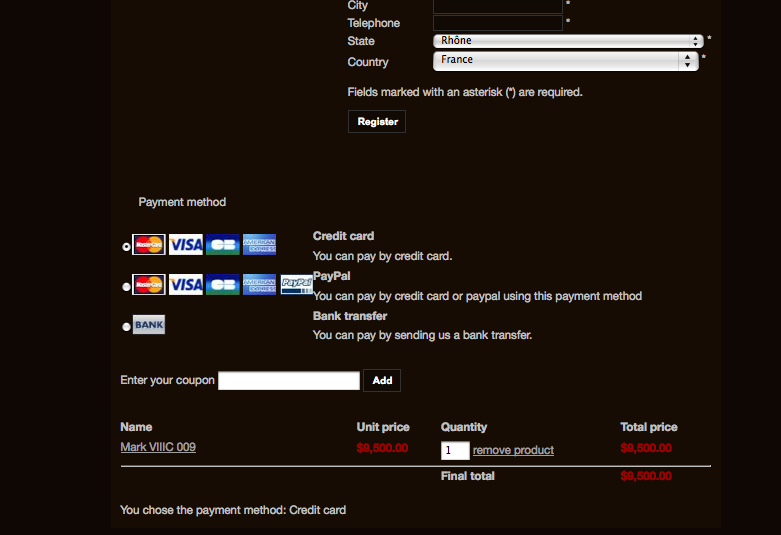
Once I click on payment it takes me to the checkout and it shows as follow.
Last edit: 15 years 5 months ago by areena.
Please Log in or Create an account to join the conversation.
15 years 5 months ago #15091
by nicolas
Replied by nicolas on topic Re: Paypal Payment Configuration
Hi areena,
What is your problem ?
What is your problem ?
Please Log in or Create an account to join the conversation.
15 years 5 months ago - 15 years 5 months ago #15150
by areena
Replied by areena on topic Re: Paypal Payment Configuration
Oh, sorry, my other post haven't been posted..
So, first I don't want payment options to be displayed on the 'login/registration' page.
Then, radio buttons don't work properly. But when I click on paypal let's say and I press next, I just go to the next page and it looks like this (attached)
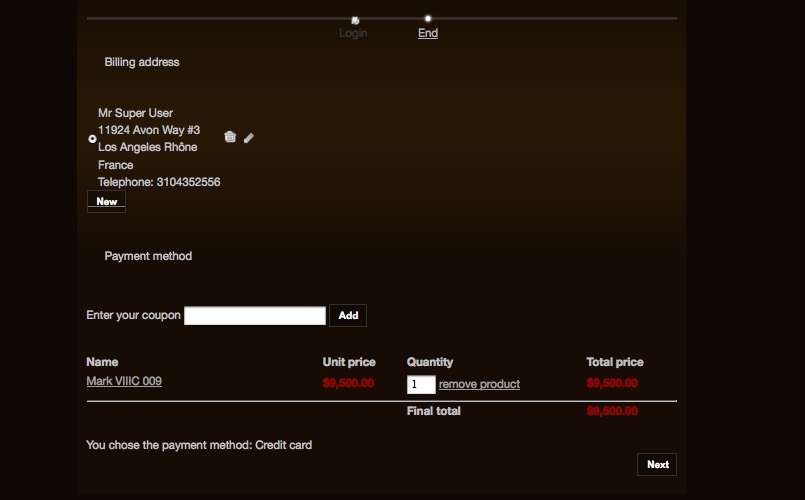
So user can't choose any payment options. Plus, if I click on next, my page refreshes and this is it.
I'm very new to all this store front, so need your help.
Thank you!
So, first I don't want payment options to be displayed on the 'login/registration' page.
Then, radio buttons don't work properly. But when I click on paypal let's say and I press next, I just go to the next page and it looks like this (attached)
So user can't choose any payment options. Plus, if I click on next, my page refreshes and this is it.
I'm very new to all this store front, so need your help.
Thank you!
Last edit: 15 years 5 months ago by areena.
Please Log in or Create an account to join the conversation.
15 years 5 months ago #15161
by nicolas
Replied by nicolas on topic Re: Paypal Payment Configuration
If you want to have your checkout workflow in several pages, you need to change the "checkout workflow" option which is in the tab checkout of the configuration. We have a lengthy documentation on how to set it up:
www.hikashop.com/support/documentation/5...config.html#checkout
Concerning the payment methods "disappearing", that's probably because you set a "zone" restriction in your payment methods settings. Here is a FAQ on the different possibilities of that problem: www.hikashop.com/support/documentation/i...ins-listing.html#faq
www.hikashop.com/support/documentation/5...config.html#checkout
Concerning the payment methods "disappearing", that's probably because you set a "zone" restriction in your payment methods settings. Here is a FAQ on the different possibilities of that problem: www.hikashop.com/support/documentation/i...ins-listing.html#faq
Please Log in or Create an account to join the conversation.
Time to create page: 0.275 seconds