
Add Categori to MENU
- Infinityjane
-
 Topic Author
- Offline
Less
More
13 years 10 months ago - 13 years 10 months ago #82157
by Infinityjane
Hello - i just installed the free version of this Cart.
Then i want to add categories to my menu.
I looked at this Youtube video - very good indeed
www.youtube.com/watch?v=SBMcCvMj6Zg
BUT - when i take the step where i am suppose to choose a category for my menu - it will NOT save.. ore yes i can save, but it dissepears when i save.. SO i end up with all category showing.
I dont know if i can explain. But if i have Paintings.. i choose my category "paintings" for the menu, but when i save it dissapears and when i then push the "menu button: Paintings" it show ALL my categories... so it did not point on the specific category.
What can i do - and what did i do wrong?
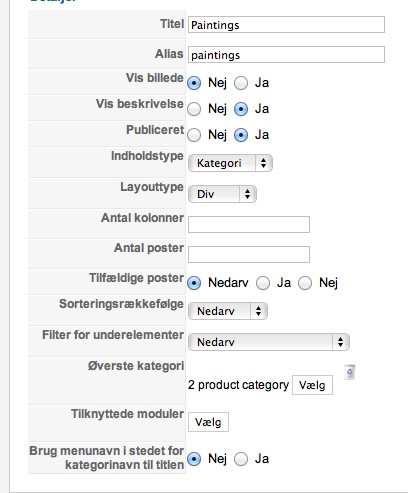
I put a screendump.. where it goes wrong is where you should choose "2 product category" - i choose.. and save.. and then it dissapear and doesnt work..
If you look my page you can push to the left "Paintings".. then it SHOULD show paintings and those subcategories (when i make them) - but its just showing all my top categories.. ?
www.markdesign.dk
i want to say i just started my page, so the layout is long from finished..
Add Categori to MENU was created by Infinityjane
Hello - i just installed the free version of this Cart.
Then i want to add categories to my menu.
I looked at this Youtube video - very good indeed
www.youtube.com/watch?v=SBMcCvMj6Zg
BUT - when i take the step where i am suppose to choose a category for my menu - it will NOT save.. ore yes i can save, but it dissepears when i save.. SO i end up with all category showing.
I dont know if i can explain. But if i have Paintings.. i choose my category "paintings" for the menu, but when i save it dissapears and when i then push the "menu button: Paintings" it show ALL my categories... so it did not point on the specific category.
What can i do - and what did i do wrong?
I put a screendump.. where it goes wrong is where you should choose "2 product category" - i choose.. and save.. and then it dissapear and doesnt work..
If you look my page you can push to the left "Paintings".. then it SHOULD show paintings and those subcategories (when i make them) - but its just showing all my top categories..
?www.markdesign.dk
i want to say i just started my page, so the layout is long from finished..
Last edit: 13 years 10 months ago by Infinityjane.
Please Log in or Create an account to join the conversation.
- Infinityjane
-
Topic Author
- Offline
13 years 10 months ago #82228
by Infinityjane
Replied by Infinityjane on topic Add Categori to MENU
No one that can help me???? 
Please Log in or Create an account to join the conversation.

13 years 10 months ago #82349
by Xavier
Replied by Xavier on topic Add Categori to MENU
Hi,
Can you try to install again HikaShop over the other install ?
Could you give us a screenshot of your categories ?
Can you try to install again HikaShop over the other install ?
Could you give us a screenshot of your categories ?
Please Log in or Create an account to join the conversation.

Less
More
- Posts: 21
- Thank you received: 0
13 years 10 months ago #82628
by red_garfield
Peter
Replied by red_garfield on topic Add Categori to MENU
Has anyone a solution? I have the same problem.
Peter
Peter
Peter
Please Log in or Create an account to join the conversation.

13 years 10 months ago #82646
by Jerome
Jerome - Obsidev.com
HikaMarket & HikaSerial developer / HikaShop core dev team.
Replied by Jerome on topic Add Categori to MENU
Hi,
Do you use the "green plus button" link displayed in this post ?
www.hikashop.com/forum/4-how-to/75741-pr...u.html?lang=en#76392
Regards,
Do you use the "green plus button" link displayed in this post ?
www.hikashop.com/forum/4-how-to/75741-pr...u.html?lang=en#76392
Regards,
Jerome - Obsidev.com
HikaMarket & HikaSerial developer / HikaShop core dev team.
Please Log in or Create an account to join the conversation.
Less
More
- Posts: 21
- Thank you received: 0
13 years 10 months ago #82648
by red_garfield
Peter
Replied by red_garfield on topic Add Categori to MENU
I try to change the number of columns, and the result was that now the number of the columns is empty. And also the number of the articles is now empty.
I can type any number but after I hit the SAVE button, every is empty again.
I can type any number but after I hit the SAVE button, every is empty again.
Peter
Please Log in or Create an account to join the conversation.
13 years 10 months ago #82658
by Jerome
Jerome - Obsidev.com
HikaMarket & HikaSerial developer / HikaShop core dev team.
Replied by Jerome on topic Add Categori to MENU
Hi red_garfield,
I tried with the access you send and I didn't have any problem to save the HikaShop content menu configuration.
I have changed the number of columns to 4, save it and, it works...
Which browser do you use ?
Regards,
I tried with the access you send and I didn't have any problem to save the HikaShop content menu configuration.
I have changed the number of columns to 4, save it and, it works...
Which browser do you use ?
Regards,
Jerome - Obsidev.com
HikaMarket & HikaSerial developer / HikaShop core dev team.
Please Log in or Create an account to join the conversation.
Less
More
- Posts: 21
- Thank you received: 0
13 years 10 months ago - 13 years 10 months ago #82661
by red_garfield
Peter
Replied by red_garfield on topic Add Categori to MENU
I'am using Safari on a Mac.
Now I also installed Chrome. It looks like this will work.
Now I also installed Chrome. It looks like this will work.
Peter
Last edit: 13 years 10 months ago by red_garfield.
Please Log in or Create an account to join the conversation.
Time to create page: 0.082 seconds