

- Posts: 13
- Thank you received: 0
Waitlist email
13 years 6 months ago #98086
by dkbeast10
Waitlist email was created by dkbeast10
Hi,
i activated the wait list function.
when there is an out of stock, user can opt to be notified when stock arrived.
however when i replenish the stock, user did not get any email notification.
What do i got to set?
Thanks!
i activated the wait list function.
when there is an out of stock, user can opt to be notified when stock arrived.
however when i replenish the stock, user did not get any email notification.
What do i got to set?
Thanks!
Please Log in or Create an account to join the conversation.

13 years 6 months ago #98176
by Xavier
Replied by Xavier on topic Waitlist email
Hi,
The wailtist emails are based on the Cron.
So if they are not send, that's because your cron is not configured correctly.
The wailtist emails are based on the Cron.
So if they are not send, that's because your cron is not configured correctly.
Please Log in or Create an account to join the conversation.
13 years 6 months ago #98179
by dkbeast10
Replied by dkbeast10 on topic Waitlist email
Hi Xavier,
thanks but i am not sure how to set the cron, can you please guide me in steps, thanks.
thanks but i am not sure how to set the cron, can you please guide me in steps, thanks.
Please Log in or Create an account to join the conversation.

13 years 6 months ago #98244
by Jerome
Jerome - Obsidev.com
HikaMarket & HikaSerial developer / HikaShop core dev team.
Replied by Jerome on topic Waitlist email
Hi,
Our documentation explains, step by step own configure the cron task:
www.hikashop.com/en/support/documentatio...ashop-cron-task.html
Best regards,
Our documentation explains, step by step own configure the cron task:
www.hikashop.com/en/support/documentatio...ashop-cron-task.html
Best regards,
Jerome - Obsidev.com
HikaMarket & HikaSerial developer / HikaShop core dev team.
Please Log in or Create an account to join the conversation.
13 years 4 months ago #107586
by dkbeast10
Replied by dkbeast10 on topic Waitlist email
Hi Jerome,
i tried the step by step cron as stated in the documentation
however the waitlist reply still wasn't performed.
0 stock > notify me when available > add 1 stock > nothing happened (cron task activated on 15mins interval)
i tried the step by step cron as stated in the documentation
however the waitlist reply still wasn't performed.
0 stock > notify me when available > add 1 stock > nothing happened (cron task activated on 15mins interval)
Please Log in or Create an account to join the conversation.
13 years 4 months ago #107644
by Xavier
Replied by Xavier on topic Waitlist email
Hi,
Have you enabled the plugin "HikaShop Product Wait List Notification plugin" ?
Have you enabled the plugin "HikaShop Product Wait List Notification plugin" ?
Please Log in or Create an account to join the conversation.
13 years 4 months ago #107882
by dkbeast10
Replied by dkbeast10 on topic Waitlist email
Hi Xavier,
thanks it works now!
thanks it works now!
Please Log in or Create an account to join the conversation.
4 years 3 months ago #343350
by Agabl123
Replied by Agabl123 on topic Waitlist email
Hello, I've the same problem, how did you fix it so that it works?
Please Log in or Create an account to join the conversation.

4 years 3 months ago #343356
by nicolas
Replied by nicolas on topic Waitlist email
Hi,
Did you make sure your cron task is up and running ?
www.hikashop.com/support/documentation/5...cron-task.html#check
Also, did you make sure the wait list plugin is enabled in the Joomla plugins manager ?
Did you make sure your cron task is up and running ?
www.hikashop.com/support/documentation/5...cron-task.html#check
Also, did you make sure the wait list plugin is enabled in the Joomla plugins manager ?
Please Log in or Create an account to join the conversation.
4 years 3 months ago #343359
by Agabl123
Replied by Agabl123 on topic Waitlist email
Hello, thank you for your answer.
Plugin is enabled, cron job is running. I get mails when stock is zero from cron job but peple are not informed when stock is > 0 even there are waiting people. I read the documentation and think I did all the things that shoulc be done ....
Plugin is enabled, cron job is running. I get mails when stock is zero from cron job but peple are not informed when stock is > 0 even there are waiting people. I read the documentation and think I did all the things that shoulc be done ....
Please Log in or Create an account to join the conversation.
4 years 3 months ago #343360
by nicolas
Replied by nicolas on topic Waitlist email
Hi,
Could you provide a screenshot of the settings of the wait list plugin ?
Also, can you check the menu Customers>Emails history ? There, you'll see all the emails sent by HikaShop. So you can check if the emails are sent by HikaShop or not, regardless of whether the email ended up in the spam folder of the user or was rejected by their email server for spam reasons.
Also, in the Customers>Waitlist menu, you can check the list of users waiting for a product. Once the email is sent for a product for a user, the entry will be removed from that listing.
Finally, note that the notification to the users is not instantaneous. There is a delay as the email is only sent when the cron task triggers the wait list plugin.
Could you provide a screenshot of the settings of the wait list plugin ?
Also, can you check the menu Customers>Emails history ? There, you'll see all the emails sent by HikaShop. So you can check if the emails are sent by HikaShop or not, regardless of whether the email ended up in the spam folder of the user or was rejected by their email server for spam reasons.
Also, in the Customers>Waitlist menu, you can check the list of users waiting for a product. Once the email is sent for a product for a user, the entry will be removed from that listing.
Finally, note that the notification to the users is not instantaneous. There is a delay as the email is only sent when the cron task triggers the wait list plugin.
Please Log in or Create an account to join the conversation.
4 years 3 months ago - 4 years 3 months ago #343369
by Agabl123
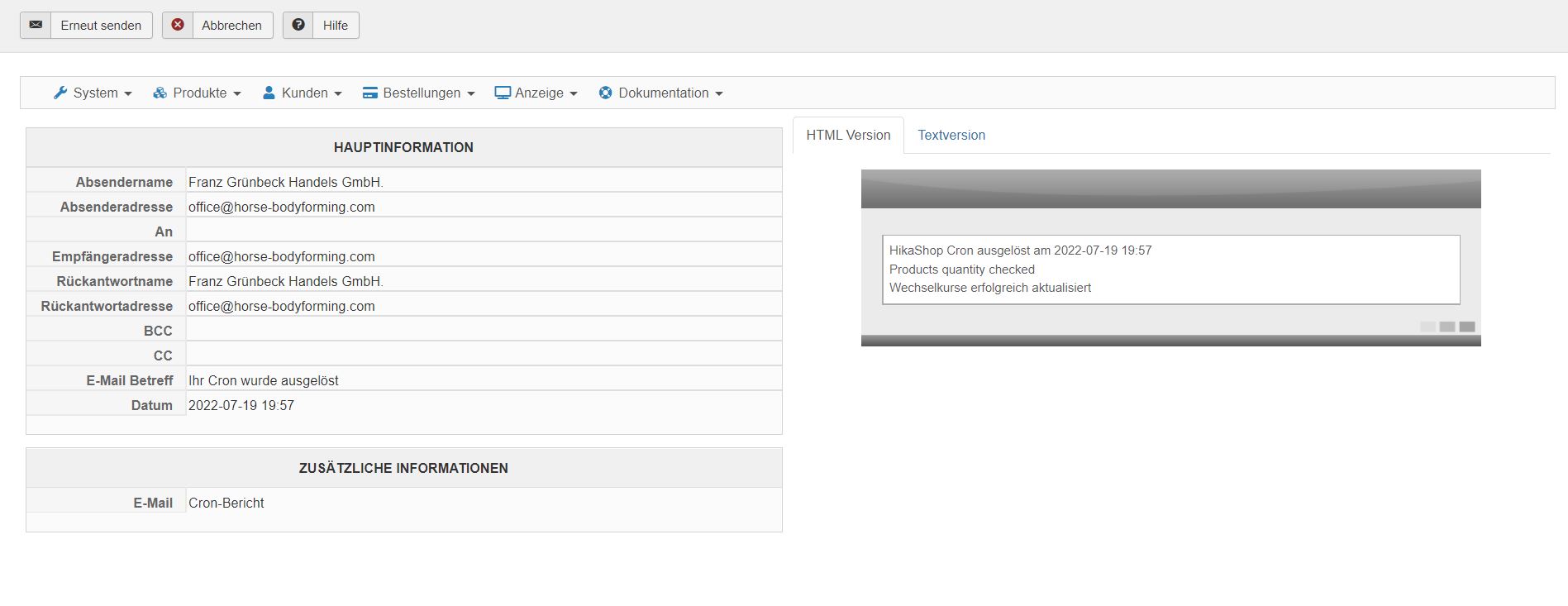 Here are screenshots. Cron job is running, but no emails are sent to the waiting customer. products are now on stock.
Replied by Agabl123 on topic Waitlist email
Last edit: 4 years 3 months ago by Agabl123.
Please Log in or Create an account to join the conversation.
4 years 3 months ago #343373
by nicolas
Replied by nicolas on topic Waitlist email
Hi,
Could you provide a backend access so that we could check everything more in depth ?
Please provide it via our contact form with a link to this thread for reference:
www.hikashop.com/support/contact-us.html
Could you provide a backend access so that we could check everything more in depth ?
Please provide it via our contact form with a link to this thread for reference:
www.hikashop.com/support/contact-us.html
Please Log in or Create an account to join the conversation.
4 years 3 months ago #343378
by Agabl123
Replied by Agabl123 on topic Waitlist email
Dear Nicolas, I sent access via contact form
Please Log in or Create an account to join the conversation.
4 years 3 months ago #343382
by nicolas
Replied by nicolas on topic Waitlist email
Hi,
Thank you. I was able to check your situation and reproduce the issue on my end. I've added a patch which should help.
Please download again the install package of HikaShop on our website and install it again on yours to get the patch.
Thank you. I was able to check your situation and reproduce the issue on my end. I've added a patch which should help.
Please download again the install package of HikaShop on our website and install it again on yours to get the patch.
Please Log in or Create an account to join the conversation.
4 years 3 months ago #343388
by Agabl123
Replied by Agabl123 on topic Waitlist email
Thank you very much !! it works!! great. Anita
Please Log in or Create an account to join the conversation.
Time to create page: 0.145 seconds