

- Posts: 13
- Thank you received: 0
typeable text field in product
12 years 6 months ago #150523
by tfkelley
typeable text field in product was created by tfkelley
-- url of the page with the problem -- :
usbeefstore.com
-- HikaShop version -- : Essential: 2.3.0
-- Joomla version -- : Joomla! 2.5.19
-- PHP version -- : 5.3
-- Browser(s) name and version -- : mozilla
-- Error-message(debug-mod must be tuned on) -- : Error_message
I am wanting to have a type-able text field in product area, i created other variants for size and or color and they work, i upgraded to Essential because they said the basic version would not do this, I upgraded but the blank text field still will not show on the front side.
help please
-- HikaShop version -- : Essential: 2.3.0
-- Joomla version -- : Joomla! 2.5.19
-- PHP version -- : 5.3
-- Browser(s) name and version -- : mozilla
-- Error-message(debug-mod must be tuned on) -- : Error_message
I am wanting to have a type-able text field in product area, i created other variants for size and or color and they work, i upgraded to Essential because they said the basic version would not do this, I upgraded but the blank text field still will not show on the front side.
help please
Please Log in or Create an account to join the conversation.

12 years 6 months ago #150552
by Xavier
Replied by Xavier on topic typeable text field in product
Hi,
You have to create a custom field in the table "Item" to allow customers to fill it.
To display it on frontend, don't forget to enable the option for that on the right side when configuring the custom field
You have to create a custom field in the table "Item" to allow customers to fill it.
To display it on frontend, don't forget to enable the option for that on the right side when configuring the custom field
Please Log in or Create an account to join the conversation.
12 years 6 months ago #150682
by tfkelley
Replied by tfkelley on topic typeable text field in product
This is a example of what i want to accomplish,
usbeefstore.com/index.php/product/8-505-...dies-crew-polo-black
see image
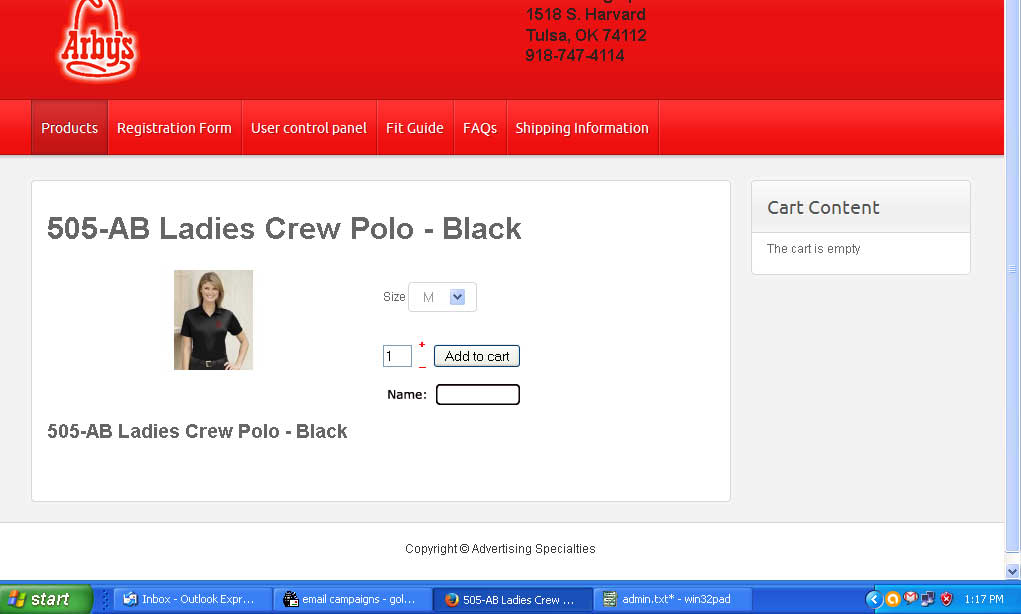
usbeefstore.com/index.php/product/8-505-...dies-crew-polo-black
see image
Please Log in or Create an account to join the conversation.

12 years 6 months ago #150702
by nicolas
Replied by nicolas on topic typeable text field in product
Custom fields of the table "item" are the solution as Xavier said. They can be created via the menu Display->Custom fields, but only with the Business edition, as explained in the custom field documentation:
www.hikashop.com/support/support/documen...shop-field-form.html
www.hikashop.com/support/support/documen...shop-field-form.html
Please Log in or Create an account to join the conversation.
12 years 6 months ago #150858
by tfkelley
Replied by tfkelley on topic typeable text field in product
at the link you provided it says "both essential and business edition only"
www.hikashop.com/support/support/documen...shop-field-form.html
With the product custom fields (both essential and business edition only), you will be able to personalize the information for your products. Your potential customers will be able to see those on the product page. Also, with the filtering module, which will be available in a later release, your customers will be able to filter your products using filters based on those custom fields.
we are running essential, i want to add a simple text field to a specific product, i was told the essential version would do this, that is why i bought it. please see image above
help please
www.hikashop.com/support/support/documen...shop-field-form.html
With the product custom fields (both essential and business edition only), you will be able to personalize the information for your products. Your potential customers will be able to see those on the product page. Also, with the filtering module, which will be available in a later release, your customers will be able to filter your products using filters based on those custom fields.
we are running essential, i want to add a simple text field to a specific product, i was told the essential version would do this, that is why i bought it. please see image above
help please
Please Log in or Create an account to join the conversation.
12 years 6 months ago #150898
by Xavier
Replied by Xavier on topic typeable text field in product
Hi,
Not "product" but "Item".
Not "product" but "Item".
With the item custom fields (business edition only), you will be able to personalize the information you can gather from your customers when they order something on your store. The custom fields will appear on the products page where you will be able to ask the user information related to the product he wants to buy. It's useful when you sell personalized goods like for example a shirts selling website where the customers can upload an image to be printed on the shirts.
Please Log in or Create an account to join the conversation.
12 years 5 months ago #152605
by tfkelley
Replied by tfkelley on topic typeable text field in product
I upgraded to business
I want to add a typeable text filed into this product to get a persons name tag information, do you have any documentation for this
usbeefstore.com/index.php/product/164-arby-s-manager-polo
-- url of the page with the problem -- : usbeefstore.com
-- HikaShop version -- : business
-- Joomla version -- : Joomla! 2.5.19
-- PHP version -- : 5.3
-- Browser(s) name and version -- : mozilla
I want to add a typeable text filed into this product to get a persons name tag information, do you have any documentation for this
usbeefstore.com/index.php/product/164-arby-s-manager-polo
-- url of the page with the problem -- : usbeefstore.com
-- HikaShop version -- : business
-- Joomla version -- : Joomla! 2.5.19
-- PHP version -- : 5.3
-- Browser(s) name and version -- : mozilla
Please Log in or Create an account to join the conversation.

Less
More
- Posts: 12953
- Thank you received: 1778
12 years 5 months ago #152607
by Mohamed Thelji
Replied by Mohamed Thelji on topic typeable text field in product
You'll just have to :
- Go to "Hikashop->Display->Custom fields"
- Create a new custom field
- Set the "Table" option to Item, and the "Field type" option to Text
- Publish it for the front-end.
For more information, you can check the custom fields documentation : www.hikashop.com/support/documentation/4...shop-field-form.html
- Go to "Hikashop->Display->Custom fields"
- Create a new custom field
- Set the "Table" option to Item, and the "Field type" option to Text
- Publish it for the front-end.
For more information, you can check the custom fields documentation : www.hikashop.com/support/documentation/4...shop-field-form.html
Please Log in or Create an account to join the conversation.
Time to create page: 0.270 seconds