
PayPal Pro Credit Card expiration date fields layout

6 years 4 months ago - 6 years 4 months ago #319852
by PeterP
PayPal Pro Credit Card expiration date fields layout was created by PeterP
-- url of the page with the problem -- :
performersheaven.com/en/
-- HikaShop version -- : 4.3.0
-- Joomla version -- : 3.9.18
-- PHP version -- : 7.2
-- Browser(s) name and version -- : Firefox 74.0
Hello.
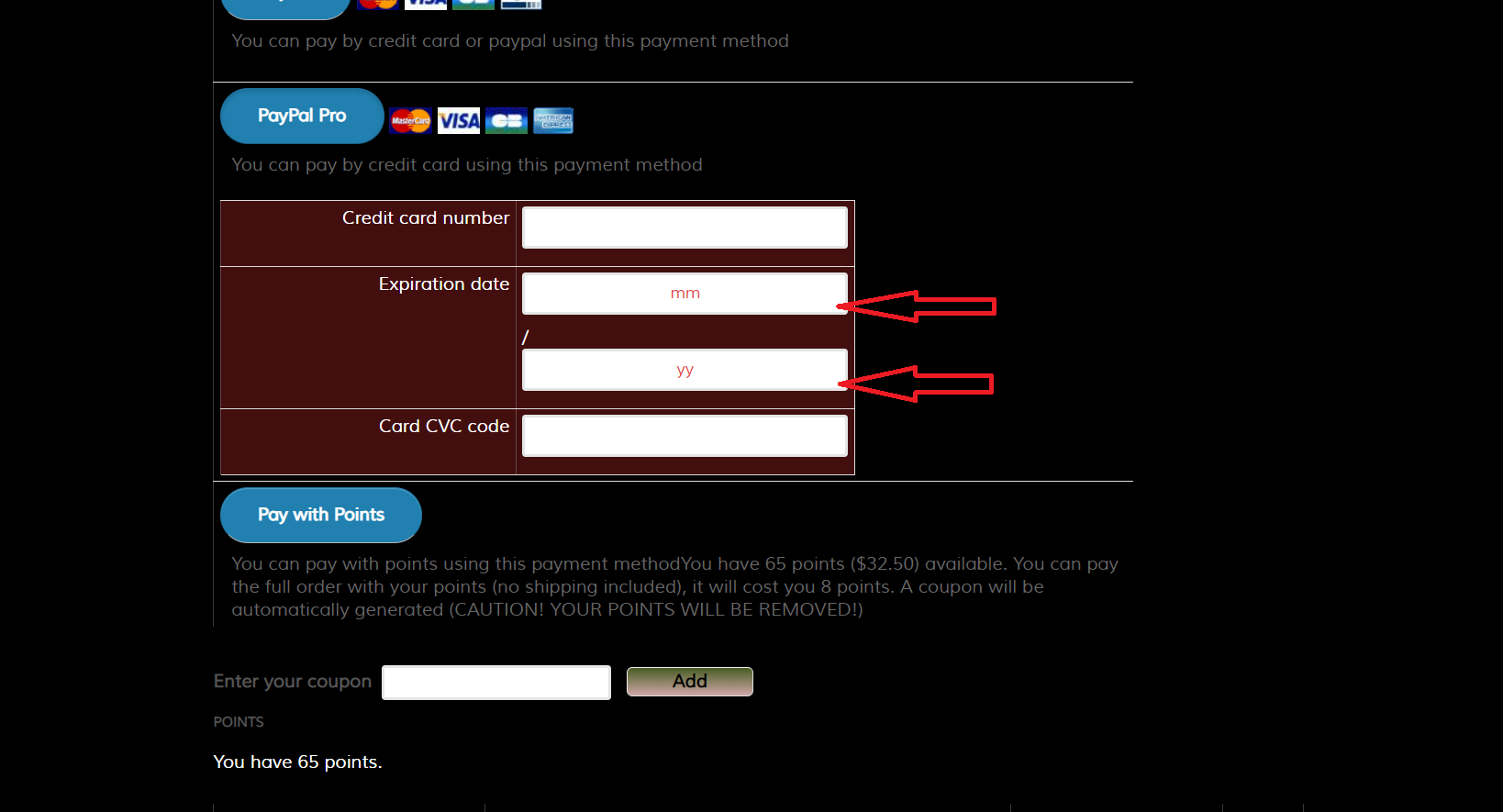
I am having hard time to figure out how I can overwrite CSS control input textbox for mm/yy.
I like to have them side by side, not one above other.
In checkout / ccinfo.php is set to be in 1 row, something must be with formatting.
I wish to have also Customer Name on top,
then full length for credit card number,
then in 1 row 2 short inputs for mm and yy
and short for CVC code.
Can you give me some clue where and how I can fix it ?
Thank You.
-- HikaShop version -- : 4.3.0
-- Joomla version -- : 3.9.18
-- PHP version -- : 7.2
-- Browser(s) name and version -- : Firefox 74.0
Hello.
I am having hard time to figure out how I can overwrite CSS control input textbox for mm/yy.
I like to have them side by side, not one above other.
In checkout / ccinfo.php is set to be in 1 row, something must be with formatting.
I wish to have also Customer Name on top,
then full length for credit card number,
then in 1 row 2 short inputs for mm and yy
and short for CVC code.
Can you give me some clue where and how I can fix it ?
Thank You.
This message contains confidential information
Last edit: 6 years 4 months ago by PeterP. Reason: Solved
Please Log in or Create an account to join the conversation.

6 years 4 months ago - 6 years 4 months ago #319858
by Philip
Replied by Philip on topic PayPal Pro Credit Card expiration date fields layout
Hello,
Ok that's something you can solve quite easily, follow me step by step :
1. Have a look on this HikaShop tutorial to see how to add custom css in your Frontend file css.
2. Use your inspector tool to get your html class of your targeted elements.
=> In details, put your mouse hover your element and right-click, then select on inspector tool (or inspect), then get your class element
Ex : <div class="html_element_class"> AND <div class="html_element_class2">
3. Create your custom code, that respect these criteria
- a very specific selector, see this w3school documentation , and add page class html to restrict your command only on your required page.
Ex : .page_class .html_element_class
- Add your css command and value
.page_class .html_element_class,
.page_class .html_element_class2 {
width: 45%;
}
Hope this will help you to achieved what you need.
Regards
Ok that's something you can solve quite easily, follow me step by step :
1. Have a look on this HikaShop tutorial to see how to add custom css in your Frontend file css.
2. Use your inspector tool to get your html class of your targeted elements.
=> In details, put your mouse hover your element and right-click, then select on inspector tool (or inspect), then get your class element
Ex : <div class="html_element_class"> AND <div class="html_element_class2">
3. Create your custom code, that respect these criteria
- a very specific selector, see this w3school documentation , and add page class html to restrict your command only on your required page.
Ex : .page_class .html_element_class
- Add your css command and value
.page_class .html_element_class,
.page_class .html_element_class2 {
width: 45%;
}
Hope this will help you to achieved what you need.
Regards
Last edit: 6 years 4 months ago by Philip.
The following user(s) said Thank You: PeterP
Please Log in or Create an account to join the conversation.
6 years 4 months ago - 6 years 4 months ago #319940
by PeterP
Replied by PeterP on topic PayPal Pro Credit Card expiration date fields layout
Thank you Philip for response.
Can you tell me where exactly is this class?
I am available to change on inspector, but only if I add width: 40% inline code.
Can you tell me where exactly is this class?
I am available to change on inspector, but only if I add width: 40% inline code.
Last edit: 6 years 4 months ago by PeterP.
Please Log in or Create an account to join the conversation.
6 years 4 months ago #319946
by PeterP
Replied by PeterP on topic PayPal Pro Credit Card expiration date fields layout
OK, I did fix by adding to Styles for the front-end custom.css file
code:
Now I need to figure out how add Name on Card.
code:
Code:
#hikashop_credit_card_month_paypalpro_4 {
width: 30%;
}
#hikashop_credit_card_year_paypalpro_4 {
width: 30%;
}
#hikashop_credit_card_CCV_paypalpro_4 {
width: 30%;
}
Please Log in or Create an account to join the conversation.
6 years 4 months ago #319947
by PeterP
Replied by PeterP on topic PayPal Pro Credit Card expiration date fields layout
I just find info about here:
www.hikashop.com/forum/4-how-to/21735-na...d-in-paypal-pro.html
Can you confirm this Name on Card is not possible using PayPal Pro?
www.hikashop.com/forum/4-how-to/21735-na...d-in-paypal-pro.html
Can you confirm this Name on Card is not possible using PayPal Pro?
Please Log in or Create an account to join the conversation.
6 years 4 months ago - 6 years 4 months ago #319948
by PeterP
Replied by PeterP on topic PayPal Pro Credit Card expiration date fields layout
This message contains confidential information
Last edit: 6 years 4 months ago by PeterP. Reason: found solution
Please Log in or Create an account to join the conversation.
6 years 4 months ago - 6 years 4 months ago #319951
by Philip
Replied by Philip on topic PayPal Pro Credit Card expiration date fields layout
Hello,
In order to answer you to all your question, I will process step by step :
1. It's seems cthat you finally find your html class reference, but let's me illustrate with a screenshot :

Here, when you are hover a page element then click on right-click => Inspector tool, you will have a new window that show all your html but with the hovered element targeted, here highlighted in blue (by the inspector tool) AND red bordered in red (by myself, in left side)
=> <div id="hikashop_checkout_login_form"> Here, on my example it's an id is more specific but works exactly as class.
2. I confirmed that Paypal Pro doesn't support in his form the cardholder name, and I can say that it does't depend on us.
3. Happy that you find the root issue of the display issue !
From this all is good for you ?
Regards
In order to answer you to all your question, I will process step by step :
1. It's seems cthat you finally find your html class reference, but let's me illustrate with a screenshot :
Here, when you are hover a page element then click on right-click => Inspector tool, you will have a new window that show all your html but with the hovered element targeted, here highlighted in blue (by the inspector tool) AND red bordered in red (by myself, in left side)
=> <div id="hikashop_checkout_login_form"> Here, on my example it's an id is more specific but works exactly as class.
2. I confirmed that Paypal Pro doesn't support in his form the cardholder name, and I can say that it does't depend on us.
3. Happy that you find the root issue of the display issue !
From this all is good for you ?
Regards
Last edit: 6 years 4 months ago by Philip.
Please Log in or Create an account to join the conversation.
6 years 4 months ago #319994
by PeterP
Replied by PeterP on topic PayPal Pro Credit Card expiration date fields layout
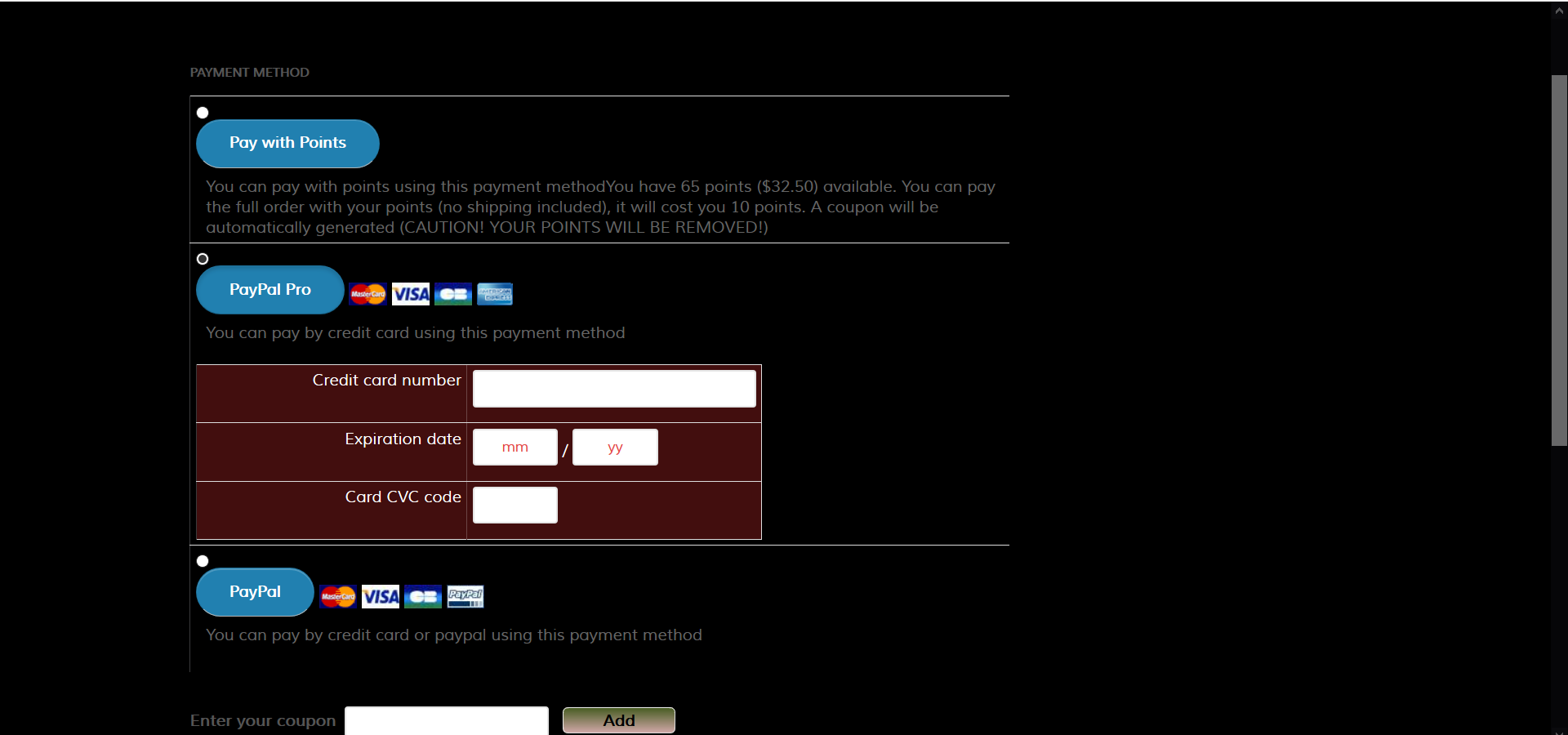
I did fix (screen 5.png), but still having problem with refreshing after change method payments.
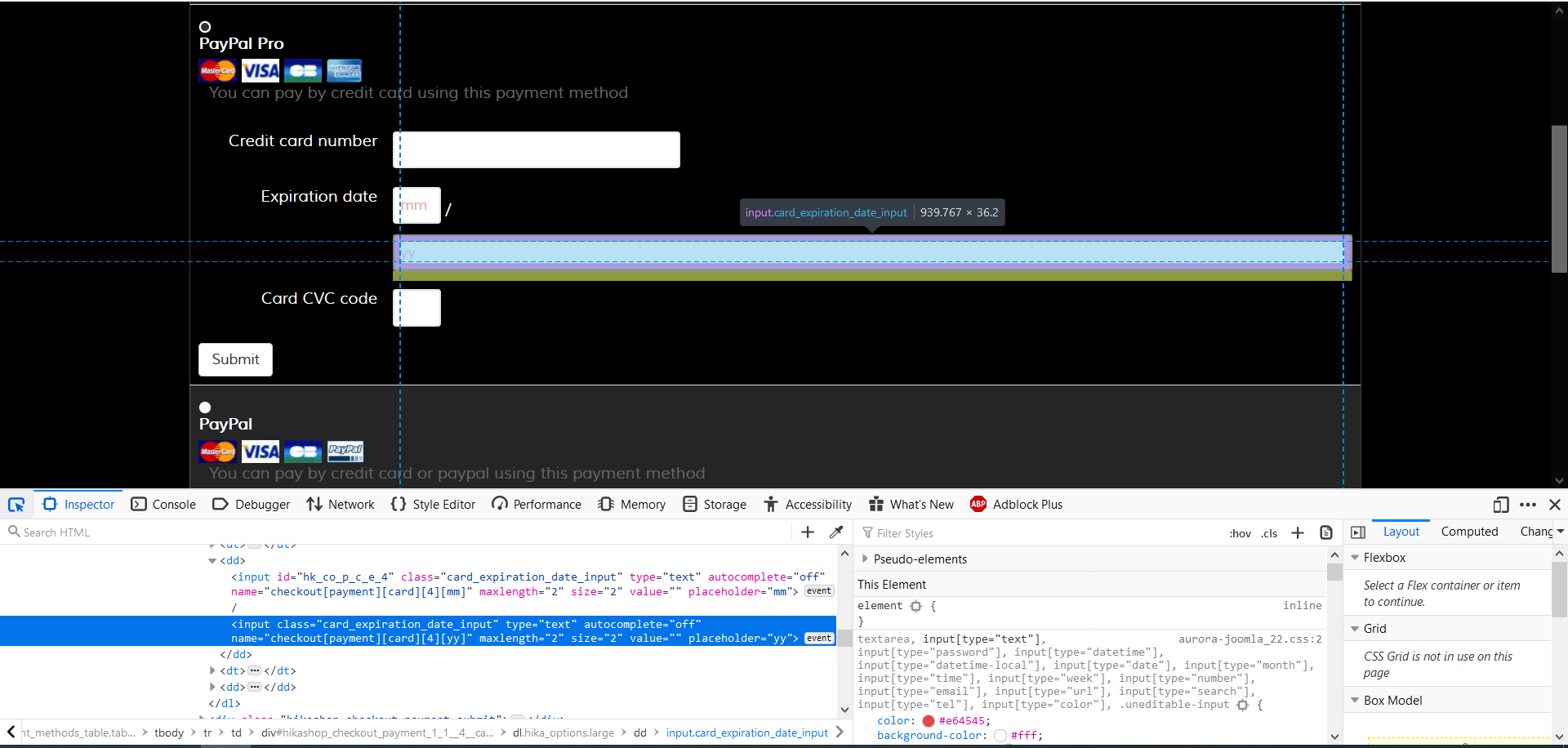
Maybe this is problem with my template, if I change Checkout legacy to No, refreshing works, but have problem to format expiration date year input box, because has no ID. (screen 6.png)
If you tell me how I can fix, I do, if not I have to use Checkout Legacy ON and let people know to watch how they pay.
Maybe this is problem with my template, if I change Checkout legacy to No, refreshing works, but have problem to format expiration date year input box, because has no ID. (screen 6.png)
If you tell me how I can fix, I do, if not I have to use Checkout Legacy ON and let people know to watch how they pay.
Please Log in or Create an account to join the conversation.
6 years 4 months ago - 6 years 4 months ago #320114
by Philip
Replied by Philip on topic PayPal Pro Credit Card expiration date fields layout
Hello,
You have to process some tests in order to better understand the root issue, follow me step by step :
- Set Checkout legacy option to Yes
- Process a test with a default template like ProtoStar
=> If that solve your refresh issue, AND you didn't have create override view (see this tutorial ), then there is a good chance that the root issue come from your template, and the best things to do is to contact template creator.
We recommend to use the Checkout because the old one isn't support anymore and isn't as stable as the new one.
But in order to answer you, in your screenshot I can see that your input have a specific class, and a specific class works exactly as an Id if there is no other html elements with the same class and here there aren't other html element with this class.
Hope this will help you to move forward.
Regards
You have to process some tests in order to better understand the root issue, follow me step by step :
- Set Checkout legacy option to Yes
- Process a test with a default template like ProtoStar
=> If that solve your refresh issue, AND you didn't have create override view (see this tutorial ), then there is a good chance that the root issue come from your template, and the best things to do is to contact template creator.
We recommend to use the Checkout because the old one isn't support anymore and isn't as stable as the new one.
But in order to answer you, in your screenshot I can see that your input have a specific class, and a specific class works exactly as an Id if there is no other html elements with the same class and here there aren't other html element with this class.
Hope this will help you to move forward.
Regards
Last edit: 6 years 4 months ago by Philip.
Please Log in or Create an account to join the conversation.
6 years 4 months ago #320150
by PeterP
Replied by PeterP on topic PayPal Pro Credit Card expiration date fields layout
I set Live payment, but only PayPal for now.
I will come back to this later.
I still have a lot of work with adding products and formatting the way I want.
Also my website if in 2 languages, need to deal with this too.
So far so good, I am really enjoy working with hikashop, when you set all fields is just fun to work.
Thank you for great software.
I will come back to this later.
I still have a lot of work with adding products and formatting the way I want.
Also my website if in 2 languages, need to deal with this too.
So far so good, I am really enjoy working with hikashop, when you set all fields is just fun to work.
Thank you for great software.
The following user(s) said Thank You: Philip
Please Log in or Create an account to join the conversation.
Time to create page: 0.396 seconds