
- Posts: 2
- Thank you received: 1
Removing Hikashop link from URL
- canthony1980
-
 Topic Author
- Offline
Less
More
3 years 3 months ago #354058
by canthony1980
Removing Hikashop link from URL was created by canthony1980
-- HikaShop version -- : HikaShop Starter 4.7.5
-- Joomla version -- : 4.33
-- PHP version -- : 8.0.28
-- Browser(s) name and version -- : Chrome
Hello
i am trying out hikashop n a test system before i deploy on a production environment. So far happy with the product.
I have a little concern.
when i click on the menu i am getting the url in this format
seyswing.freesite.host/index.php/shop/hi...g/category/men-shoes
i would like to remove the hikashop-menu-for-categories-listing from the URL. have seen some of the website using hikashop and they are not in that format.
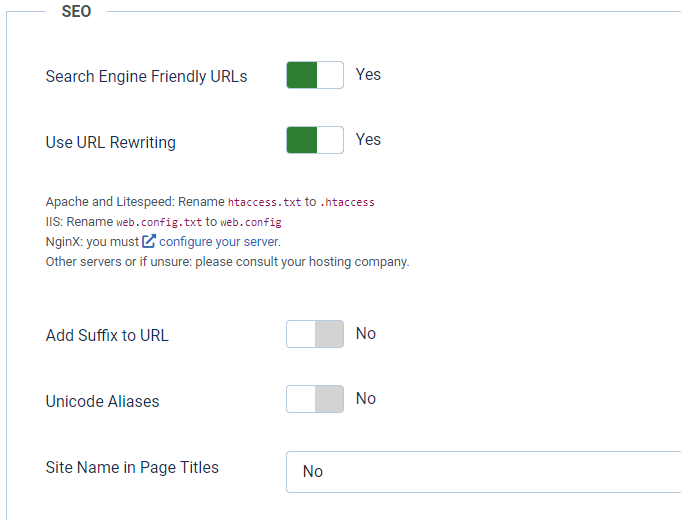
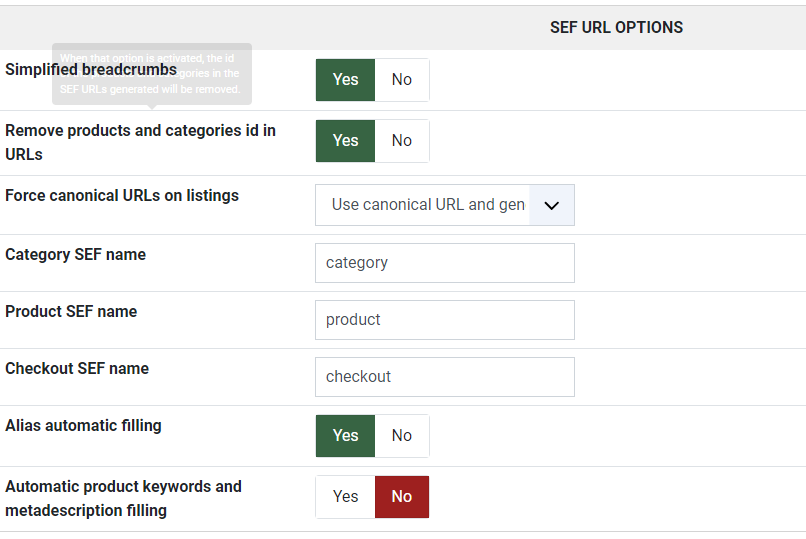
i have made changes in the in the SEF url part and also enable SEF on Joomla see attachments
but it doesnt seem to be helping
-- Joomla version -- : 4.33
-- PHP version -- : 8.0.28
-- Browser(s) name and version -- : Chrome
Hello
i am trying out hikashop n a test system before i deploy on a production environment. So far happy with the product.
I have a little concern.
when i click on the menu i am getting the url in this format
seyswing.freesite.host/index.php/shop/hi...g/category/men-shoes
i would like to remove the hikashop-menu-for-categories-listing from the URL. have seen some of the website using hikashop and they are not in that format.
i have made changes in the in the SEF url part and also enable SEF on Joomla see attachments
but it doesnt seem to be helping
Please Log in or Create an account to join the conversation.

3 years 3 months ago #354065
by nicolas
Replied by nicolas on topic Removing Hikashop link from URL
Hi,
The part "hikashop-menu-for-categories-listing" in the URL is the alias of the menu item used to display the current page.
So edit the menu item with that alias in your Joomla menu items manager and change the alias to whatever you want.
Note that once you do, you might not see any change on your frontend because you've activated the "force canonical URLs on listings" setting of the HikaShop configuration. This means that when the canonical URL setting of a product is empty, it will generate the URL dynamically (taking into account the alias of the menu item), but once that's done it will save that URL as canonical URL. Then, it won't generate the URL dynamically and will continue using the canonical URL. So if you change the alias of the menu item used in the canonical URL, you also need to empty the canonical URL field of the products so that HikaShop can regenerate it with the new menu item alias. This can be done on all the products at once with a mass action with an action "update the values" on the product_canonical column with an empty value.
www.hikashop.com/support/documentation/167-massaction-form.html
The part "hikashop-menu-for-categories-listing" in the URL is the alias of the menu item used to display the current page.
So edit the menu item with that alias in your Joomla menu items manager and change the alias to whatever you want.
Note that once you do, you might not see any change on your frontend because you've activated the "force canonical URLs on listings" setting of the HikaShop configuration. This means that when the canonical URL setting of a product is empty, it will generate the URL dynamically (taking into account the alias of the menu item), but once that's done it will save that URL as canonical URL. Then, it won't generate the URL dynamically and will continue using the canonical URL. So if you change the alias of the menu item used in the canonical URL, you also need to empty the canonical URL field of the products so that HikaShop can regenerate it with the new menu item alias. This can be done on all the products at once with a mass action with an action "update the values" on the product_canonical column with an empty value.
www.hikashop.com/support/documentation/167-massaction-form.html
Please Log in or Create an account to join the conversation.
- canthony1980
-
Topic Author
- Offline
Less
More
- Posts: 2
- Thank you received: 1
3 years 3 months ago #354088
by canthony1980
Replied by canthony1980 on topic Removing Hikashop link from URL
Thanks for the quick response.
The solution provided works.
The solution provided works.
The following user(s) said Thank You: Philip
Please Log in or Create an account to join the conversation.
Time to create page: 0.044 seconds