

- Posts: 127
- Thank you received: 6
Option Tax not showing on Order Administration, add product to order
6 years 5 months ago #319534
by Bobwales
-- HikaShop version -- : 4.3.0
-- Joomla version -- : 3.9.18
-- PHP version -- : 7.4.4
Hello Hika Team!
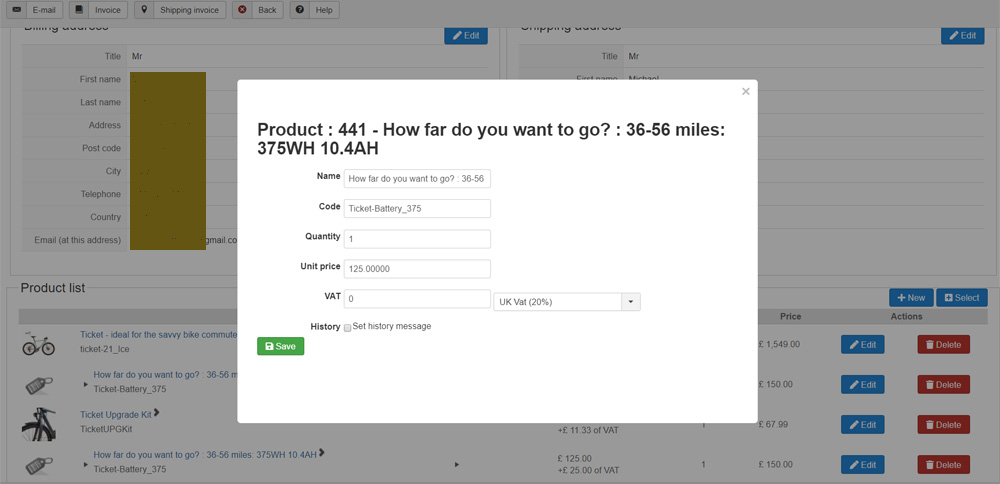
When an option product is added to an order by a Customer it shows correctly in the Product Listing (order / show_products.php) correctly.
However, when we add a product to an existing order from Administration (order / edit_products.php) the Tax is showing zero...
This picture perhaps shows the issue.
Is there a solution?
-- Joomla version -- : 3.9.18
-- PHP version -- : 7.4.4
Hello Hika Team!
When an option product is added to an order by a Customer it shows correctly in the Product Listing (order / show_products.php) correctly.
However, when we add a product to an existing order from Administration (order / edit_products.php) the Tax is showing zero...
This picture perhaps shows the issue.
Is there a solution?
Please Log in or Create an account to join the conversation.

6 years 5 months ago #319545
by nicolas
Replied by nicolas on topic Option Tax not showing on Order Administration, add product to order
Hi,
The VAT is calculated there on my end with the latest version of HikaShop.
Can you confirm that you're using the 4.3.0 ?
Also, could it be linked to how your product is configured or how your tax rules are configured ?
For example, if you set "access level" to some user groups in your tax rules, they might not include the super admin user group which your current user is using and thus not calculate the tax ?
Or maybe it's something linked to the fact that the product has variants (however I checked on my end with a product with variants and the VAT was calculated too) ?
The VAT is calculated there on my end with the latest version of HikaShop.
Can you confirm that you're using the 4.3.0 ?
Also, could it be linked to how your product is configured or how your tax rules are configured ?
For example, if you set "access level" to some user groups in your tax rules, they might not include the super admin user group which your current user is using and thus not calculate the tax ?
Or maybe it's something linked to the fact that the product has variants (however I checked on my end with a product with variants and the VAT was calculated too) ?
Please Log in or Create an account to join the conversation.
6 years 5 months ago #319575
by Bobwales
Replied by Bobwales on topic Option Tax not showing on Order Administration, add product to order
Thanks Nicolas
Yes we're using 4.3.0
I don't think there are any odd tax rules. Certainly no Tax configured per user, or per user group.
I've double checked Product configuration and can't see anything different to how we have been doing things over the years.
Could it be anything to do with the Optional Product itself having Variants?
In other words, a Product with Variants AND Option Products which also have Variants... Is that easy to check on your installation?
Yes we're using 4.3.0
I don't think there are any odd tax rules. Certainly no Tax configured per user, or per user group.
I've double checked Product configuration and can't see anything different to how we have been doing things over the years.
Could it be anything to do with the Optional Product itself having Variants?
In other words, a Product with Variants AND Option Products which also have Variants... Is that easy to check on your installation?
Please Log in or Create an account to join the conversation.
6 years 5 months ago #319579
by nicolas
Replied by nicolas on topic Option Tax not showing on Order Administration, add product to order
Hi,
I'm not sure what you mean. There is no mechanism to be able to add options to products in the backend order edition. You can only add products.
And from you're first message, I understand that we're talking about "adding", not "editing":
I'm not sure what you mean. There is no mechanism to be able to add options to products in the backend order edition. You can only add products.
And from you're first message, I understand that we're talking about "adding", not "editing":
If you're talking about editing an option for a product, then yes, there is auto calculation since the VAT is already calculated when the order is created and if you want to change the price of the option or its VAT, it's up to you.When an option product is added to an order
Please Log in or Create an account to join the conversation.
6 years 5 months ago #319598
by Bobwales
Replied by Bobwales on topic Option Tax not showing on Order Administration, add product to order
Thanks Nicolas
I'm not being clear - sorry, busy day here.
Attached are 3 pictures, 1 2 and 3 which may better describe what I'm trying to show happens...
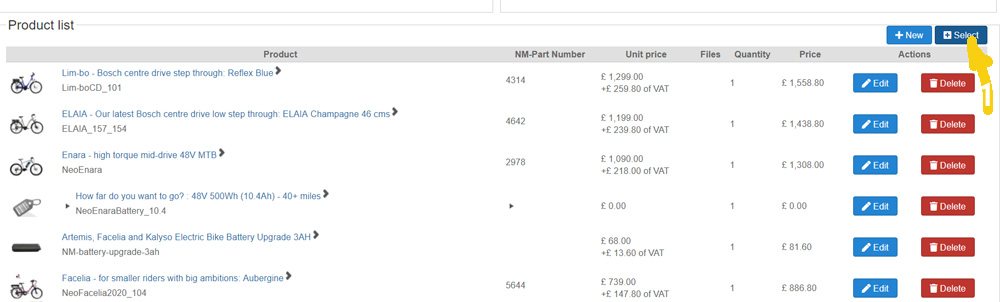
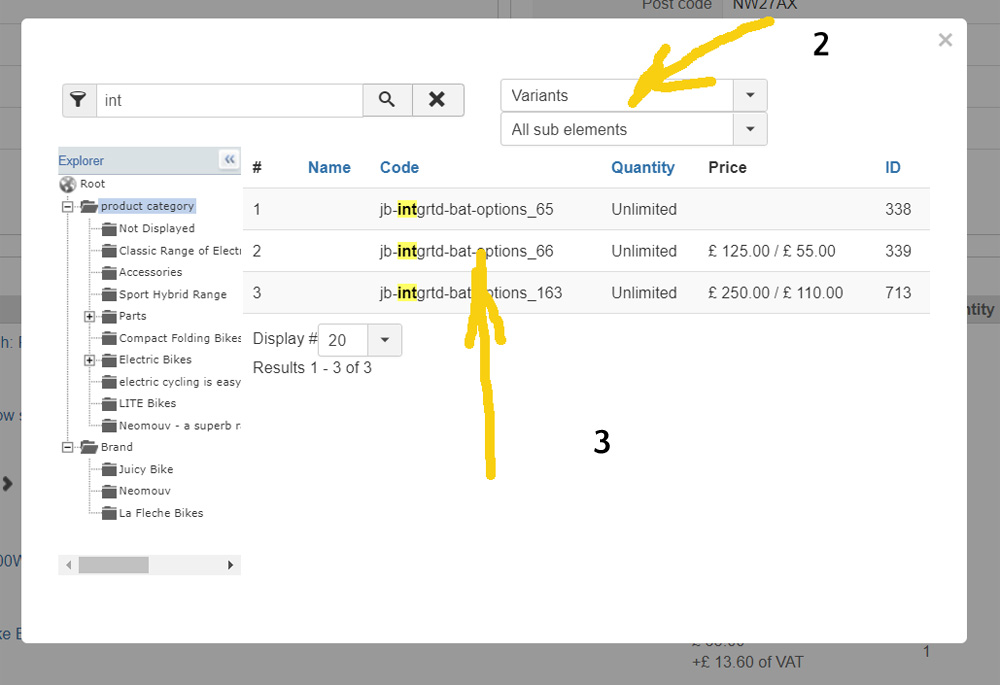
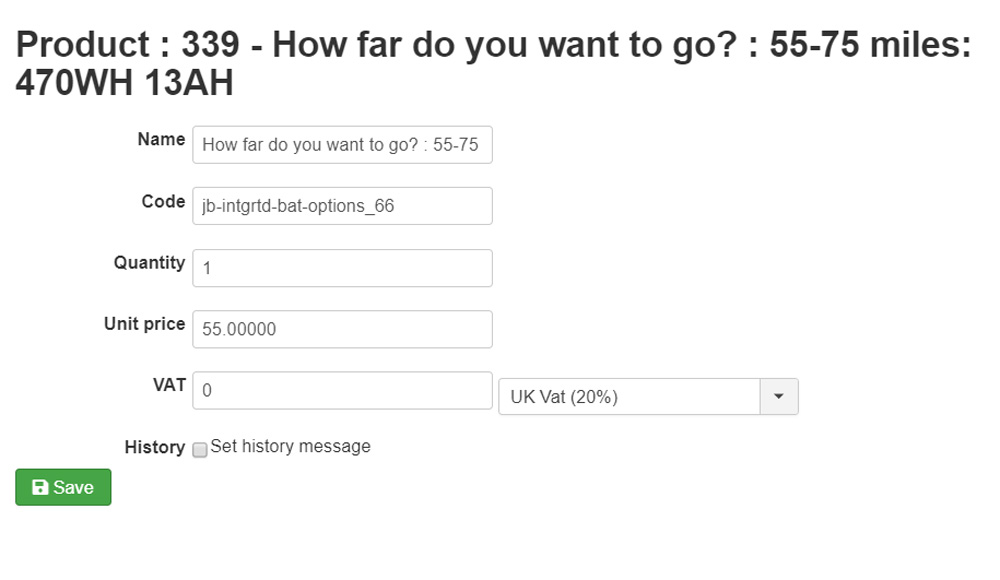
Does this help explain?
I'm not being clear - sorry, busy day here.
Attached are 3 pictures, 1 2 and 3 which may better describe what I'm trying to show happens...
Does this help explain?
Please Log in or Create an account to join the conversation.
6 years 5 months ago #319601
by nicolas
Replied by nicolas on topic Option Tax not showing on Order Administration, add product to order
Hi,
Well, I tried that on my end and it works fine.
So we're back to my first message:
www.hikashop.com/forum/taxes/899944-opti...to-order.html#319545
Can you provide a screenshot of the settings of the product and one of the variant and a screenshot of your tax rules ?
Well, I tried that on my end and it works fine.
So we're back to my first message:
www.hikashop.com/forum/taxes/899944-opti...to-order.html#319545
Can you provide a screenshot of the settings of the product and one of the variant and a screenshot of your tax rules ?
Please Log in or Create an account to join the conversation.
6 years 5 months ago #319620
by Bobwales
Replied by Bobwales on topic Option Tax not showing on Order Administration, add product to order
Okay Nicolas, please see attached. Thanks
Please Log in or Create an account to join the conversation.
6 years 5 months ago #319728
by nicolas
Replied by nicolas on topic Option Tax not showing on Order Administration, add product to order
Hi,
Thanks. However, even with that I'm not able to reproduce the problem here.
Could you provide a backend access and a FTP access ?
Then we could check directly on your website why it's doing that.
If so, you can use our contact form to provide that:
www.hikashop.com/support/contact-us.html
Please make sure you also include a link to this thread for reference
Thanks. However, even with that I'm not able to reproduce the problem here.
Could you provide a backend access and a FTP access ?
Then we could check directly on your website why it's doing that.
If so, you can use our contact form to provide that:
www.hikashop.com/support/contact-us.html
Please make sure you also include a link to this thread for reference
Please Log in or Create an account to join the conversation.
6 years 5 months ago #319731
by Bobwales
Replied by Bobwales on topic Option Tax not showing on Order Administration, add product to order
On its way... Merci!
Please Log in or Create an account to join the conversation.
6 years 5 months ago #319811
by nicolas
Replied by nicolas on topic Option Tax not showing on Order Administration, add product to order
Hi,
I checked the situation but I don't see why it doesn't work. Could it be possible to also get a FTP access to be able to add some debugging to better understand where the problem is ?
I checked the situation but I don't see why it doesn't work. Could it be possible to also get a FTP access to be able to add some debugging to better understand where the problem is ?
Please Log in or Create an account to join the conversation.
6 years 5 months ago #319833
by Bobwales
Replied by Bobwales on topic Option Tax not showing on Order Administration, add product to order
Thanks very much for looking.
The ftp details were in the message sent with the Admin access. I've just sent it again Nicolas...
The ftp details were in the message sent with the Admin access. I've just sent it again Nicolas...
Please Log in or Create an account to join the conversation.
6 years 5 months ago #319863
by nicolas
Replied by nicolas on topic Option Tax not showing on Order Administration, add product to order
Hi,
Thanks. I've found the issue. I fixed it by adding the line:
after the line:
in the file administrator/components/com_hikashop/views/order/view.html.php
I've added it on your end and I've also added it on our end so others will have the fix.
Thanks. I've found the issue. I fixed it by adding the line:
Code:
$rows[0]->product_tax_id = $rows[1]->product_tax_id;
Code:
$rows[]=$allproducts[ (int)$product_id[1] ];
I've added it on your end and I've also added it on our end so others will have the fix.
The following user(s) said Thank You: Bobwales
Please Log in or Create an account to join the conversation.
6 years 5 months ago #319865
by Bobwales
Replied by Bobwales on topic Option Tax not showing on Order Administration, add product to order
Superb Nicolas, merci beaucoup. Nous sommes très reconnaissants - cela rend la vie beaucoup plus facile! Merci encore.
The following user(s) said Thank You: nicolas
Please Log in or Create an account to join the conversation.
Time to create page: 0.189 seconds