

- Posts: 16
- Thank you received: 0
Vote and Comments not showing
10 years 3 months ago #245816
by sonic69
Vote and Comments not showing was created by sonic69
I have a problem in the comments!
Comments are not displayed by default for all . Is displayed only for those who write comments!
But I do not want to.I want to comment is visible to everyone
Comments are not displayed by default for all . Is displayed only for those who write comments!
But I do not want to.I want to comment is visible to everyone
Please Log in or Create an account to join the conversation.

10 years 3 months ago #245817
by nicolas
Replied by nicolas on topic Vote and Comments not showing
Hi,
I suppose that you want to turn on the option "Users must be registered to see other comments" in the Features tab of the HikaShop configuration and that should display the comments for everyone.
I suppose that you want to turn on the option "Users must be registered to see other comments" in the Features tab of the HikaShop configuration and that should display the comments for everyone.
The following user(s) said Thank You: sonic69
Please Log in or Create an account to join the conversation.
10 years 3 months ago #245886
by sonic69
Replied by sonic69 on topic Vote and Comments not showing
hi,
Thank for replay .
You said something that I did not
I attached a picture of the sector
help me
Thank for replay .
You said something that I did not
I attached a picture of the sector
help me
Please Log in or Create an account to join the conversation.
10 years 3 months ago #245887
by sonic69
Replied by sonic69 on topic Vote and Comments not showing
hi,
Thank for replay .
You said something that I did not
I attached a picture of the sector
help me
Thank for replay .
You said something that I did not
I attached a picture of the sector
help me
Please Log in or Create an account to join the conversation.

10 years 3 months ago - 10 years 3 months ago #245888
by Philip
Replied by Philip on topic Vote and Comments not showing
Hello,
Can you try to reproduce this configuration ?
For this :
- Go to Components => HikaShop => Configuration,
- Then in Feature tab,
- And Go to Vote & Comment part
- And reproduce this configuration on the screenshot, and especially those which are red framed.
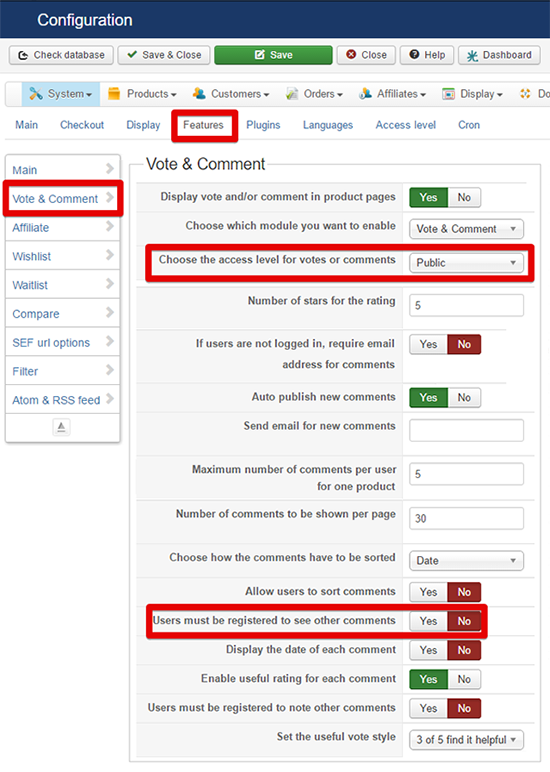
Hope this will able your customers to see all comments in all case.
Regards
Can you try to reproduce this configuration ?
For this :
- Go to Components => HikaShop => Configuration,
- Then in Feature tab,
- And Go to Vote & Comment part
- And reproduce this configuration on the screenshot, and especially those which are red framed.
Hope this will able your customers to see all comments in all case.
Regards
Last edit: 10 years 3 months ago by Philip.
Please Log in or Create an account to join the conversation.
10 years 3 months ago #245985
by sonic69
Replied by sonic69 on topic Vote and Comments not showing
Thank You
my setting like this setting(your picture), But already exists problem!
for view comments, user must send a comment. and this very bad
my setting like this setting(your picture), But already exists problem!
for view comments, user must send a comment. and this very bad
Please Log in or Create an account to join the conversation.
10 years 3 months ago #245986
by Philip
Replied by Philip on topic Vote and Comments not showing
Hello,
Quite strange, it is the first time, I heard about an issue like this !
Can you provide an url link, in order to see it by ourself and process some tests ?
Awaiting news from you.
Regards
Quite strange, it is the first time, I heard about an issue like this !
Can you provide an url link, in order to see it by ourself and process some tests ?
Awaiting news from you.
Regards
The following user(s) said Thank You: sonic69
Please Log in or Create an account to join the conversation.
10 years 3 months ago #246080
by sonic69
Replied by sonic69 on topic Vote and Comments not showing
yes!, url send as privite message to you
Please Log in or Create an account to join the conversation.
10 years 3 months ago - 10 years 3 months ago #246123
by Philip
Replied by Philip on topic Vote and Comments not showing
Hello,
Your comments working is quite strange...
Right now I have to go more far, can you provide some back-end access ?
This time thanks to use our " Contact Us " form to provide this elements, and don't forget to put in your message an Url link to this topic.
Tell me, if I your website is in production phase...
Awaiting news from you.
Regards
Your comments working is quite strange...
Right now I have to go more far, can you provide some back-end access ?
This time thanks to use our " Contact Us " form to provide this elements, and don't forget to put in your message an Url link to this topic.
Tell me, if I your website is in production phase...
Awaiting news from you.
Regards
Last edit: 10 years 3 months ago by Philip.
The following user(s) said Thank You: sonic69
Please Log in or Create an account to join the conversation.
10 years 3 months ago #246901
by nicolas
Replied by nicolas on topic Vote and Comments not showing
Hi,
Please try to rename the folder templates/YOUR_TEMPLATE/html/com_hikashop to something else via FTP and try again. Does it work ? If yes, then the problem comes from your template view overrides and you'll have to check with your template provider. It looks like they have view overrides that are outdated, and that what is causing the problem.
Please try to rename the folder templates/YOUR_TEMPLATE/html/com_hikashop to something else via FTP and try again. Does it work ? If yes, then the problem comes from your template view overrides and you'll have to check with your template provider. It looks like they have view overrides that are outdated, and that what is causing the problem.
The following user(s) said Thank You: sonic69
Please Log in or Create an account to join the conversation.
10 years 3 months ago - 10 years 3 months ago #246905
by sonic69
Replied by sonic69 on topic Vote and Comments not showing
Thank you, but not
I do all the things that you said
But comments will not be displayed!
Response Team Support Template:
I do all the things that you said
But comments will not be displayed!
Response Team Support Template:
This problem relates to Hikashop component, so please contact them for more information first. Because we use Hikashop as a third party component.
After that, if it is due to our template, we will help you.
Last edit: 10 years 3 months ago by sonic69.
Please Log in or Create an account to join the conversation.
10 years 3 months ago #246909
by nicolas
Replied by nicolas on topic Vote and Comments not showing
Hi,
Then, could you provide a link to a product page where the comment doesn't work and where you use the protostar template? Because with all the customization of the template, it's hard to understand what does what and where it could come from.
Then, could you provide a link to a product page where the comment doesn't work and where you use the protostar template? Because with all the customization of the template, it's hard to understand what does what and where it could come from.
Please Log in or Create an account to join the conversation.
10 years 2 months ago #247565
by sonic69
Replied by sonic69 on topic Vote and Comments not showing
I took a closer look
What is the problem?
When I go to the following path. I changed the name com_hikashop
templates/YOUR_TEMPLATE/html/com_hikashop
Previous comments will not be displayed! But in this case I will comment when it works properly!
Even when the name com_hikashop've come to a previous state.Comments are displayed correctly!
But again, the problem already exists:(
What is the problem?
When I go to the following path. I changed the name com_hikashop
templates/YOUR_TEMPLATE/html/com_hikashop
Previous comments will not be displayed! But in this case I will comment when it works properly!
Even when the name com_hikashop've come to a previous state.Comments are displayed correctly!
But again, the problem already exists:(
Please Log in or Create an account to join the conversation.
10 years 2 months ago #247573
by nicolas
Replied by nicolas on topic Vote and Comments not showing
Hi,
So could you provide a link to a product page with the default joomla template ?
Does it work with the default joomla template ?
So could you provide a link to a product page with the default joomla template ?
Does it work with the default joomla template ?
Please Log in or Create an account to join the conversation.
10 years 2 months ago #247589
by sonic69
Replied by sonic69 on topic Vote and Comments not showing
product page is:
ghaen.xyz/index.php/shop/products/product/49-is-test
and access administrator joomla sen by private message to you
thank you
ghaen.xyz/index.php/shop/products/product/49-is-test
and access administrator joomla sen by private message to you
thank you
Please Log in or Create an account to join the conversation.

10 years 2 months ago #247604
by Carolek
Replied by Carolek on topic Vote and Comments not showing
Hello
I have also an issue with vote and it's new. People can't leave a vote because the stars are missing and there is an alert:
"Missing value for the comment or the vote value is wrong or unset"
Hikashop 2.6.3 - Joomla 2.5.28
Every things seems to be ok in the backend.
You can try by yourself here
I have also an issue with vote and it's new. People can't leave a vote because the stars are missing and there is an alert:
"Missing value for the comment or the vote value is wrong or unset"
Hikashop 2.6.3 - Joomla 2.5.28
Every things seems to be ok in the backend.
You can try by yourself here
Please Log in or Create an account to join the conversation.
10 years 2 months ago #247608
by nicolas
Replied by nicolas on topic Vote and Comments not showing
Hi,
@sonic69 : We already had a backend access. The link that you provided is a product page link with your template, not with the default template of Joomla called protostar. Could you provide a link to such page please ?
@Carolek : From what I can see on your link, I actually don't see the vote/comment form at all. Apparently, either you've turned restricted the voting/commenting to either only registered users or to only users who already bought the product. Could you check on that ?
@sonic69 : We already had a backend access. The link that you provided is a product page link with your template, not with the default template of Joomla called protostar. Could you provide a link to such page please ?
@Carolek : From what I can see on your link, I actually don't see the vote/comment form at all. Apparently, either you've turned restricted the voting/commenting to either only registered users or to only users who already bought the product. Could you check on that ?
Please Log in or Create an account to join the conversation.
10 years 2 months ago #247617
by Carolek
Replied by Carolek on topic Vote and Comments not showing
Hi Nicolas
Yes, the vote is restrict to registered users only. But also when I log on, I can see only the comment field and there is no stars. I open the vote to all for you so you can see this.
Yes, the vote is restrict to registered users only. But also when I log on, I can see only the comment field and there is no stars. I open the vote to all for you so you can see this.
Please Log in or Create an account to join the conversation.
10 years 2 months ago #247619
by sonic69
Replied by sonic69 on topic Vote and Comments not showing
@nicolas I give you my management..Any changes you need to do
If you need to change the default format change
You have full access to all parts of the site
To manage templates, extensions and ....
If you need to change the default format change
You have full access to all parts of the site
To manage templates, extensions and ....
Please Log in or Create an account to join the conversation.
10 years 2 months ago #247627
by nicolas
Replied by nicolas on topic Vote and Comments not showing
Hi,
@Carolek : If you look at the CSS for the stars HTML with the developer tool of your browser, you'll see that there is no CSS coming from HikaShop to style them.
And if you open the CSS file of HikaShop ( yaeliq.com/media/com_hikashop/css/frontend_custom.css ) that you can find in the header of the page, you can see that you're basing your CSS of HikaShop with the version 2.3.0 which didn't contain the new CSS that is used by the new vote and comment system.
So you need to either add your modifications to the new version of the CSS of HikaShop, or add the missing CSS to your custom CSS file:
@sonic69 : Yes, I know that. And I tried to change the default template to use the protostar template, but it didn't do anything. So that means that the menu item of your link has a template assigned to it. But I don't know which one and you have 20 different templates. So I don't want to spend an hour trying to figure out how your website is structured, especially since you didn't purchase HikaShop and that we usually only provide such advanced user support to customers who purchased our products, and that the problem likely comes from a template customization and isn't inherant to HikaShop.
So could you please provide a link where we can see the product page with the protostar template ?
@Carolek : If you look at the CSS for the stars HTML with the developer tool of your browser, you'll see that there is no CSS coming from HikaShop to style them.
And if you open the CSS file of HikaShop ( yaeliq.com/media/com_hikashop/css/frontend_custom.css ) that you can find in the header of the page, you can see that you're basing your CSS of HikaShop with the version 2.3.0 which didn't contain the new CSS that is used by the new vote and comment system.
So you need to either add your modifications to the new version of the CSS of HikaShop, or add the missing CSS to your custom CSS file:
Code:
/*
* Rating
*/
.hk-rating {
margin:auto;
display:inline;
}
.hk-rating a { cursor: pointer; background-color: transparent !important; }
.hk-rate-star {
width:16px;
height:16px;
font-size:2px;
display:inline-block;
text-decoration:none;
vertical-align:bottom;
background-image:url('../images/star.gif') !important;
background-repeat:no-repeat;
}
.hk-rate-star.state-full { background-position:left top; }
.hk-rate-star.state-mid { background-position:left -16px; }
.hk-rate-star.state-empty { background-position:left -32px; }
.hk-rate-star.state-hover { background-position:left -48px !important; }
.hikashop_vote_notification{
display:inline;
color:grey;
}
.hikashop_vote_form .hikashop_comment_textarea{
border: 1px solid #EEEEEE;
border-radius: 4px 4px 4px 4px;
color: #666666;
height: 60px;
margin: 5px 0;
padding: 5px;
width: 98%;
}
.hikashop_vote_form .button{margin-left:0px}
.hikashop_comment_textarea:hover, .hikashop_comment_textarea:focus{
border:1px solid #ddd;
}
.hikashop_vote_stars{
width: 100%;
padding:5px 0px;
}
.hikashop_vote_notification_mini{color:#666; font-size:11px; font-style:italic}
.hikashop_total_vote{color:#666; font-size:11px;}
.hikashop_total_vote{
display: inline;
}
.hikashop_vote_form{margin-top:10px}
.hikashop_vote_listing_useful_bought{font-style:italic}
.hikashop_vote_listing_useful_note{
margin-right:10px;
}
.hikashop_vote_listing_notification:hover{
margin-left:3px;
}
#hikashop_product_vote_listing{
margin-top:30px;
}
#hikashop_product_vote_form table, .hikashop_product_vote_form table{
margin:auto;
color:#666;}
.hikashop_vote_no_comment{
margin-left: 80px;
font-weight:bold;
}
.hikashop_listing_comment{
color:#555555;
font-weight: bold;
}
.hikashop_form_comment{
color:#555;
font-weight: bold;
}
.hikashop_vote_notification_mini{
display: inline;
}
.hikashop_comment_form{
width:100%;
}
.hikashop_comment_form input{
border: 1px solid #DDDDDD;
border-radius: 3px 3px 3px 3px;
padding: 3px;
}
.hikashop_product_vote_listing .pagination{text-align:center;}
.hikashop_product_vote_listing .pagination .list-footer{
margin: 10px 0px 5px 0px;
}
.hikashop_product_vote_listing .pagination .list-footer .counter{
display: none;
}
.hikashop_product_vote_listing .pagination .list-footer .limit{
display: none;
}
.hika_comment_listing{
margin:10px auto;
border: 1px solid #eee;
color: #999;
width: 100%;}
.hika_comment_listing_notification{
width: 120px;
font-style:italic;
}
.hika_comment_listing td{padding:5px;}
.hika_comment_listing:hover{border: 1px solid #ddd;}
.hika_comment_listing:hover .hika_comment_listing_useful_p{
color: #90b1c3;
}
.hika_comment_listing_name{
font-weight: bold;
color:#2C8296
}
.hika_comment_listing_stars{
width:85px;
}
.hika_comment_listing_content{
background-color: white;
padding: 2px;
color: #333;
}
.hika_comment_listing_useful_p{
width: 18px;
background-color: #ffffff;
border: 1px solid #90b1c3;
font-weight:bold;
padding: 1px;
text-align:center;
}
.hika_comment_listing_useful{
background-color: transparent !important;
width: 16px !important;
height: 14px !important;
background-image:url(../images/icons/vote_plus.png) !important;
background-size:16px 14px !important;
background-repeat:no-repeat !important;
background-position: right !important;
cursor: pointer !important;
}
.hika_comment_listing_useful.hide{
width: 16px;
height: 14px;
background-size:0px 0px;
}
.hika_comment_listing_useful_p.hide{
display:none;
}
.hika_comment_listing_useful.locked{
opacity: 0.2;
cursor: default !important;
}
.hika_comment_listing_useful.locked:hover, .hika_comment_listing_useless.locked:hover{
opacity: 1;
}
.hika_comment_listing_useless{
background-color: transparent !important;
width: 16px !important;
height: 14px !important;
background-image:url(../images/icons/vote_minus.png) !important;
background-size:16px 14px !important;
background-repeat:no-repeat !important;
background-position: right !important;
cursor: pointer !important;
}
.hika_comment_listing_useless.locked{
opacity: 0.5;
cursor: default;
}
.hika_comment_listing_full_stars {
width: 16px;
height: 16px;
display:inline-block;
text-decoration: none;
background-image: url('../images/star.gif') !important;
background-repeat: no-repeat;
background-position:left top;
cursor: default;
}
.hika_comment_listing_empty_stars {
width: 16px;
height: 16px;
display:inline-block;
text-decoration: none;
background-image: url('../images/star.gif') !important;
background-repeat: no-repeat;
background-position:left -32px;
cursor: default;
}
.hika_comment_listing_empty{
color: #666;
padding:5px;
}
.hika_comment_listing_bottom{
}
@media only screen and (max-width: 420px) {
.hikashop_sort_listing_comment{display: none;}
}
@sonic69 : Yes, I know that. And I tried to change the default template to use the protostar template, but it didn't do anything. So that means that the menu item of your link has a template assigned to it. But I don't know which one and you have 20 different templates. So I don't want to spend an hour trying to figure out how your website is structured, especially since you didn't purchase HikaShop and that we usually only provide such advanced user support to customers who purchased our products, and that the problem likely comes from a template customization and isn't inherant to HikaShop.
So could you please provide a link where we can see the product page with the protostar template ?
Please Log in or Create an account to join the conversation.
Time to create page: 0.184 seconds