
- Posts: 8
- Thank you received: 0
Price Increase Export Then Import
- metalhardwaresupplies
-
 Topic Author
- Offline
Less
More
8 years 4 months ago #293102
by metalhardwaresupplies
Price Increase Export Then Import was created by metalhardwaresupplies
-- url of the page with the problem -- :
www.metalhardwaresupplies.com.au/metal-h...nted-rectangles.html
-- HikaShop version -- : 3.4.0
-- Joomla version -- : 3.8.8
-- PHP version -- : 7.0.30
-- Browser(s) name and version -- : Firefox
Hi
How can I increase prices by 10% on certain categories via Mass Action? (Please Send a Screen Shot not just a link) I have read the documentation but am not a level 50 Website Developer with 20 years experience.
Can I Export the CSV of these Categories & Products, adjust the prices by 10% and re-import the same CSV? If so, can you provide a screenshot of how the Mass Action Page should be filled in?
PS: I think a Screen Shot of the Mass Action form to increase by 10% should be in the documentation. Rather than just a blank screenshot. This would save a lot of time from both ends..
Cheers
-- HikaShop version -- : 3.4.0
-- Joomla version -- : 3.8.8
-- PHP version -- : 7.0.30
-- Browser(s) name and version -- : Firefox
Hi
How can I increase prices by 10% on certain categories via Mass Action? (Please Send a Screen Shot not just a link) I have read the documentation but am not a level 50 Website Developer with 20 years experience.
Can I Export the CSV of these Categories & Products, adjust the prices by 10% and re-import the same CSV? If so, can you provide a screenshot of how the Mass Action Page should be filled in?
PS: I think a Screen Shot of the Mass Action form to increase by 10% should be in the documentation. Rather than just a blank screenshot. This would save a lot of time from both ends..
Cheers
Please Log in or Create an account to join the conversation.

8 years 4 months ago - 8 years 4 months ago #293110
by Philip
Replied by Philip on topic Price Increase Export Then Import
Hello,
See my screenshot, and take care to the step by step :

- Ignore the Triggers and Limitations part, and follow all settings, (even these without red bordered)
- Add a filter, if you have several Product Category to define.
Hope this will help you to better use the Mass Actions system
Regards
See my screenshot, and take care to the step by step :
- Ignore the Triggers and Limitations part, and follow all settings, (even these without red bordered)
- Add a filter, if you have several Product Category to define.
Hope this will help you to better use the Mass Actions system
Regards
Last edit: 8 years 4 months ago by Philip.
Please Log in or Create an account to join the conversation.
- metalhardwaresupplies
-
Topic Author
- Offline
Less
More
- Posts: 8
- Thank you received: 0
8 years 4 months ago #293140
by metalhardwaresupplies
Replied by metalhardwaresupplies on topic Price Increase Export Then Import
Awesome! Thanks for that. 
Please Log in or Create an account to join the conversation.
- metalhardwaresupplies
-
Topic Author
- Offline
Less
More
- Posts: 8
- Thank you received: 0
8 years 4 months ago #293141
by metalhardwaresupplies
Replied by metalhardwaresupplies on topic Price Increase Export Then Import
One More Question.
How can I Change All Products to "Condition NEW" in the SEO Section?
How can I Change All Products to "Condition NEW" in the SEO Section?
Please Log in or Create an account to join the conversation.

8 years 4 months ago #293155
by nicolas
Replied by nicolas on topic Price Increase Export Then Import
Hi,
You would have to use a mass action:
www.hikashop.com/support/documentation/167-massaction-form.html
You would have to use a mass action:
www.hikashop.com/support/documentation/167-massaction-form.html
Please Log in or Create an account to join the conversation.
- metalhardwaresupplies
-
Topic Author
- Offline
Less
More
- Posts: 8
- Thank you received: 0
8 years 4 months ago #293233
by metalhardwaresupplies
Replied by metalhardwaresupplies on topic Price Increase Export Then Import
So, how would I fill out the Mass Action Form to change all products to "NEW"? I can't see anything in there to change the SEO section.
Cheers
Cheers
Please Log in or Create an account to join the conversation.
8 years 4 months ago #293261
by nicolas
Replied by nicolas on topic Price Increase Export Then Import
You would have an action "update the values". There, you would select the column "product_condition" and the type "string" and enter in the input text your "NewCondition" text (and yes, you need to use NewCondition not just "new").
Then, just click on "process" to run the mass action.
Then, just click on "process" to run the mass action.
Please Log in or Create an account to join the conversation.
- metalhardwaresupplies
-
Topic Author
- Offline
Less
More
- Posts: 8
- Thank you received: 0
8 years 4 months ago #293284
by metalhardwaresupplies
Replied by metalhardwaresupplies on topic Price Increase Export Then Import
Great! Worked! Thanks!
Please Log in or Create an account to join the conversation.

8 years 3 months ago #295359
by Dragon41673
Owner - Aries Games & Miniatures
Replied by Dragon41673 on topic Price Increase Export Then Import
Philip,
Just wanted to say thank you for the screen shots on this as per the OP's request. This actually helped me do a straight across the board price increase on products I found out the hard way that they increased without notifying the retailers.
I had to increase the price from $3.29 to $3.69, and used your screen shots as a template, tested the available actions on a test site, and figured out that the "operation" one is the one I needed. All the prices in this specific category now are $3.69!
Thanks!
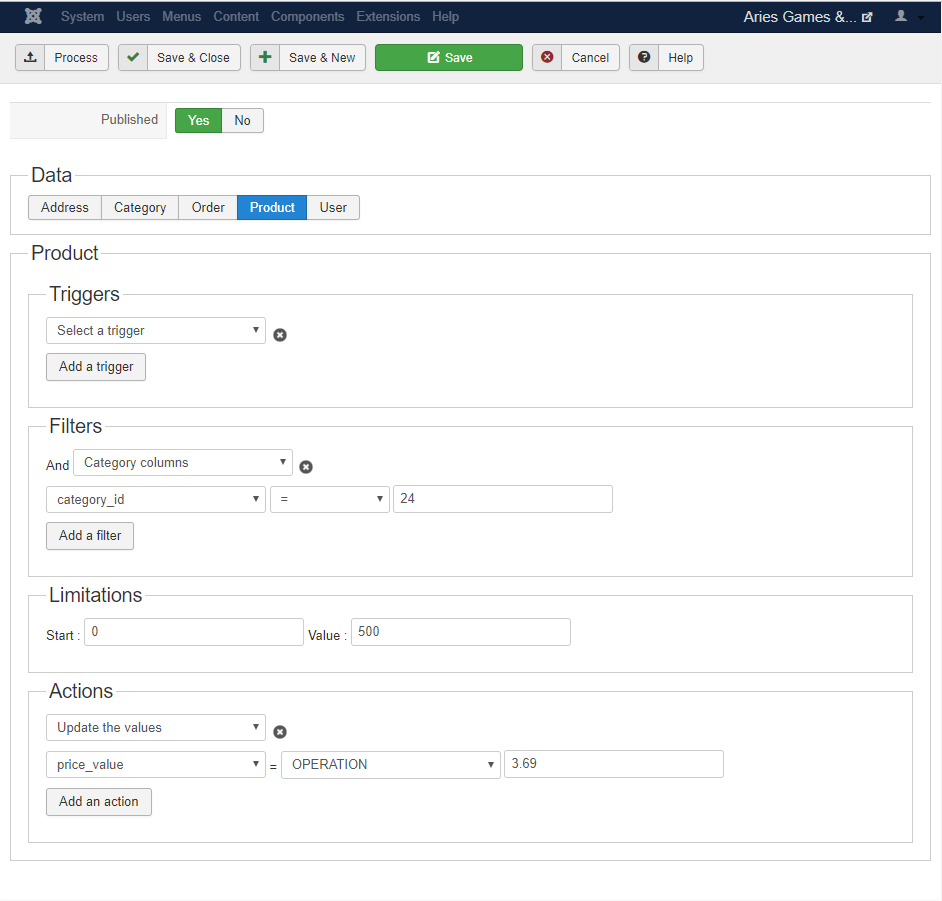
Just wanted to say thank you for the screen shots on this as per the OP's request. This actually helped me do a straight across the board price increase on products I found out the hard way that they increased without notifying the retailers.
I had to increase the price from $3.29 to $3.69, and used your screen shots as a template, tested the available actions on a test site, and figured out that the "operation" one is the one I needed. All the prices in this specific category now are $3.69!
Thanks!
Owner - Aries Games & Miniatures
Please Log in or Create an account to join the conversation.
Time to create page: 0.317 seconds