

- Posts: 145
- Thank you received: 6
How to use Mass action to update products' canonical url
2 years 4 weeks ago #362870
by levelup
Life is the unique stage of our art. Everyone sings their own song and leaves the stage. The stage is always permanent. Blessed is that song that people remember.
How to use Mass action to update products' canonical url was created by levelup
Hi
How to use Mass action to update products' canonical url?
I want the canonical link to be something like: categoryName/product_alias
You wrote in the documentation that operations can be used.
Is it true as I wrote?
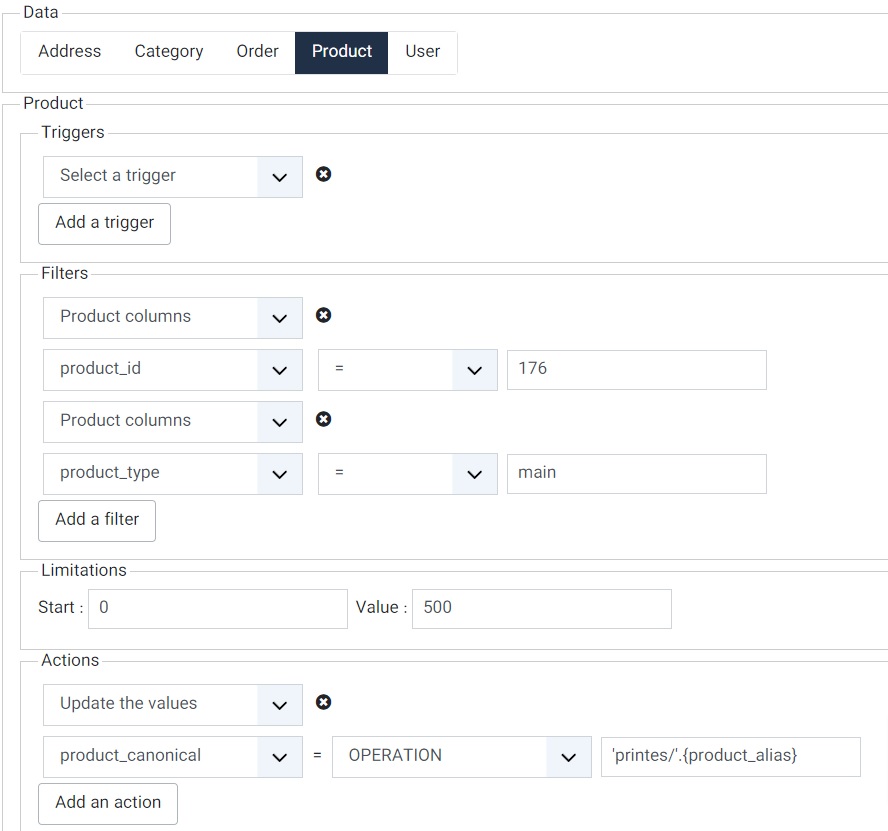
How to use Mass action to update products' canonical url?
I want the canonical link to be something like: categoryName/product_alias
You wrote in the documentation that operations can be used.
Is it true as I wrote?
Life is the unique stage of our art. Everyone sings their own song and leaves the stage. The stage is always permanent. Blessed is that song that people remember.
Please Log in or Create an account to join the conversation.
2 years 4 weeks ago #362871
by levelup
Life is the unique stage of our art. Everyone sings their own song and leaves the stage. The stage is always permanent. Blessed is that song that people remember.
Replied by levelup on topic How to use Mass action to update products' canonical url
I used CONCAT('printes/', '{product_alias}') but the result was printes/{product_alias}.
Life is the unique stage of our art. Everyone sings their own song and leaves the stage. The stage is always permanent. Blessed is that song that people remember.
Please Log in or Create an account to join the conversation.

2 years 3 weeks ago #362876
by nicolas
Replied by nicolas on topic How to use Mass action to update products' canonical url
Hi,
You can find the mass action documentation page here:
www.hikashop.com/support/documentation/167-massaction-form.html
There, we have a section for the "update the values" action:
So, in your case, it should be:
You can find the mass action documentation page here:
www.hikashop.com/support/documentation/167-massaction-form.html
There, we have a section for the "update the values" action:
As per this documentation, the tag you want to use is product.product_aliasWhen using the "Update the values" action, you have several modes:
INT For which you can provide a number without decimals
FLOAT For which you can provide a number with decimals
STRING For which you can provide a text
OPERATION In that case, you can provide a formula with arithmetic operations (if you're processing numbers), or text operations (if you're processing text). You can also use tags like product.product_name or price.price_value or order.order_full_price or user.user_email, etc in your operations. These tags must match with the column names in the database for the corresponding tables. For arithmetic operations, you can use the MySQL numeric functions, and for text operations, you can use MySQL string operations. This can allow you to update product prices, generate the canonical URL from the alias of the product, update stocks, automatically fill custom fields, etc.
So, in your case, it should be:
Code:
CONCAT('printes/', product.product_alias)
The following user(s) said Thank You: levelup
Please Log in or Create an account to join the conversation.
2 years 3 weeks ago - 2 years 3 weeks ago #362886
by levelup
Life is the unique stage of our art. Everyone sings their own song and leaves the stage. The stage is always permanent. Blessed is that song that people remember.
Replied by levelup on topic How to use Mass action to update products' canonical url
Hi
I did this, but it gives a message: the product table does not exist
I even tested with CONCAT('printes/', hikashop_product.product_alias) and CONCAT('printes/', jjs3u_hikashop_product.product_alias), but it still gives the same message.
I did this, but it gives a message: the product table does not exist
I even tested with CONCAT('printes/', hikashop_product.product_alias) and CONCAT('printes/', jjs3u_hikashop_product.product_alias), but it still gives the same message.
Life is the unique stage of our art. Everyone sings their own song and leaves the stage. The stage is always permanent. Blessed is that song that people remember.
Last edit: 2 years 3 weeks ago by levelup.
Please Log in or Create an account to join the conversation.
2 years 3 weeks ago #362900
by nicolas
Replied by nicolas on topic How to use Mass action to update products' canonical url
Hi,
If you have the error message "the product table does not exist" with the operation "CONCAT('printes/', product.product_alias)" it means that the type of the mass action is not "product".
For example, for category mass actions, you can't use an operation on product.product_alias. However, you can use an operation on category.category_alias.
It's also not possible to use full table names. We only allow a restricted number of values for security reasons.
If you have the error message "the product table does not exist" with the operation "CONCAT('printes/', product.product_alias)" it means that the type of the mass action is not "product".
For example, for category mass actions, you can't use an operation on product.product_alias. However, you can use an operation on category.category_alias.
It's also not possible to use full table names. We only allow a restricted number of values for security reasons.
Please Log in or Create an account to join the conversation.
2 years 3 weeks ago - 2 years 3 weeks ago #362929
by levelup
Life is the unique stage of our art. Everyone sings their own song and leaves the stage. The stage is always permanent. Blessed is that song that people remember.
Replied by levelup on topic How to use Mass action to update products' canonical url
As it is clear from the picture inserted in the
#362870
message, the type of Mass Action is the Product.
Life is the unique stage of our art. Everyone sings their own song and leaves the stage. The stage is always permanent. Blessed is that song that people remember.
Last edit: 2 years 3 weeks ago by levelup.
Please Log in or Create an account to join the conversation.

2 years 3 weeks ago #362930
by Philip
Replied by Philip on topic How to use Mass action to update products' canonical url
Hello,
Can you provide a new screenshot of your MassAction with the error message?
There is something strange in your issue.
Regards
Can you provide a new screenshot of your MassAction with the error message?
There is something strange in your issue.
Regards
Please Log in or Create an account to join the conversation.
2 years 3 weeks ago #362964
by levelup
Life is the unique stage of our art. Everyone sings their own song and leaves the stage. The stage is always permanent. Blessed is that song that people remember.
Replied by levelup on topic How to use Mass action to update products' canonical url
Hi
As an experiment, I want to apply it to a product for now.
If it works, I'll set up for all a category products.
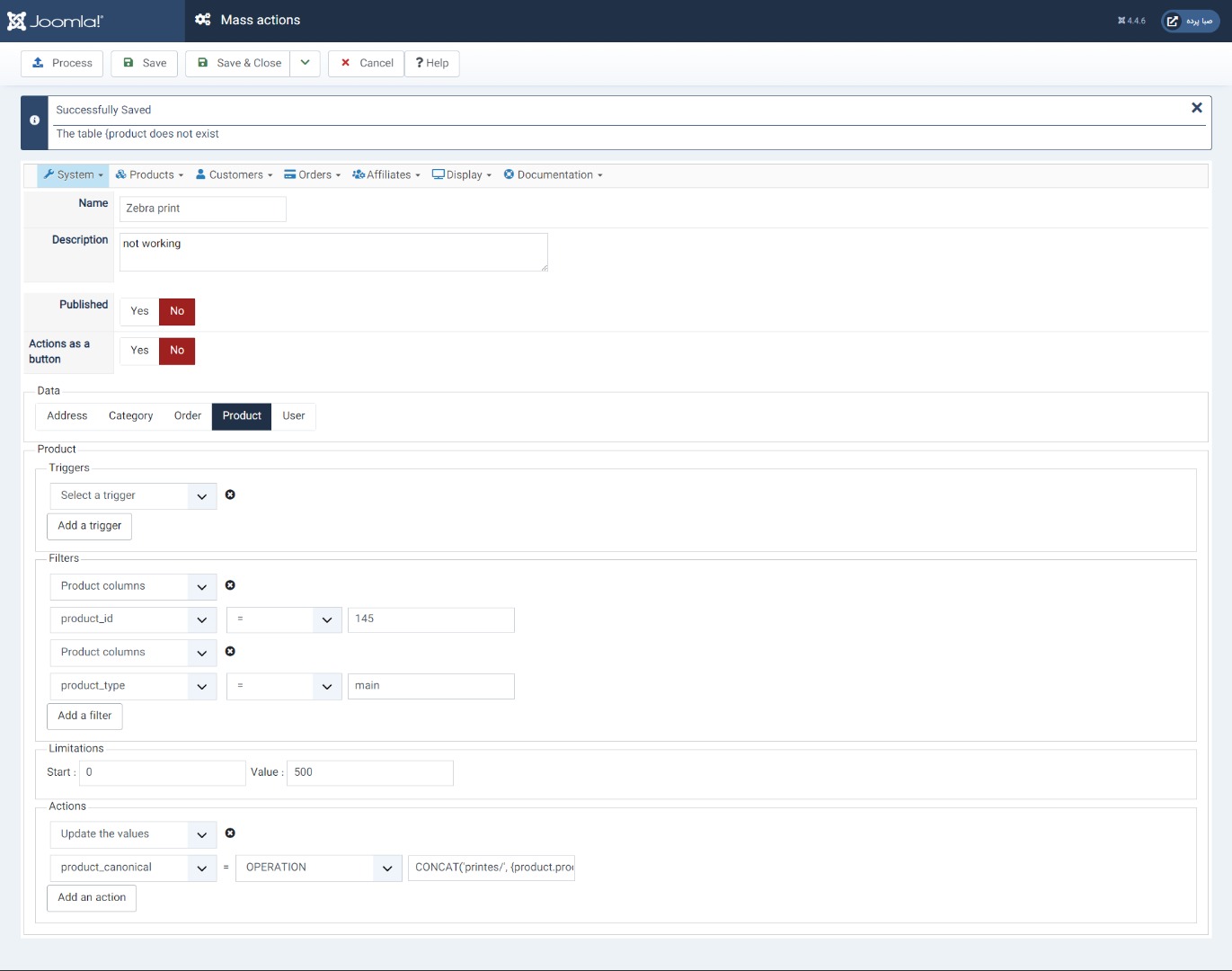
As an experiment, I want to apply it to a product for now.
If it works, I'll set up for all a category products.
Life is the unique stage of our art. Everyone sings their own song and leaves the stage. The stage is always permanent. Blessed is that song that people remember.
Please Log in or Create an account to join the conversation.
2 years 3 weeks ago #362966
by nicolas
Replied by nicolas on topic How to use Mass action to update products' canonical url
Hi,
Can you change the operation to "CONCAT('printes/', product.product_alias)" and run it ? What error do you get ?
Please make sure you remove the { and }. This is not valid and it won't work. That's why you get the error "the table .vessel-footer-col ul{list-style:none;margin:0;padding:0}.vessel-footer-col li{margin:0 0 10px}.vessel-footer-col a{color:#ECEAE0;text-decoration:none;font-size:14.5px;opacity:.82;transition:opacity .15s ease}.vessel-footer-col a:hover{opacity:1;text-decoration:underline}.vessel-footer-brand .fb-name{font-family:var(--serif, Georgia, serif);font-size:23px;color:#fff;margin:0 0 12px}.vessel-footer-brand p{color:#9FB0C0;font-size:14px;line-height:1.65;margin:0;max-width:270px}
Can you change the operation to "CONCAT('printes/', product.product_alias)" and run it ? What error do you get ?
Please make sure you remove the { and }. This is not valid and it won't work. That's why you get the error "the table .vessel-footer-col ul{list-style:none;margin:0;padding:0}.vessel-footer-col li{margin:0 0 10px}.vessel-footer-col a{color:#ECEAE0;text-decoration:none;font-size:14.5px;opacity:.82;transition:opacity .15s ease}.vessel-footer-col a:hover{opacity:1;text-decoration:underline}.vessel-footer-brand .fb-name{font-family:var(--serif, Georgia, serif);font-size:23px;color:#fff;margin:0 0 12px}.vessel-footer-brand p{color:#9FB0C0;font-size:14px;line-height:1.65;margin:0;max-width:270px}
HikaShop
The e-commerce engine for Joomla and WordPress. Your store, on your own server, under your own code.
© 2010-2026 HIKARI Software · All rights reserved