
- Posts: 259
- Thank you received: 22
Accessing customer details onAfterOrderCreate
- rodfarrell
-
 Topic Author
- Offline
Less
More
1 year 11 months ago #364765
by rodfarrell
Accessing customer details onAfterOrderCreate was created by rodfarrell
I'm writing a php script to add a customer's details to a MailerLite list after an order is created. How do I call the customers email address and name into variables?
Please Log in or Create an account to join the conversation.

1 year 11 months ago #364766
by nicolas
Replied by nicolas on topic Accessing customer details onAfterOrderCreate
Hi,
So, in the onAfterOrderCreate event, you have a parameter $order as explained here:
www.hikashop.com/support/documentation/6...l#onAfterOrderCreate
You'll find the id of the user in $order->order_user_id
And you can retrieve the information of the user with such code:
So, in the onAfterOrderCreate event, you have a parameter $order as explained here:
www.hikashop.com/support/documentation/6...l#onAfterOrderCreate
You'll find the id of the user in $order->order_user_id
And you can retrieve the information of the user with such code:
Code:
$userClass = hikashop_get('class.user');
$user = $userClass->get($order->order_user_id);
echo $user->user_email; // this is the email stored in HikaShop. This will always be available
echo $user->name; // this is the name of the user stored in the Joomla user account. This won't be available if the order is created as a guest checkout
// supposing the user provided a billing address during the checkout, you'll have the information of the address in $order->cart->billing_address
echo $order->cart->billing_address->address_firstname; // this would provide the first name of the user in the billing address of the order
Please Log in or Create an account to join the conversation.
- rodfarrell
-
Topic Author
- Offline
Less
More
- Posts: 259
- Thank you received: 22
1 year 11 months ago - 1 year 11 months ago #364786
by rodfarrell
Replied by rodfarrell on topic Accessing customer details onAfterOrderCreate
Thanks. I am missing something here. $order is not defined but I thought the trigger After an Order is Created should do that?
Warning: Undefined variable $order in /home/joomlawe/findmorestars/plugins/system/hikashopmassaction/hikashopmassaction.php(1963) : eval()'d code on line 3
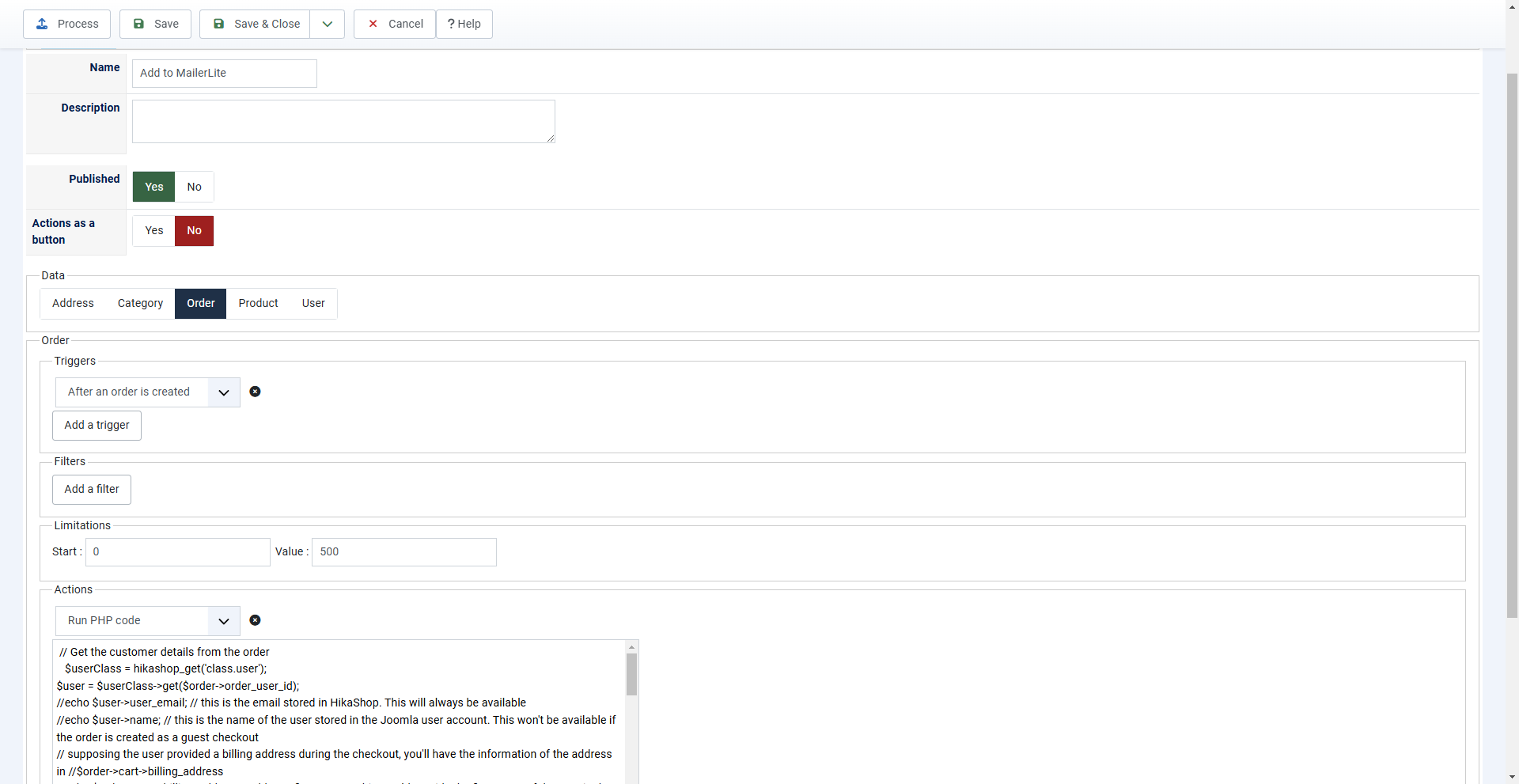
Warning: Undefined variable $order in /home/joomlawe/findmorestars/plugins/system/hikashopmassaction/hikashopmassaction.php(1963) : eval()'d code on line 3
Last edit: 1 year 11 months ago by rodfarrell.
Please Log in or Create an account to join the conversation.
1 year 10 months ago #364789
by nicolas
Replied by nicolas on topic Accessing customer details onAfterOrderCreate
Hi,
In your first message, you talked about onAfterOrderCreate.
That's an event fired by HikaShop, which plugins of the groups "hikashop", "hikashopshipping", "hikashoppayment" or "system" can subscribe to by defining a method for it as explained here:
www.hikashop.com/support/documentation/6...mentation.html#intro
Based on your new screenshot, I now understand that you're actually not using the onAfterOrderCreate event.
Instead, you've created a massaction with a trigger "after an order is created" and you're using the "run PHP code" action in order to try to achieve a similar result as a plugin.
In the PHP code of a "run PHP code" action, you don't have access to any existing variable like $order.
You only have access to tags on the element being processed:
www.hikashop.com/support/documentation/1...action-form.html#php
So, you can't use the code of my previous message "as is". You need to adapt it. For example:
In your first message, you talked about onAfterOrderCreate.
That's an event fired by HikaShop, which plugins of the groups "hikashop", "hikashopshipping", "hikashoppayment" or "system" can subscribe to by defining a method for it as explained here:
www.hikashop.com/support/documentation/6...mentation.html#intro
Based on your new screenshot, I now understand that you're actually not using the onAfterOrderCreate event.
Instead, you've created a massaction with a trigger "after an order is created" and you're using the "run PHP code" action in order to try to achieve a similar result as a plugin.
In the PHP code of a "run PHP code" action, you don't have access to any existing variable like $order.
You only have access to tags on the element being processed:
www.hikashop.com/support/documentation/1...action-form.html#php
So, you can't use the code of my previous message "as is". You need to adapt it. For example:
Code:
$orderClass = hikashop_get('class.order');
$order = $orderClass->loadFullOrder({order_id}, true, false);
echo $order->customer->user_email; // this is the email stored in HikaShop. This will always be available
echo $order->customer->name; // this is the name of the user stored in the Joomla user account. This won't be available if the order is created as a guest checkout
// supposing the user provided a billing address during the checkout, you'll have the information of the address in $order->billing_address
echo $order->billing_address->address_firstname; // this would provide the first name of the user in the billing address of the order
Please Log in or Create an account to join the conversation.
- rodfarrell
-
Topic Author
- Offline
Less
More
- Posts: 259
- Thank you received: 22
1 year 10 months ago #364840
by rodfarrell
Replied by rodfarrell on topic Accessing customer details onAfterOrderCreate
Sorry for the misunderstanding. I presumed incorrectly that Mass Actions used the same event trigger. Your solution works perfectly and customers purchasing my intro product now get added to the MailerLite sales funnel. Thanks for your help.
The following user(s) said Thank You: nicolas
Please Log in or Create an account to join the conversation.
Time to create page: 0.105 seconds