
- Posts: 424
- Thank you received: 11
filters images doesn't go the next line.
- BluepointWebdesign
-
 Topic Author
- Offline
Less
More
7 years 11 months ago #301064
by BluepointWebdesign
filters images doesn't go the next line. was created by BluepointWebdesign
-- HikaShop version -- : 4.0.0
-- Joomla version -- : 3.9.1
-- PHP version -- : 7.2
-- Error-message(debug-mod must be tuned on) -- : filters images doesn't go the next line.
Hello,
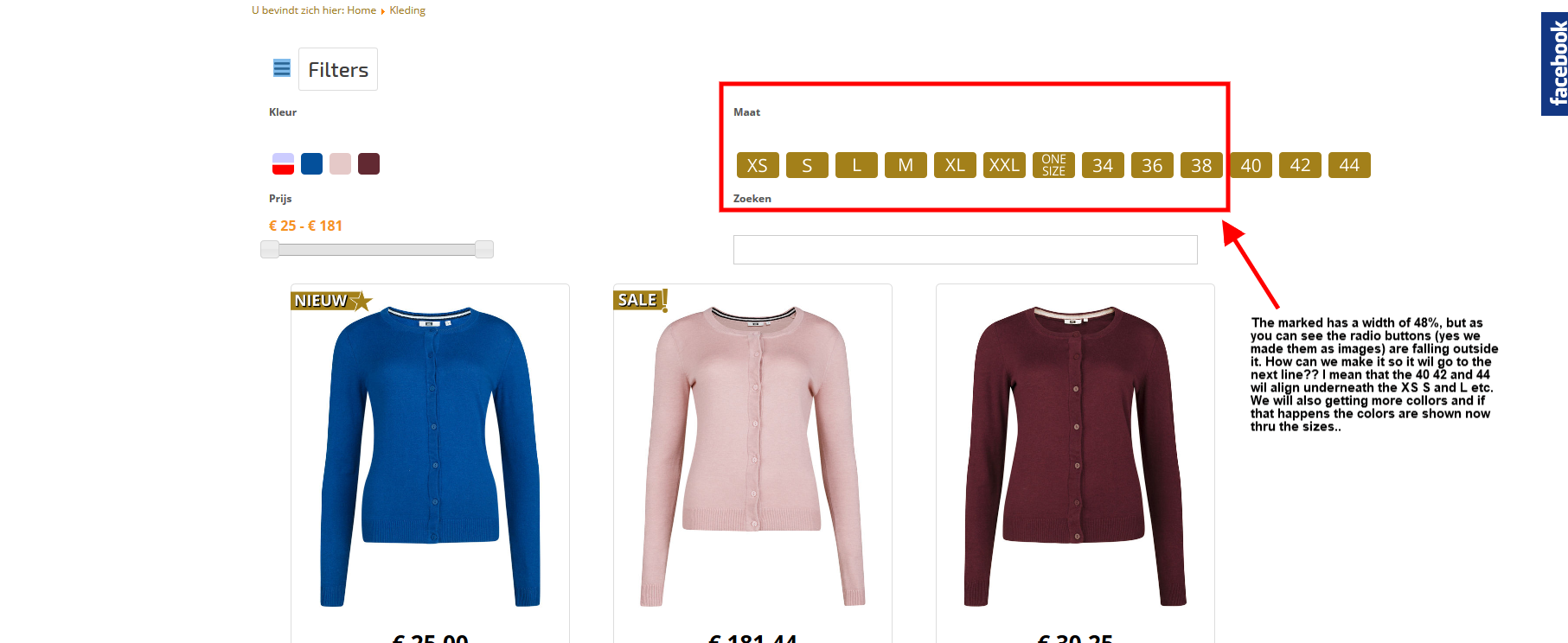
The filters above the page are not staying inside there own box.
They are not automaticly shown on a next line.
See attachment.
Regards,
Mark
-- Joomla version -- : 3.9.1
-- PHP version -- : 7.2
-- Error-message(debug-mod must be tuned on) -- : filters images doesn't go the next line.
Hello,
The filters above the page are not staying inside there own box.
They are not automaticly shown on a next line.
See attachment.
Regards,
Mark
Please Log in or Create an account to join the conversation.

7 years 11 months ago #301066
by nicolas
Replied by nicolas on topic filters images doesn't go the next line.
Hi,
Hard to say without analyzing the CSS directly on the page.
Could you provide a link to it ?
Hard to say without analyzing the CSS directly on the page.
Could you provide a link to it ?
Please Log in or Create an account to join the conversation.
- BluepointWebdesign
-
Topic Author
- Offline
Less
More
- Posts: 424
- Thank you received: 11
7 years 11 months ago #301092
by BluepointWebdesign
Replied by BluepointWebdesign on topic filters images doesn't go the next line.
This website is still under construction ... to witch email can I send the credentials?
Please Log in or Create an account to join the conversation.
7 years 11 months ago #301095
by nicolas
Replied by nicolas on topic filters images doesn't go the next line.
Hi,
You can use our contact form:
www.hikashop.com/support/contact-us.html
Make sure you include a link to that thread so that we know why you're sending in the link.
You can use our contact form:
www.hikashop.com/support/contact-us.html
Make sure you include a link to that thread so that we know why you're sending in the link.
Please Log in or Create an account to join the conversation.
7 years 11 months ago - 7 years 11 months ago #301198
by Philip
Replied by Philip on topic filters images doesn't go the next line.
Hello,
You can use this kind of Css command to manage all your different size in your filter:
To see how to add these custom command, have a look on this tutorial .
Regards
You can use this kind of Css command to manage all your different size in your filter:
Code:
.hikashop_filter_Maat_2 {
width: 550px;
}
span#filter_values_container_Maat_2_hikashop_category_information_menu_130 span {
display: inline-block;
}
To see how to add these custom command, have a look on this tutorial .
Regards
Last edit: 7 years 11 months ago by Philip.
Please Log in or Create an account to join the conversation.
- BluepointWebdesign
-
Topic Author
- Offline
Less
More
- Posts: 424
- Thank you received: 11
7 years 11 months ago #301307
by BluepointWebdesign
Replied by BluepointWebdesign on topic filters images doesn't go the next line.
Hello Philip,
Thanks for this solution! Works great
Regards,
Thanks for this solution! Works great
Regards,
The following user(s) said Thank You: Philip
Please Log in or Create an account to join the conversation.
Time to create page: 0.059 seconds