

- Posts: 141
- Thank you received: 3
problem with filters reset
6 years 8 months ago #314890
by Greg_C
Replied by Greg_C on topic problem with filters reset
Hi Nicolas, I don’t wan’t do deactivate Ajax so I would like to keep this code but I would like also to have proper functioning of filter reset.
It seems that present situation is similar as it was after Hikashop update to 4.2.0 and it was discussed with you on this: Forum Thread . Then you added a patch that caused this line of code to remain and the reset buttons to work properly. Please find below two screenshots from our discussion in this matter:
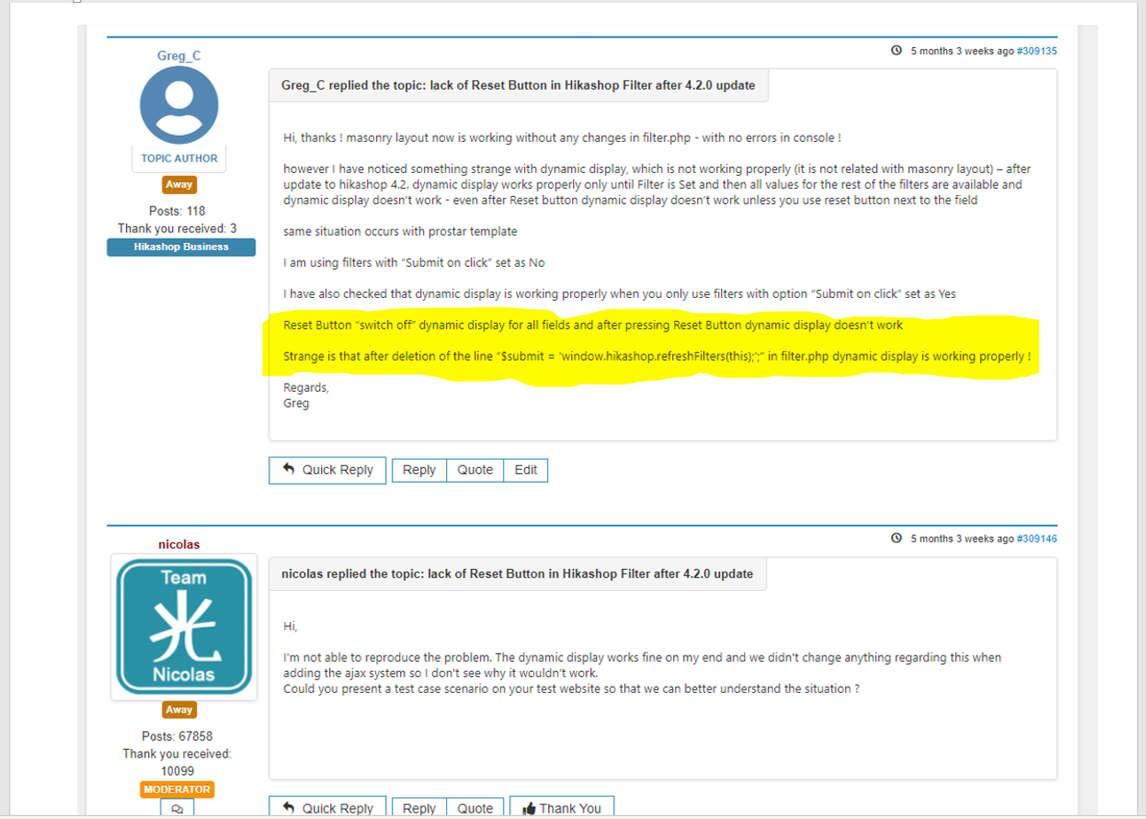
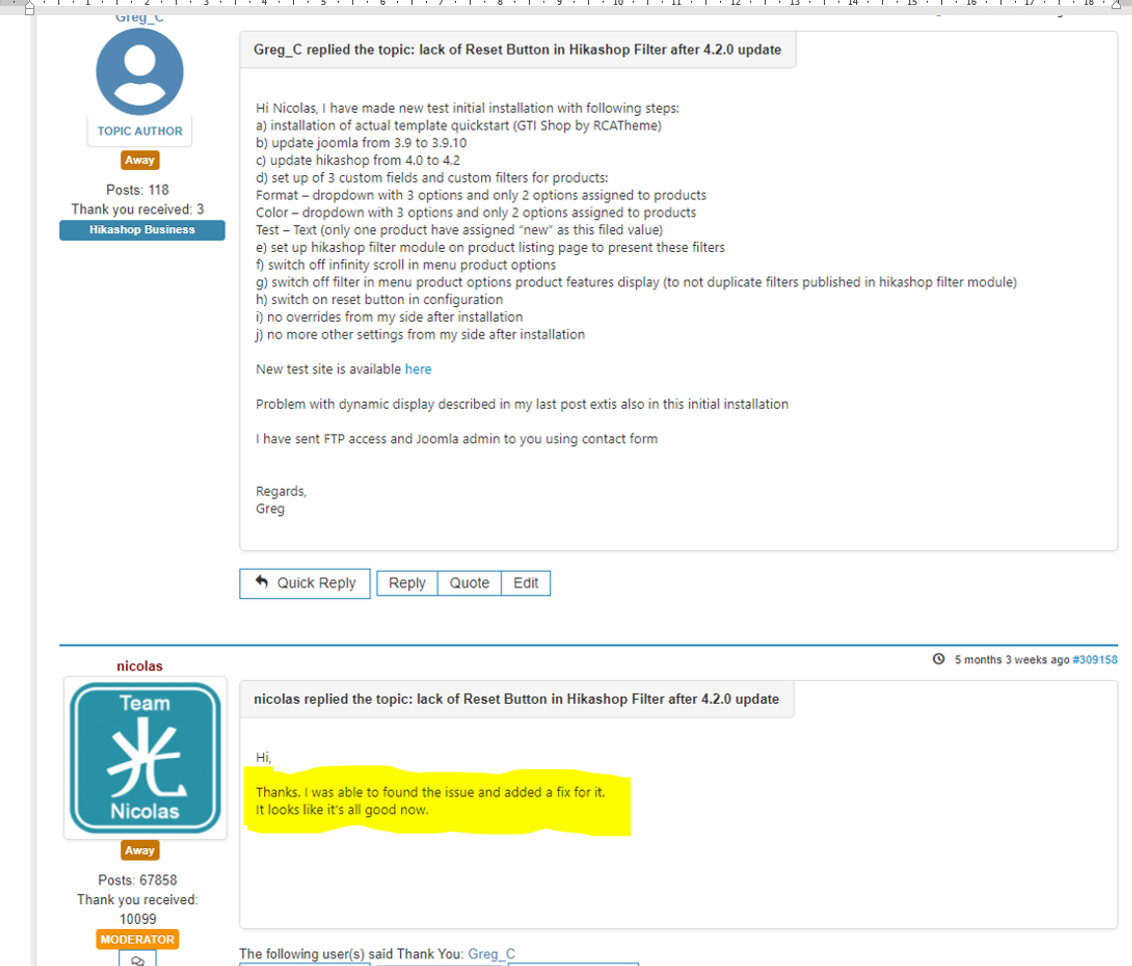
as with the upgrade to 4.2.0, the only change from my side was the upgrade from 4.2.1 to 4.2.2 without any other changes, and the reset buttons stopped working properly - I assume that the reason may be the same as it was after 4.2.0 upgrade
Regards,
Greg
It seems that present situation is similar as it was after Hikashop update to 4.2.0 and it was discussed with you on this: Forum Thread . Then you added a patch that caused this line of code to remain and the reset buttons to work properly. Please find below two screenshots from our discussion in this matter:
as with the upgrade to 4.2.0, the only change from my side was the upgrade from 4.2.1 to 4.2.2 without any other changes, and the reset buttons stopped working properly - I assume that the reason may be the same as it was after 4.2.0 upgrade
Regards,
Greg
Please Log in or Create an account to join the conversation.

6 years 8 months ago #314922
by nicolas
Replied by nicolas on topic problem with filters reset
Hi,
It's not the same problem at all.
What you need to understand is that as long as there is a problem with the AJAX request asking for the new content of the filter module area, the module won't be refreshed. It can come from anything on the server side.
The code modification in the view file just deactivate the AJAX so of course, for such problems that solution will work.
But that doesn't mean that it's the same cause, and it's not since the patchs we've added for that other thread are still in there.
Also, on that other thread, the issue was not caused by a 500 HTTP error but something where we did get back an error message in the response so it was easy to identify.
Here, the only information returned is that there is a 500 error. Normally, in such case, the cause of the issue is written in the logs of the server.
So in order to fix the issue, we first need to get some error message to be able to understand why this is happening.
Let's go back to one of your previous message:
monosnap.com/file/lvCEP4pqxJEt0MdfNyaeHEIoupgsBB
It's not int he console that there is the error but in the "network" tab, where you can check the AJAX requests responses...
This leads me to believe that the person you got didn't understand what they were looking for.
The best would be to configure the server to display the fatal error instead of a 500 server error page:
stackoverflow.com/questions/22170864/500...r-error-how-to-debug
It's not the same problem at all.
What you need to understand is that as long as there is a problem with the AJAX request asking for the new content of the filter module area, the module won't be refreshed. It can come from anything on the server side.
The code modification in the view file just deactivate the AJAX so of course, for such problems that solution will work.
But that doesn't mean that it's the same cause, and it's not since the patchs we've added for that other thread are still in there.
Also, on that other thread, the issue was not caused by a 500 HTTP error but something where we did get back an error message in the response so it was easy to identify.
Here, the only information returned is that there is a 500 error. Normally, in such case, the cause of the issue is written in the logs of the server.
So in order to fix the issue, we first need to get some error message to be able to understand why this is happening.
Let's go back to one of your previous message:
errors.log is the apache error log, not the PHP error log.a) errors.log file doesn’t contain any error information
Your hosting provider is completely wrong here. I get the exact same error in Firefox:b) they checked that only in Google Chrome in the Console is information indicated error 500 but for example on Firefox there is no information regarding error 500 (however filters doesn’t reset also in Firefox)
monosnap.com/file/lvCEP4pqxJEt0MdfNyaeHEIoupgsBB
It's not int he console that there is the error but in the "network" tab, where you can check the AJAX requests responses...
This leads me to believe that the person you got didn't understand what they were looking for.
And I'm not denying this. It's probably a bug in the application. However, to understand what is the problem, we need some kind of error message. A 500 server error indicates that it's the web server which returned a 500 error instead of displaying a blank page with the PHP error message, and so in such case, the PHP error message should be logged in the PHP error log. Or that error doesn't come from the PHP but from the server, and in that case, it should be logged in the apache error log (and the issue is probably linked to the way the server is configured (for example, the URL is too big and thus the request was refused or something))c) based on above in their opinion problem is generated between application and browsers and is not related with the server
The best would be to configure the server to display the fatal error instead of a 500 server error page:
stackoverflow.com/questions/22170864/500...r-error-how-to-debug
Please Log in or Create an account to join the conversation.
6 years 8 months ago #314931
by Greg_C
Replied by Greg_C on topic problem with filters reset
Hi Nicolas, Thank you for the information. I have contacted again with the hosting provider – the operator was consulting problems with the server administrator and inform me that:
a) they checked if the filter reset cause any problem on the server and they didn’t see any inconveniences on the server – they only see information on Browser Console/Network (same as we)
b) they cannot run fatal error instead of a 500 server error under their servers
I was insist to give me any solution to explain the reason of error 500 but they told me that this is not possible on their side because they didn’t notice any inconveniences on the server and they suggest to verify the script which may cause an error
I have implemented changes in php.ini as described in stackoverflow.com/questions/22170864/500...r-error-how-to-debug but this didn’t give any results
I don’t know what can I do now. Maybe installation on different server would help to identify the reason of the problem but I have no other server solution out of hand.
Regards,
Greg
a) they checked if the filter reset cause any problem on the server and they didn’t see any inconveniences on the server – they only see information on Browser Console/Network (same as we)
b) they cannot run fatal error instead of a 500 server error under their servers
I was insist to give me any solution to explain the reason of error 500 but they told me that this is not possible on their side because they didn’t notice any inconveniences on the server and they suggest to verify the script which may cause an error
I have implemented changes in php.ini as described in stackoverflow.com/questions/22170864/500...r-error-how-to-debug but this didn’t give any results
I don’t know what can I do now. Maybe installation on different server would help to identify the reason of the problem but I have no other server solution out of hand.
Regards,
Greg
Please Log in or Create an account to join the conversation.

6 years 8 months ago #314937
by kyratn
Replied by kyratn on topic problem with filters reset
Hi,
You may want to install the copy of your site on XAMPP and see if there is same issue. As this would be localhost, you could do all changes in php to find the issue... Potentially you could give same copy to Nicolas so he could take a look into it too....
Thanks
You may want to install the copy of your site on XAMPP and see if there is same issue. As this would be localhost, you could do all changes in php to find the issue... Potentially you could give same copy to Nicolas so he could take a look into it too....
Thanks
Please Log in or Create an account to join the conversation.
6 years 8 months ago #314941
by Greg_C
Replied by Greg_C on topic problem with filters reset
Hi Kyratn, Thank you for your suggestions. I am trying to check installation with other hosting provider I hope I will be able to realize tests tomorrow and I will see if the problem occurs. However if Nicolas could look into it would be the best option
Regards,
Greg
Regards,
Greg
Please Log in or Create an account to join the conversation.
6 years 8 months ago #314952
by nicolas
Replied by nicolas on topic problem with filters reset
Hi,
Well, I can only look into it if I get the error message.
It can be done two ways:
- have the server display it instead of a 500 error (but it looks like with their server setup it's not possible)
- check the PHP error log, and it doesn't see that it's logging an error (which could also come from the server setup disabling it for some reason)
So as kyratn said, a good alternative here would be to get a copy of the files and database on a local server to be able to get the error (supposing that the error is with the PHP and not with the server settings, in which case you won't be able to reproduce on local and it will be hard to debug).
Well, I can only look into it if I get the error message.
It can be done two ways:
- have the server display it instead of a 500 error (but it looks like with their server setup it's not possible)
- check the PHP error log, and it doesn't see that it's logging an error (which could also come from the server setup disabling it for some reason)
So as kyratn said, a good alternative here would be to get a copy of the files and database on a local server to be able to get the error (supposing that the error is with the PHP and not with the server settings, in which case you won't be able to reproduce on local and it will be hard to debug).
Please Log in or Create an account to join the conversation.
6 years 8 months ago #314970
by Greg_C
Replied by Greg_C on topic problem with filters reset
Hi, I have checked with two other hosting providers and problem didn't occur. I have sent information to my actual hosting provider to solve this issue if possible - if not I suppose I will have to change hosting company.
Regards,
Greg
Regards,
Greg
Please Log in or Create an account to join the conversation.
6 years 7 months ago #315411
by Greg_C
Replied by Greg_C on topic problem with filters reset
Hi Nicolas, I have found the reason of the problem related with filters reset. I am using two sets of filters for two different languages (each of them apply on same custom fields). When I unpublished filters in one language then filters reset works fine. So I need to use only one set of filters in one language and have possibility to translate filter names (labels). I know how to translate custom fields names (labels) and custom field values but I cannot find a way how to translate custom filters names (labels). How can I translate filters names (labels) not using third party components ?
Regards,
Greg
Regards,
Greg
Please Log in or Create an account to join the conversation.
6 years 7 months ago #315416
by nicolas
Replied by nicolas on topic problem with filters reset
Hi,
The name of filters can be translated with translation overrides.
Just enter a translation key as name of the filter and add the corresponding entry to the translation override area of your language via the HikaShop configuration (like you probably did for the custom fields) and it will work.
The name of filters can be translated with translation overrides.
Just enter a translation key as name of the filter and add the corresponding entry to the translation override area of your language via the HikaShop configuration (like you probably did for the custom fields) and it will work.
Please Log in or Create an account to join the conversation.
6 years 7 months ago #315434
by Greg_C
Replied by Greg_C on topic problem with filters reset
Hi Nicolas, I have tried to translate filters names in the same way as custom fields names - using Hikashop Language Override - as you described in your post. For custom fields names it works but for filers names it doesn’t work.
Regards,
Greg
Regards,
Greg
Please Log in or Create an account to join the conversation.
6 years 7 months ago #315439
by nicolas
Replied by nicolas on topic problem with filters reset
Hi,
Well, as far as I could test, it works for me.
Could you provide a screenshot of the settings of the filter and a screenshot of the result on the frontend with the issue ?
Well, as far as I could test, it works for me.
Could you provide a screenshot of the settings of the filter and a screenshot of the result on the frontend with the issue ?
Please Log in or Create an account to join the conversation.
6 years 7 months ago #315450
by Greg_C
Replied by Greg_C on topic problem with filters reset
Hi Nicolas, I have created custom filter with name „Equipment” – see image 1.
Then in System – Configuration – Languages – Polish – Edit I set in Override screen: EQUIPMENT="Abc" – see image 2.
However in Filter module for Polish language is still visible name Equipment instead of Abc – see image 3.
I have sent you admin details via the contact form
Regards,
Greg
Then in System – Configuration – Languages – Polish – Edit I set in Override screen: EQUIPMENT="Abc" – see image 2.
However in Filter module for Polish language is still visible name Equipment instead of Abc – see image 3.
I have sent you admin details via the contact form
Regards,
Greg
Please Log in or Create an account to join the conversation.
6 years 7 months ago #315481
by nicolas
Replied by nicolas on topic problem with filters reset
Hi,
Ok, I understand the issue.
That's because the issue only happens for dropdown filters when the title position is "inside".
Change the line:
$html.='<OPTION VALUE="none">'.$filter->filter_name.'</OPTION>';
to:
$html.='<OPTION VALUE="none">'.$this->trans($filter->filter_name).'</OPTION>';
in administrator/components/com_hikashop/classes/filter.php and that will fix the problem.
We'll add that on our end too.
Ok, I understand the issue.
That's because the issue only happens for dropdown filters when the title position is "inside".
Change the line:
$html.='<OPTION VALUE="none">'.$filter->filter_name.'</OPTION>';
to:
$html.='<OPTION VALUE="none">'.$this->trans($filter->filter_name).'</OPTION>';
in administrator/components/com_hikashop/classes/filter.php and that will fix the problem.
We'll add that on our end too.
The following user(s) said Thank You: Greg_C
Please Log in or Create an account to join the conversation.
6 years 7 months ago #315489
by Greg_C
Replied by Greg_C on topic problem with filters reset
Hi Nicolas, ok, it works
thank you !
Regards,
Greg
thank you !
Regards,
Greg
Please Log in or Create an account to join the conversation.
Time to create page: 0.315 seconds