

- Posts: 141
- Thank you received: 3
problem with filters reset
6 years 9 months ago #313799
by Greg_C
problem with filters reset was created by Greg_C
-- HikaShop version -- : 4.2.2
-- Joomla version -- : 3.9.13
-- PHP version -- : 7.2.14
Hi, I have problem with proper functioning of filters – In fact with filters reset either using Reset Button or using mark “x” for deletable filters. I thought that the problem might be caused by the URL length as discussed on this Forum Thread and I have implemented proposed change in media/com_hikashop/js/hikashop.js – so URL address after filters are set looks like that
However I did test with more number of products which caused pagination of product listing. After I change the page from the first 12 items to see another page (for example to the next 12 items) URL structure is changing and include filter parameters and it looks like that:
– although this URL is very short and shouldn't cause a problem
Then after I use Reset Button filters are reset and full product listing is presented but filters in the Hikashop Filter Module are still presented as they were set (I am attaching an image).
I checked message in Console and it looks like below (no error message is reported in everything.php file from System Debug):
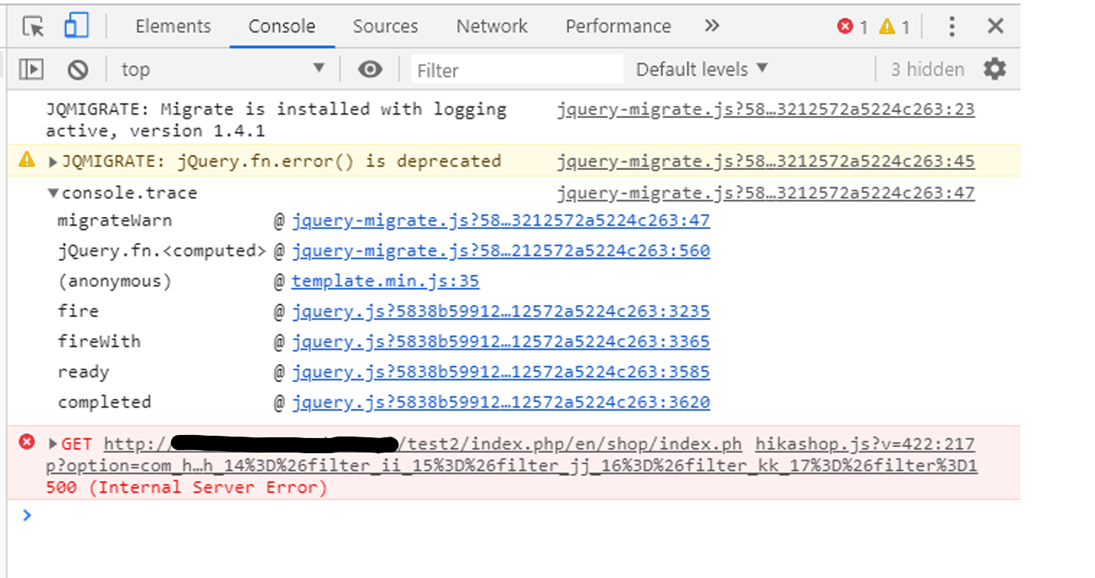
I have no customization in filter.php. This problem also occur using Prostar Template.
I would like to ask for help in solving this problem.
Regards,
Greg
-- Joomla version -- : 3.9.13
-- PHP version -- : 7.2.14
Hi, I have problem with proper functioning of filters – In fact with filters reset either using Reset Button or using mark “x” for deletable filters. I thought that the problem might be caused by the URL length as discussed on this Forum Thread and I have implemented proposed change in media/com_hikashop/js/hikashop.js – so URL address after filters are set looks like that
Code:
/shop/products
Code:
/shop/products?limitstart=12&filter_Test_1=&filter_Color_2=White&filter_Format_3=Large&filter_Keywords_6=&filter_Category_5=none&filter_aa_7=&filter_bb_8=&filter_cc_9=&filter_dd_10=&filter_ee_11=&filter_ff_12=&filter_gg_13=&filter_hh_14=&filter_ii_15=&filter_jj_16=&filter_kk_17=&filter=1
Then after I use Reset Button filters are reset and full product listing is presented but filters in the Hikashop Filter Module are still presented as they were set (I am attaching an image).
I checked message in Console and it looks like below (no error message is reported in everything.php file from System Debug):
I have no customization in filter.php. This problem also occur using Prostar Template.
I would like to ask for help in solving this problem.
Regards,
Greg
Please Log in or Create an account to join the conversation.

6 years 9 months ago #313808
by nicolas
Replied by nicolas on topic problem with filters reset
Hi,
Could you provide a link to the shop so that we could reproduce the issue in order to first better understand the situation ?
Could you provide a link to the shop so that we could reproduce the issue in order to first better understand the situation ?
Please Log in or Create an account to join the conversation.
6 years 9 months ago #313818
by Greg_C
Replied by Greg_C on topic problem with filters reset
Hi Nicolas, I have sent a link and access data to the test site using contact form
Regards,
Greg
Regards,
Greg
Please Log in or Create an account to join the conversation.

6 years 9 months ago - 6 years 9 months ago #313843
by Philip
Replied by Philip on topic problem with filters reset
Hello,
But unfortunately when we process our tests everything works as expected, there may be something missing in your step by step.
In order to help you, can you precise :
- Your browser to process your test
- If you are logged or not
- If you are logged, does the account you provide to us, have the same properties same yours ?
- Other points that can help us.
Awaiting your returns to progress on your subject.
Regards
But unfortunately when we process our tests everything works as expected, there may be something missing in your step by step.
In order to help you, can you precise :
- Your browser to process your test
- If you are logged or not
- If you are logged, does the account you provide to us, have the same properties same yours ?
- Other points that can help us.
Awaiting your returns to progress on your subject.
Regards
Last edit: 6 years 9 months ago by Philip.
Please Log in or Create an account to join the conversation.
6 years 9 months ago #313858
by Greg_C
Replied by Greg_C on topic problem with filters reset
Hi Philip, Please find below scenario to reproduce problem with reset button (I have sent new test site address using contact form):
Browser: Mozilla Firefox 71 (but it should be also possible to reproduced on Google Chrome 78)
User: Not logged
Scenario
- Set Filter: Category: Travel
- Click on Filter Button
- Click on Reset Button
- Go to Page 2 (pagination toolbar)
- Set Filter: Category: Travel
- Click on Filter Button
- Click on Reset Button
- product listing is reset but filter (in this case Category) in Hikashop Filter Module are still showing as set
Additionally I found another problem with functioning of filters - problem is related with wrong presentation of filters after product page visiting - please find below two scenarios how to reproduce this problem
Browser: Mozilla Firefox 71
User: Not logged
Scenario A
- Set Filter: Category: Travel
- Click on Filter Button
- Go to Page 2 (pagination toolbar)
- Click on Reset Button (in consequence all filters are clean)
- Click on any Product Image to open Product Page (for example first image on the left - first row)
- Click on back button on browser navigation to back from Product Page to Product Listing page
- After returning to the Product Listing Page, instead of empty filters, we see filters that have been reseted before going to the product page
Scenario B
- Set Filter: Category: Travel
- Click on Filter Button
- Go to Page 2 (pagination toolbar)
- Click on Reset Button (in consequence all filters are clean)
- Go again to Page 2 (pagination toolbar)
- Set Filter: Category: Travel
- Click on Filter Button
- Click on any Product Image to open Product Page (for example first image on the left - first row)
- Click on back button on browser navigation to back from Product Page to Product Listing page
- After returning to the Product Listing Page, filters are not set (as they were presented before going to the product page) - we see all filters clean (reset)
Regards,
Greg
Browser: Mozilla Firefox 71 (but it should be also possible to reproduced on Google Chrome 78)
User: Not logged
Scenario
- Set Filter: Category: Travel
- Click on Filter Button
- Click on Reset Button
- Go to Page 2 (pagination toolbar)
- Set Filter: Category: Travel
- Click on Filter Button
- Click on Reset Button
- product listing is reset but filter (in this case Category) in Hikashop Filter Module are still showing as set
Additionally I found another problem with functioning of filters - problem is related with wrong presentation of filters after product page visiting - please find below two scenarios how to reproduce this problem
Browser: Mozilla Firefox 71
User: Not logged
Scenario A
- Set Filter: Category: Travel
- Click on Filter Button
- Go to Page 2 (pagination toolbar)
- Click on Reset Button (in consequence all filters are clean)
- Click on any Product Image to open Product Page (for example first image on the left - first row)
- Click on back button on browser navigation to back from Product Page to Product Listing page
- After returning to the Product Listing Page, instead of empty filters, we see filters that have been reseted before going to the product page
Scenario B
- Set Filter: Category: Travel
- Click on Filter Button
- Go to Page 2 (pagination toolbar)
- Click on Reset Button (in consequence all filters are clean)
- Go again to Page 2 (pagination toolbar)
- Set Filter: Category: Travel
- Click on Filter Button
- Click on any Product Image to open Product Page (for example first image on the left - first row)
- Click on back button on browser navigation to back from Product Page to Product Listing page
- After returning to the Product Listing Page, filters are not set (as they were presented before going to the product page) - we see all filters clean (reset)
Regards,
Greg
Please Log in or Create an account to join the conversation.
6 years 9 months ago #313962
by Greg_C
Replied by Greg_C on topic problem with filters reset
Hi Philip, did you have the opportunity to analyze the problem ?
Regards,
Greg
Regards,
Greg
Please Log in or Create an account to join the conversation.
6 years 9 months ago #314102
by Greg_C
Replied by Greg_C on topic problem with filters reset
Hi Nicolas / Hi Philip, please let me know whether you are analyzing this problem
sorry for pressing but I haven’t received feedback for a long time and I am worried if this topic is still being analyzed on your side, especially because it is a very important matter for me
Regards,
Greg
sorry for pressing but I haven’t received feedback for a long time and I am worried if this topic is still being analyzed on your side, especially because it is a very important matter for me
Regards,
Greg
Please Log in or Create an account to join the conversation.

Less
More
- Posts: 12953
- Thank you received: 1778
6 years 9 months ago #314150
by Mohamed Thelji
Replied by Mohamed Thelji on topic problem with filters reset
Hello Greg and sorry for the late reply,
Philip and Nicolas have actually analyzed it but they will be in winter holidays until the January so they won't be able to debug it until then.
I'll try to reproduce and debug it as soon as possible !
Kind regards,
Mohamed.
Philip and Nicolas have actually analyzed it but they will be in winter holidays until the January so they won't be able to debug it until then.
I'll try to reproduce and debug it as soon as possible !
Kind regards,
Mohamed.
Please Log in or Create an account to join the conversation.
6 years 9 months ago #314158
by Greg_C
Replied by Greg_C on topic problem with filters reset
Hi Mohamed, ok, thank you for the information
I will be waiting for a solution
Regards,
Greg
I will be waiting for a solution
Regards,
Greg
Please Log in or Create an account to join the conversation.
6 years 8 months ago #314513
by Greg_C
Replied by Greg_C on topic problem with filters reset
Hello, did you manage to find solution ?
Regards,
Greg
Regards,
Greg
Please Log in or Create an account to join the conversation.
6 years 8 months ago #314684
by nicolas
Replied by nicolas on topic problem with filters reset
Hi,
Sorry for the delay. It was a rough start of the year with a lot of support to handle.
I finally had the time to look into the issue today, however I must be missing something because I'm not able to reproduce it.
I went to serwer1910203 DOT home DOT pl/test/en/shop/product-listing (I put the URL just to make sure that we're talking about the same website) with Google Chrome (I also tried with FireFox with the same result)
Then, I set the filter "people" to "group_of_people"
Then, I click on the "filter" button
Then, I go to the second page
Then, I click on the "reset" button
And I correctly get the first page of all the products and the filter is reset in the filter module.
So I'm not sure if you still have a problem ?
However, regarding your "Scenario A" and "Scenario B", I was able to reproduce the issue. However, these have been fixed in HikaShop 4.2.2 with a modification to media/com_hikashop/js/hikashop.js
I checked the version of your HikaShop and it seems that you have the 4.2.2. However, if I check the version of your media/com_hikashop/js/hikashop.js I can see that it says it's the 4.2.1 version and it doesn't have the patch I was talking about above.
So to me, you need to make sure that this file is replaced with the one of the 4.2.2 and it should work:
monosnap.com/file/ktCKr1HdJbHY52xT5D0r6aXaqQQSik
To do that, you could rename that file via FTP (or delete it) and then install the HikaShop 4.2.2 install package that you can download on our website. That will it will add again the file with the latest version.
Alternatively, you can extract the install package on your local computer and replace the file via the FTP. It is located in the media/js/ folder in the install package.
Sorry for the delay. It was a rough start of the year with a lot of support to handle.
I finally had the time to look into the issue today, however I must be missing something because I'm not able to reproduce it.
I went to serwer1910203 DOT home DOT pl/test/en/shop/product-listing (I put the URL just to make sure that we're talking about the same website) with Google Chrome (I also tried with FireFox with the same result)
Then, I set the filter "people" to "group_of_people"
Then, I click on the "filter" button
Then, I go to the second page
Then, I click on the "reset" button
And I correctly get the first page of all the products and the filter is reset in the filter module.
So I'm not sure if you still have a problem ?
However, regarding your "Scenario A" and "Scenario B", I was able to reproduce the issue. However, these have been fixed in HikaShop 4.2.2 with a modification to media/com_hikashop/js/hikashop.js
I checked the version of your HikaShop and it seems that you have the 4.2.2. However, if I check the version of your media/com_hikashop/js/hikashop.js I can see that it says it's the 4.2.1 version and it doesn't have the patch I was talking about above.
So to me, you need to make sure that this file is replaced with the one of the 4.2.2 and it should work:
monosnap.com/file/ktCKr1HdJbHY52xT5D0r6aXaqQQSik
To do that, you could rename that file via FTP (or delete it) and then install the HikaShop 4.2.2 install package that you can download on our website. That will it will add again the file with the latest version.
Alternatively, you can extract the install package on your local computer and replace the file via the FTP. It is located in the media/js/ folder in the install package.
Please Log in or Create an account to join the conversation.
6 years 8 months ago #314693
by Greg_C
Replied by Greg_C on topic problem with filters reset
Hi Nicolas, Thank you for your answer. URL is correct. To reproduce problem with filter reset you should exactly follow scenario presented from my side – it means:
- Set Filter: Category: Travel
- Click on Filter Button
- Click on Reset Button
- Go to Page 2 (pagination toolbar)
- Set Filter: Category: Travel
- Click on Filter Button
- Click on Reset Button
- product listing is reset but filter (in this case Category) in Hikashop Filter Module are still showing as set
I have uploaded again hikashop 4.2.2 and after installation hikashop.js is in the ver. 4.2.2. and problem presented in Scenario A and B is not exist.
However problem with filter reset still exist.
Regards,
Greg
- Set Filter: Category: Travel
- Click on Filter Button
- Click on Reset Button
- Go to Page 2 (pagination toolbar)
- Set Filter: Category: Travel
- Click on Filter Button
- Click on Reset Button
- product listing is reset but filter (in this case Category) in Hikashop Filter Module are still showing as set
I have uploaded again hikashop 4.2.2 and after installation hikashop.js is in the ver. 4.2.2. and problem presented in Scenario A and B is not exist.
However problem with filter reset still exist.
Regards,
Greg
Please Log in or Create an account to join the conversation.
6 years 8 months ago #314715
by nicolas
Replied by nicolas on topic problem with filters reset
Hi,
Ok, I was able to get the problem on your website now.
Looking at the situation, I can see that the AJAX request sent to the server to refresh the filter module gets back a 500 error message:
monosnap.com/file/XHb5YE2WZ1lf2vKvTw46bMUnHfjHcx
So because of that, the filter area is not refreshed and thus you still see the filters set.
I don't know why you get that.
Could you check the PHP error log of your server ?
It should contain a "fatal error" message corresponding to that 500 error which should help us understand what is going on.
Ok, I was able to get the problem on your website now.
Looking at the situation, I can see that the AJAX request sent to the server to refresh the filter module gets back a 500 error message:
monosnap.com/file/XHb5YE2WZ1lf2vKvTw46bMUnHfjHcx
So because of that, the filter area is not refreshed and thus you still see the filters set.
I don't know why you get that.
Could you check the PHP error log of your server ?
It should contain a "fatal error" message corresponding to that 500 error which should help us understand what is going on.
Please Log in or Create an account to join the conversation.
6 years 8 months ago #314731
by Greg_C
Replied by Greg_C on topic problem with filters reset
Hi Nicolas, I’ve tried to check PHP error logs on my server but I didn’t find any detail information regarding 500 internal server error. The only information I have found with “500” I’ve sent to you via contact form.
I have asked my server provider for checking PHP error logs and I will be back with this information to you.
Regards,
Greg
I have asked my server provider for checking PHP error logs and I will be back with this information to you.
Regards,
Greg
Please Log in or Create an account to join the conversation.
6 years 8 months ago #314732
by nicolas
Replied by nicolas on topic problem with filters reset
Hi,
I got your message but what you gave is the apache access log, not the PHP error log and thus it doesn't provide much information on the issues besides the fact that there was a 500 HTTP error status returned (which we already knew from replicating the issue on your website).
So yes, we'll definitely need the PHP error log to get the real error message behind the issue and understand what is going on.
I got your message but what you gave is the apache access log, not the PHP error log and thus it doesn't provide much information on the issues besides the fact that there was a 500 HTTP error status returned (which we already knew from replicating the issue on your website).
So yes, we'll definitely need the PHP error log to get the real error message behind the issue and understand what is going on.
Please Log in or Create an account to join the conversation.
6 years 8 months ago #314818
by Greg_C
Replied by Greg_C on topic problem with filters reset
Hi Nicolas, I have discussed this issue with my hosting provider (home.pl – very popular hosting provider in Poland). They informed me as following:
a) errors.log file doesn’t contain any error information
b) they checked that only in Google Chrome in the Console is information indicated error 500 but for example on Firefox there is no information regarding error 500 (however filters doesn’t reset also in Firefox)
c) based on above in their opinion problem is generated between application and browsers and is not related with the server
Regards,
Greg
a) errors.log file doesn’t contain any error information
b) they checked that only in Google Chrome in the Console is information indicated error 500 but for example on Firefox there is no information regarding error 500 (however filters doesn’t reset also in Firefox)
c) based on above in their opinion problem is generated between application and browsers and is not related with the server
Regards,
Greg
Please Log in or Create an account to join the conversation.
6 years 8 months ago - 6 years 8 months ago #314845
by Greg_C
Replied by Greg_C on topic problem with filters reset
Hi Nicolas, I have found that after deletion in product/filter.php the line 111 with the code
filter reset is working properly. So maybe the reason of the problem is the same as discussed on this
Forum Thread
#309158, which was solved by you by adding a patch for that
Regards,
Greg
Code:
$submit = 'window.hikashop.refreshFilters(this);';
Regards,
Greg
Last edit: 6 years 8 months ago by Greg_C.
Please Log in or Create an account to join the conversation.
6 years 8 months ago #314851
by nicolas
Replied by nicolas on topic problem with filters reset
Hi,
I'm not sure what you mean. There is no such line of code on line 111.
So maybe you also have an old version of the file administrator/components/com_hikashop/classes/filter.php
Similarily, check the version of that file near the beginning. If it's not 4.2.2 then you probably have an old version.
I'm not sure what you mean. There is no such line of code on line 111.
So maybe you also have an old version of the file administrator/components/com_hikashop/classes/filter.php
Similarily, check the version of that file near the beginning. If it's not 4.2.2 then you probably have an old version.
Please Log in or Create an account to join the conversation.
6 years 8 months ago #314874
by Greg_C
Replied by Greg_C on topic problem with filters reset
Hi Nicolas, I mean filter.php file which is available in Display - View - Product - Filter. I checked version and it is 4.2.2. I mean code:
which is in the line 111 below the code:
Regards,
Greg
Code:
$submit = 'window.hikashop.refreshFilters(this);';
Code:
<?php
}
if($this->ajax) {
if($this->params->get('module') == 'mod_hikashop_filter') {
$url = hikaInput::get()->getVar('return_url', hikashop_currentURL());
}
Regards,
Greg
Please Log in or Create an account to join the conversation.
6 years 8 months ago #314876
by nicolas
Replied by nicolas on topic problem with filters reset
Hi,
Ah ok, I see. I was looking at another file.
Removing that file from product / filter.php basically deactivates the ajax on the filter system.
Since you have them along with the products on a full page, deactivating the ajax is fine as it won't change much speed wise. And it will circumvent the issue you have with the ajax request for the refresh of the filter module area returning a 500 error.
So that can indeed be a viable solution for you.
Ah ok, I see. I was looking at another file.
Removing that file from product / filter.php basically deactivates the ajax on the filter system.
Since you have them along with the products on a full page, deactivating the ajax is fine as it won't change much speed wise. And it will circumvent the issue you have with the ajax request for the refresh of the filter module area returning a 500 error.
So that can indeed be a viable solution for you.
Please Log in or Create an account to join the conversation.
Time to create page: 0.416 seconds