

- Posts: 74
- Thank you received: 7
Student discount
1 year 9 months ago #365391
by marcmarc
Student discount was created by marcmarc
-- HikaShop version -- : 5.1.2
-- Joomla version -- : 8.2.3
-- PHP version -- : 8.2.26
Hi,
I would like to implement a student discount, on per product basis.
i.e. for product xxx, I choose "student discount" and I get -10% on the product
I've tried variants but it's a very complicated way to do it.
I've tried coupons but the discount is applied on the whole basket, so not applicable.
How to achieve that?
Regards,
marc
-- Joomla version -- : 8.2.3
-- PHP version -- : 8.2.26
Hi,
I would like to implement a student discount, on per product basis.
i.e. for product xxx, I choose "student discount" and I get -10% on the product
I've tried variants but it's a very complicated way to do it.
I've tried coupons but the discount is applied on the whole basket, so not applicable.
How to achieve that?
Regards,
marc
Please Log in or Create an account to join the conversation.

1 year 9 months ago #365392
by nicolas
Replied by nicolas on topic Student discount
Hi,
A simpler solution would be to do it like this:
- create a custom field of the table "item" and of the type "radio" or "single dropdown" with two values: 0 with the title "normal rate" and 1 with the title "student discount". If you don't want it to be possible for all the products, you can use the "products" or "categories" settings to restrict the field to only some products. Suppose that you use the column name "studentdiscount".
- Use the "price calculations" plugin ( www.hikashop.com/marketplace/product/148...ce-calculations.html ) with this formula:
Suppose that the price is 10, the formula will be calculated either like this: 10-10*0.1*0 = 10-0 = 10 (when the normal rate is selected) or 10-10*0.1*1 = 10-1 = 9
A simpler solution would be to do it like this:
- create a custom field of the table "item" and of the type "radio" or "single dropdown" with two values: 0 with the title "normal rate" and 1 with the title "student discount". If you don't want it to be possible for all the products, you can use the "products" or "categories" settings to restrict the field to only some products. Suppose that you use the column name "studentdiscount".
- Use the "price calculations" plugin ( www.hikashop.com/marketplace/product/148...ce-calculations.html ) with this formula:
Code:
{price}-{price}*0.1*{studentdiscount}
Please Log in or Create an account to join the conversation.
1 year 9 months ago #365397
by marcmarc
Replied by marcmarc on topic Student discount
Hi,
Ok, I've bought the "price calculations" plugin, install and so on.
I've created a product list custom field "remise_etudiant" with values 0 and 1, and put the formula
in the plugin.
I can choose the remise_etudiant value in the product backend and the calculation is made and appears in the checkout.
But I don't get how to display this custom field in the public product view and let the customer choose its value
Thanks
Ok, I've bought the "price calculations" plugin, install and so on.
I've created a product list custom field "remise_etudiant" with values 0 and 1, and put the formula
Code:
{price}-{price}*0.1*{remise_etudiant}
I can choose the remise_etudiant value in the product backend and the calculation is made and appears in the checkout.
But I don't get how to display this custom field in the public product view and let the customer choose its value
Thanks
Please Log in or Create an account to join the conversation.
1 year 9 months ago #365400
by nicolas
Replied by nicolas on topic Student discount
Hi,
You created a custom field of the table "product" ("produit" in French).
You should instead create a custom field of the table "item" ("article" in French).
You created a custom field of the table "product" ("produit" in French).
You should instead create a custom field of the table "item" ("article" in French).
Please Log in or Create an account to join the conversation.
1 year 9 months ago #365411
by marcmarc
Replied by marcmarc on topic Student discount
There is no table "item"
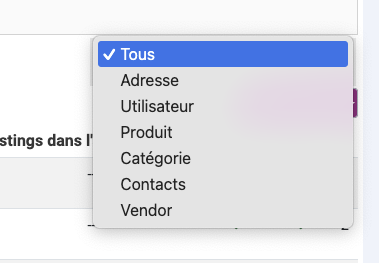
Please Log in or Create an account to join the conversation.
1 year 9 months ago #365412
by nicolas
Replied by nicolas on topic Student discount
Hi,
I had missed the fact that you are using HikaShop Essential. Sorry for that.
Custom fields of the table "item" are only available with the Business edition of HikaShop:
www.hikashop.com/support/documentation/4...shop-field-form.html
You would have to upgrade your Essential edition to Business to be able to use this capability:
www.hikashop.com/extensions/upgrade-my-version.html
I had missed the fact that you are using HikaShop Essential. Sorry for that.
Custom fields of the table "item" are only available with the Business edition of HikaShop:
www.hikashop.com/support/documentation/4...shop-field-form.html
You would have to upgrade your Essential edition to Business to be able to use this capability:
www.hikashop.com/extensions/upgrade-my-version.html
Please Log in or Create an account to join the conversation.
1 year 9 months ago #365413
by marcmarc
Replied by marcmarc on topic Student discount
Ok,
so I've bought the business edition.
Now it's ok except for one important thing :
I need to print "Tarif étudiant" on the generated ticket but since I can only access the value (0 or 1 in my case) of the custom field "remise_etudiant" (from hikashop_order_product) in the Hikaserial attachserial plugin, I can't do it.
Any idea?
so I've bought the business edition.
Now it's ok except for one important thing :
I need to print "Tarif étudiant" on the generated ticket but since I can only access the value (0 or 1 in my case) of the custom field "remise_etudiant" (from hikashop_order_product) in the Hikaserial attachserial plugin, I can't do it.
Any idea?
Please Log in or Create an account to join the conversation.
1 year 9 months ago #365417
by nicolas
Replied by nicolas on topic Student discount
Hi,
Indeed, the attachserial plugin can only use the exact data stored in the custom field ( so 0 or 1 in this case ).
The only way I can see to display something else than 0 or 1 would be to develop a small plugin for HikaSerial, implementing the events onGetCustomAttachSerialFormats(&$new_types, &$new_formats) and onCustomAttachSerialFormat($format, $format_ex, $content, &$img, &$d)
In onGetCustomAttachSerialFormats, you want to have such code:
In onCustomAttachSerialFormat, you want to have such code:
That will display "Remise étudiante" on the image generated by the attach serial plugin if the value of the field is 1 and will not display anything on it if the value is 0.
You'll have to select the type "Student Discount" when configuring the attach serial plugin in Hikaserial.
If you're a developer, it will be trivial to create the plugin and add the code above in it. If not, it's something we could do for you for a small fee.
Indeed, the attachserial plugin can only use the exact data stored in the custom field ( so 0 or 1 in this case ).
The only way I can see to display something else than 0 or 1 would be to develop a small plugin for HikaSerial, implementing the events onGetCustomAttachSerialFormats(&$new_types, &$new_formats) and onCustomAttachSerialFormat($format, $format_ex, $content, &$img, &$d)
In onGetCustomAttachSerialFormats, you want to have such code:
Code:
$new_formats[] = JHTML::_('select.option', 'studentdiscount', 'Student Discount');
Code:
if($format!='studentdiscount') return;
if(!empty($content) && $content > 0)
$d['text'] = 'Remise étudiante';
You'll have to select the type "Student Discount" when configuring the attach serial plugin in Hikaserial.
If you're a developer, it will be trivial to create the plugin and add the code above in it. If not, it's something we could do for you for a small fee.
Please Log in or Create an account to join the conversation.
1 year 9 months ago #365420
by marcmarc
Replied by marcmarc on topic Student discount
I've resolved the problem with a second item's custom field "remise_etudiant_label", type text, read only, display limited to when the 1st one (`remise_etudiant") is equal to "tarif étudiant", default value on "tarif étudiant".
in attachserial I display the hikashop_order_product "remise_etudiant_label".
thanks
in attachserial I display the hikashop_order_product "remise_etudiant_label".
thanks
Please Log in or Create an account to join the conversation.
1 year 9 months ago #365421
by nicolas
Replied by nicolas on topic Student discount
Hi,
Ah, that's a good way ! Nice thinking outside of the box !
Ah, that's a good way ! Nice thinking outside of the box !
Please Log in or Create an account to join the conversation.
Time to create page: 0.075 seconds