

- Posts: 105
- Thank you received: 9
payment screen
9 years 3 months ago - 9 years 3 months ago #275593
by mduda
payment screen was created by mduda
-- HikaShop version -- : 3.1.1
-- Joomla version -- : 3.7.4
Not sure what happened...but after I updated, I am no longer taken directly to payment. I have use hikashop checkout enabled.
Step 1:

Step 2:
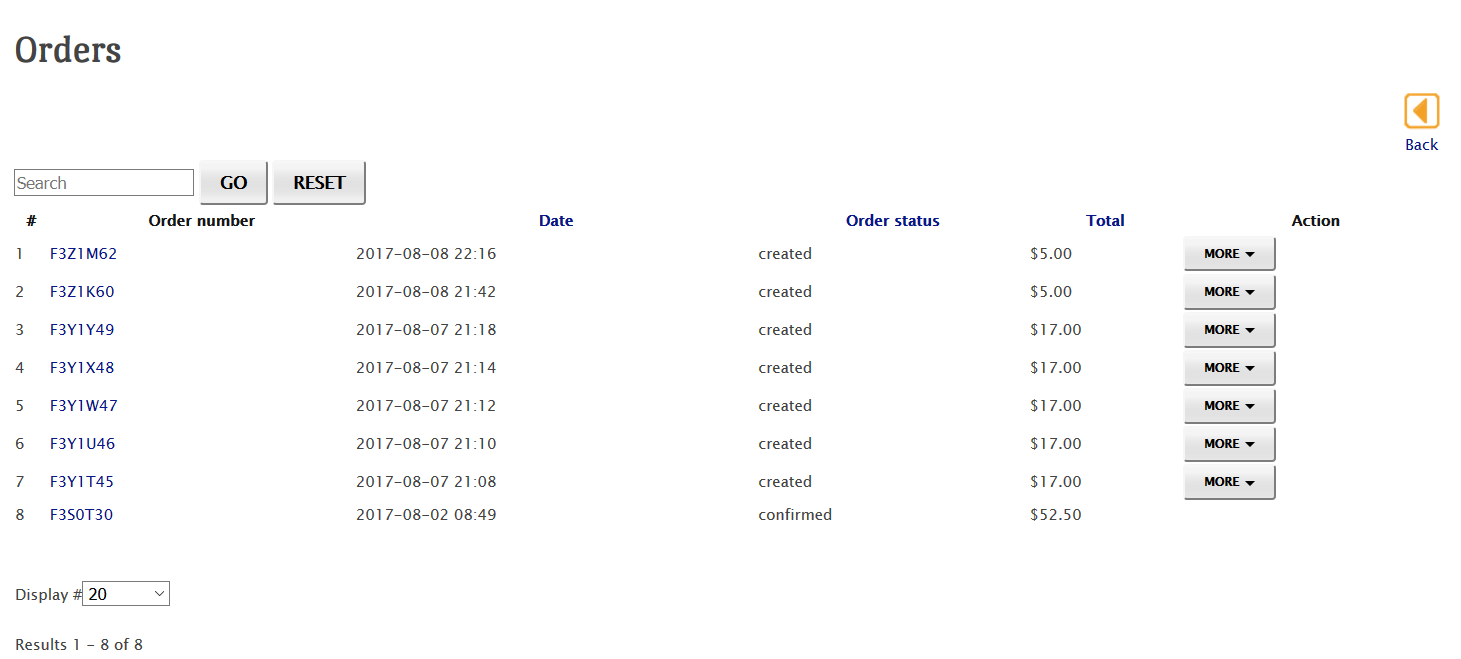
I then have to click on "action" and then "pay now".
Then

Then I'm redirected to paypal.
What settings do I need to adjust...or what am I missing?
-- Joomla version -- : 3.7.4
Not sure what happened...but after I updated, I am no longer taken directly to payment. I have use hikashop checkout enabled.
Step 1:
Step 2:
I then have to click on "action" and then "pay now".
Then
Then I'm redirected to paypal.
What settings do I need to adjust...or what am I missing?
Last edit: 9 years 3 months ago by mduda.
Please Log in or Create an account to join the conversation.

Less
More
- Posts: 12953
- Thank you received: 1778
9 years 3 months ago #275626
by Mohamed Thelji
Replied by Mohamed Thelji on topic payment screen
Hello,
The fact that you are directly redirected to the payment page or not will also depends on if you have enabled more than one Hikashop payment methods via "Hikashop->System->Payment Methods".
So can you firstly tell me if you have enabled more than one Hikashop payment methods ?
Thank you.
The fact that you are directly redirected to the payment page or not will also depends on if you have enabled more than one Hikashop payment methods via "Hikashop->System->Payment Methods".
So can you firstly tell me if you have enabled more than one Hikashop payment methods ?
Thank you.
Please Log in or Create an account to join the conversation.
9 years 3 months ago - 9 years 3 months ago #275658
by mduda
Replied by mduda on topic payment screen
Yes, the person has the option of either paypal or cash/credit payment. But I do not want the user to have to go to the orders screen.
Last edit: 9 years 3 months ago by mduda.
Please Log in or Create an account to join the conversation.
Less
More
- Posts: 12953
- Thank you received: 1778
9 years 2 months ago #275687
by Mohamed Thelji
Replied by Mohamed Thelji on topic payment screen
Hello,
Your issue is coming from the fact that if you have more than 1 payment method available, you'll be redirected to your order listing to properly select which payment method you'll want to use.
To be directly redirected to the payment page you can :
- Only use one payment method
or
- directly edit the code of the file "components\com_hikaauction\controllers\auction.php" but some development skills will be required.
Your issue is coming from the fact that if you have more than 1 payment method available, you'll be redirected to your order listing to properly select which payment method you'll want to use.
To be directly redirected to the payment page you can :
- Only use one payment method
or
- directly edit the code of the file "components\com_hikaauction\controllers\auction.php" but some development skills will be required.
Please Log in or Create an account to join the conversation.
9 years 2 months ago #275719
by mduda
Replied by mduda on topic payment screen
Hi Mohamed,
I don't remember being forced to go to the created orders screen before I updated.
And, in the Hika Auction configuration, the payment process does not seem to be affected if I select "use Hikashop checkout" or not. Shouldn't this change something? Either way, I go thru the exact same steps.
step 1 - choose address
step 2 - taken to the create orders screen, where I then have to find my order, and select the action
step 3 - select payment method
step 4 - abruptly taken to paypal
Am I doing something wrong? It doesn't matter what I change in the checkout workflow...nothing changes.
I don't remember being forced to go to the created orders screen before I updated.
And, in the Hika Auction configuration, the payment process does not seem to be affected if I select "use Hikashop checkout" or not. Shouldn't this change something? Either way, I go thru the exact same steps.
step 1 - choose address
step 2 - taken to the create orders screen, where I then have to find my order, and select the action
step 3 - select payment method
step 4 - abruptly taken to paypal
Am I doing something wrong? It doesn't matter what I change in the checkout workflow...nothing changes.
Please Log in or Create an account to join the conversation.
Less
More
- Posts: 12953
- Thank you received: 1778
9 years 2 months ago #275735
by Mohamed Thelji
Replied by Mohamed Thelji on topic payment screen
Hello,
A starter edition of Hikashop, your customer will directly be redirected through the payment platform of your first payment method.
A commercial edition of Hikashop, your customer will directly be redirected to the payment platform if you only have one available payment method. Else, he will be redirected to his order listing to correctly select his payment method and proceed to checkout.
If you have enabled the "use Hikashop checkout" option, then you should make sure that your Hikashop "Checkout legacy" option is disabled via "HikaShop->System->Configuration->Advanced".
By using that option, you will enable your customers to directly pay the auction they won though the Hikashop Checkout (Not available with the checkout legacy mode).
As it's said on the HikaAuction documentation :I don't remember being forced to go to the created orders screen before I updated.
A starter edition of Hikashop, your customer will directly be redirected through the payment platform of your first payment method.
A commercial edition of Hikashop, your customer will directly be redirected to the payment platform if you only have one available payment method. Else, he will be redirected to his order listing to correctly select his payment method and proceed to checkout.
And, in the Hika Auction configuration, the payment process does not seem to be affected if I select "use Hikashop checkout" or not. Shouldn't this change something? Either way, I go thru the exact same steps.
If you have enabled the "use Hikashop checkout" option, then you should make sure that your Hikashop "Checkout legacy" option is disabled via "HikaShop->System->Configuration->Advanced".
By using that option, you will enable your customers to directly pay the auction they won though the Hikashop Checkout (Not available with the checkout legacy mode).
Please Log in or Create an account to join the conversation.
9 years 2 months ago #275759
by mduda
Replied by mduda on topic payment screen
I have legacy checkout disabled in hikashop. I'm still not able to see any changes when I adjust the checkout flow in Hika Auction. Am I missing something Mohamed?
Thanks for your awesome support!
Thanks for your awesome support!
The following user(s) said Thank You: Mohamed Thelji
Please Log in or Create an account to join the conversation.
Less
More
- Posts: 12953
- Thank you received: 1778
9 years 2 months ago #275772
by Mohamed Thelji
Replied by Mohamed Thelji on topic payment screen
Hello,
If you have enabled the "Use Hikashop checkout" option and disabled the Hikashop "Checkout legacy" option, then when your Auction will be finished, the winner of your Auction will receive a different link which will redirect him directly to the Hikashop checkout instead of the HikaAuction custom payment page.
Best regards,
Mohamed Thelji.
If you have enabled the "Use Hikashop checkout" option and disabled the Hikashop "Checkout legacy" option, then when your Auction will be finished, the winner of your Auction will receive a different link which will redirect him directly to the Hikashop checkout instead of the HikaAuction custom payment page.
Best regards,
Mohamed Thelji.
The following user(s) said Thank You: mduda
Please Log in or Create an account to join the conversation.
9 years 2 months ago #275834
by mduda
Replied by mduda on topic payment screen
Aha! Figured it out based on your last response. I had a customization in html, and was not getting the new url for checkout! Thanks Mohamed!
Please Log in or Create an account to join the conversation.
Moderators: Mohamed Thelji
Time to create page: 0.063 seconds