

- Posts: 301
- Thank you received: 6
Product Listing Hover Is Too Big How Can I Make Suttle
1 year 8 months ago #365425
by fan4chevy
Product Listing Hover Is Too Big How Can I Make Suttle was created by fan4chevy
-- HikaShop version -- : 5.1.3
-- Joomla version -- : 5
Hi,
I have HikaShop Business. I have product images on product listing to hover, however, they hover real big. How do I make them hover just a bit to make it obvious of mouseover?
Thank you,
Charles
-- Joomla version -- : 5
Hi,
I have HikaShop Business. I have product images on product listing to hover, however, they hover real big. How do I make them hover just a bit to make it obvious of mouseover?
Thank you,
Charles
Please Log in or Create an account to join the conversation.

1 year 8 months ago - 1 year 8 months ago #365448
by Philip
Replied by Philip on topic Product Listing Hover Is Too Big How Can I Make Suttle
Hello,
Please provide us, these elements :
- An Url link to your context.
- Your relative product listing configuration via a screenshot (in product options tab)
Regards
Please provide us, these elements :
- An Url link to your context.
- Your relative product listing configuration via a screenshot (in product options tab)
Regards
Last edit: 1 year 8 months ago by Philip.
Please Log in or Create an account to join the conversation.
1 year 8 months ago #365579
by fan4chevy
Replied by fan4chevy on topic Product Listing Hover Is Too Big How Can I Make Suttle
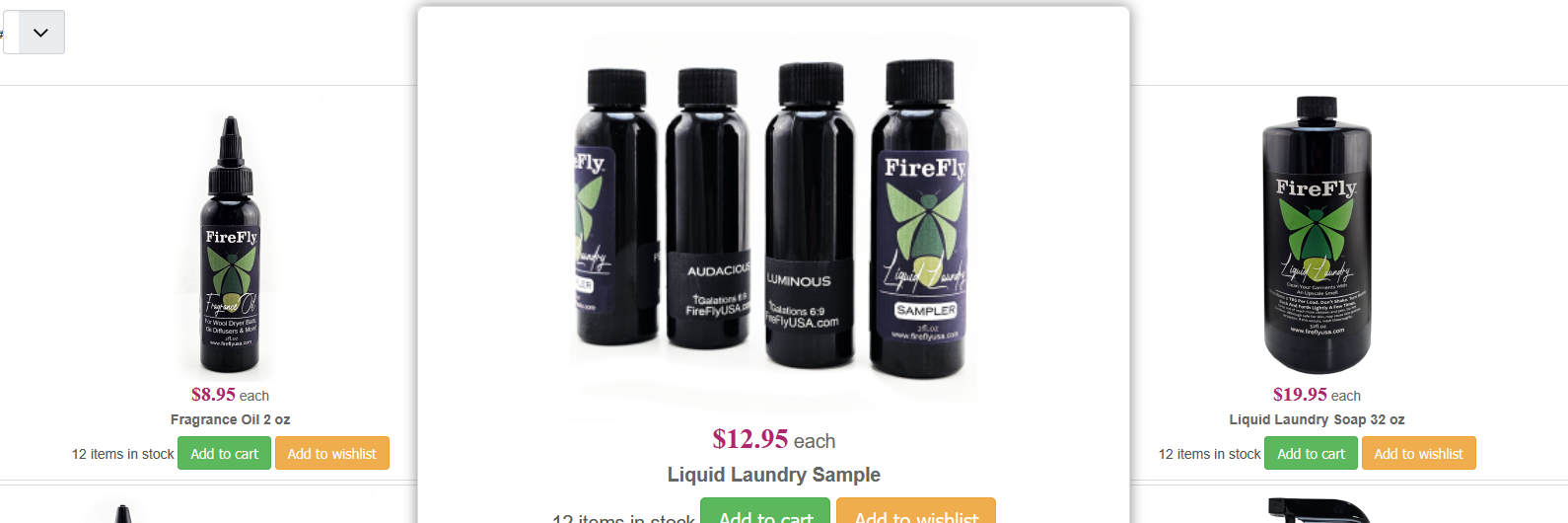
Here is an example of what I mean about hover too big! In my images notice how they are much bigger than the main image. Is there a way to just make it slightly bigger just enough to notice you hovered?
Thank you,
Charles
Thank you,
Charles
Please Log in or Create an account to join the conversation.
1 year 8 months ago - 1 year 8 months ago #365581
by Philip
Replied by Philip on topic Product Listing Hover Is Too Big How Can I Make Suttle
Hello,
You can edit your Css code, learn how to edit (and create a custom frontend file Css), here .
And in your frontend css file, around line 920 you will find this :
Edit the transform command to modify the scale value for by example 1.2.
Result :
Regards
You can edit your Css code, learn how to edit (and create a custom frontend file Css), here .
And in your frontend css file, around line 920 you will find this :
Code:
.hikashop_category_information .hikashop_zoom_hover .hikashop_subcontainer:hover {
transform: scale(1.4);
transition-delay: 0.5s;
z-index: 999;
box-shadow: 0 0 10px rgba(0,0,0,0.5);
}
Result :
Code:
.hikashop_category_information .hikashop_zoom_hover .hikashop_subcontainer:hover {
transform: scale(1.2);
transition-delay: 0.5s;
z-index: 999;
box-shadow: 0 0 10px rgba(0, 0, 0, 0.5);
}
Regards
Last edit: 1 year 8 months ago by Philip.
Please Log in or Create an account to join the conversation.
1 year 8 months ago #365585
by fan4chevy
Replied by fan4chevy on topic Product Listing Hover Is Too Big How Can I Make Suttle
That worked. Thank you. What is the difference between front end css file and styles for the front end?
Please Log in or Create an account to join the conversation.

1 year 8 months ago #365589
by nicolas
Replied by nicolas on topic Product Listing Hover Is Too Big How Can I Make Suttle
The "Styles for the frontend" setting allows you to select a style from the style pack:
www.hikashop.com/download/styles-for-hikashop.html
The frontend CSS comes by default with HikaShop.
www.hikashop.com/download/styles-for-hikashop.html
The frontend CSS comes by default with HikaShop.
Please Log in or Create an account to join the conversation.
Time to create page: 0.208 seconds